
Release 90.6: Dark Mode


Release Info
Kpow can be found on Dockerhub
docker pull factorhouse/kpow-ee:90.6View our Docker quick start guide for help getting started.
Kpow can be found on ArtifactHub
Helm version: 1.0.45
helm repo add kpow https://charts.kpow.io
helm repo update
helm install --namespace factorhouse --create-namespace my-kpow kpow/kpow --version 1.0.45 \
--set env.LICENSE_ID="00000000-0000-0000-0000-000000000001" \
--set env.LICENSE_CODE="KPOW_CREDIT" \
--set env.LICENSEE="Your Corp\, Inc." \
--set env.LICENSE_EXPIRY="2024-01-01" \
--set env.LICENSE_SIGNATURE="638......A51" \
--set env.BOOTSTRAP="127.0.0.1:9092\,127.0.0.1:9093\,127.0.0.1:9094" \
--set env.SECURITY_PROTOCOL="SASL_PLAINTEXT" \
--set env.SASL_MECHANISM="PLAIN" \
--set env.SASL_JAAS_CONFIG="org.apache.kafka.common.security.plain.PlainLoginModule required username=\"user\" password=\"secret\";"
--set env.LICENSE_CREDITS="7"
View our Helm instructions for help getting started.
Kpow can be found on the AWS Marketplace
View our AWS Marketplace documentation for help getting started.
Kpow can be downloaded and installed as a Java JAR file. This JAR is compatible with Java versions 11+.
View our JAR quick start guide for help getting started.
Kpow can be downloaded and installed as a Java JAR file. This JAR is compatible with Java 8.
View our JAR quick start guide for help getting started
For more information, read the Kpow accessibility documentation.
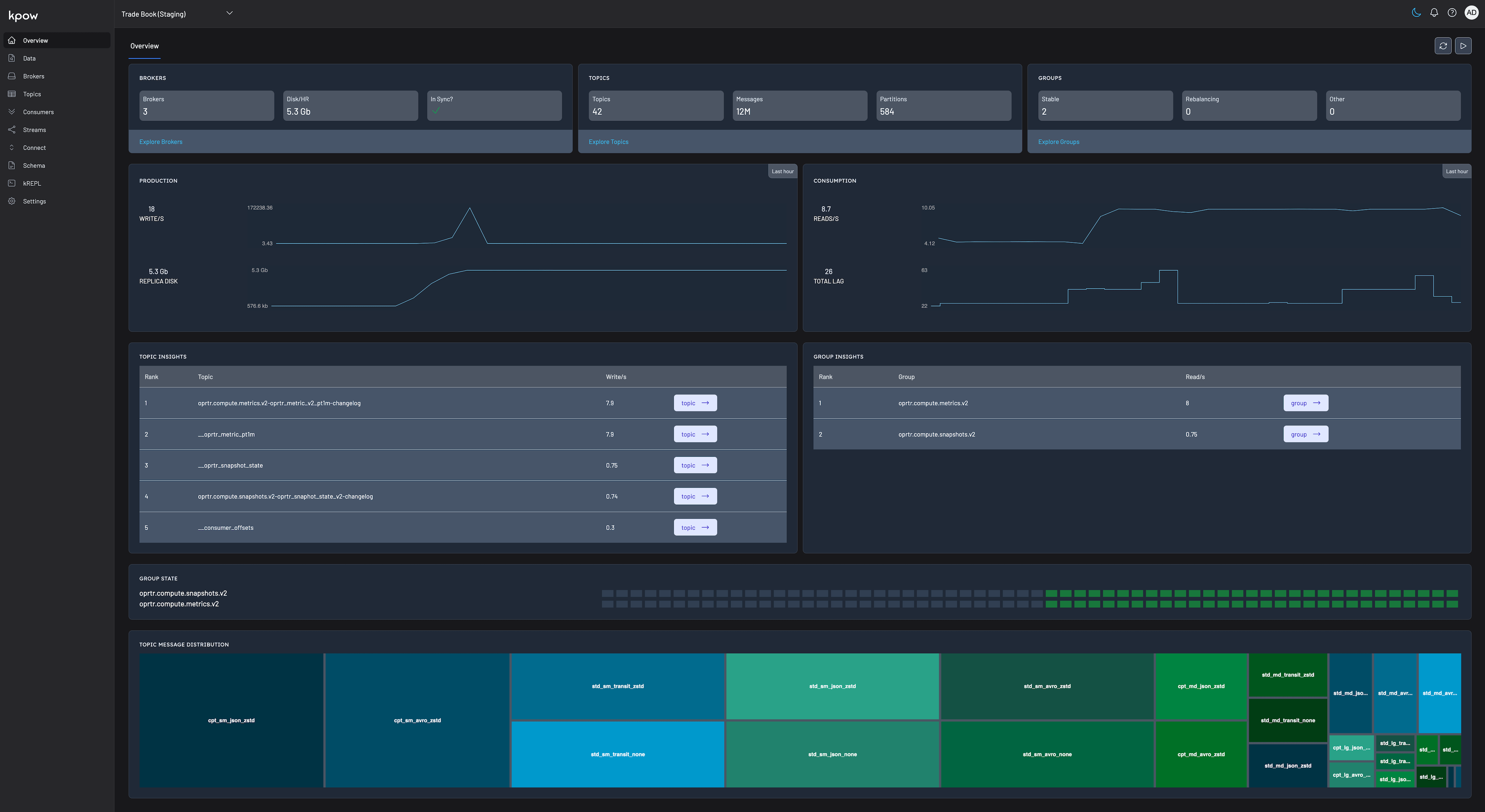
Kpow v90.6 introduces a new Dark Mode UI, improved intellisense, and confiugrable persistence settings.
Dark Mode
Start the new year right with the sleek new Dark Mode UI available in Kpow v90.6!
Improved Intellisense
From kJQ filters to Schema Editing, text entry input in Kpow has upgraded intellisense for JSON and EDN data.

Persistence Mode
Powered by two internal Kafka Streams applications, Kpow stores data in the first cluster in your configuration (we call this the Primary Cluster). This storage takes the form of several internal topics that are tuned to retain only a small amount of data.
In addition, an audit log topic is persisted permanently for data governance purposes.
These internal topics provide considerable feature support to Kpow, but there are circumstances in which you might want to turn them off.
Kpow v90.6 introduces a new PERSISTENCE_MODE environment variable that provides the following options to tune data storage:
Persistence Mode: Full (Default)
PERSISTENCE_MODE="full"full is the current persistence behaviour of Kpow and utilizes the full set of internal topics.
This is the default behaviour of Kpow where no configuration is set.
Persistence Mode: Audit
PERSISTENCE_MODE="audit"audit is a new persistence mode where the only internal topic that is created is the audit log.
This mode considerably reduces the amount of data written to Kafka, while retaining a full data governance trail.
When this mode is activated, certain features of Kpow run in a modified manner:
- Metrics charts are not re-hydrated on a Kpow restart (normally they hydrate from an internal changelog).
- Activity metrics (e.g. 'this topic was written to 3 minutes ago') are not persisted/maintained through a Kpow restart.
- Kpow Streams Agent integration is disabled
Persistence Mode: None
PERSISTENCE_MODE="none"none is a new persistence mode where zero data is written to Kafka.
This mode ensures that no internal topics are created and no data is written by Kpow to your Kafka cluster.
When this mode is activated, certain features of Kpow run in a modified manner:
- Metrics charts are not re-hydrated on a Kpow restart (normally they hydrate from an internal changelog).
- Activity metrics (e.g. 'this topic was written to 3 minutes ago') are not persisted/maintained through a Kpow restart.
- Kpow Streams Agent integration is disabled
- Audit log and user log are not available
- Staged mutations are not available
- Bulk actions are not available
Release v90.6 Changelog
See the Factor House Product Roadmap to understand current delivery priorities.
Kpow v90.6 Changelog
See the full Kpow Changelog for information on previous releases
- New Dark Mode UI
- Improved Editor Intellisense
- Configurable Persistence Mode
.png)
Release 96.1: Factor Platform, performance Improvements and new features in Kpow and Flex
Factor House release v96.1 brings significant new product features and performance enhancements to our Kafka and Flink tooling, and makes Factor Platform publicly available for early-access users.
.png)
Release 95.5: UI performance improvements
95.5 is a minor bugfix release focusing on UI performance and resolving some regressions introduced by Kpow 95.4.
Release 95.4: Concurrent data inspect, Strimzi support, and consumer group improvements
Kpow 95.4 introduces concurrent data inspect queries, Strimzi support, and improved consumer group management and monitoring.
Start your streaming transformation today.
Try both Kpow or Flex free for 30 days with a single license - no credit card required.