
Release 94.5: New Factor House docs, enhanced data inspection and URP & KRaft improvements


Release Info
Kpow can be found on Dockerhub
docker pull factorhouse/kpow:94.5View our Docker quick start guide for help getting started.
Kpow can be found on ArtifactHub
Helm version: 1.0.69
helm repo add factorhouse https://charts.factorhouse.io
helm repo update
helm install --namespace factorhouse --create-namespace my-kpow factorhouse/kpow --version 1.0.69 \
--set env.LICENSE_ID="00000000-0000-0000-0000-000000000001" \
--set env.LICENSE_CODE="KPOW_CREDIT" \
--set env.LICENSEE="Your Corp\, Inc." \
--set env.LICENSE_EXPIRY="2024-01-01" \
--set env.LICENSE_SIGNATURE="638......A51" \
--set env.BOOTSTRAP="127.0.0.1:9092\,127.0.0.1:9093\,127.0.0.1:9094" \
--set env.SECURITY_PROTOCOL="SASL_PLAINTEXT" \
--set env.SASL_MECHANISM="PLAIN" \
--set env.SASL_JAAS_CONFIG="org.apache.kafka.common.security.plain.PlainLoginModule required username=\"user\" password=\"secret\";"
--set env.LICENSE_CREDITS="7"
View our Helm instructions for help getting started.
Kpow can be found on the AWS Marketplace
View our AWS Marketplace documentation for help getting started.
Kpow can be downloaded and installed as a Java JAR file. This JAR is compatible with Java versions 17+.
View our JAR quick start guide for help getting started.
Kpow can be downloaded and installed as a Java JAR file. This JAR is compatible with Java versions 11+.
View our JAR quick start guide for help getting started.
Kpow can be downloaded and installed as a Java JAR file. This JAR is compatible with Java 8.
View our JAR quick start guide for help getting started.
For more information, read the Kpow accessibility documentation.
Introducing our new docs site
Announcement post: Introduction to Factor House docs v2.0.
All Factor House product documentation has been migrated to a new, unified site. This new hub, Factor House Docs, provides a single, streamlined resource for all users.
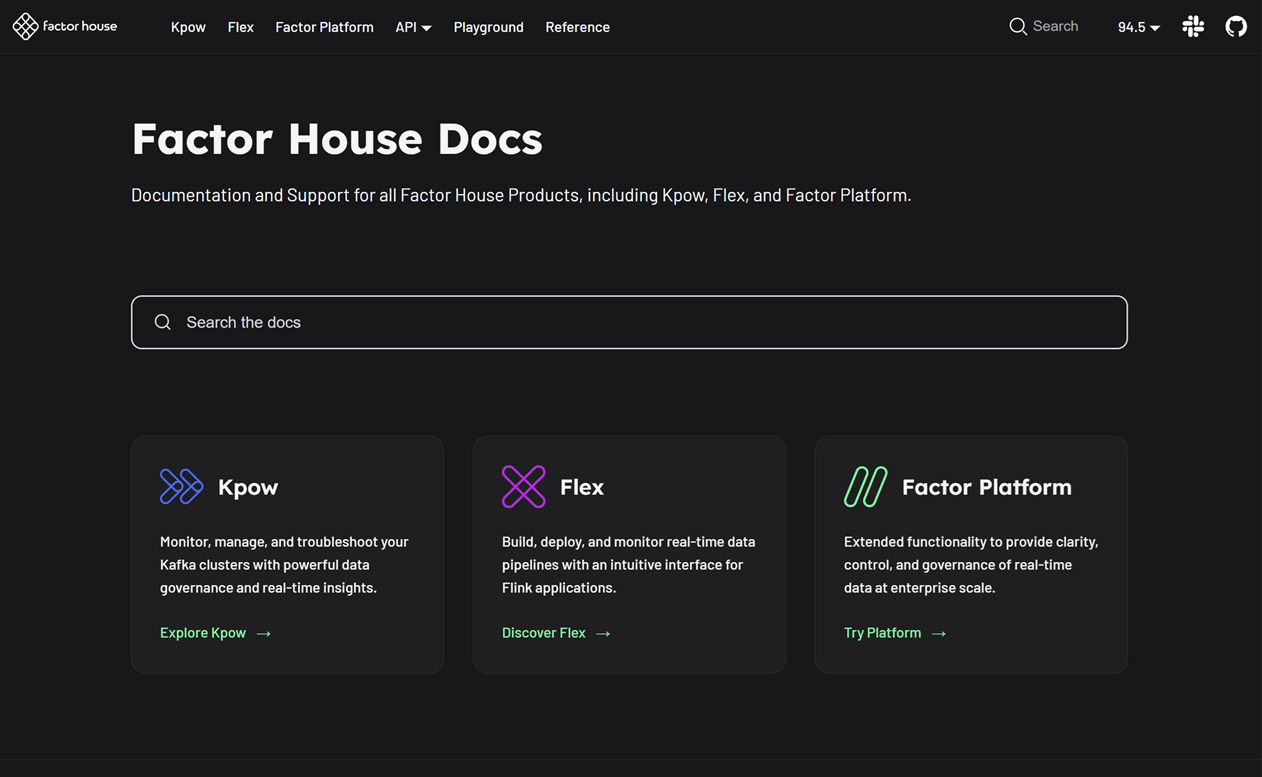
Key improvements you'll find on the new site include:
- Unified product content: All documentation is now in one place with a simplified structure, consolidating what was previously separate community and enterprise docs.
- Clear feature availability:
COMMUNITY,TEAM, andENTERPRISEbadges have been added to clearly indicate which features are available in each edition. - Improved organization: Content is now grouped into more relevant sections, making it easier to find the information you need.
- Powerful search, instant answers: Instantly find any configuration, example, or guide with our new Algolia-powered, site-wide search.
- Hands-on playground: A new section featuring interactive labs and projects to help you explore product capabilities.
- Ready for the future: The documentation for the new Factor Platform will be added and expanded upon release, ensuring this hub remains the most up-to-date resource for all product information.
The documentation has been updated and is live at https://docs.factorhouse.io.
Data inspect enhancements
Feature post: Data inspect enhancements in Kpow 94.5.
Kpow 94.5 builds upon the foundation of previous releases to deliver a more powerful and user-friendly data inspection experience.
kJQ Projection expressions & search
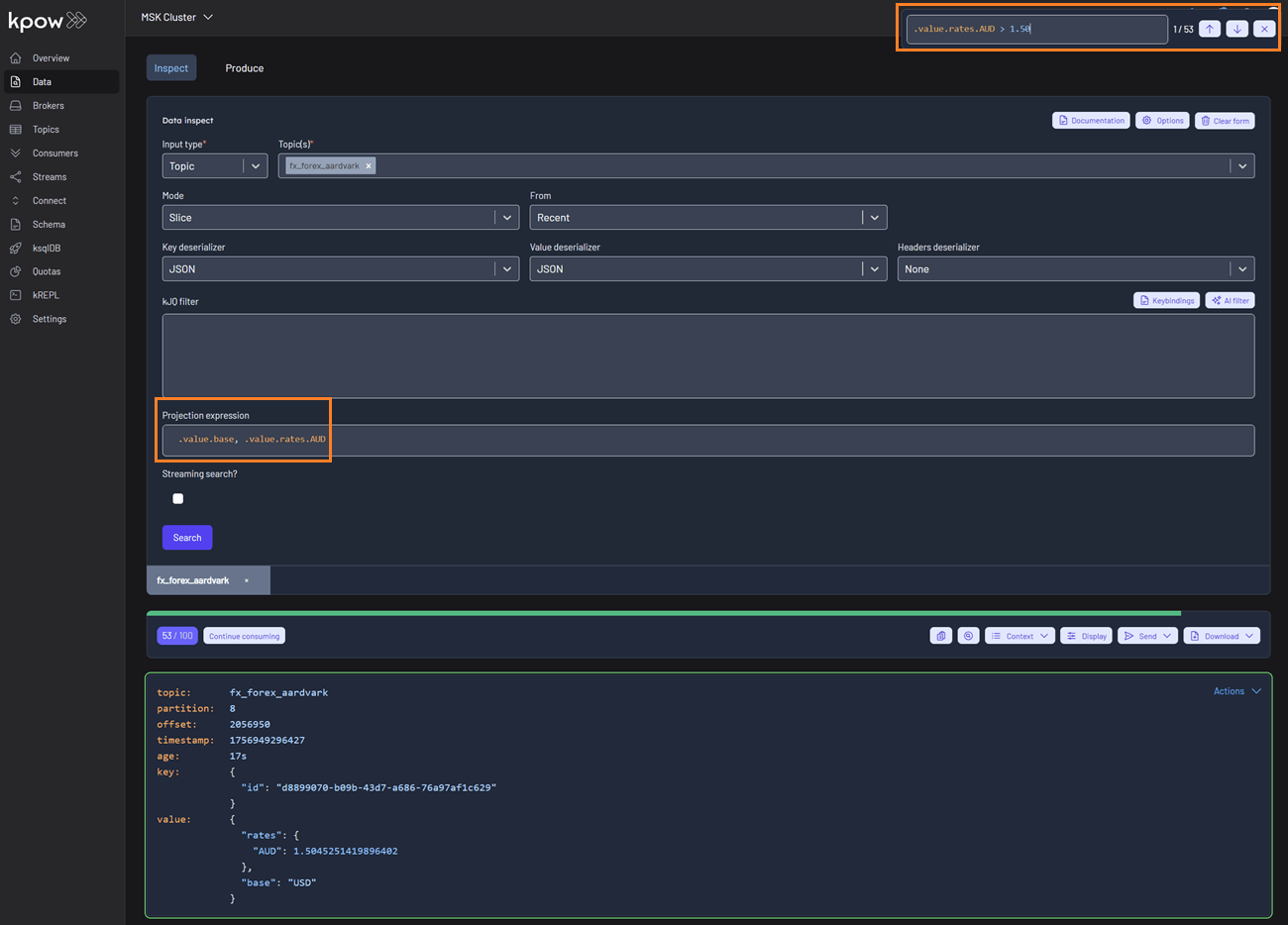
- Comma-Separated kJQ Projection expressions: We've added support for comma-separated projection expressions (e.g.,
.value.base, .value.rates). This allows you to extract multiple fields from Kafka records in a single query, providing targeted data views without cluttering your output. This works for both key and value sub-paths. - In-Browser Search (Ctrl + F): You can now use in-browser search (Ctrl + F) with kJQ filters to quickly find records by JSON path or value without re-running queries. The results component is now fully keyboard-friendly and follows the Listbox pattern, making it easier for everyone to navigate. Screen reader users can understand the list structure, and keyboard users can move through and select items smoothly and predictably.
Schema & deserialization insights
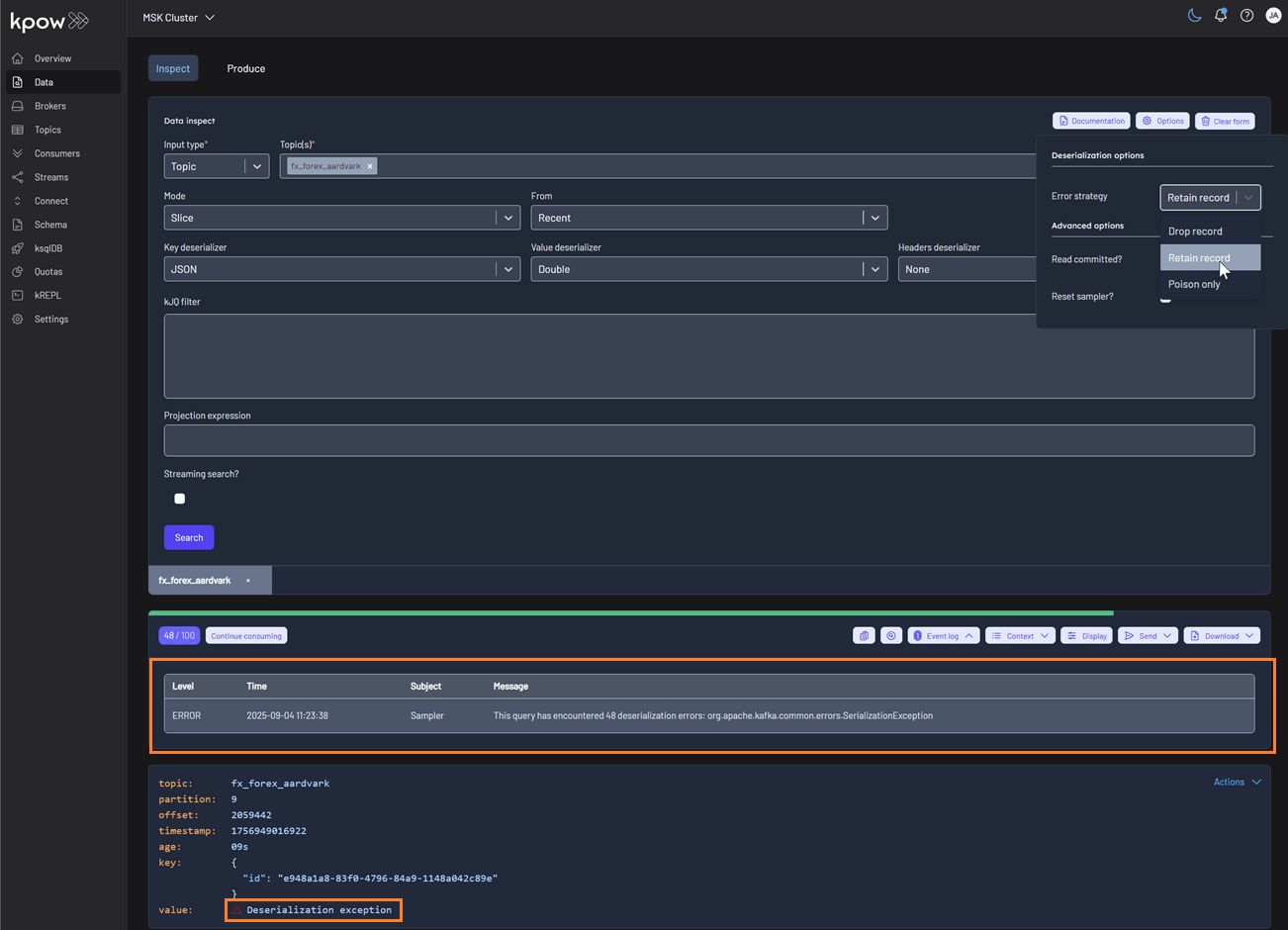
Data Inspect now provides detailed schema metadata for each message, including schema IDs and deserializer types. It also identifies misaligned schemas and poison messages, offering the following deserialization options:
- Drop record (default): Ignores erroneous records and displays only well-formatted records.
- Retain record: Includes both well-formatted and erroneous records. Instead of displaying the raw, poisonous value for problematic records, the system flags them with the message 'Deserialization exception'.
- Poison only: Displays only erroneous records, where the value is recorded as 'Deserialization exception'.
Sorting by Attribute
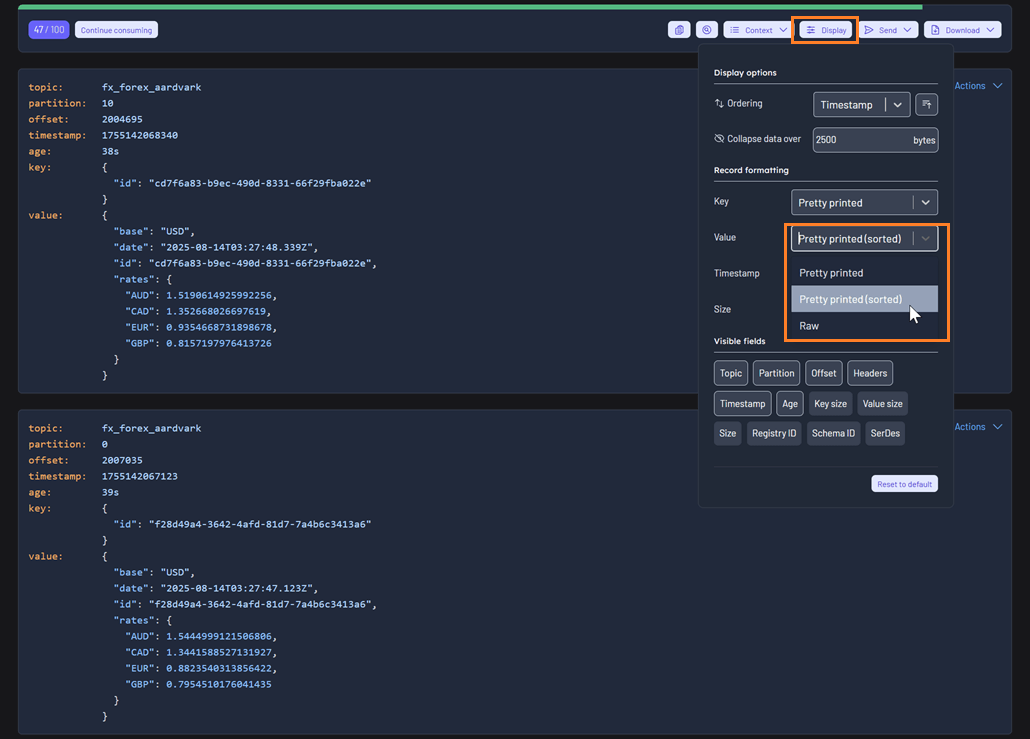
Selecting the 'Pretty printed (sorted)' display option sorts the attributes of the key or value alphabetically by name, improving readability and consistency during inspection.
High-performance streaming
Data Inspect can stream over 500,000 records smoothly without UI lag, enabling efficient analysis of large datasets.
kJQ improvements
Expanded kJQ capabilities with new transforms including parse-json, floor, ceil, upper-case, lower-case, trim, ltrim, rtrim, reverse, sort, unique, first, last, keys, values, is-empty, and flatten.
Also added new functions: within, split, and join, enabling richer data manipulation directly within kJQ queries.
For more details on these new features, please refer to the updated kJQ manual. Also, be sure to visit the new interactive examples page on our new Factor House docs site—it's a great way to quickly verify your kJQ queries.
Consumer group management
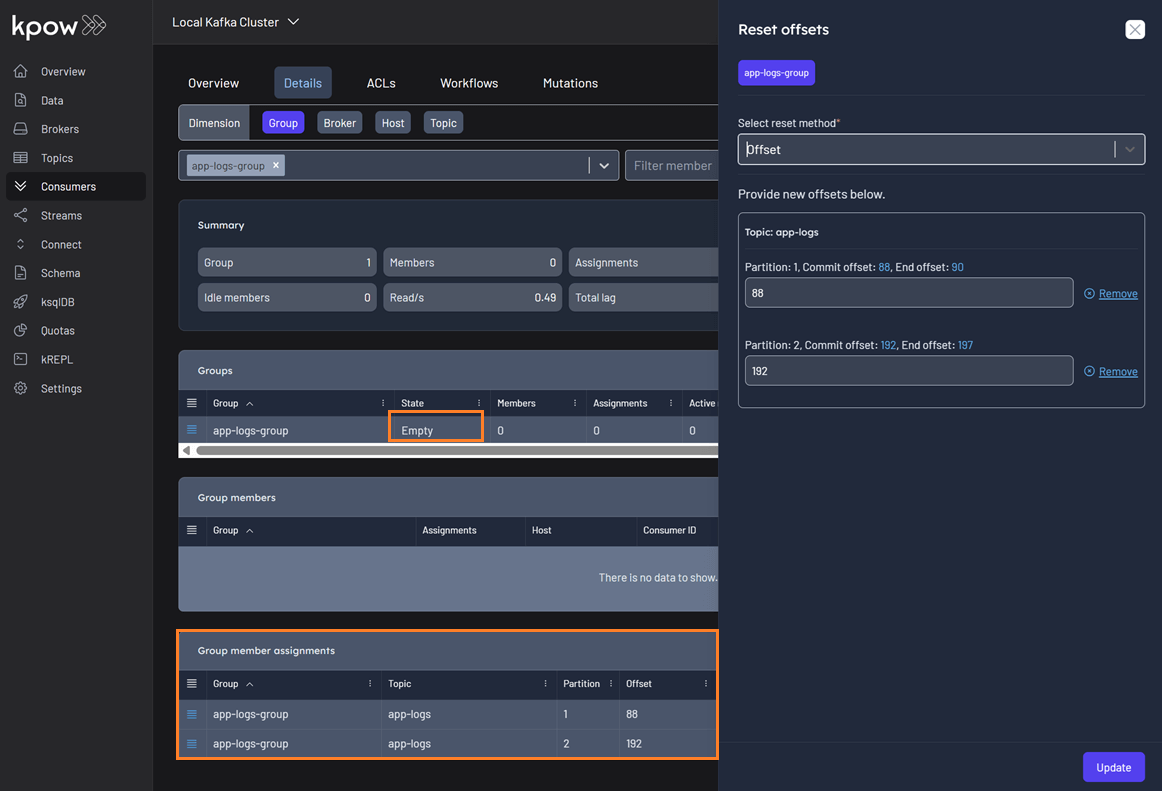
Empty group member assignments
Previously, EMPTY consumer groups showed no offset information in the reset offset UI, preventing customers from resetting their offsets. This was a critical issue when a poison message caused an entire consumer group to go offline. The fix now fetches offsets directly from the AdminClient instead of relying on the snapshot, ensuring offsets can be reset in these scenarios.
Cluster & platform enhancements
Improved Under-Replicated Partition (URP) Detection
Feature post: Enhanced URP detection in Kpow 94.5.
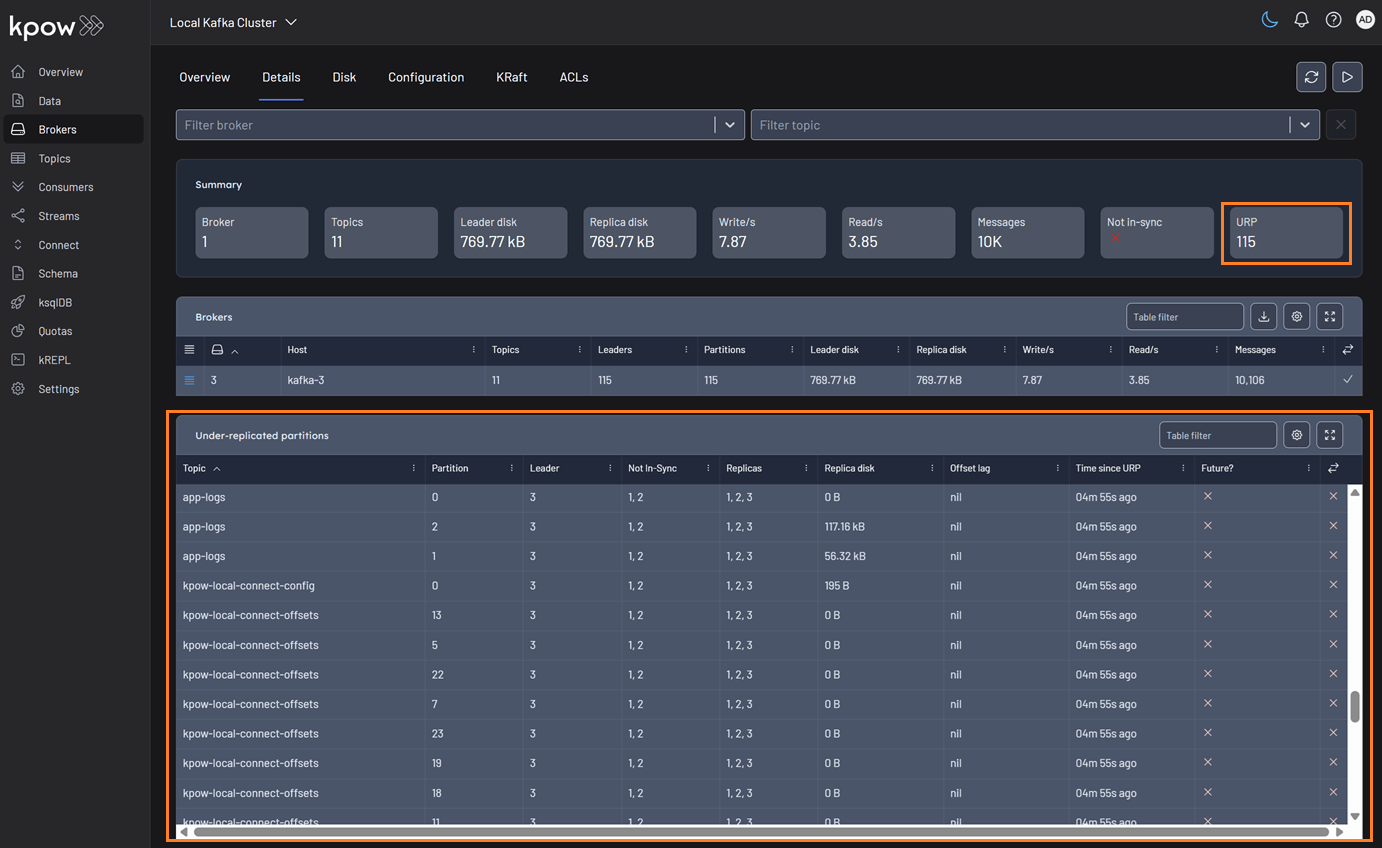
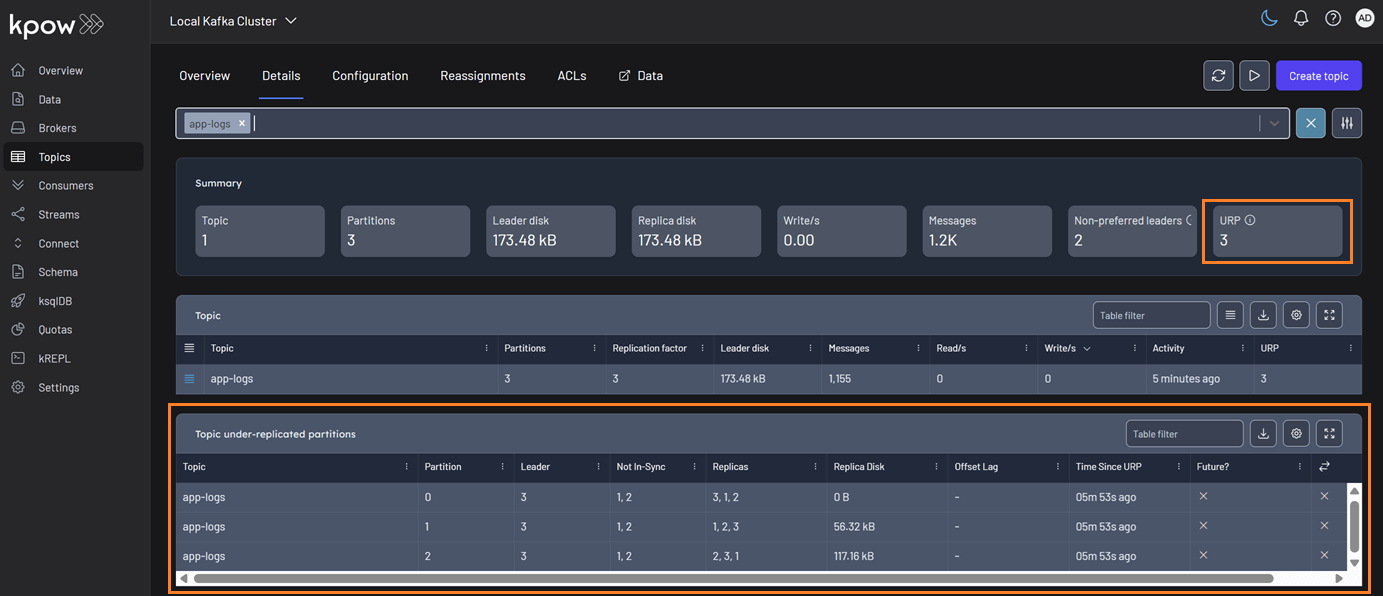
We've enhanced our calculation for under-replicated partitions to provide more accurate health monitoring for your Kafka clusters. The system now correctly detects partitions with fewer in-sync replicas than the configured replication factor, even when brokers are offline and not reported by the AdminClient.
You can find URP details on the Brokers and Topics pages. The summary statistics will display the total number of under-replicated partitions. If this count is greater than zero, a new table will appear with details on all applicable topics.
Brokers
Topics
To further strengthen monitoring and alerting, new Prometheus metrics have been introduced to track under-replicated partitions. These metrics integrate seamlessly with your existing observability stack and provide more granular insights:
- broker_urp: The number of under-replicated topic partitions on this broker.
- topic_urp: The number of under-replicated partitions for this specific topic.
- topic_urp_total: The total number of under-replicated partitions across all topics in the Kafka cluster.
KRaft improvements and fixes
The following improvements and bug fixes have been made to KRaft:
- Polished KRaft tables with improved sorting and corrected display of the End Offset (now showing timestamps instead of offsets).
- Fixed an issue where the controller broker was incorrectly displayed in broker details.
- Added new KRaft-related metrics to Prometheus for enhanced observability.
- Introduced new KRaft-specific Prometheus metrics to strengthen observability:
- kraft_high_watermark: The high watermark of the metadata log in the KRaft cluster, indicating the highest committed offset.
- kraft_leader_epoch: The current leader epoch in the KRaft cluster, incremented each time a new leader is elected.
- kraft_leader_id: The broker ID of the current leader in the KRaft cluster responsible for handling metadata operations.
- kraft_observer_count: The number of observer replicas in the KRaft cluster. Observers replicate the metadata log but do not participate in leader election.
- kraft_replicas_count: The total number of replicas (voters + observers) in the KRaft cluster responsible for maintaining the metadata log.
- kraft_voter_count: The number of voting replicas in the KRaft cluster. Voters participate in leader election and maintain the metadata log.
Custom SerDes per cluster
Feature post: Per-cluster custom serdes configuration guide.
Kpow supports to configure custom SerDes on a per-cluster basis, providing the flexibility to handle different data formats and compatibility requirements across your Kafka environments. This approach ensures smoother integration with diverse data pipelines, reduces serialization errors, and improves overall system reliability.
Here is an example of a per-cluster custom SerDes configuration:
serdes:
  - name: "PROTO 1"
    format: "json"
    isKey: true
    config:
      bootstrap: "some-value"
      limit: 22
      display: another-value
      abc: $SOME_ENV
  - name: "PROTO 2"
    cluster: "Trade Book (Staging)" # THIS IS A NEW KEY
    format: "json"
    isKey: false
    config:
      bootstrap: "some-value"
      limit: "100"
      display: another-value
      abc: $ANOTHER_ENV
Bug fixes
This release addresses several key issues improving UI stability, integrations, and navigation consistency across the platform.
- Resolved an edge case in the temporary policy UI display
- Fixed Microsoft Teams webhook integration
- Fixed a buggy textarea inside the Data Masking Playground.
- Fixed regression affecting ordering of ksqlDB, Schema Registry, and Connect resources in navigation dropdown
- Fixed ordering of Kafka resources. Examples:
CONNECT_RESOURCE_IDS=QA1,DEV1,DEV2→ showing in order:QA1,DEV1,DEV2SCHEMA_REGISTRY_RESOURCE_IDS=QA1,DEV1,DEV2→ showing in order:QA1,DEV1,DEV2KSQLDB_RESOURCE_IDS=QA1,DEV1,DEV2→ showing in order:QA1,DEV1,DEV2
Updated Help menu
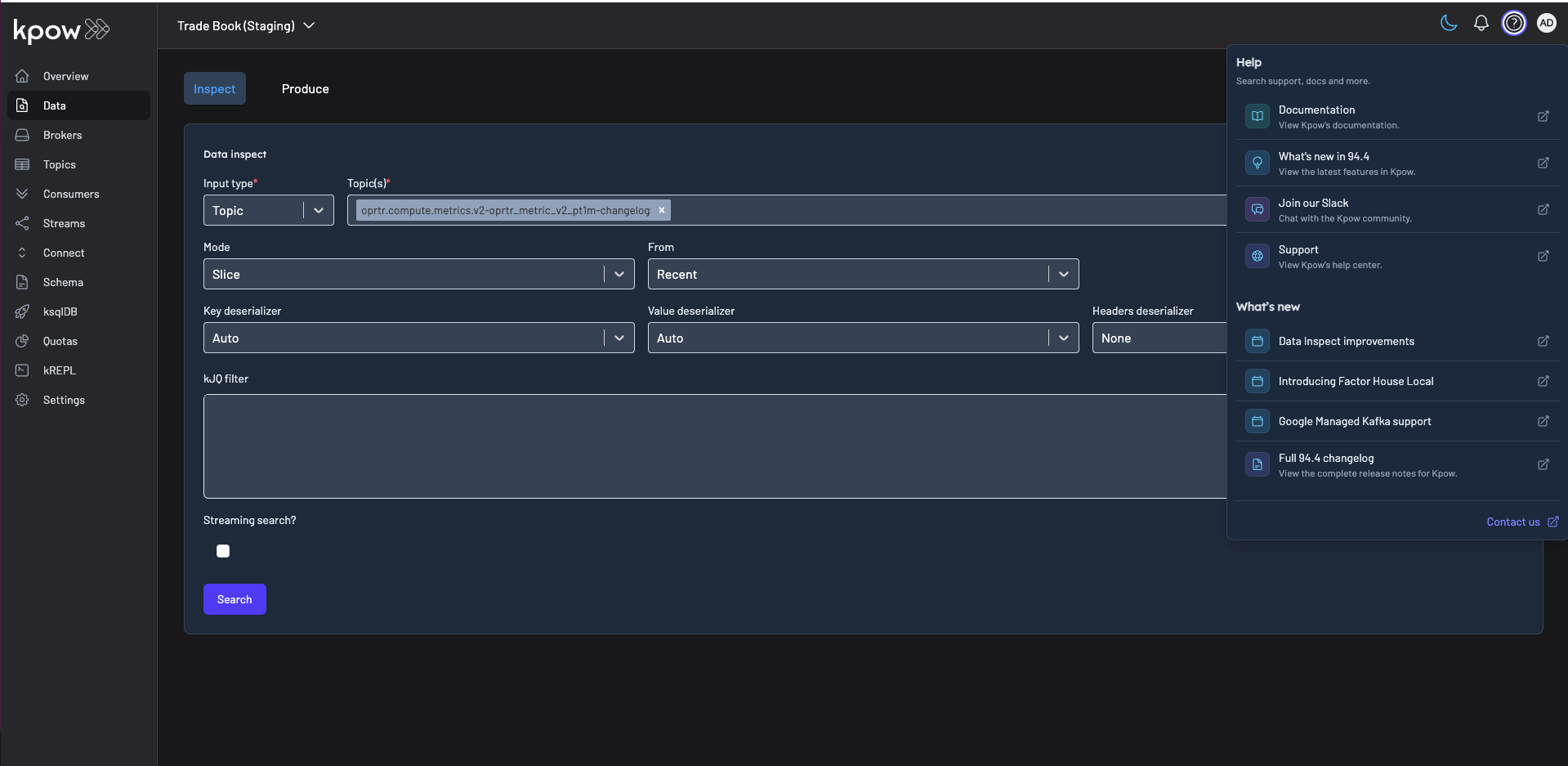
Introduced a redesigned Help menu featuring an improved What's New section for quick access to the latest product updates. The menu also now includes direct links to join our Slack community, making it easier to connect with other users, share feedback, and get support right from within the product.
Release v94.5 Changelog
See the Factor House Product Roadmap to understand current delivery priorities.
Kpow v94.5 Changelog
See the full Kpow Changelog for information on previous releases
- Data Inspect Enhancements:
- Add support for comma-separated kJQ Projection expressions to extract multiple fields in one query.
- Introduce in-browser search (Ctrl + F) with kJQ filter support.
- Surface detailed schema metadata per message, including schema IDs and deserializer types.
- Improve detection of misaligned schemas, poison messages, and deserialization errors.
- Add alphabetical sorting for message keys and values to improve readability.
- Stream over 500,000 records smoothly without UI lag.
- kJQ Improvements:
- Expanded capabilities with new transforms (e.g.,
parse-json,upper-case,flatten) and functions (within,split,join) for richer data manipulation.
- Expanded capabilities with new transforms (e.g.,
- Consumer Group Management:
- Fix an issue preventing offset resets for consumer groups with
EMPTYmember assignments by fetching offsets directly from the AdminClient.
- Fix an issue preventing offset resets for consumer groups with
- Cluster & Platform Enhancements:
- Improve Under-Replicated Partition (URP) detection, even when brokers are offline.
- Add support for configuring custom serializers and deserializers on a per-cluster basis.
- KRaft Improvements:
- Improve KRaft tables with better sorting and correct End Offset display.
- Fix incorrect display of the controller broker in broker details.
- Add new KRaft-related metrics to Prometheus.
- Bug Fixes:
- Resolve an edge case in the temporary policy UI display.
- Fix the Microsoft Teams webhook integration.
- Correct a buggy textarea in the Data Masking Playground.
- Fix a regression affecting the ordering of ksqlDB, Schema Registry, and Connect resources in navigation.
- Fixed Kafka resource ordering so that
CONNECT_RESOURCE_IDS,SCHEMA_REGISTRY_RESOURCE_IDS, andKSQLDB_RESOURCE_IDSshow in the specified order
- User Interface:
- Redesign the Help menu with an improved "What's New" section and a direct link to the Slack community.
Flex v94.5 Changelog
See the full Flex Changelog for information on previous releases
- Bug Fixes:
- Fixed an issue where Flink SQL jobs were incorrectly applied when selected from the Jobs filter.
- Fixed overflow of long job names in Jobs Overview tab's Job state chart.
- Selected jobs now persist in the Jobs filter when navigating back and forth between the Overview and Details tabs.
- User Interface:
- Improved sorting of jobs with identical names in the Jobs Details tab, with the most recent invocations appearing first.
- Improved differentiation of jobs with identical names in the Jobs Inspect tab's filter by adding invocation start time to job labels.
- Improved sorting of JARs with identical names in the Jobs JARs tab, with the most recently uploaded appearing first.
.png)
Release 96.1: Factor Platform, performance Improvements and new features in Kpow and Flex
Factor House release v96.1 brings significant new product features and performance enhancements to our Kafka and Flink tooling, and makes Factor Platform publicly available for early-access users.
.png)
Release 95.5: UI performance improvements
95.5 is a minor bugfix release focusing on UI performance and resolving some regressions introduced by Kpow 95.4.
Release 95.4: Concurrent data inspect, Strimzi support, and consumer group improvements
Kpow 95.4 introduces concurrent data inspect queries, Strimzi support, and improved consumer group management and monitoring.
Start your streaming transformation today.
Try both Kpow or Flex free for 30 days with a single license - no credit card required.