Skip to content

Agentic Kafka operations, governed by Kpow

The Factor CLI and agent skills that let Claude Code, Codex, and Copilot answer Kafka questions under your existing access controls.

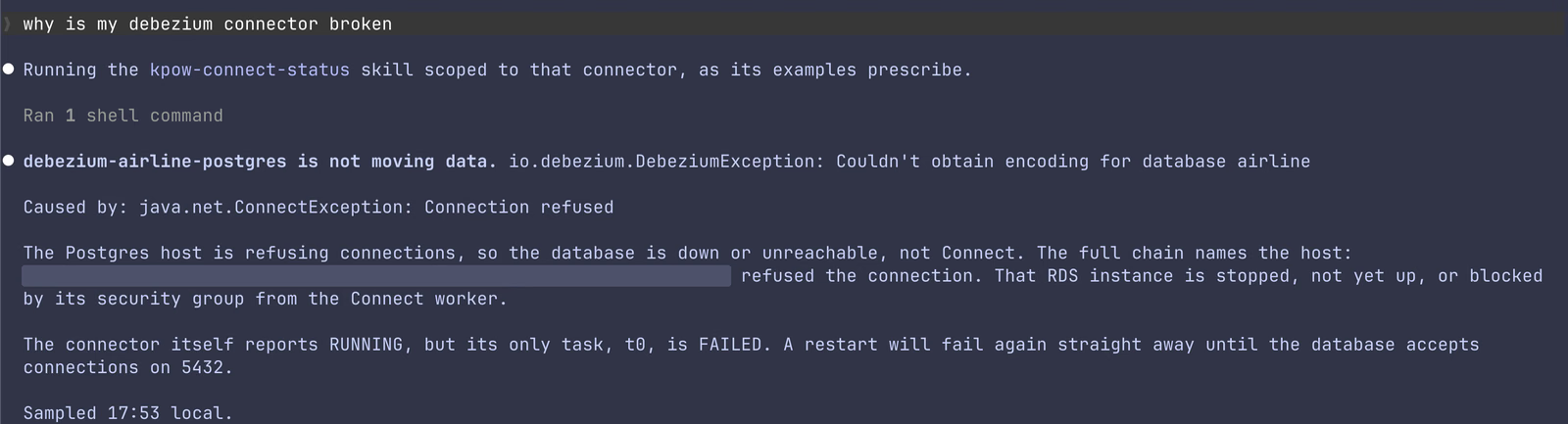
Claude Code answering why a Debezium connector is broken with the kpow-connect-status skill: the task exception, the root cause, and what a restart would do

AI agents need better access than a broker credential

An admin credential gives an AI agent more access than the task needs, with no approval step and no audit trail. It also hands the agent raw data to work through, so answers vary between runs and cost more tokens than they should.

Product demo

See an AI agent diagnose a Kafka Connect failure

Product demo · 11 min

Governed agentic Kafka operations powered by Kpow

Chad Harris shows how Kpow delivers governed, agentic Kafka operations using the Factor CLI with Claude: diagnosing a failing connector, proving a service is consuming data, and finding the most lagging topic.

Agent skills

Ask in plain English, get a verdict with evidence

Each skill collects data through the Factor CLI, applies stated rules, and reports in a fixed shape.

  • kpow-topic-overview

    “What are my five biggest topics?”

    The biggest topics, detail on any one topic, and which have gone idle.

  • kpow-consumer-health

    “Is the analytics group keeping up?”

    A health verdict for one consumer group, with the evidence for it.

  • kpow-lag-triage

    “Which consumers are behind or imbalanced?”

    The groups that are really lagging, separated from the ones that only look it.

  • kpow-why-no-data

    “Why isn't my service getting data?”

    Proof of whether data is produced and consumed: write rate, group state, lag, and last commit.

  • kpow-connect-status

    “Are my connectors healthy?”

    Failed tasks, the exception behind each one, and whether a restart would help.

  • kpow-lineage

    “Where does this topic's data come from?”

    What writes to a topic, what reads from it, and how your clusters replicate.

  • kpow-replay-topic

    “Replay this topic for my group from the beginning.”

    A replay plan, shown before any offsets change. Runs only when you name it.

  • One command installs all seven

    fh skills install puts the skills wherever your agent looks for them.

    Read the skills docs

Works with the agent you already use

  • Claude Code
  • Codex CLI
  • GitHub Copilot
  • Cursor
  • Gemini CLI
  • OpenCode
  • Goose
  • Amp
  • Windsurf
  • Kiro
How it works

One governed path from your agent to Kafka

Your identity, your permissions

AI agents act through the Factor CLI, signed in as you, so they can see and do only what you can in Kpow.

  • Single sign-on through OpenID Connect, with tokens refreshed automatically
  • RBAC and multi-tenancy scope what an agent can read and change
  • Data masking applies to everything an agent reads
  • Changes wait in staged approval and land in the Kpow audit log

Answers you can check

A script collects one JSON document through the Factor CLI, and the skill tells the model how to read it. Two runs on the same cluster produce the same kind of answer.

  • Every report ends in one verdict, such as healthy, stalled, or not running, with the evidence
  • Small, structured context means a mid-tier model like Claude Sonnet is usually enough
  • Read-only by default: nothing changes unless you ask for a change

Every Kpow API endpoint as a command

The Factor CLI calls the same REST API as the Kpow web UI, so anything you can do in Kpow you can script, run in CI, or hand to an agent.

  • Table output for people, JSON or YAML for agents and scripts
  • Named contexts switch between deployments, tenants, and clusters
  • Signed checksums, an SBOM, and a vulnerability report ship with every release
FAQ

Questions about agentic Kafka operations

If you don't see your question here, ask us directly.

Ask a question

Claude Code, Codex CLI, GitHub Copilot, Cursor, Gemini CLI, OpenCode, Goose, Amp, Windsurf, and Kiro. Running fh skills install places the skills in each agent's skills directory.

Yes. The Factor CLI, agent skills, and REST API are all in Community Edition. OIDC sign-in, RBAC and multi-tenancy scoping, staged approval, audit logging, and data masking for agent access are Enterprise features.

Only when you ask it to. The skills read by default, kpow-replay-topic runs only when named and shows its plan first, and any change Kpow requires approval for waits until an approver accepts it.

A mid-tier model such as Claude Sonnet is usually enough for overview, health, lag, and connector questions. Use a frontier model such as Claude Opus for lineage across many clusters or an unclear failure.

Kpow 96.5 or later with the API enabled, the Factor CLI installed and signed in, and jq on your PATH.

An MCP server is coming soon. Today, AI agents reach Kpow through the Factor CLI and agent skills, with the same sign-in, permissions, and audit log.

Get started

Give your AI agents governed access to Kafka

  1. 1

    Get a license key

    Fill out the form and we'll email you a license key.

  2. 2

    Deploy Kpow with the API enabled

    Run Kpow 96.5 or later via Docker, Kubernetes, or a standalone JAR, with the Kpow API turned on.

  3. 3

    Install the Factor CLI and skills

    Install fh, sign in, and run fh skills install for your agent.