Chad Harris, Head of Product at Factor House, gave a 20-minute live demo of the Factor House CLI, terminal UI, and agent skills for Kpow, which bring everyday Kafka operations into the terminal for engineers and the coding agents they work with. He started with the gaps in the usual options: config as code can’t help you diagnose a problem, the Kafka shell scripts need broker credentials and leave no audit trail, web consoles are slow when you just need something done, and handing an agent broker credentials risks deleted data, reset offsets, and overloaded admin APIs.
Chad then worked through the tools. The CLI wraps the Kpow API, so every command is scoped by your existing single sign-on and role-based access control. The terminal UI, inspired by k9s, lets you move by keyboard through topics, consumer groups, brokers, Flink topologies, tenants, and lineage. He then asked Claude Code, using the agent skills, why a service had stopped receiving data, the kind of question a platform team fields every day.
The session closed on keeping people in charge when agents operate Kafka: serving agents Kpow’s cached cluster history instead of letting them hit the admin APIs, on-behalf-of tokens with narrower roles for agents, and approval workflows so an agent can request an offset reset or rebalance that a human then approves. It is aimed at platform engineers and developers who want faster Kafka troubleshooting from the terminal, by hand or through an AI agent.
Full transcript
I'm Chad Harris, Head of Product at Factor House, and today I want to show a sneak peek of what we've been working on: bringing the operational side of Apache Kafka, Apache Flink, and Apache Iceberg into the terminal and into your agents. I'll introduce our CLI, our terminal UI, and our agent skills, debug a problem or two live, and show how these tools help you solve problems faster with agentic workflows.
What are your options today for automating and interacting with Kafka? Config as code is how we should all be delivering changes to production, and it's great because it's declarative. But it doesn't help you monitor a cluster, diagnose problems, or fix things in a hurry. You can't inspect data on a topic or do your debugging from Terraform; it only gets you back to a desired state. The usual fallback is the scripts that ship with open-source Apache Kafka. I've been using Kafka since 2012 and I couldn't tell you how many times those scripts have saved me, but they are awkward to use and they need your broker credentials, which I don't like handing out to anyone. You end up setting up jump boxes for people to run the scripts from, with no audit trail, so someone can delete a topic by accident and you don't even know who did it.
Then there are web consoles. We build one for Kafka, and they're great for browsing and exploring the state and health of a cluster and looking at data on topics, but when you just need to get in and get something done, clicking around a web app is slow. And there are agents. You could give an agent your broker credentials, and it would get you up and running quickly, but I'd ask you not to. Just as quickly you'll be falling over because the agent deleted data or reset some offsets, or simply because 50 people in your organization pointed agents at the cluster, hammered the admin APIs, hit quota limits, and caused contention for everyone else. What we want is something in the middle that lets agents access Kafka more safely.
A few months ago I was on a train in Finland. I've been an engineer for 25 years and I still love engineering, and I was using k9s at the time, the Kubernetes terminal UI most platform engineers know. I wondered what k9s for Kafka would look like, so I started writing it, and that's how Factor House got its newest product, the terminal UI. Engineers live in the terminal, so give them the tools to do their job where they already work.
The first thing to show is the Factor House CLI. Kpow and Factor Platform are a management layer on top of Apache Kafka, and they come with an API: anything you can do in the web app, you can do through the API. In my previous job I led the Kafka teams at Cash App and spent a lot of my time building CLIs, so once there was an API, putting a CLI around it was an obvious way to add value. I didn't realize how much value it would create until I gave it to agent skills. Because the platform is integrated with your organization's single sign-on, identity providers, and role-based access control, you can give the CLI to every team and they can only perform the actions they already have permission to do. Your payments team can change the config or reset the offsets of the payments topics, while other teams can look at those topics but can't change them.
From the CLI I can list topics, which means I can script it, put it in CI, or interact with it however I want. I can create a topic, check that it's there, and delete it again without clicking a single button. You probably don't want to do that in production, but it's great for test environments. We've also written Claude skills for all of this. A couple of days ago I needed to do some performance testing and wanted to push the number of partitions to the limit, so I asked Claude for 10,000 topics. It wrote a script, and a couple of minutes later I had 10,000 topics.
What I love more, and this was the idea I had on the train, is extending this into a terminal UI. It looks a lot like our web app, but it runs in your terminal and resizes with it, and it shows you everything about your Kafka topology: summaries of topics, size on disk, and brokers. The headings across the top, such as overview, signals, inspect, and topics, each have a number, so you can jump straight to one. Press five for consumer groups or nine for brokers, then use the arrow keys to move through sub-tabs like overview, disk, and config. You can update broker config from here too. Please don't update production config this way, although I did once: a team realized at 6.95 days into a seven-day retention period that data they hadn't consumed was about to age out. Keep that for break-glass situations.
On the topics page I can filter the list, select a topic such as airline baggage arrived, and see everything about it: a producer on the left writing data, three consumer groups reading from it, and the lag for each of them. If you're using Flink, you can navigate your live Flink topology node by node and see throughput and backpressure. From one tool you can move between Kafka topics and Flink topologies, and Iceberg is coming soon, so you'll be able to trace lineage all the way through.
We also have tenancy, so different teams get different access. As an admin I can switch into any tenant, but if the only tenant I'd been assigned was the shop tenant, that's the only one I'd see. Inside the shop tenant I can view the lineage of the entire shop topology. Most of this is available in the web app too, but it's much faster to navigate from here.
How do we give agents access to all of this? We already had the APIs and the CLI; all we needed was a set of agent skills. I asked Claude why the airline analytics service wasn't getting any data. As a platform engineer I was asked questions like that every day: why isn't my connector running, why do I have lag on this topic. Answering used to take five to ten minutes, because I had to prove to the engineers who'd raised the incident that the service was receiving data and something else was wrong, or find out that it really wasn't. In this case Claude came back and showed the service was getting data. When I asked why shop orders wasn't getting data, it wasn't, and Claude explained why. So the next time someone asks you in Slack, Claude can do the research for you, and it could even be a Slack bot that reaches the LLM through Kpow.
There are two main problems with giving agents access to your cluster. The first is authentication, authorization, and auditing: how much permission do you give an agent, and can you tell who actually made a change. The second is load: give a lot of agents direct access and they'll overwhelm your admin APIs and cause other incidents. Kpow addresses the second because it already collects this data. Every minute it snapshots the health and state of your cluster and keeps that history for as long as you choose to store it, and all of it is now available to your agents from a cache in a split second instead of them querying Kafka directly. We've written the agent skills around the data agents need, because the better the context you give an agent, the better the answer. We've been building this tool for seven years, so we know which data matters, and agents are very good at crunching it and finding the issue faster than I can.
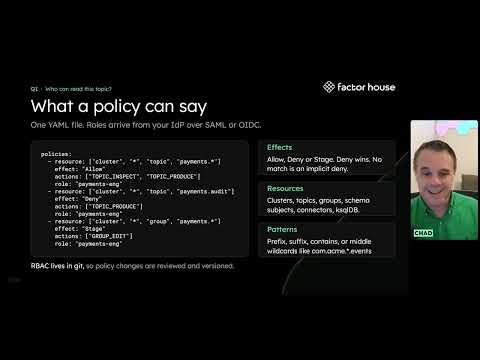
On roles and auditing, many organizations give agents their own credentials. Others are moving to on-behalf-of tokens, which our single sign-on and RBAC will support: the human gets whatever role you assign, and their agent gets an on-behalf-of role that might have read access but not write access. Many organizations are also minting fresh tokens for their agents, which is probably the direction to go, and we support all of these approaches. Resetting offsets is a good example. I'm allowed to do it as a human, but I don't want my agent to do it automatically; I want it to recommend the change. The agent can stage or request an offset reset, a repartition, or a rebalance, and a human in the loop approves it.
It's easy to install before you leave. Add the Factor House Homebrew tap and install fh to get all of the CLI tools you've seen, then run fh skills install, adding the Claude flag if you're using Claude Code; for other agents that follow the standard you can leave the flag off. It does need a Kpow server, version 96.5 or above. Kpow Community Edition is free in production for up to three clusters, and there's the Enterprise Edition with a trial for as long as you need. MCP support is coming very soon as well.
Speaker

Head of Product, Factor House
Chad Harris is Head of Product at Factor House, bringing 25 years of experience across software engineering, application architecture, and engineering leadership. He has deep hands-on expertise with Apache Kafka, high-volume transactional systems, and PCI-compliant architectures, most recently as an Engineering Leader at Block (formerly Square). At Factor House, Chad works directly with global enterprise customers to help them improve how they manage, govern, and observe their real-time data.
Try Kpow for Apache Kafka
The Kafka management console built for platform and data engineers.
Learn more