Integrate Confluent-compatible registries in Kpow
How-toOverview
In modern data architectures built on Apache Kafka, a Schema Registry is an essential component for enforcing data contracts and supporting strong data governance. While the Confluent Schema Registry set the original standard, the ecosystem has expanded to include powerful Confluent-compatible alternatives such as Red Hat’s Apicurio Registry and Aiven’s Karapace.
Whether driven by a gradual migration, the need to support autonomous teams, or simply technology evaluation, many organizations find themselves running multiple schema registries in parallel. This inevitably leads to operational complexity and a fragmented view of their data governance.
This guide demonstrates how Kpow directly solves this challenge. We will integrate these popular schema registries into a single Kafka environment and show how to manage them all seamlessly through Kpow’s single, unified interface.
About Factor House
Factor House is a leader in real-time data tooling, empowering engineers with innovative solutions for Apache Kafka® and Apache Flink®.
Our flagship product, Kpow for Apache Kafka, is a Kafka UI for searching, monitoring, and managing Apache Kafka clusters, with role-based access control, data masking, and audit logging for enterprise teams.
Start free with Kpow Community Edition, try Kpow Enterprise for free, or explore our live multi-cluster demo environment to see Kpow in action.

Prerequisites
To create subjects in Kpow, the logged-in user must have the necessary permissions. If Role-Based Access Control (RBAC) is enabled, this requires the SCHEMA_CREATE action. For Simple Access Control, set ALLOW_SCHEMA_CREATE=true. For details, see the Kpow User Authorization docs.
Launch Kafka Environment
To accelerate the setup, we will use the Factor House Local repository, which provides a solid foundation with pre-built configurations for authentication and authorization.
First, clone the repository:
git clone https://github.com/factorhouse/factorhouse-localNext, navigate into the project root and create a Docker Compose file named compose-kpow-multi-registries.yml. This file defines our entire stack: a 3-broker Kafka cluster, our three schema registries, and Kpow.
services:
  schema:
    image: confluentinc/cp-schema-registry:7.8.0
    container_name: schema_registry
    ports:
      - "8081:8081"
    networks:
      - factorhouse
    depends_on:
      - zookeeper
      - kafka-1
      - kafka-2
      - kafka-3
    environment:
      SCHEMA_REGISTRY_HOST_NAME: "schema"
      SCHEMA_REGISTRY_LISTENERS: http://schema:8081,http://${DOCKER_HOST_IP:-127.0.0.1}:8081
      SCHEMA_REGISTRY_KAFKASTORE_BOOTSTRAP_SERVERS: "kafka-1:19092,kafka-2:19093,kafka-3:19094"
      SCHEMA_REGISTRY_AUTHENTICATION_METHOD: BASIC
      SCHEMA_REGISTRY_AUTHENTICATION_REALM: schema
      SCHEMA_REGISTRY_AUTHENTICATION_ROLES: schema-admin
      SCHEMA_REGISTRY_OPTS: -Djava.security.auth.login.config=/etc/schema/schema_jaas.conf
    volumes:
      - ./resources/kpow/schema:/etc/schema

  apicurio:
    image: apicurio/apicurio-registry:3.0.9
    container_name: apicurio
    ports:
      - "8080:8080"
    networks:
      - factorhouse
    environment:
      APICURIO_KAFKASQL_BOOTSTRAP_SERVERS: kafka-1:19092,kafka-2:19093,kafka-3:19094
      APICURIO_STORAGE_KIND: kafkasql
      APICURIO_AUTH_ENABLED: "true"
      APICURIO_AUTH_ROLE_BASED_AUTHORIZATION: "true"
      APICURIO_AUTH_STATIC_USERS: "admin=admin" # Format: user1=pass1,user2=pass2
      APICURIO_AUTH_STATIC_ROLES: "admin:sr-admin" # Format: user:role,user2:role2

  karapace:
    image: ghcr.io/aiven-open/karapace:develop
    container_name: karapace
    entrypoint:
      - python3
      - -m
      - karapace
    ports:
      - "8082:8081"
    networks:
      - factorhouse
    depends_on:
      - zookeeper
      - kafka-1
      - kafka-2
      - kafka-3
    environment:
      KARAPACE_KARAPACE_REGISTRY: true
      KARAPACE_ADVERTISED_HOSTNAME: karapace
      KARAPACE_ADVERTISED_PROTOCOL: http
      KARAPACE_BOOTSTRAP_URI: kafka-1:19092,kafka-2:19093,kafka-3:19094
      KARAPACE_PORT: 8081
      KARAPACE_HOST: 0.0.0.0
      KARAPACE_CLIENT_ID: karapace-0
      KARAPACE_GROUP_ID: karapace
      KARAPACE_MASTER_ELECTION_STRATEGY: highest
      KARAPACE_MASTER_ELIGIBILITY: true
      KARAPACE_TOPIC_NAME: _karapace
      KARAPACE_COMPATIBILITY: "BACKWARD"

  kpow:
    image: factorhouse/kpow:latest
    container_name: kpow-ee
    pull_policy: always
    restart: always
    ports:
      - "3000:3000"
    networks:
      - factorhouse
    depends_on:
      - schema
      - apicurio
      - karapace
    env_file:
      - resources/kpow/config/multi-registry.env
      - ${KPOW_TRIAL_LICENSE:-resources/kpow/config/trial-license.env}
    mem_limit: 2G
    volumes:
      - ./resources/kpow/jaas:/etc/kpow/jaas
      - ./resources/kpow/rbac:/etc/kpow/rbac

  zookeeper:
    image: confluentinc/cp-zookeeper:7.8.0
    container_name: zookeeper
    ports:
      - "2181:2181"
    networks:
      - factorhouse
    environment:
      ZOOKEEPER_CLIENT_PORT: 2181
      ZOOKEEPER_TICK_TIME: 2000

  kafka-1:
    image: confluentinc/cp-kafka:7.8.0
    container_name: kafka-1
    ports:
      - "9092:9092"
    networks:
      - factorhouse
    environment:
      KAFKA_BROKER_ID: 1
      KAFKA_ZOOKEEPER_CONNECT: zookeeper:2181
      KAFKA_ADVERTISED_LISTENERS: LISTENER_DOCKER_INTERNAL://kafka-1:19092,LISTENER_DOCKER_EXTERNAL://${DOCKER_HOST_IP:-127.0.0.1}:9092
      KAFKA_LISTENER_SECURITY_PROTOCOL_MAP: LISTENER_DOCKER_INTERNAL:PLAINTEXT,LISTENER_DOCKER_EXTERNAL:PLAINTEXT
      KAFKA_INTER_BROKER_LISTENER_NAME: LISTENER_DOCKER_INTERNAL
      KAFKA_CONFLUENT_SUPPORT_METRICS_ENABLE: "false"
      KAFKA_LOG4J_ROOT_LOGLEVEL: INFO
      KAFKA_NUM_PARTITIONS: "3"
      KAFKA_DEFAULT_REPLICATION_FACTOR: "3"
    depends_on:
      - zookeeper

  kafka-2:
    image: confluentinc/cp-kafka:7.8.0
    container_name: kafka-2
    ports:
      - "9093:9093"
    networks:
      - factorhouse
    environment:
      KAFKA_BROKER_ID: 2
      KAFKA_ZOOKEEPER_CONNECT: zookeeper:2181
      KAFKA_ADVERTISED_LISTENERS: LISTENER_DOCKER_INTERNAL://kafka-2:19093,LISTENER_DOCKER_EXTERNAL://${DOCKER_HOST_IP:-127.0.0.1}:9093
      KAFKA_LISTENER_SECURITY_PROTOCOL_MAP: LISTENER_DOCKER_INTERNAL:PLAINTEXT,LISTENER_DOCKER_EXTERNAL:PLAINTEXT
      KAFKA_INTER_BROKER_LISTENER_NAME: LISTENER_DOCKER_INTERNAL
      KAFKA_CONFLUENT_SUPPORT_METRICS_ENABLE: "false"
      KAFKA_LOG4J_ROOT_LOGLEVEL: INFO
      KAFKA_NUM_PARTITIONS: "3"
      KAFKA_DEFAULT_REPLICATION_FACTOR: "3"
    depends_on:
      - zookeeper

  kafka-3:
    image: confluentinc/cp-kafka:7.8.0
    container_name: kafka-3
    ports:
      - "9094:9094"
    networks:
      - factorhouse
    environment:
      KAFKA_BROKER_ID: 3
      KAFKA_ZOOKEEPER_CONNECT: zookeeper:2181
      KAFKA_ADVERTISED_LISTENERS: LISTENER_DOCKER_INTERNAL://kafka-3:19094,LISTENER_DOCKER_EXTERNAL://${DOCKER_HOST_IP:-127.0.0.1}:9094
      KAFKA_LISTENER_SECURITY_PROTOCOL_MAP: LISTENER_DOCKER_INTERNAL:PLAINTEXT,LISTENER_DOCKER_EXTERNAL:PLAINTEXT
      KAFKA_INTER_BROKER_LISTENER_NAME: LISTENER_DOCKER_INTERNAL
      KAFKA_CONFLUENT_SUPPORT_METRICS_ENABLE: "false"
      KAFKA_LOG4J_ROOT_LOGLEVEL: INFO
      KAFKA_NUM_PARTITIONS: "3"
      KAFKA_DEFAULT_REPLICATION_FACTOR: "3"
    depends_on:
      - zookeeper

networks:
  factorhouse:
    name: factorhouse
Here’s an overview of the three schema registries and Kpow:
- Confluent Schema Registry (
schema)- Image :
confluentinc/cp-schema-registry:7.8.0 - Storage : It uses the connected Kafka cluster for durable storage, persisting schemas in an internal topic (named
_schemasby default). - Security : This service is secured using
BASICHTTP authentication. Access requires a valid username and password, which are defined in theschema_jaas.conffile mounted via thevolumesdirective.
- Image :
- Apicurio Registry (
apicurio)- Image :
apicurio/apicurio-registry:3.0.9 - Storage : It’s configured to use the
kafkasqlstorage backend, and schemas are stored in a Kafka topic (kafkasql-journal). - Security : Authentication is enabled and managed directly through environment variables. This setup creates a static user (
adminwith passwordadmin) and grants it administrative privileges. - API Endpoint : To align with the Kafka environment, we’ll use
/apis/ccompat/v7as the Confluent Compatibility API endpoint.
- Image :
- Karapace Registry (
karapace)- Image :
ghcr.io/aiven-open/karapace:develop - Storage : Like the others, it uses a Kafka topic (
_karapace) to store its schema data. - Security : For simplicity, authentication is not configured, leaving the API openly accessible on the network. However, the logged-in Kpow user must still have the appropriate permissions to manage schema resources, highlighting one of the key access control benefits Kpow offers in enterprise environments.
- Image :
- Kpow (
kpow)- Image :
factorhouse/kpow:latest - Host Port : 3000
- Configuration :
env_file: Its primary configuration is loaded from external files. Themulti-registry.envfile is crucial, as it contains the connection details for the Kafka cluster and all three schema registries.- Licensing : The configuration also loads a license file. It uses a local
trial-license.envby default, but this can be overridden by setting theKPOW_TRIAL_LICENSEenvironment variable to a different file path.
- Volumes :
./resources/kpow/jaas: This mounts authentication configuration (JAAS file) into Kpow../resources/kpow/rbac: This mounts Role-Based Access Control (RBAC) file.
- Image :
We also need to create the Kpow configuration file (resources/kpow/config/multi-registry.env). The environment variables in this file configures Kpow’s own user security, the connection to the Kafka cluster, and the integration with all three schema registries.
## AauthN + AuthZ
JAVA_TOOL_OPTIONS="-Djava.awt.headless=true -Djava.security.auth.login.config=/etc/kpow/jaas/hash-jaas.conf"
AUTH_PROVIDER_TYPE=jetty
RBAC_CONFIGURATION_FILE=/etc/kpow/rbac/hash-rbac.yml

## Kafka environments
ENVIRONMENT_NAME=Multi-registry Integration
BOOTSTRAP=kafka-1:19092,kafka-2:19093,kafka-3:19094

SCHEMA_REGISTRY_RESOURCE_IDS=CONFLUENT,APICURIO,KARAPACE

CONFLUENT_SCHEMA_REGISTRY_URL=http://schema:8081
CONFLUENT_SCHEMA_REGISTRY_AUTH=USER_INFO
CONFLUENT_SCHEMA_REGISTRY_USER=admin
CONFLUENT_SCHEMA_REGISTRY_PASSWORD=admin

APICURIO_SCHEMA_REGISTRY_URL=http://apicurio:8080/apis/ccompat/v7
APICURIO_SCHEMA_REGISTRY_AUTH=USER_INFO
APICURIO_SCHEMA_REGISTRY_USER=admin
APICURIO_SCHEMA_REGISTRY_PASSWORD=admin

KARAPACE_SCHEMA_REGISTRY_URL=http://karapace:8081
We can start all services in the background using the Docker Compose file:
docker compose -f ./compose-kpow-multi-registries.yml up -dOnce the containers are running, navigate to http://localhost:3000 to access the Kpow UI (admin as both username and password). In the left-hand navigation menu under Schema , you will see all three registries - CONFLUENT, APICURIO, and KARAPACE.
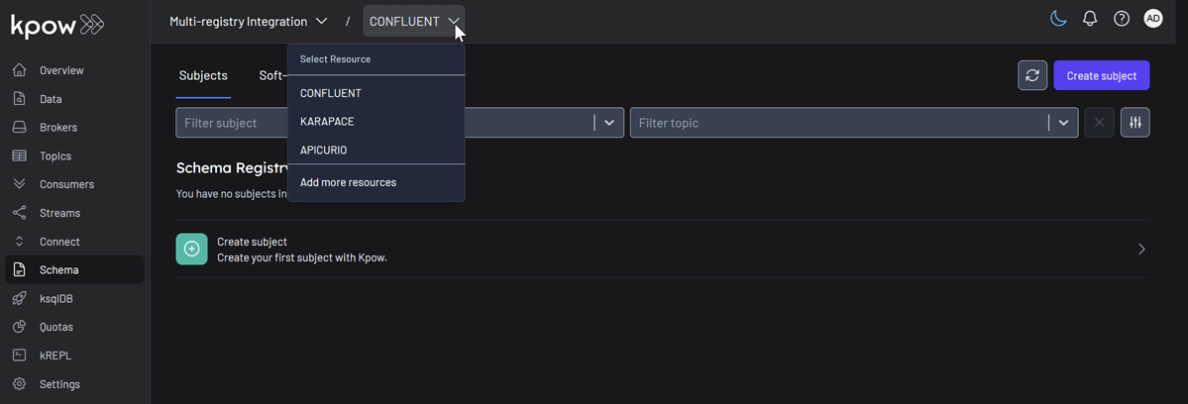
Unified Schema Management
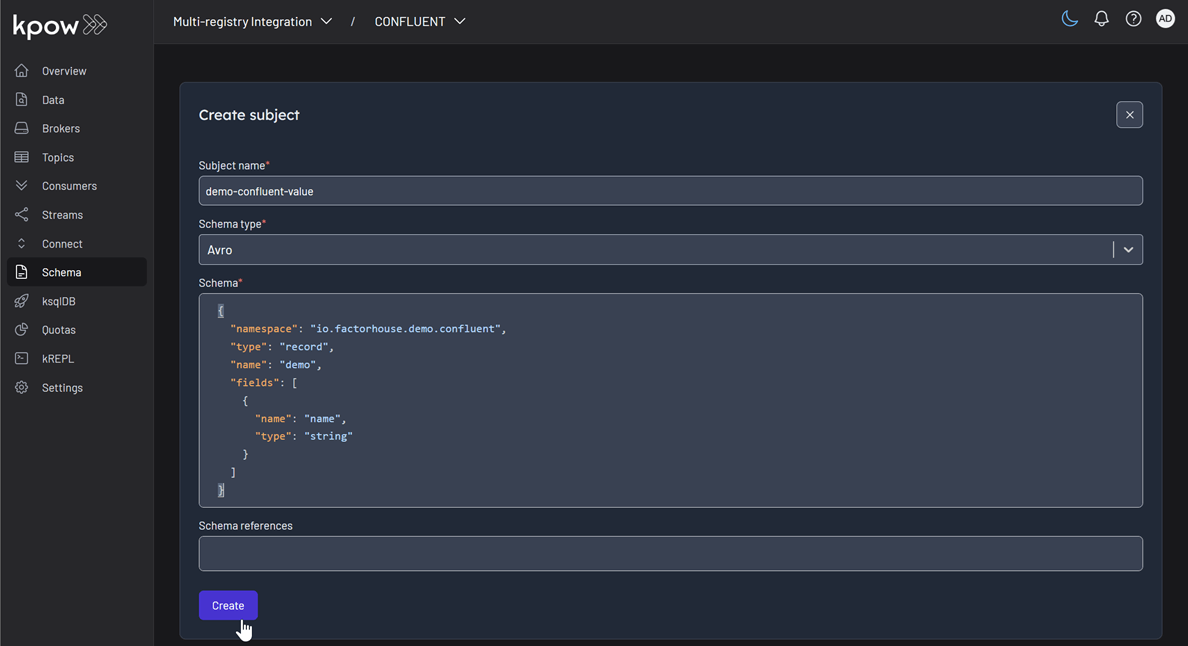
Now, we will create a schema subject in each registry directly from Kpow.
- In the Schema menu, click Create subject.
- Select CONFLUENT from the Registry dropdown.
- Enter a subject name (e.g.,
demo-confluent-value), chooseAVROas the type, and provide a schema definition. Click Create.
Subject: demo-confluent-value
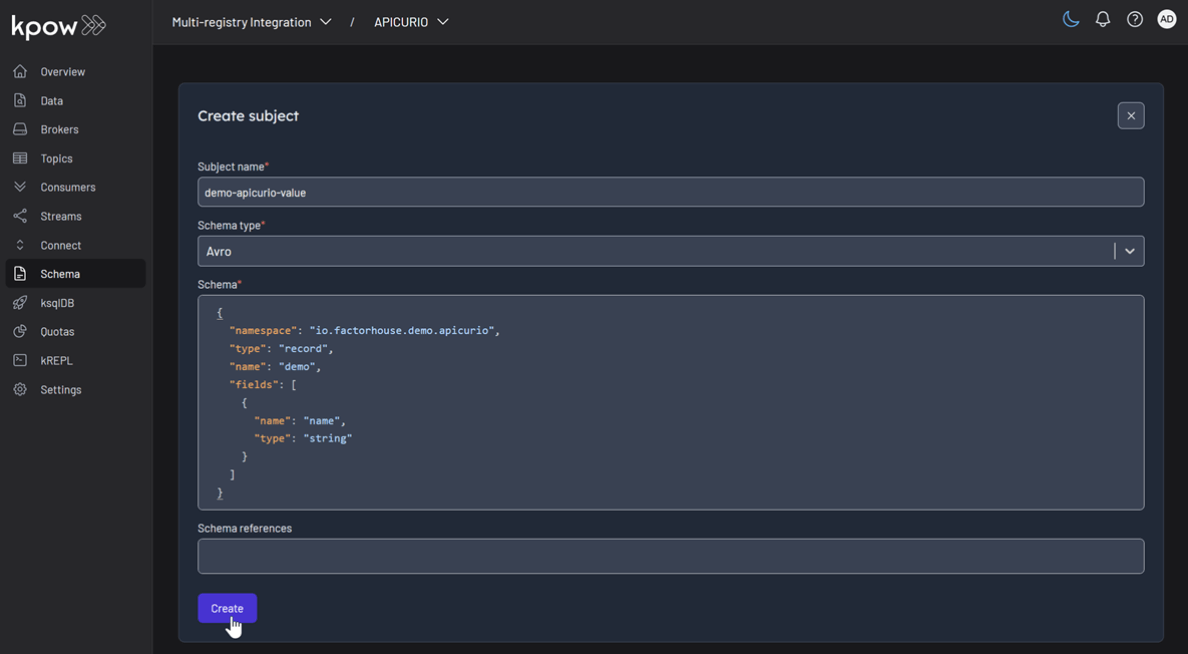
Following the same pattern, create subjects for the other two registries:
- Apicurio : Select
APICURIOand create thedemo-apicurio-valuesubject. - Karapace : Select
KARAPACEand create thedemo-karapace-valuesubject.
Subject: demo-apicurio-value
Subject: demo-karapace-value

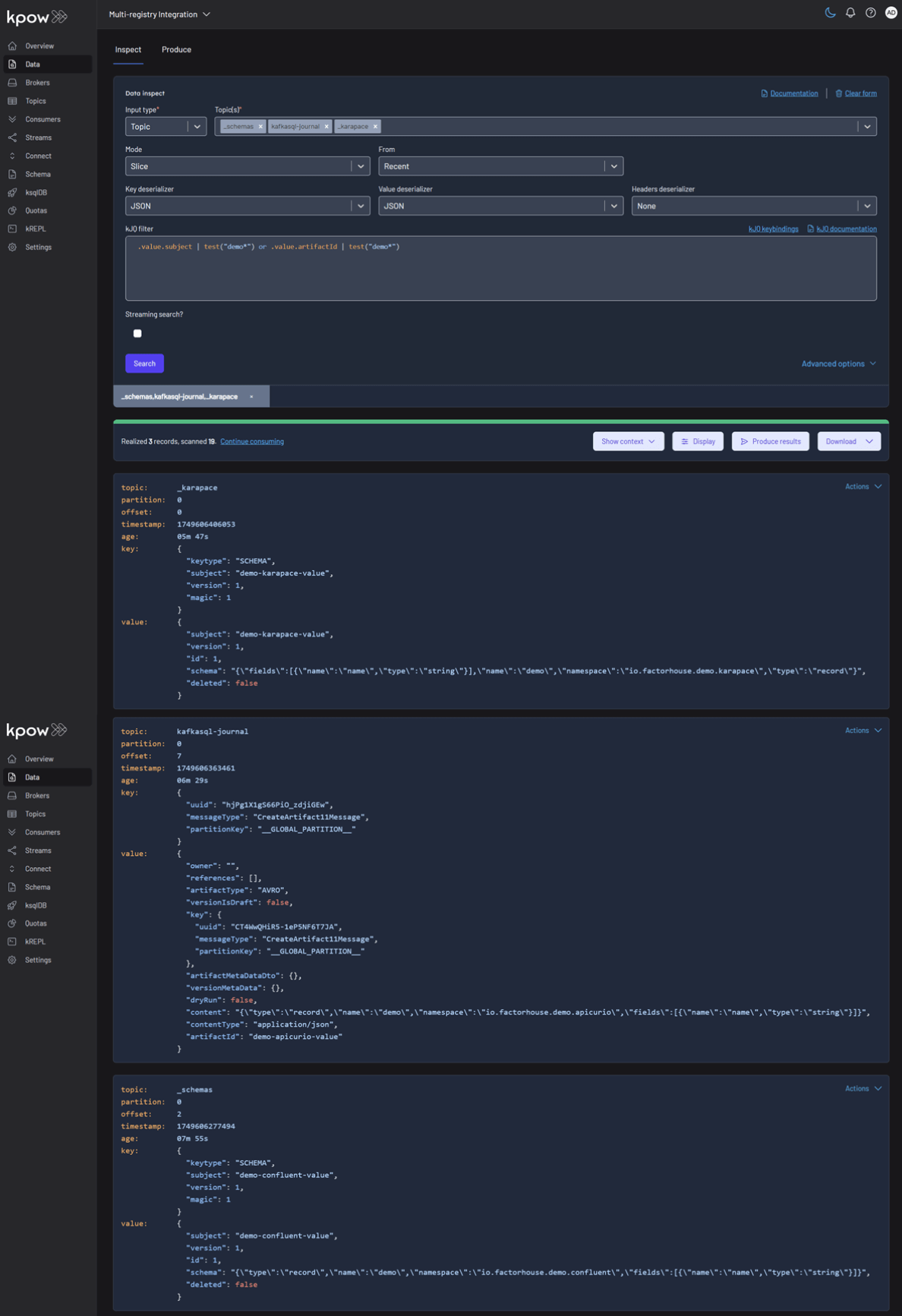
Each registry persists its schemas in an internal Kafka topic. We can verify this in Kpow’s Data tab by inspecting the contents of their respective storage topics:
- CONFLUENT :
_schemas - APICURIO :
kafkasql-journal(the default topic for itskafkasqlstorage engine) - KARAPACE :
_karapace
Produce and Inspect Records Across All Registries
Finally, we’ll produce and inspect Avro records, leveraging the schemas from each registry.
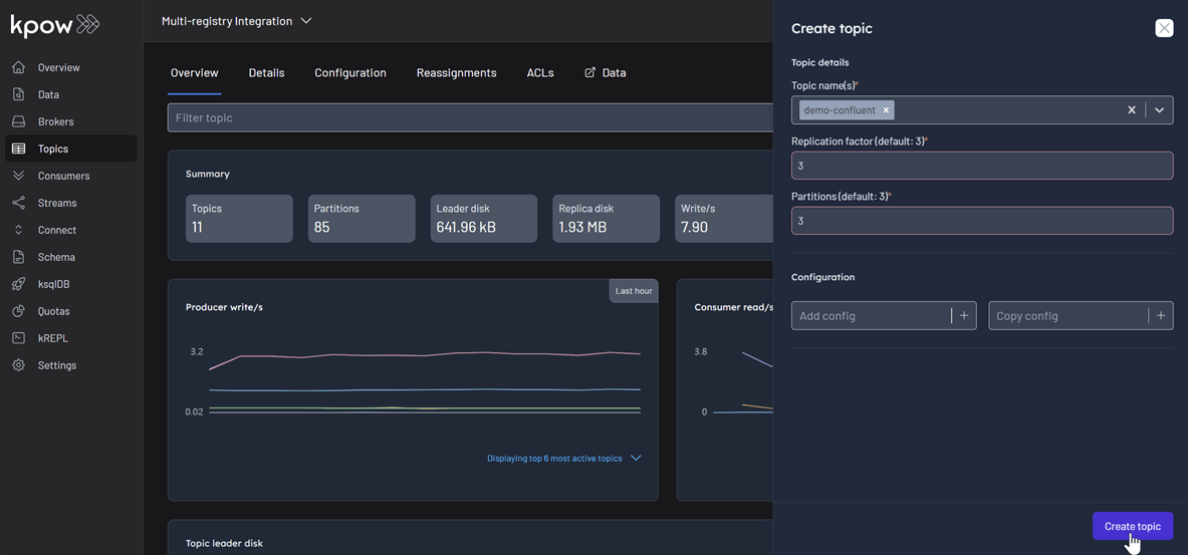
First, create the topics demo-confluent , demo-apicurio , and demo-karapace in Kpow.
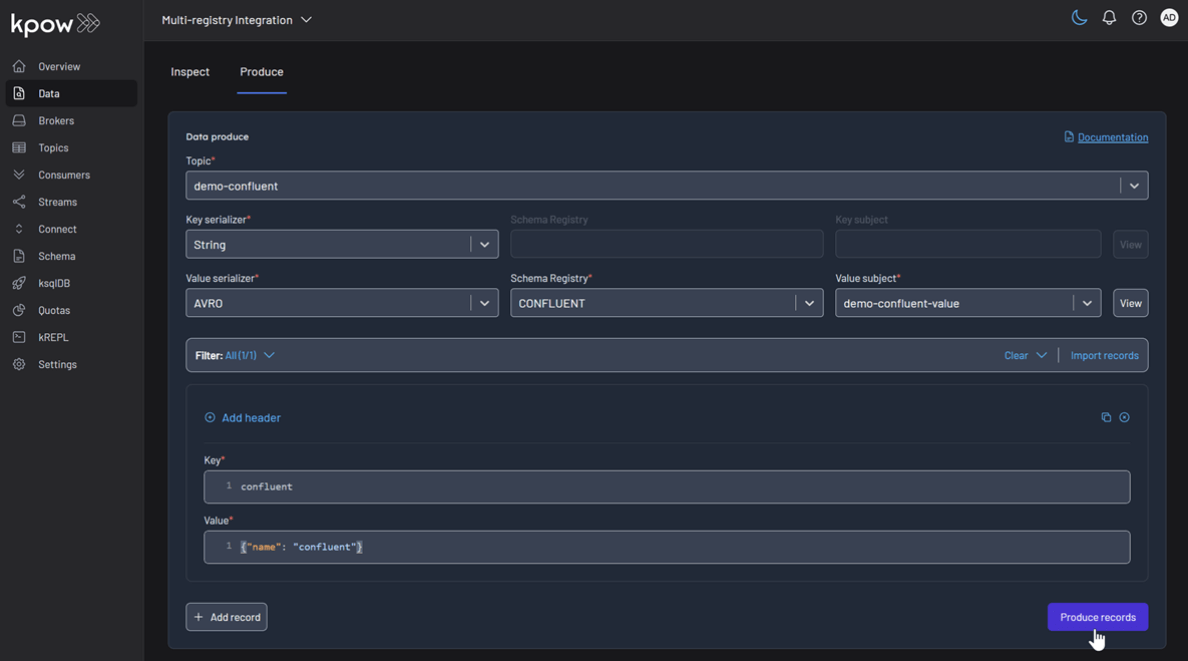
To produce a record for the demo-confluent topic:
- Go to the Data menu, select the topic, and open the Produce tab.
- Select
Stringas the Key Serializer - Set the Value Serializer to
AVRO. - Choose CONFLUENT as the Schema Registry.
- Select the
demo-confluent-valuesubject. - Enter key/value data and click Produce.
Topic: demo-confluent
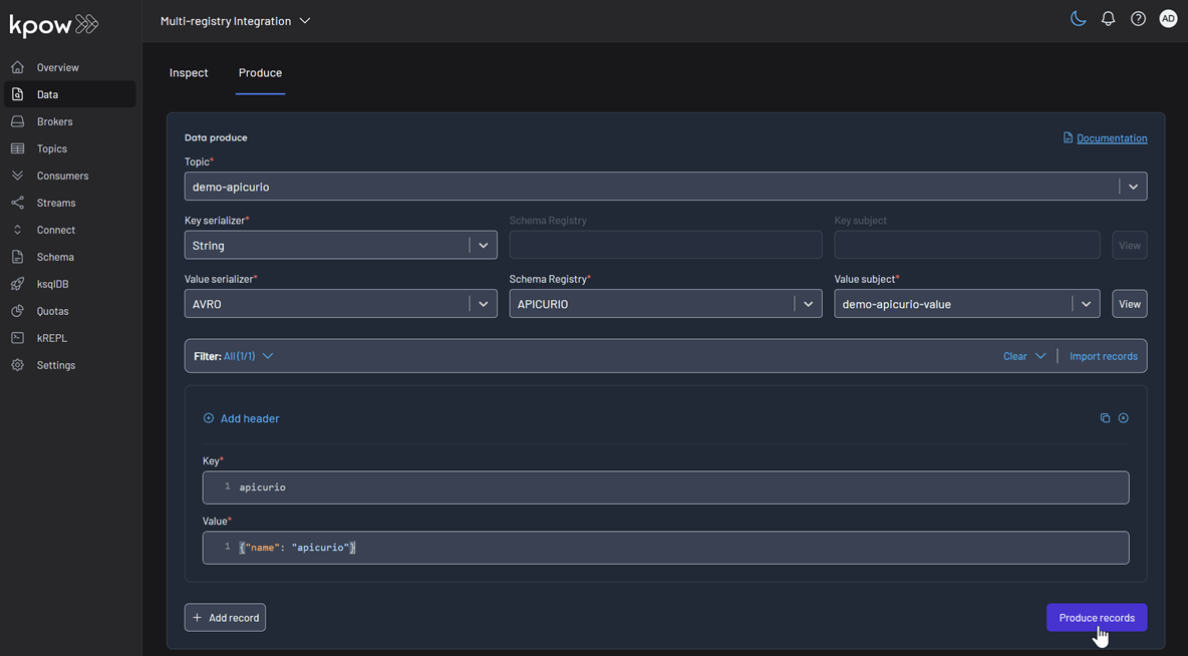
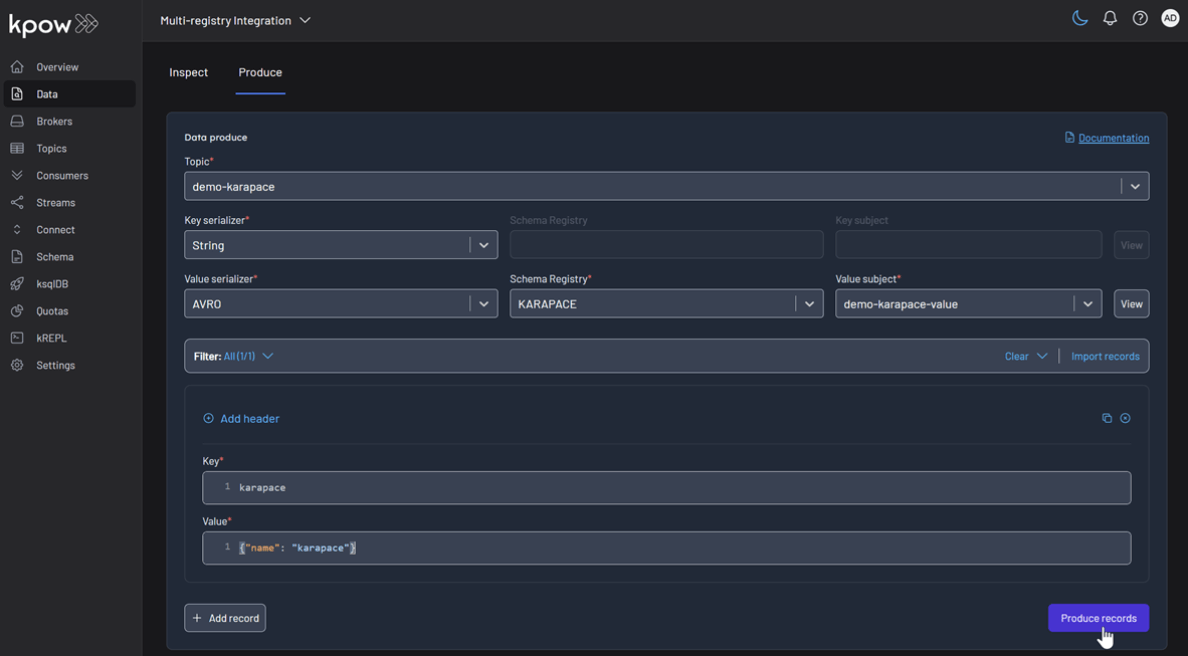
Repeat this for the other topics, making sure to select the corresponding registry and subject for demo-apicurio and demo-karapace.
Topic: demo-apicurio
Topic: demo-karapace
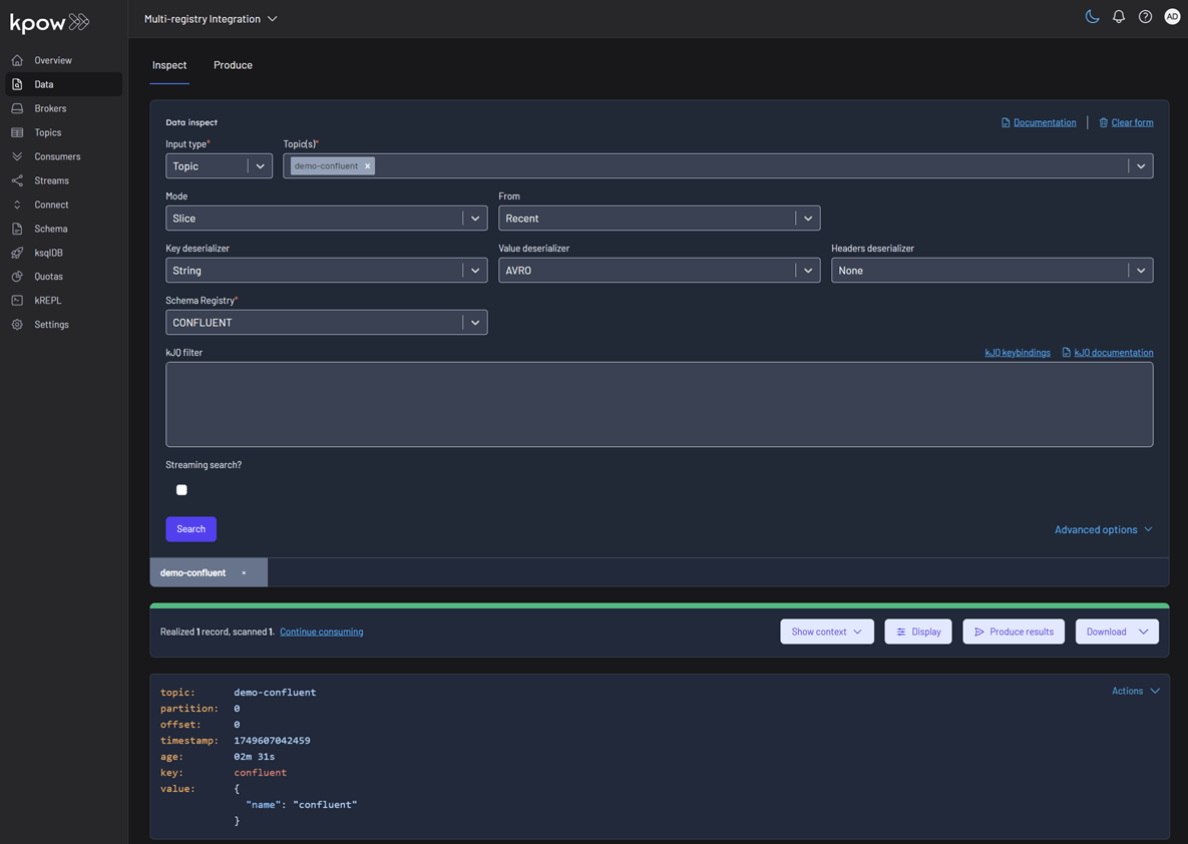
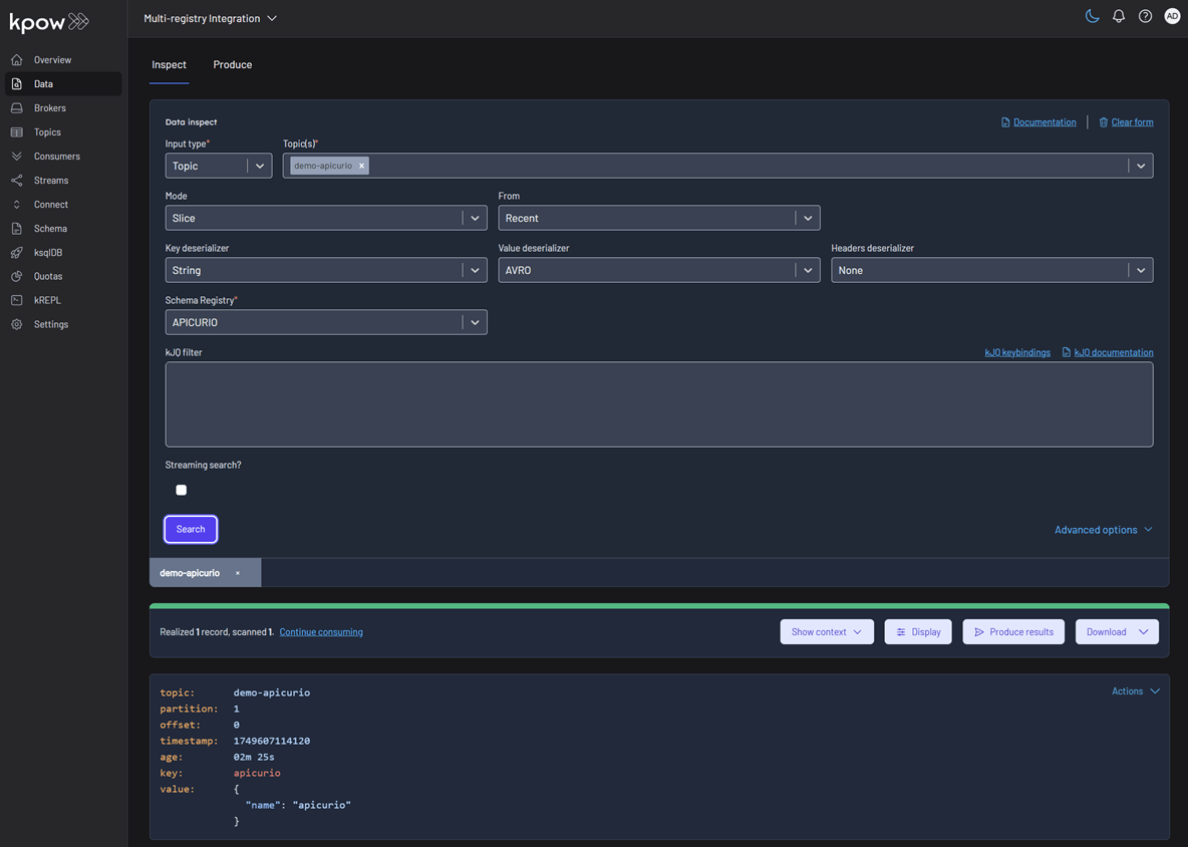
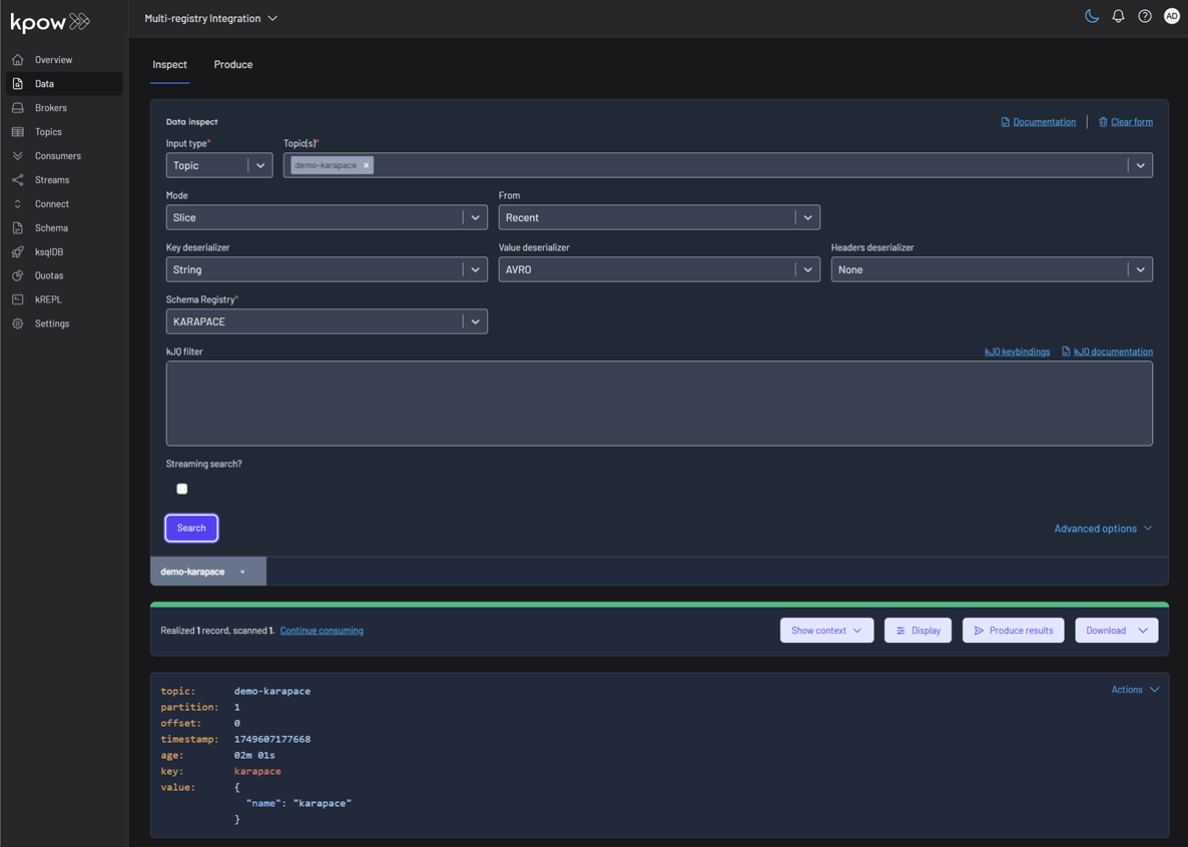
To inspect the records, navigate back to the Data tab for each topic. Select the correct Schema Registry in the deserializer options. Kpow will automatically fetch the correct schema, deserialize the binary Avro data, and present it as human-readable JSON. When a consumer or Kpow cannot deserialize a record, for example because it was written against a different registry or schema ID, the cause and fix are covered in how to fix a Kafka deserialization error.
Topic: demo-confluent
Topic: demo-apicurio
Topic: demo-karapace
Conclusion
This guide has demonstrated that managing a heterogeneous, multi-registry Kafka environment does not have to be a fragmented or complex task. By leveraging the Confluent-compatible APIs of Apicurio and Karapace, we can successfully integrate them alongside the standard Confluent Schema Registry.
With Kpow providing a single pane of glass, we gain centralized control and visibility over all our schema resources. This unified approach simplifies critical operations like schema management, data production, and inspection, empowering teams to use the best tool for their needs without sacrificing governance or operational efficiency.
For the rest of the tooling landscape, see the complete guide to Kafka.