How to diagnose and fix an unbalanced Kafka cluster
KafkaAn unbalanced Kafka cluster shows up as one broker running hotter than the rest: a CPU alert on broker 3 while its peers idle, a disk alarm on the broker that happens to hold your biggest partitions, or a leader count graph where one line sits far above the others. Kafka cluster imbalance is an uneven spread of partition leadership, replica data or traffic across brokers, so a subset of brokers does most of the work.
This page is about partition and leader balance across brokers. If you searched “Kafka rebalance” because a consumer group keeps pausing while partitions are reassigned between its members, that is a different mechanism, covered in what is Kafka rebalancing. For how brokers fit into the wider cluster, the complete Kafka guide has the full picture.
Diagnose the type of imbalance
Before you move anything, rule out the case where nothing is unbalanced and something is broken. A broker that is down or falling behind produces the same hot-broker symptom on its peers, and reassigning partitions onto a cluster with under-replicated partitions makes the copy slower and the risk higher. Check replication health first, on every broker:
kafka.server:type=ReplicaManager,name=UnderReplicatedPartitions
kafka.server:type=ReplicaManager,name=UnderMinIsrPartitionCount
kafka.controller:type=KafkaController,name=OfflinePartitionsCount
All three should be zero in steady state, per the Apache Kafka monitoring documentation. From the CLI, kafka-topics.sh --describe takes --under-replicated-partitions, --under-min-isr-partitions and --unavailable-partitions filters, which list the affected partitions by name. If any of these are non-zero, fix the broker first. The rest of this page assumes replication is healthy.
Metrics that only tell you something is wrong will not tell you which of these you have. Most teams already chart consumer lag, broker CPU and network, and under-replicated partitions. As I put it in our operational issues talk, “These are useful for telling you something is wrong, but not why.” The per-broker counts below are what separate the two kinds of imbalance, and the comparison of broker health monitoring tools covers which tools collect them.
Leader imbalance
Every partition has one leader, and the leader serves all produce and fetch requests for that partition. If one broker leads far more partitions than its peers, it carries far more client traffic, even when every broker holds the same amount of data. The classic cause is a restart: when a broker comes back it is a follower for everything, and leadership stays wherever it moved while the broker was down. Compare leader counts across brokers, and check the controller’s own count of partitions not led by their preferred replica:
kafka.server:type=ReplicaManager,name=LeaderCount
kafka.controller:type=KafkaController,name=PreferredReplicaImbalanceCount
Apache’s documented expectation for LeaderCount is “mostly even across brokers”. A PreferredReplicaImbalanceCount that stays above zero after restarts have settled means leadership has drifted from where the replica lists say it should be.
Data and disk imbalance
Data imbalance is uneven replica placement. One broker holds more partitions, or bigger ones, so its disk fills first and its replication and fetch load run higher. Compare partition counts, then look at actual bytes per log directory:
kafka.server:type=ReplicaManager,name=PartitionCount
kafka-log-dirs.sh --bootstrap-server <broker:9092> --describe --broker-list 1,2,3
kafka-log-dirs.sh --describe returns the size of every partition replica in every log directory, which is where you find the handful of partitions that account for most of a hot broker’s disk. A common cause is growth: brokers were added and nothing moved onto them. The Apache operations guide is explicit that new servers “will not automatically be assigned any data partitions, so unless partitions are moved to them they won’t be doing any work until new topics are created.”
Partition skew inside a topic
The third case is not about brokers at all. If producers key records on a field with few distinct values, most records hash to a few partitions, and whichever brokers lead those partitions run hot. Derek Troy-West, Factor House’s co-founder and CEO, gave the clearest example of it in an internal thread: “if you have 100 partitions in a topic, and you produce messages to that topic where a customer ID is the key, and you only have six customers - at most only six partitions will be used.” Reassignment cannot fix this. Moving a hot partition to another broker moves the hot spot with it. Compare per-partition end-offset growth or per-partition size within the topic, and if a few partitions carry most of the bytes, the fix is the key, covered under prevention below. To rule this branch in or out, compare per-partition byte rates for the hot topic, and if a handful of keys dominate, the fix is in the producer’s key choice, covered in Kafka partition key best practices, not in a reassignment.
Immediate, safe fixes
Match the fix to the diagnosis. Leader imbalance is fixed without moving data. Data imbalance needs data to move, which is slower and riskier, so it gets its own safeguards in the next section.
Restore preferred leaders
Kafka treats the first replica in each partition’s replica list as the preferred leader. A preferred leader election moves leadership back to that replica for every partition where it is in sync, and no replica data moves:
kafka-leader-election.sh --bootstrap-server <broker:9092> --election-type preferred --all-topic-partitionsThis is the command from the Apache guide’s balancing leadership section. Watch PreferredReplicaImbalanceCount fall and LeaderCount converge across brokers afterwards.
The same mechanism works in reverse when one broker is the problem. In one incident I walked through in the talk, a broker being rebuilt after a disk failure could not keep up, and every producer timeout traced back to it. “The fix was to temporarily stop that broker from taking leadership, using the preferred leadership API, since you only get produce requests when you’re a leader.” Once it had rebuilt, leadership went back.
Reassign partitions to spread the data
For data imbalance, kafka-reassign-partitions.sh moves replicas between brokers in three steps, documented in the Apache guide’s expanding your cluster section:
- Generate a candidate plan from a list of topics and a list of target brokers:
kafka-reassign-partitions.sh --bootstrap-server <broker:9092> --topics-to-move-json-file topics-to-move.json --broker-list "4,5,6" --generate- Review the proposed JSON, save it, and execute it with a throttle (next section):
kafka-reassign-partitions.sh --bootstrap-server <broker:9092> --reassignment-json-file plan.json --execute --throttle 50000000- Verify until every partition reports complete:
kafka-reassign-partitions.sh --bootstrap-server <broker:9092> --reassignment-json-file plan.json --verifyRead the generated plan before you run it. Apache documents that the tool “does not have the capability to automatically study the data distribution in a Kafka cluster”, and --generate spreads the named topics across the brokers you list with no view of which brokers are already hot. Order matters too, because the first replica in each list becomes the preferred leader. Derek made the point directly: “If you set them all to the same thing (e.g. 1,2,3) then leadership would be the same for every partition in a topic, e.g. every partition in that topic would have broker leader 1”. A plan that fixes disk and hands broker 1 every leader has traded one imbalance for another.
Decommissioning is the same operation pointed the other way. The Apache 4.3 procedure starts by cordoning the broker with cordoned.log.dirs so no new partitions land on it, then reassigns every replica it holds. The CLI will not generate that plan for you, so the JSON is written by hand or by one of the tools in the automation section.
Throttle the move
Moving replica data copies gigabytes, sometimes terabytes, over the same network interfaces that serve producers and consumers. An unthrottled reassignment can starve live traffic badly enough to push unrelated partitions out of the in-sync replica set, which turns a balancing job into an incident. Kafka lets you cap replication bandwidth for the move:
--throttle 50000000That value is bytes per second (about 50 MB/s) and applies to inter-broker replication for the partitions being moved. Three rules from the Apache guide’s throttling section matter in production:
Change it mid-move if you need to. Re-run --execute with --additional and the same plan file and a new --throttle value.
Too low means no progress. If producers write to a moving partition faster than the throttle allows, replication never catches up. Apache states the condition as max(BytesInPerSec) > throttle. Watch follower lag during the move:
kafka.server:type=FetcherLagMetrics,name=ConsumerLag,clientId=([-.\w]+),topic=([-.\w]+),partition=([0-9]+)It should fall steadily. If it does not, raise the throttle.
Remove it when you finish. The throttle is written as dynamic broker and topic config (leader.replication.throttled.rate, follower.replication.throttled.rate and the matching throttled.replicas lists), and it outlives the reassignment. Running --verify after the move completes clears it. Skip that step and ordinary replication stays capped until someone notices, often during the next broker failure when you need full replication speed.
I would add one rule of my own. Move a slice of the cluster at a time rather than every topic in one plan, and change one thing at a time. From the talk: “make changes judiciously: one change at a time, monitored before the next.” A reassignment running alongside a config change or a broker upgrade leaves you unable to tell which one caused the lag you are now looking at.
Automating rebalancing
Hand-built plans work for a one-off move after adding brokers. They stop working when the cluster is large, changes often, or has to be rebalanced by someone who is not a Kafka specialist. Two open-source options come up most for automating it.
Cruise Control, originally built at LinkedIn, generates reassignment proposals against goals you configure, including rack awareness, disk, CPU and network balance, and leader distribution, then executes them in batches with a replication throttle. Every rebalance request is a dry run unless you set dryrun=false, which is the right default for a tool that moves data. The cost is operational: it runs as its own service and needs a metrics reporter JAR installed on every broker.
On Kubernetes, Strimzi deploys Cruise Control for you, exposes rebalances through a KafkaRebalance custom resource, and can trigger a rebalance automatically when you change the broker count of a node pool.
Once you know which kind of imbalance you have and how often it recurs, the choice of tool follows. We compare the tools for reassigning Kafka partitions on planning, throttling, batching, cancellation and audit, including the CLI, Cruise Control, Strimzi, topicctl and Kpow.
Preventing the next imbalance
Leave automatic leader rebalancing on. auto.leader.rebalance.enable already defaults to true in the Apache broker configuration reference. A background check runs on the controller every leader.imbalance.check.interval.seconds (default 300) and triggers a preferred leader election when leadership has drifted. If someone turned it off, turning it back on is a server.properties change and a restart, since both settings are read-only at runtime. Checking what each broker is actually running is covered in the guide to Kafka broker config tools.
Fix hot keys at the producer. Skew from a low-cardinality key is a data model problem. Choose a key with enough distinct values to spread across the partition count, or add a suffix to known hot keys if per-key ordering allows it. Kafka scaling best practices covers partition key choice and skew in more depth.
Plan reassignment into every broker addition. Adding a broker without a reassignment adds capacity nothing uses. Treat the plan, the throttle and the verify step as part of the scaling change, not a follow-up ticket.
Do not scale as a reflex. In the first incident from the talk, a team scaled a service and then the cluster while the real cause, an overloaded group coordinator, went unexamined. My advice from that session: “don’t scale Kafka as a reflex during an incident”. Scaling after you understand the cause is a different decision. Diagnose which kind of imbalance you have before you add hardware to it.
Alert on the per-broker spread, not only the totals. A cluster-wide partition total looks healthy while one broker holds twice its share. Alert on the difference between the highest and lowest LeaderCount and log directory size across brokers. Kafka broker monitoring has warning and critical thresholds for each of these metrics.
Where Kpow fits
This page is published by Factor House, which makes Kpow, its Kafka management and monitoring product, so weigh this section with that in mind. For this job it covers the diagnosis and the manual fixes, and it does not replace a goal-based rebalancer.
Diagnosis. Kpow shows under-replicated partition totals on its Brokers and Topics pages, calculated per topic partition so the count stays correct even when a broker is offline and missing from the AdminClient’s view. The same data is exported to Prometheus as broker_urp, topic_urp, cluster_leader_preferred_percentage and topic_non_preferred_leaders_total. Signals, an opt-in Alpha feature added in Kpow 96.3 for Enterprise, adds a broker view with two checks that map directly to this page: unbalanced leader partitions and unbalanced data distribution. It is off by default and the documentation notes it may add overhead on large clusters.
Fixes. From a topic’s details page Kpow runs preferred or unclean leader elections and reassigns a single topic partition to replicas you choose, with a Reassignment view that lists in-progress moves and cancels them. Full topic and cluster reassignment is not in the current release, the UI has no throttle control, and Kpow does not generate a balanced plan for you. For a cluster-wide move, generate and throttle the plan with the CLI or Cruise Control and use Kpow to watch URPs and leadership while it runs. The Kpow topic management documentation has the exact steps. To see the diagnosis half on a running cluster, open the Kpow demo and check the Brokers page: per-broker partition and leader counts, the under-replicated partition table, and the preferred-leader figures this page uses to tell leader imbalance from data imbalance.
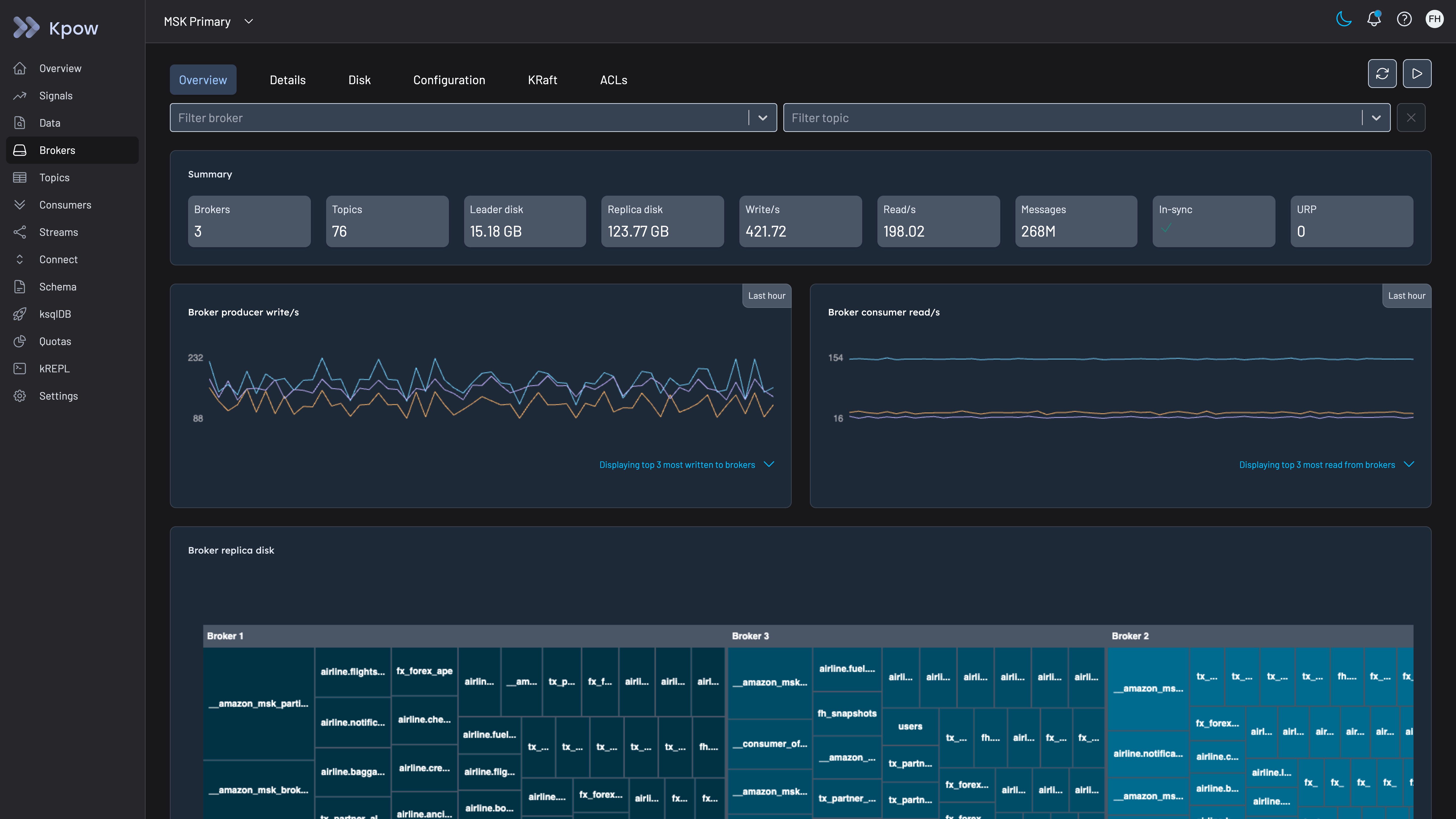
Kpow Brokers overview on a three-broker cluster with nothing under-replicated, shown as a baseline: URP is 0, the in-sync check passes, and the Broker replica disk treemap breaks each broker’s replica data down by topic.
Kpow live demo
See broker imbalance on a live cluster
Open the Kpow demo and check per-broker leader counts, partition counts and under-replicated partitions, the signals that tell leader imbalance from data imbalance.
For platform engineers chasing a hot broker.
Try the Kpow demoFAQ
Does Kafka rebalance partitions automatically when you add a broker?
No. A new broker only receives partitions from topics created after it joins. Existing partitions stay where they are until you reassign them with kafka-reassign-partitions.sh, Cruise Control or another tool. Some managed services add automatic rebalancing on scaling, so check your provider’s documentation.
What is the difference between leader imbalance and partition imbalance?
Leader imbalance means one broker leads more partitions than its share, so it serves more client traffic, and it is fixed by a preferred leader election with no data movement. Partition or data imbalance means replicas are unevenly placed, so disk and replication load are uneven, and it is fixed by reassignment, which copies data.
How do I fix under-replicated partitions?
Find the broker the lagging replicas live on, using UnderReplicatedPartitions per broker or kafka-topics.sh --describe --under-replicated-partitions, and fix that broker first: a process that is down, a full disk, or saturated disk or network. Do not start a reassignment while partitions are under-replicated, because the copy adds load to the brokers already struggling.
What throttle should I set for a partition reassignment?
Set it above the peak write rate into the partitions you are moving, or replication will never catch up, and below the headroom your brokers have after normal traffic. Start conservatively, watch follower lag, raise it with --additional if lag is not falling, and clear it with --verify when the move completes.