At a glance
Kpow and Kadeck are scored here on the same five criteria, 50 points in all: Kpow 44 out of 50, Kadeck 29 out of 50. Kpow takes its best score on Access control and audit (10 out of 10) and its lowest on Cost as teams grow (7 out of 10). Cost a year: $13,500 licence for 3 clusters, plus $2,880 in ops. Kadeck takes its best score on Multi-cluster reach (9 out of 10) and its lowest on Cost as teams grow (4 out of 10). Cost a year: $7,680 for 20 users on Enterprise, plus about $2,880 in ops.
Kpow vs Kadeck, compared
Kpow meets 6 of 7 requirements on this page. One row is not a yes or no question.
Key takeaway
Kadeck bills per user per month and Kpow by Factor House bills per cluster per year, so the question is not which is cheaper but which of your two numbers is growing faster. Kadeck Enterprise is 32 US dollars per user per month with a ten-user minimum, so a team of four pays 3,840 a year, and access control, masking and audit logs all sit in that tier. Its teams edition activates its licence against the vendor at startup. Kpow runs air-gapped, licensed per cluster.
Kpow live demo
See Kpow in a working Kafka environment
You have seen how Kpow compares on paper. Open the live demo to test the workflows your platform team will depend on during an incident.
Built for platform and data teams managing shared Kafka clusters.
Try the Kpow demoWhat is Kadeck?
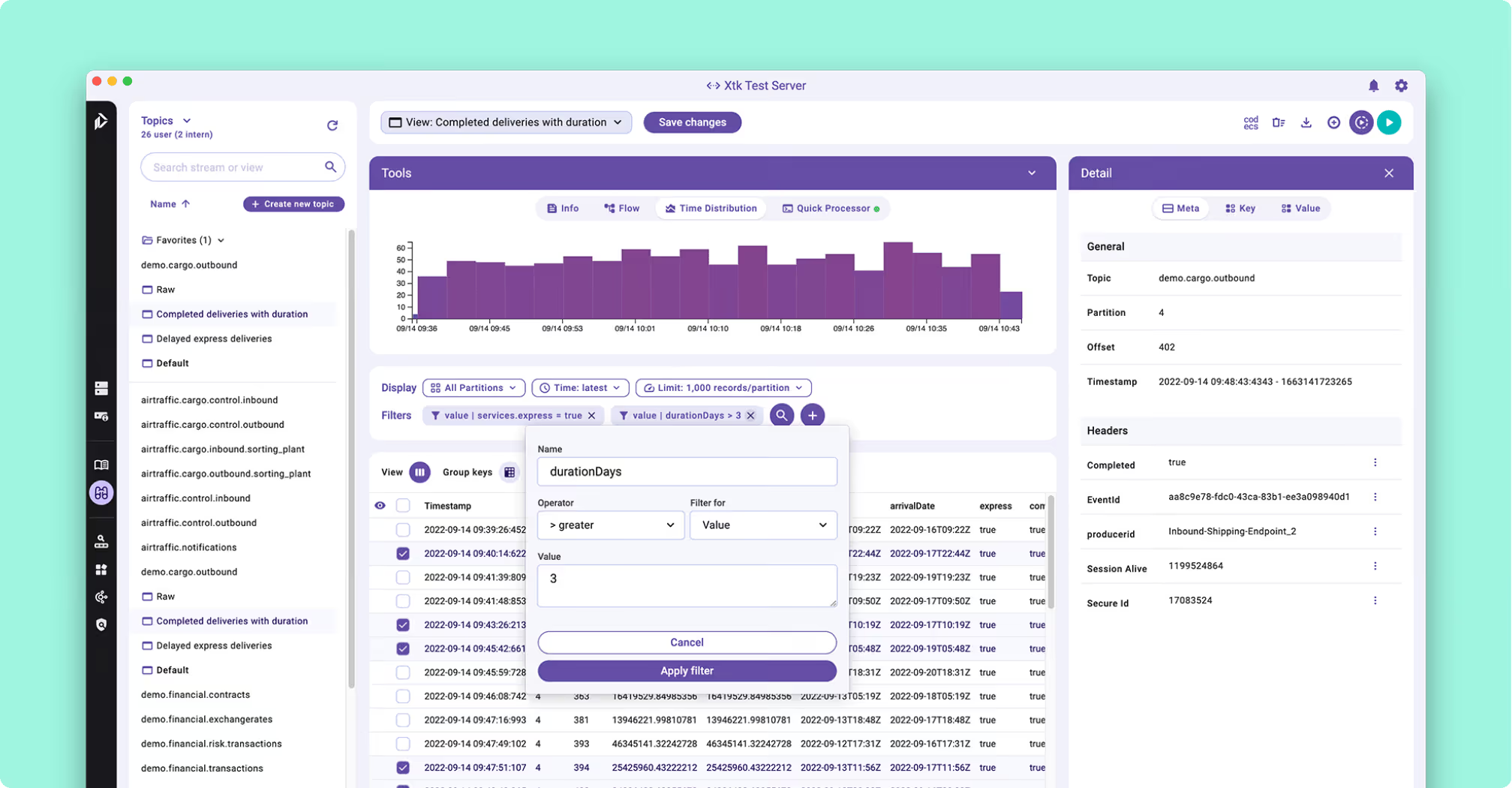
Kadeck is a commercially licensed Kafka management and data exploration tool from Xeotek, and it ships in two editions. The teams edition is a Docker image. The desktop edition installs natively on Windows, on macOS for both Intel and Apple Silicon, and on Linux, so a single developer can run it with no container runtime. It reads Apache Kafka, Redpanda and Amazon Kinesis, and the current teams release line is 7.x.
- Record view: Avro decoded through Confluent Schema Registry and presented in a columnar layout rather than as raw bytes.
- QuickProcessor: a JavaScript expression derives calculated fields, with no streaming application behind it.
- Dead letter recovery: isolate the failed records, transform inline, preview, re-ingest to the source topic, then delete up to that point.
- Metadata layer: schema fields documented without touching the Schema Registry or bumping a version.
That recovery workflow replaces the one-off consumer and producer script most teams write once per incident, and it is a real answer to a job somebody does at two in the morning.
What is Kpow?
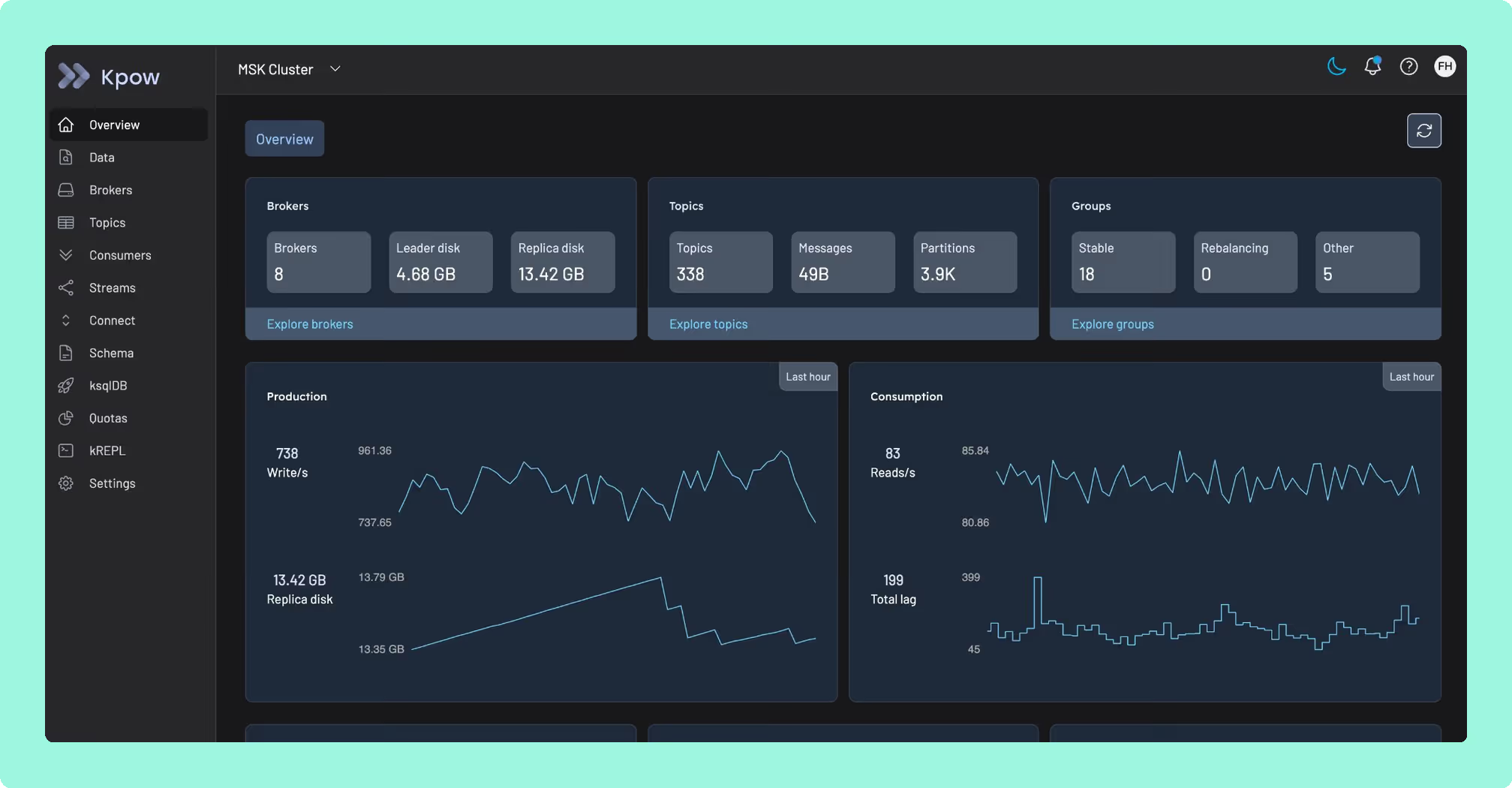
Kpow by Factor House is engineer-facing tooling for Apache Kafka, and it runs against whatever cluster you already have: self-managed Kafka, Amazon MSK, Confluent Cloud, Redpanda, Aiven and Instaclustr. It is a single stateless JVM container, configured entirely through environment variables, with no external database, no sidecar and no persistent volume, storing its telemetry in internal Kafka topics on the cluster it is already monitoring. One instance manages up to 12 Kafka clusters, and Kafka broker monitoring, consumer group lag and topic inspection all come out of that one container.
What is the official 2026 pricing of Kpow and Kadeck?
Kadeck prices the seat, so the bill follows the org chart, and the minimum on the governed tier is where that bites first. A team of four that needs access control pays for ten seats, which is 3,840 US dollars a year before anybody else is hired. At 100 engineers the same tier is 38,400 US dollars a year. Floating licences are offered from 30 users, and they are still per user underneath.
Kpow prices the cluster and publishes the number, so the same two teams run the other way. An engineer joining does not move the bill and neither does a whole team; the only thing that moves it is another cluster. The governance line matters more than the headline rate: RBAC for Kafka with LDAP and OpenID, data masking and audit logs sit above Kadeck’s Professional tier, so a team that needs access control takes the ten-user minimum with it. Those controls are an Enterprise property on Kpow too, and that tier is priced per cluster, so governing an estate tracks the estate rather than the org chart. Write both numbers down and project them two years out, because the unit is the part that compounds.
Where does each one run out?
Both tools are marked out of 10 on the same five criteria, for a total out of 50, and every criterion counts once. Nothing sits behind a multiplier, so a total is the sum of its five marks and a reader can recompute it. The five are cost as teams grow, deployment footprint, support and maintenance, access control and audit, and multi-cluster reach, because those are the questions a Kafka interface is actually measured against after the first month: a second cluster, an access review with a date on it, an upgrade nobody owns, and a bill that moves when the team does. The widest gap between the two marks is on deployment footprint, where Kpow marks 9 and Kadeck marks 4. The marks come from the same matrix used on every comparison on this site, so a tool scores the same here as it does anywhere else, and the reason behind each mark is in the card below, under Why these scores.
 Rank 1
 Kpow
44 out of 50 Total
Try Kpow in the live demo No signup needed.
- Cost a year
- $13,500 licence for 3 clusters, plus $2,880 in ops
- Pricing unit
- Per cluster per year, published
- Starting offline
- Runs air-gapped. Nothing is called at start
- Cost as teams grow
- 7 out of 10
- Deployment footprint
- 9 out of 10
- Support and maintenance
- 9 out of 10
- Access control and audit
- 10 out of 10
- Multi-cluster reach
- 9 out of 10
Why these scores for Kpow
- Cost as teams grow 7 out of 10
- Published per cluster, Enterprise from $4,500 with 100 users, Community Edition free for 3 clusters and 10 users with RBAC, masking and audit held back. On this page, an engineer joining does not move the bill and neither does a whole team, and at twenty seats Kadeck’s licence is the cheaper of the two.
- Deployment footprint 9 out of 10
- One stateless container, environment variables, no database, sidecar or volume. This page adds that telemetry lives in internal Kafka topics on the monitored cluster, so there is no external database to retire with it.
- Support and maintenance 9 out of 10
- Email support and an Enterprise support SLA, shipping continuously. On this page, nothing about starting it depends on reaching Factor House, so there is no licence service in the startup path.
- Access control and audit 10 out of 10
- RBAC, SSO, server-side masking applied by role, and an audit log of user actions. This page records that governance reaches every engineer rather than the ten who hold seats.
- Multi-cluster reach 9 out of 10
- Up to 12 clusters per instance, held at 9 by the per-instance cap. On this page, Kadeck’s paid tiers are uncapped, so this is the one criterion where the two are level.
It runs air-gapped, and nothing about starting it depends on reaching Factor House. A container that comes up in an isolated network comes up the way it does on a laptop, which decides an evaluation in a regulated environment more often than any feature does.
Kpow is not a proxy, so no Factor House component sits between producers and brokers to enforce policy on the wire, and it leaves Kadeck’s inline record transformation and re-ingest to Kadeck, aiming instead at the read side: a role model and an audit trail across everything a desktop licence does not reach.
What it costs a year: published, plus the cost of running it. Enterprise is 4,500 US dollars per cluster a year with 100 users included, so dev, staging and production are 13,500, and this page’s estimate for one stateless container with no database beside it is two engineer-hours a month at 120 US dollars an hour, 2,880 a year, which is 16,380 all in whether twenty engineers use it or a hundred. Kadeck is the cheaper of the two at twenty, 10,560 against 16,380. At a hundred it is 41,280 against the same 16,380, and the two ladders cross between thirty and forty engineers. That crossing is the number worth projecting rather than the headline rate.
 Rank 2
 Kadeck
kadeck.com
29 out of 50 Total
- Cost a year
- $7,680 for 20 users on Enterprise, plus about $2,880 in ops
- Pricing unit
- Per user per month, ten-user minimum on Enterprise
- Starting offline
- Activates against the vendor at startup
- Cost as teams grow
- 4 out of 10
- Deployment footprint
- 4 out of 10
- Support and maintenance
- 6 out of 10
- Access control and audit
- 6 out of 10
- Multi-cluster reach
- 9 out of 10
Why these scores for Kadeck
- Cost as teams grow 4 out of 10
- Per user per month on every paid tier, with governance on Enterprise at $32 per user per month and a ten-user minimum. On this page, a team of four that needs access control pays 3,840 US dollars a year, and 100 engineers pay 38,400.
- Deployment footprint 4 out of 10
- Teams ships only as a Docker image, no Helm chart, external database on the Kubernetes path, online licence check on every start. This page finds no RPM and no native server binary either, so production is a container plus a database to provision, secure, back up and upgrade.
- Support and maintenance 6 out of 10
- Vendor support under the licence, against a container that does not start without the licence service. This page adds that activation runs against Xeotek Link at startup and is stored in the tool’s own database.
- Access control and audit 6 out of 10
- RBAC with LDAP and OpenID Connect, masking through Data Protection Policies and audit logs, all on Enterprise, with no SAML named. On this page, the ten-user minimum comes with them.
- Multi-cluster reach 9 out of 10
- Unlimited cluster connections on both paid tiers, one on free, across Apache Kafka, Redpanda and Kinesis. This page gives one cluster connection on each free tier.
The Kadeck teams edition ships exclusively as a Docker image. There is no RPM, no native server binary and no Helm chart, and the documented Kubernetes path wants a persistent external database, so a production deployment is a container plus a database to provision, secure, back up and upgrade.
Licence activation: at startup against Xeotek Link, stored in its own database, so an instance whose database persists reuses it across restarts.
Air-gapped: an administrator generates a challenge code, carries it to a connected machine, and enters the response back into the tool.
Ephemeral: a CI job that tears the container down loses the activation with the database every time.
Free tiers: one cluster connection each, five users on teams and one on desktop, and one certificate at a time.
A desktop licence is not upgradeable into Enterprise either, so a team that outgrows individual use buys again rather than upgrades.
What it costs a year: 7,680 US dollars for twenty engineers on Enterprise at its published 32 US dollars per user per month, and 38,400 for a hundred, because the meter is people. On top of the licence, this page’s estimate rather than a vendor price: two engineer-hours a month at 120 US dollars an hour, 2,880 a year, for the container and the external database the documented Kubernetes path wants, with the startup activation and the air-gapped challenge and response inside those hours. That is 10,560 at twenty engineers and 41,280 at a hundred.
How do you switch, or run both?
Running both is reasonable, and more common than either vendor’s marketing suggests. Neither tool owns cluster state, so a second one is a container and a configuration block rather than a migration. Moving off Kadeck depends on the edition: the desktop edition holds no shared state, so it is an uninstall per engineer, and the teams edition is a container plus an external database to retire with it. Two things do not come with you: topic documentation held in Kadeck’s own metadata layer has to be re-entered, and QuickProcessor scripts are a re-implementation rather than an export. The detail nobody plans for is that a Kadeck licence is tied to the database it was activated against, so resetting or replacing that database means licensing the tool again. Moving off Kpow is deleting a container, and the telemetry topics stay on the cluster you already run.
Which should you pick?
Kpow by Factor House is the pick for a team whose headcount grows faster than its cluster count, scoring 44 against Kadeck’s 29, because it prices the cluster rather than the seat and runs air-gapped with no licence call at startup. Kadeck is the better choice for data exploration and dead-letter recovery on a small, cluster-heavy team, and its desktop client has no Kpow equivalent.
Pick Kadeck if:
- the work is data exploration and recovery rather than cluster operations
- the team is cluster-heavy rather than headcount-heavy
- dead letter queue triage with inline transformation and re-ingest is routine
- individual developers want a native desktop client and no container runtime
Pick Kpow if:
- headcount is growing faster than cluster count
- governance has to reach every engineer rather than the ten who hold seats
- the deployment has to run air-gapped, or come up inside CI with no outbound call
- a single Kafka management console has to cover a mixed estate
Neither answer is a verdict on the software, and a feature grid will not produce one. Write your own constraint down first, in one sentence: a licence server you cannot reach, a seat count that doubles next year, an engineer who wants a desktop client.
Against the rest of the field, the best Kafka management tools sets out who else prices the seat, and Kafka multi-cluster tools covers how far a single deployment reaches before a second one is needed.
Why do these constraints show up so late?
Kadeck’s dead letter recovery is genuinely good: isolate the failed records, transform them inline, preview the result, and re-ingest to the source topic before deleting up to that point, all in place of the one-off consumer and producer script most teams write once per incident. Its record view decodes Avro through Confluent Schema Registry into a columnar layout instead of raw bytes, and the metadata layer lets a team document schema fields without touching the registry or bumping a version. Together they cover a job most teams otherwise handle with a throwaway script written at two in the morning.
Yet the teams edition ships exclusively as a Docker image, with no RPM, no native server binary and no Helm chart, and the documented Kubernetes path wants a persistent external database, so a production deployment is a container plus a database to provision, secure, back up and upgrade. The licence itself depends on reaching Xeotek at startup and storing the result in that same database, so an air-gapped install means an administrator carrying a challenge code to a connected machine and typing the response back in, and a CI job that tears the container down loses the activation every time. Kpow answers each of those directly: it’s a single stateless JVM container with no external database, sidecar or persistent volume, and its telemetry lives in internal Kafka topics on the cluster it already monitors, so there’s no second system to provision or back up; and it runs air-gapped with nothing about starting it depending on reaching Factor House, so a container that comes up in an isolated network comes up the same way it does on a laptop.
It also settles the bill differently: Kpow prices the cluster rather than the seat, so a team that outgrows the desktop licence Kadeck can’t upgrade in place doesn’t renegotiate anything, and one instance already reaches up to 12 clusters. So start on Kpow before those constraints show up on your own cluster. Kadeck recovers the message after something breaks. Kpow doesn’t ask you to recover the licence too.
How these tools were scored
Every option is scored from 0 to 10 on each criterion, from the evidence and sources this page cites, and the reason for each score is on its card. Each criterion counts once, for a total out of 50. This page is published by Factor House, which makes Kpow. Every option is scored on the same rubric and the same sources: Kpow's per-criterion scores are set the same way as every other option's and are not adjusted, and the weights apply to every option alike. Kpow ranks first on its total of 44 out of 50. The other options follow by total.