Operating Kafka through the CLI works at small scale, but it creates problems as teams and environments grow. A Kafka management console solves that by centralising administrative operations behind a web interface that any team member can use without needing direct broker access. This article defines what a capable console should cover, maps the current tool landscape, and explains what separates a production-ready console from a basic monitoring UI.
At a glance
Five options are scored here on this page's five criteria, 50 points in all. The five listed first each out of 50: Kpow 44, which takes its best score on Access control and audit (10 out of 10) and its lowest on Cost as teams grow (7 out of 10), Cost a year: $13,500 licence for 3 clusters, plus $2,880 in ops; Kafbat UI 38, Cost a year: $0 licence, about $8,640 in operator time (this page's estimate); AKHQ 37, Cost a year: $0 licence, $8,640 in operator time (this page's estimate); Redpanda Console 29, Cost a year: $0 licence, $8,640 in operator time (this page's estimate); CMAK 20, Cost a year: $0 licence, $11,520 in operator time (this page's estimate).
What is a Kafka management console?
A Kafka management console is a web-based interface for operating and administering an Apache Kafka environment. It provides controls for topics, consumer groups, schemas, connectors, and access management, replacing CLI-based operations with a UI that can be safely delegated to team members without direct broker access.
The distinction worth drawing is between a console and a read-only monitoring tool. A monitoring tool shows you what is happening: metrics, consumer lag, throughput, broker health. A management console lets you act on it. You can create or reconfigure a topic, reset a consumer group offset, deploy a connector, or revoke a user’s access, all from the same interface, without touching the CLI or exposing broker credentials.
The Kafka CLI covers the same administrative operations, but it requires shell access, direct cluster connectivity, and enough familiarity with the tooling to avoid mistakes under pressure. A console delegates those operations through a controlled interface. That separation matters when multiple teams need access to a shared cluster, when your compliance requirements demand an audit trail, or when you want to avoid the kind of offset reset that takes the wrong consumer group offline.
The rest of this article defines what a production-grade console should cover and how to evaluate the options available.

An example Kafka management console - Kpow by Factor House
Who needs a Kafka management console
A command-line workflow is reasonable for a single engineer managing one cluster. It becomes a liability at most other scales.
Platform and infrastructure teams responsible for multiple environments face a coordination problem. Running separate CLI tooling per cluster, with per-environment credentials, is slow and error-prone. A multi-cluster console reduces that to a single interface.
Engineering teams in regulated industries (financial services, healthcare, payments) often have non-negotiable requirements around access control and audit trails. The Kafka CLI provides neither. A console that implements RBAC and immutable audit logging meets those requirements in a way that CLI workflows cannot.
Organisations scaling beyond a single cluster hit a point where ad-hoc CLI operations create coordination risk. When multiple teams are creating topics, managing consumer groups, or deploying connectors on the same cluster, a console with RBAC prevents one team’s operations from affecting another’s.
Teams running Kafka Connect or Kafka Streams at scale find CLI-only connector management particularly fragile under time pressure. Pausing a connector, checking task health, or restarting a failed task through direct REST API calls is workable in isolation but introduces risk in shared environments.
Teams that need to delegate Kafka access safely, giving topic owners limited visibility and control without sharing admin credentials, need RBAC at the console level, not just at the Kafka ACL level.
Core management capabilities
The table below is a reference checklist for evaluating any Kafka management console. Not every tool covers all of these; some focus on monitoring only, some cover a subset of management operations, and a smaller number support the full stack including Connect, Streams, RBAC, and audit logging.
| Capability | What it enables | Why it matters in production |
|---|---|---|
| Topic management | Create, configure, inspect, and delete topics from the UI | Eliminates direct CLI access for routine operations; reduces misconfiguration risk |
| Consumer group control | View member state, partition assignment, and reset offsets | Essential for recovery workflows; dangerous to perform ad hoc from the CLI under load |
| Partition reassignment | Rebalance partitions across brokers | Required after scaling or rack changes; complex to do manually |
| Schema Registry integration | Manage Avro, Protobuf, and JSON schemas with compatibility checks | Prevents schema breaks in production pipelines |
| Kafka Connect management | Deploy, configure, pause, and restart connectors | Removes CLI dependency for connector operations |
| Kafka Streams inspection | View running topologies and task health | Surfaces lag and failure states that do not appear in standard broker metrics |
| Data inspect | Browse, filter, and deserialise messages in the console | Critical for debugging; saves building bespoke consumer scripts for one-off investigations |
| RBAC | Role-based access control scoped to cluster, topic, or consumer group | Enables safe delegation without sharing admin credentials |
| Audit logging | Immutable record of all console actions | Required for regulated industries; invaluable for incident investigation |
| Multi-cluster support | Operate multiple environments from one interface | Reduces context-switching and avoids separate tooling per environment |
Coverage varies considerably across tools. The sections below map the current landscape before covering how Kpow addresses the full capability stack.
The five consoles described below, AKHQ, Kafbat UI, Redpanda Console, CMAK and Kpow, are each marked out of 10 on the five criteria used by every Kafka UI comparison on this site, 50 points in all, and no criterion is weighted above another. Cost as teams grow asks whether adding an engineer or a cluster changes the bill. Deployment footprint asks how much has to run beside the console. Support and maintenance asks who ships fixes and whether current Kafka is supported. Access control and audit covers per-resource roles, SSO, masking and an audit log you can read in the product. Multi-cluster reach asks how many clusters, and which distributions, one deployment can manage. Each tool carries the same marks here as on its other comparisons. Conduktor and Lenses.io are named below but not scored on this page, because it describes them only together.
Open-source vs commercial Kafka management consoles
Several open-source tools cover the basics well. Commercial tools add security features, enterprise support, and multi-cluster capabilities that become relevant as requirements grow.
The main open-source options
 Rank 2
 Kafbat UI
github.com/kafbat/kafka-ui
38 out of 50 Total
- Cost a year
- $0 licence, about $8,640 in operator time (this page's estimate)
- Licence
- Apache 2.0, no seat or cluster cap
- Latest release
- v1.5.0, April 2026
- Cost as teams grow
- 10 out of 10
- Deployment footprint
- 8 out of 10
- Support and maintenance
- 5 out of 10
- Access control and audit
- 6 out of 10
- Multi-cluster reach
- 9 out of 10
Why these scores for Kafbat UI
- Cost as teams grow 10 out of 10
- Apache 2.0 with no seat or cluster cap and nothing held back for a paid tier.
- Deployment footprint 8 out of 10
- The Kadeck vs Kafbat UI comparison gives a stateless container with a published Helm chart, with a mounted volume only if the configuration wizard is used.
- Support and maintenance 5 out of 10
- v1.5.0 shipped in April 2026 with commits still landing in August 2026, and professional services are quoted but carry no SLA.
- Access control and audit 6 out of 10
- RBAC through YAML with OAuth2 and LDAP, plus server-side REMOVE, REPLACE and MASK policies, but no per-role masking and no audit view in the product.
- Multi-cluster reach 9 out of 10
- Another cluster is another config entry, with no cap, across MSK, Confluent Cloud and Redpanda.
Kafbat is the community-maintained continuation of Provectus kafka-ui, which Provectus paused in September 2023. Kafbat is actively developed: version 1.5.0 (released in April 2026) added live consumer lag updates, MessagePack serialisation support, and CSV export. RBAC is available through YAML-based configuration, with OAuth2 (Google, GitHub, Azure AD), LDAP, and Active Directory support. Notable gaps include no per-role data masking, no approval workflows, and no policy enforcement layer.
 Rank 3
 AKHQ
akhq.io
37 out of 50 Total
- Cost a year
- $0 licence, $8,640 in operator time (this page's estimate)
- Licence
- Apache 2.0, no paid tier
- Latest release
- v0.28.0, August 2026
- Cost as teams grow
- 10 out of 10
- Deployment footprint
- 8 out of 10
- Support and maintenance
- 5 out of 10
- Access control and audit
- 5 out of 10
- Multi-cluster reach
- 9 out of 10
Why these scores for AKHQ
- Cost as teams grow 10 out of 10
- Apache 2.0 with the whole product free and no paid tier, so adding an engineer or a cluster changes nothing.
- Deployment footprint 8 out of 10
- The AKHQ vs Kadeck comparison has it as one JVM container with no database or sidecar, docked for the memory growth reported under load.
- Support and maintenance 5 out of 10
- It has no commercial support offering, and the AKHQ vs Kafbat UI comparison has three releases in eight months from one maintainer, with GitHub issues only and no SLA.
- Access control and audit 5 out of 10
- LDAP, OIDC and GitHub SSO are there, but masking is a global policy rather than a role-aware one and audit is opt-in to a Kafka topic, not shown in the tool.
- Multi-cluster reach 9 out of 10
- The Kpow vs AKHQ comparison has one deployment reaching one cluster or many, across MSK, Confluent Cloud and Redpanda.
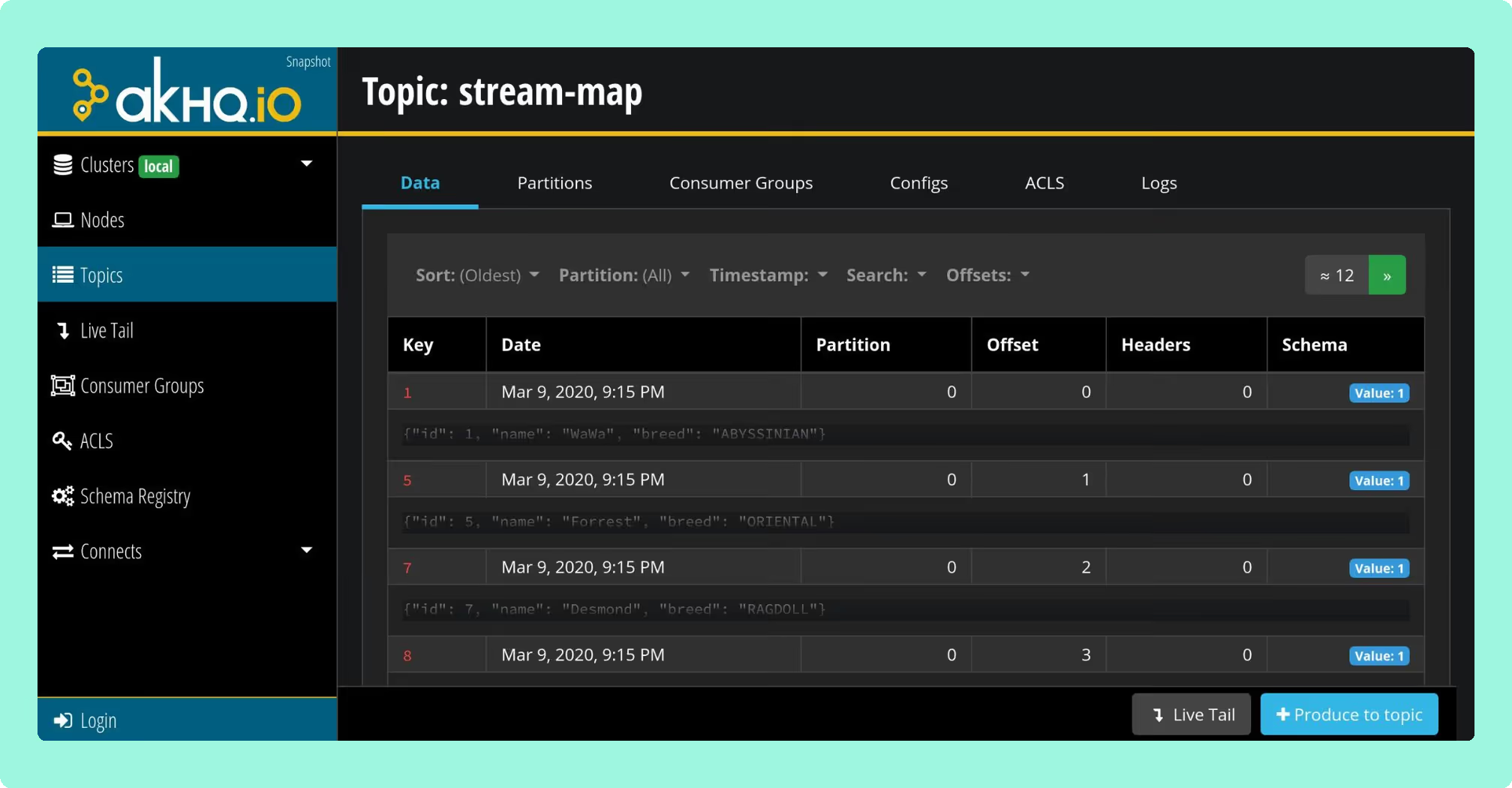
AKHQ (formerly KafkaHQ) is the most widely deployed open-source Kafka management UI. It covers topic management, consumer group inspection, Schema Registry, and Kafka Connect. The project is actively maintained under the Apache 2.0 licence, with v0.28.0 released in August 2026. AKHQ has no paid tier and no commercial support offering. RBAC is limited compared to commercial tools.
 Rank 4
 Redpanda Console
redpanda.com
29 out of 50 Total
- Cost a year
- $0 licence, $8,640 in operator time (this page's estimate)
- Licence
- Business Source License
- Governance
- Needs a Redpanda Enterprise licence
- Cost as teams grow
- 6 out of 10
- Deployment footprint
- 8 out of 10
- Support and maintenance
- 7 out of 10
- Access control and audit
- 6 out of 10
- Multi-cluster reach
- 2 out of 10
Why these scores for Redpanda Console
- Cost as teams grow 6 out of 10
- The viewer is free, but SSO, RBAC and masking need a paid Redpanda Enterprise licence even on clusters that are not Redpanda.
- Deployment footprint 8 out of 10
- It is written in Go with a small memory footprint, and runs as a stateless container beside an external Schema Registry.
- Support and maintenance 7 out of 10
- The Kafbat UI vs Redpanda Console comparison has v3.11.0 on 25 August 2026, with vendor support under a Redpanda contract where licensed and the public tracker otherwise.
- Access control and audit 6 out of 10
- SSO, RBAC and data masking are all licence-gated, and audit is a Redpanda platform capability rather than a Console one.
- Multi-cluster reach 2 out of 10
- The Kafdrop vs Redpanda Console comparison has one broker cluster per deployment on any licence.
Redpanda Console has a free community edition, under the Business Source License, that covers topic management, consumer group inspection, and basic data browsing. In the free tier, RBAC and SSO are not available; those are enterprise-only features. The free edition is a reasonable choice for development environments or teams using Redpanda itself.
CMAK
github.com/yahoo/CMAK
20 out of 50 Total
- Cost a year
- $0 licence, $11,520 in operator time (this page's estimate)
- Newest release
- 3.0.0.6, April 2022
- Kafka 4.x
- No. ZooKeeper mode was removed in 4.0
- Cost as teams grow
- 10 out of 10
- Deployment footprint
- 3 out of 10
- Support and maintenance
- 1 out of 10
- Access control and audit
- 2 out of 10
- Multi-cluster reach
- 4 out of 10
Why these scores for CMAK
- Cost as teams grow 10 out of 10
- Apache 2.0 with nothing to buy, so the whole cost is the engineering time that carries it.
- Deployment footprint 3 out of 10
- It is a source build with sbt and Scala, the only Kubernetes chart is archived, and a ZooKeeper ensemble is required.
- Support and maintenance 1 out of 10
- The last release was 3.0.0.6 in April 2022, with no support tier, documentation site or community channel.
- Access control and audit 2 out of 10
- LDAP basic auth and coarse global feature flags only, with no SAML, no OIDC, no per-topic granularity and no audit log.
- Multi-cluster reach 4 out of 10
- It shows many clusters from one view, but only ZooKeeper-based clusters, so nothing on Kafka 4.x and little that is managed.
CMAK (Cluster Manager for Apache Kafka, originally Kafka Manager from Yahoo) is no longer actively maintained. The last release was 3.0.0.6 in April 2022. More critically, CMAK requires a ZooKeeper endpoint and has no KRaft support, making it incompatible with Kafka 4.0 and later. It is not a viable choice for new deployments.
What open-source tools do well and where they fall short
Open-source tools handle the core daily operations (topic creation, consumer group inspection, basic message browsing) without significant gaps. For a single-cluster development environment or a small team with no compliance requirements, AKHQ or Kafbat is a defensible choice.
The gaps appear at the edges that matter in production: RBAC is either absent, limited, or requires significant configuration work; audit logging is typically not provided; multi-cluster support is limited or absent; and commercial support is not available. If access control, audit trails, and multi-cluster management are requirements rather than nice-to-haves, open-source tools require substantial additional work to meet them.
What commercial tools add
Commercial tools such as Kpow, Conduktor, and Lenses.io typically include RBAC as a first-class feature, immutable audit logging, multi-cluster management from a single interface, and commercial support contracts. The trade-off is licence cost and the added consideration of running a closed-source tool in your infrastructure.
For regulated environments, or for platform teams managing more than one or two clusters with multiple teams sharing access, commercial tooling generally reduces the operational burden significantly compared to assembling equivalent capabilities from open-source tools.
How Kpow covers the full capability stack
Kpow is a commercial Kafka management console built by Factor House. It covers the full capability table above: topic management, consumer group control, Schema Registry, Kafka Connect, Kafka Streams, data inspect, RBAC, audit logging, and multi-cluster support, all from a single interface.
 Rank 1
 Kpow
44 out of 50 Total
Try Kpow in the live demo No signup needed.
- Cost a year
- $13,500 licence for 3 clusters, plus $2,880 in ops
- Deployment
- One stateless container, no database
- Free tier
- Community Edition: 3 clusters, 10 users
- Cost as teams grow
- 7 out of 10
- Deployment footprint
- 9 out of 10
- Support and maintenance
- 9 out of 10
- Access control and audit
- 10 out of 10
- Multi-cluster reach
- 9 out of 10
Why these scores for Kpow
- Cost as teams grow 7 out of 10
- The Kpow pricing page has Enterprise from $4,500 per cluster with 100 users and Community Edition free for 3 clusters and 10 users, but RBAC, masking and audit are held back from the free tier, so it sits below the free open-source tools.
- Deployment footprint 9 out of 10
- It runs as one stateless container with its state in internal Kafka topics and no database, sidecar or volume, and Kafdrop is the only lighter tool on the site.
- Support and maintenance 9 out of 10
- The Kpow features page gives an Enterprise support SLA, and releases ship continuously.
- Access control and audit 10 out of 10
- RBAC scoped to cluster, topic or consumer group with SAML, LDAP and OpenID, server-side masking, and an audit log of every action with user and timestamp, all on Enterprise.
- Multi-cluster reach 9 out of 10
- One instance manages several Kafka clusters, Schema Registries and Connect clusters across MSK, Confluent Cloud, Redpanda and Aiven, level with AKHQ and Kafbat UI rather than above them.
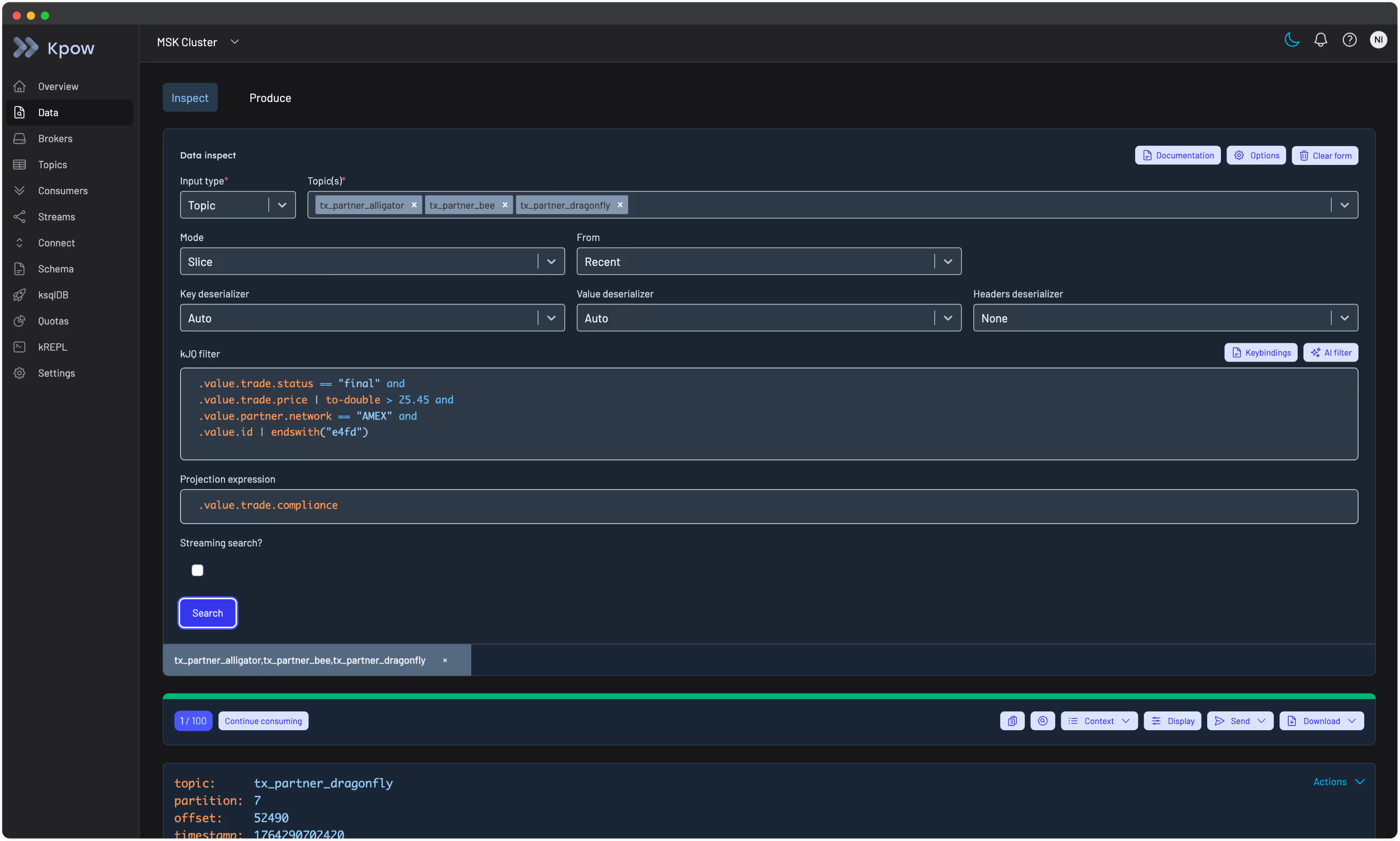
Deployment model. Kpow deploys inside your own infrastructure. It runs as a Docker container, a Helm chart on Kubernetes, a JAR, via AWS CloudFormation on ECS, or from the AWS Marketplace. No data leaves your environment: agents connect directly to your brokers, Schema Registry, and Connect clusters. There are no external dependencies and no inbound connections required.
Multi-cluster management. A single Kpow instance can manage multiple Kafka clusters, Schema Registries, and Connect clusters. This is useful for teams operating separate environments (production, staging, development) or multiple independent clusters, where switching between separate tools per cluster creates overhead.
RBAC and audit logging. RBAC in Kpow is scoped at the cluster, topic, or consumer group level: you can give a team read access to one topic and write access to another without granting broader permissions. Audit logging records every action taken through the console with a timestamp and user identity. Both are first-class features, not optional add-ons.
Data inspect. Kpow’s data inspect supports Avro, Protobuf, JSON, and custom deserializers. Operators can browse, filter, and deserialise messages without exposing raw broker access, which is important in environments where message contents are sensitive.
Kafka Streams support. Kpow surfaces running topologies and task health for Kafka Streams applications, including information that does not appear in standard broker metrics and is difficult to access without dedicated tooling.
Compare Kpow vs AKHQKpow vs Kafbat UI
Frequently asked questions
What is a Kafka management console?
A Kafka management console is a web-based interface for operating and administering an Apache Kafka environment. It provides controls for topics, consumer groups, schemas, connectors, and access management, replacing CLI-based operations with a UI that can be safely delegated to team members without direct broker access.
What’s the difference between a Kafka management console and a Kafka monitoring tool?
A monitoring tool shows you what is happening: metrics, lag, throughput. A management console lets you act on it: create or modify topics, reset consumer group offsets, manage connectors, and control access. Many tools do both, but the distinction matters when evaluating whether a tool is read-only or operational.
Can I manage Kafka without using the CLI?
Yes. A Kafka management console exposes the same administrative operations as the Kafka CLI (topic creation, consumer group management, offset resets, partition reassignment) through a web UI. Most consoles also add RBAC so operators can perform these actions without needing direct shell or broker access.
What are the best open-source Kafka management consoles?
The most widely used open-source options are AKHQ and Kafbat (a maintained fork of Provectus kafka-ui). Redpanda Console has a free community edition, under the Business Source License, suited to Redpanda deployments. CMAK is no longer actively maintained and is incompatible with Kafka 4.0 due to its ZooKeeper dependency. AKHQ and Kafbat are the most defensible choices for standard Apache Kafka deployments.
What is Kafka RBAC and does a management console support it?
Kafka RBAC (role-based access control) lets you define what each user or team can do: view topics, reset offsets, manage connectors, scoped to specific clusters or resources. Not all consoles implement RBAC; those that do typically layer it on top of Kafka’s native ACLs. Kpow implements RBAC at the console level, scoped to cluster, topic, or consumer group.
How do I reset consumer group offsets without the CLI?
A management console with consumer group control lets you select a group, choose a topic and partition, and reset the offset to a specific position: earliest, latest, a timestamp, or a specific offset value. This avoids running kafka-consumer-groups.sh directly and reduces the risk of resetting the wrong group or partition under pressure.
Can I manage multiple Kafka clusters from one interface?
Yes, if the console supports multi-cluster management. Kpow, Conduktor, and Lenses.io all support multiple clusters from a single interface. Most open-source tools are single-cluster by default, though some support switching between configured environments.
What is Kafka audit logging and why does it matter?
Audit logging in a Kafka management console records every action taken, including who created or deleted a topic, who reset a consumer group, and who changed a connector, along with a timestamp and user identity. This is required in regulated industries for compliance and is invaluable for diagnosing production incidents caused by administrative changes.
How do I manage Kafka Connect from a console?
A console with Connect support lets you deploy, configure, pause, restart, and delete connectors through the UI, and view connector status and task health. This replaces direct calls to the Connect REST API and is safer in shared environments where multiple teams manage connectors on the same cluster.
What’s the difference between Kpow, Conduktor, and AKHQ?
Kpow and Conduktor are commercial tools with enterprise features: RBAC, audit logging, multi-cluster support, and commercial support contracts. Compared to Conduktor, Kpow does not require a proxy in the data path. AKHQ is open-source and widely used for topic and consumer group management, with more limited RBAC and an opt-in audit trail that writes to a Kafka topic rather than to a view in the product. The right choice depends on team size, compliance requirements, and whether commercial support matters.
Is there a free Kafka management console?
Yes. AKHQ and Kafbat are free and open-source. Redpanda Console has a free community edition under the Business Source License. Kpow has a Community Edition and an Enterprise trial. For development and small team use, open-source tools are generally sufficient; commercial options are more common in regulated or large-scale production environments where RBAC and audit logging are requirements.
How do I inspect Kafka messages without writing a consumer?
Most management consoles include a data inspect or message browser feature. You select a topic, optionally filter by key, header, or value, choose a time range or offset, and the console deserialises and displays messages, supporting Avro, Protobuf, JSON, and sometimes custom deserializers. This replaces ad-hoc consumer scripts for debugging.
Getting started with Kpow
To get started with Kpow you need a running Kafka cluster (self-managed, Amazon MSK, Confluent Cloud, Redpanda, or another Kafka-compatible platform) and a container runtime or JVM environment.
Kpow deploys as a single container or JAR. Configuration is environment-variable based: you point Kpow at your bootstrap servers, and optionally at your Schema Registry and Connect clusters, and it connects directly without any intermediate services or agents. A typical install takes under 30 minutes from first pull to a running console.
Deployment options include Docker, Docker Compose for local development, Helm for Kubernetes, AWS CloudFormation for ECS, and the AWS Marketplace. The same artefact covers all environments.
Kpow is maintained by Factor House with commercial support available for Enterprise customers.
Try Kpow Enterprise for free, or start free with Kpow Community Edition on up to 3 clusters, with no credit card required. You can connect it to any Kafka cluster in minutes and deploy via Docker, Helm, or JAR.
For the rest of the tooling landscape, see the complete guide to Kafka.
How these tools were scored
Every option is scored from 0 to 10 on each criterion, from the evidence and sources this page cites, and the reason for each score is on its card. Each criterion counts once, for a total out of 50. This page is published by Factor House, which makes Kpow. Every option is scored on the same rubric and the same sources: Kpow's per-criterion scores are set the same way as every other option's and are not adjusted, and the weights apply to every option alike. Kpow ranks first on its total of 44 out of 50. The other options follow by total.