At a glance
Redpanda Console scores 55 out of 90 on this page's five weighted criteria: it takes its best score on Deployment footprint (8 out of 10) and its lowest on Multi-cluster reach (2 out of 10). The rubric is weighted: Support and maintenance counts three times, Access control and audit counts three times, and Cost as teams grow, Deployment footprint and Multi-cluster reach count once. Licence: BSL community tier, no licence fee. The other options, in the order this page lists them: Kpow (Factor House) 82, AKHQ / Kafbat 57, Confluent Control Center 46, Lenses / AxonOps 41, each out of 90. Kpow (Factor House) takes its best score on Access control and audit (10 out of 10) and its lowest on Cost as teams grow (7 out of 10). Licence: $4,500 per cluster per year, published.
Key takeaways
- Redpanda Console’s message viewer is among the best available in any free Kafka UI: time-travel offset debugging, multi-format deserialization (Avro, Protobuf, JSON, XML, CBOR, MessagePack), and JavaScript-based filtering are standout capabilities for developer workflows.
- The Observer Mode lets developers stream topic messages without joining a consumer group, avoiding accidental rebalancing on production offsets.
- The tool is a viewer and browser, not an operational platform. There are no built-in broker metrics, no alerting, and no historical trend views; a separate Prometheus/Grafana stack is required for production monitoring.
- RBAC, SSO, and data masking are locked behind a paid Redpanda Enterprise license. Teams running vanilla Apache Kafka or Amazon MSK who need access controls will pay for a Redpanda license even if they do not run Redpanda as their broker.
- Multi-cluster management is absent at the broker tier, at any price. No paid tier adds a second broker cluster to a Console instance, so teams managing dev, staging, and production clusters must deploy separate Console instances.
- If you need production-grade access controls, multi-cluster support, and a fast-moving commercial roadmap, Kpow is worth evaluating as a dedicated Apache Kafka management tool.
Kpow live demo
Test the operational trade-offs in a live Kafka UI
A Redpanda Console review is only the start of an evaluation. Open Kpow and try the shared workflows your platform team will need every day.
Explore data inspection, consumer operations, and governed access in one environment.
Try the Kpow demoWhat is Redpanda Console?
Redpanda Console is an open source web UI for inspecting and managing Apache Kafka-compatible clusters. It was originally developed by CloudHut under the name Kowl and acquired by Redpanda in April 2022. The product serves both Redpanda clusters (where it integrates with the Redpanda admin API for additional capabilities) and vanilla Apache Kafka, Amazon MSK, and Confluent Platform deployments.
The community edition is available under the Business Source License (BSL), which permits free use by internal teams but restricts commercial SaaS use. An enterprise edition adds RBAC, SSO (OIDC), and data masking behind a paid Redpanda Enterprise license.
The application is built on Go and React, and is distributed as a Docker image and a Helm chart.
Platform neutrality is a frequently confirmed strength among practitioners. Engineers running standard Apache Kafka report the tool works well outside of a Redpanda environment: “I’ve been using Redpanda’s console and it’s pretty awesome. You should be able to use it with any implementation of Kafka — that’s what I’m doing.” [vintage_px, r/apachekafka, 2024] This positions Console as a viable standardisation choice for teams running diverse broker configurations across on-premise, cloud-managed, and hybrid environments.
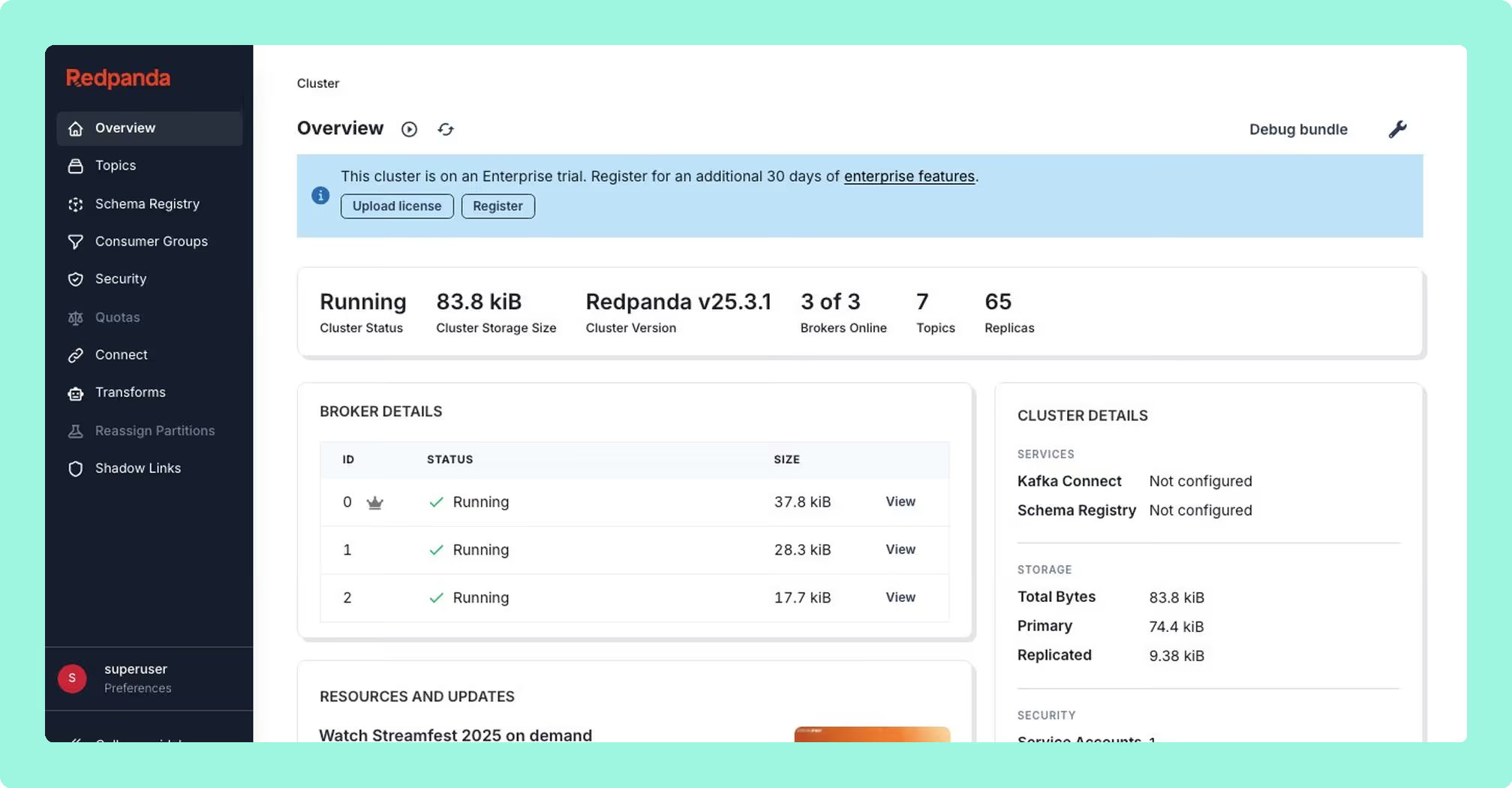
Redpanda Console review
Functionalities
Redpanda Console’s primary strength is its message viewer. The interface supports consuming, seeking, and filtering messages with a level of care that practitioners consistently describe as best-in-class for a free tool. One engineer who spent a year running Redpanda in production wrote that the interface made dedicated ad-hoc tools like Apache Zeppelin or custom query applications unnecessary. [Yaroslav Tkachenko, streamingdata.tech, July 2023]
Time-travel offset management, replay workflows, and JavaScript-based message filtering are well-regarded for developer debugging scenarios. Deserialization covers Avro, Protobuf, JSON, XML, CBOR, MessagePack, and binary (hex).
Protobuf without a schema registry is a less-discussed but practically useful capability. Teams with Protobuf-encoded topics that have no schema registry in their stack can configure Console with local proto descriptor maps, declaring which schema applies to which topic. The original Kowl maintainer confirmed: “Redpanda Console is capable of doing this — you just have to configure what Protos it should use for each topic.” [leventus93, r/apachekafka, 2022] This avoids the common workaround of running external CLI decoding scripts during incident response.
Observer Mode allows developers to stream and browse topic messages without joining an active consumer group. This matters in production contexts: joining a consumer group triggers a rebalance, which can affect downstream processing and pollutes offset tracking. Observer Mode sidesteps this entirely. Engineering teams reference it specifically for development-time debugging and lag investigation: “We mainly use scripts as we want automation. But we use Kowl/Redpanda Console for quickly viewing messages or checking lags during development or troubleshooting for instance.” [handstand2001, r/apachekafka, 2025]
Beyond the message viewer, the feature set thins out. The tool has no built-in broker metrics, no alerting, and no historical trend analysis. An independent comparison from January 2026 concluded that Console is suited to “browsing and basic management” and that any production monitoring setup requires an external stack. [KLogic, klogic.io, January 2026] If choosing that stack is the next decision, the best Kafka monitoring tools for 2026 are scored against one rubric.
Consumer group management is present, but there is a known rendering bug: on some cluster configurations a partition is absent from the consumer group view in the UI while being correctly visible via the command-line tool rpk group describe. [freef4ll, GitHub Issue #447, August 2022]
Schema Registry support was historically read-only. A GitHub issue requesting write operations (creating, updating, and deleting schemas) was filed in August 2022 and closed, suggesting the capability was addressed, though the exact resolution is not confirmed in public sources. [sap1ens, GitHub Issue #434, August 2022] An intermittent display bug causing the Schema Registry Overview card to show “Not configured” despite correct configuration was filed in April 2026. [haoyukongTrackunit, GitHub Issue #2422, April 2026]
There is no ability to produce (write) messages to a topic via the UI. A feature request for this was filed in May 2021 and closed with no visible resolution. [tej1996nitrr, GitHub Issue #221, May 2021] The capability was discussed publicly on Reddit as far back as 2021, when the then-Kowl maintainer indicated it was on the roadmap (including key and value input fields, JSON validation, and confirmation dialogs), but it has not appeared in the stable release as of the research date. [Cell-i-Zenit and leventus93, r/apachekafka, 2021]
Console cannot set request quotas or trigger partition rebalancing. [Zeenia Gupta, platformatory.io, September 2024]
Deployment and operations
Docker and Helm deployments are straightforward for single-cluster setups. One engineer deployed Console on Amazon EKS via Helm with “minimal configuration required.” [Priyankar Prasad, medium.com, February 2023]
Local developer overhead is a recurring friction point for engineers who want ad-hoc topic inspection without running a persistent stack. Because Console is a server-side web application rather than a native desktop client, it requires Docker or a running server. Practitioners note the mismatch for lightweight diagnostic tasks: “Kafka UI, AKHQ, Redpanda Console — all great, but they’re web apps that need Docker or a server. On my work machine I don’t always have Docker running, and spinning up a container just to peek at a topic feels like overkill.” [r/apachekafka, 2025] This has driven interest in native desktop and TUI alternatives for local development loops, even among teams that run Console centrally for shared cluster access.
There is a known Helm upgrade bug: upgrading with console.enabled: true fails with “cannot patch ‘redpanda-console’ with kind Deployment” due to immutable label selectors. This is documented in the official Redpanda troubleshooting guides.
At scale, hardcoded timeouts become a meaningful operational problem. GetClusterInfo has a 6-second timeout for DescribeLogDirs and Metadata; GetTopicsOverview has a 5-second timeout for DescribeConfigs. On large AWS MSK clusters with IAM authentication, these limits are regularly exceeded because the overhead of the STS token exchange with IAM adds latency that the hardcoded values do not account for. Observed actual times of 4.9s and 5.7s were reported in April 2026. [grassiale, GitHub Issue #2410, April 2026] A separate timeout of 35 seconds in ListMessages also causes failures on slow or heavily filtered clusters; versions 3.5.2, 3.6.0, and 3.7.2 are all affected, and users have requested configurable timeout values. [cobolbaby, GitHub Issue #2432, May 2026]
Partial cluster failures expose a design limitation: when a single broker goes offline in a multi-node cluster, all consumer group queries fail entirely rather than degrading gracefully. The error reads “failed to list end offsets for topics: request ListOffsets has 1 separate shard errors.” This is a significant problem during incidents, when observability is most critical. [cobolbaby, GitHub Issue #2327, March 2026]
Kubernetes and TLS complexity is a documented risk for teams running Console in Kubernetes alongside the Redpanda Operator. Integrating with Knative channels, ingress controllers, or custom TLS configurations can lead to certificate validation failures against the Admin API on port 9644, hostname verification errors, and rpk debug bundle failures when localhost is not included in the certificate’s subject alternative names. One practitioner documented spending approximately 20 hours attempting to resolve these issues on a fresh GitOps-managed cluster before switching to Kafka with Strimzi, which completed the equivalent setup in under an hour: “After 3-4 hours (now total of about 20 hrs), I decided to cut losses with Redpanda Operator, and instead went with Strimzi.” [JuroOravec, r/kubernetes, 2024] Automated CD pipelines can encounter additional friction from Helm rate-limiting during FluxCD reconciliation of the Console HelmRelease.
Access control and security
RBAC and SSO (OIDC) are enterprise-only features. The free community tier has no access control of any kind. This is a significant limitation for teams managing shared clusters in multi-team or regulated environments.
The OIDC integration introduces a split authentication model that is worth understanding before committing to it. OIDC SSO for the Console UI is available across Redpanda Enterprise Self-Managed, BYOC, and Dedicated cloud deployments. However, OIDC authentication for the Kafka API, HTTP Proxy API, Admin API, and Schema Registry API is only available in Redpanda Enterprise Self-Managed as of early 2026. [r/redpanda, 2025] Teams on BYOC or Dedicated therefore operate two parallel security models: human operators authenticate through a centralised identity provider when accessing the Console UI, while automated client applications must fall back to mTLS, SASL/SCRAM, or OAuthBearer tokens when accessing the same APIs programmatically. This increases the maintenance surface and complicates auditing.
If the enterprise license expires at runtime, Redpanda Console shuts down entirely. If the license has already expired at startup, Console prints an error and exits. This behaviour creates production risk if license renewal is missed. [Redpanda documentation, docs.redpanda.com]
A security configuration bug filed in May 2026 reports that Kafka Connect requests ignore the Console base path setting. [malinskibeniamin, GitHub Issue #2440, May 2026]
Multi-tenant deployments requiring per-account payload visibility controls present an additional challenge. Teams co-mingling records from different accounts on shared topics, where access must be restricted by jurisdiction or contract, need data masking rules that redact values based on user group membership while preserving metadata for debugging. This capability is available in Console but is gated behind the enterprise license. [GitHub Issue discussion, r/apachekafka, 2021]
One comparison article summarised the commercial model plainly: “Every enterprise feature that matters (SSO, RBAC, data masking) requires a paid Redpanda Enterprise license. This creates a problematic dynamic for vanilla Apache Kafka or MSK users: you can use the viewer for free, but the moment you need governance, you’re paying for a Redpanda license even if you don’t run Redpanda.” [Factor House, factorhouse.io]
User interface
The UI is consistently described as modern, clean, and developer-focused. Practitioner feedback from 2022 onwards regularly describes it as the best-looking free Kafka UI available, with the message viewer praised as “extremely thoughtful.” [Yaroslav Tkachenko, streamingdata.tech, July 2023; rfernandez2007, Confluent Community Forum, February 2022]
Several active frontend bugs undermine this reputation on specific configurations. Pressing ? (the help shortcut) crashes the entire page with a React error when Console is connected to vanilla Apache Kafka rather than Redpanda. The root cause is repeated failed calls to the ListEnterpriseFeatures endpoint, which returns HTTP 501 “the Redpanda admin API must be configured to use this endpoint.” The bug affects versions 3.1.0, 3.3.0, and 3.5.3. [alexkau, GitHub Issue #2262, March 2026] A separate input field bug causes the search text field to replace typed input with a scientific notation number. [Wouter-M, GitHub Issue #2459, May 2026] Message previews could not expand or collapse after upgrading to Console 3.5+. [cobolbaby, GitHub Issue #2247, February 2026]
Users running Confluent Platform noted that the tool “felt optimised for Redpanda rather than Confluent Platform,” with credential propagation limitations for Kafka Connect. [whatsupbros, Confluent Community Forum, March 2023]
Ecosystem
Kafka Connect management is present: Console queries all configured Kafka Connect clusters and supports multi-cluster Kafka Connect setups (unlike broker-tier multi-cluster, which is not supported). Functionality covers connector discovery, bulk configuration operations, and basic task status monitoring. This distinction matters for teams with connector-heavy architectures who want a single pane for Connect management without needing separate instances per environment. [Redpanda documentation, docs.redpanda.com]
There is no native support for ksqlDB. A feature request was filed in 2021 and, as of the research date, there is no confirmed implementation. [GitHub Issue #177]
Multi-cluster management at the broker tier is not supported, and it is not something the enterprise licence adds: there is no tier that puts a second broker cluster into one Console instance. A team managing development, staging, and production clusters must run three separate Console instances. Two GitHub issues requesting single-instance multi-cluster support were filed in 2021 and 2022; one remains open. [GitHub Issues #250, #349] For teams that have already outgrown one cluster, the tools that manage multiple Kafka clusters from one place are compared separately.
Support for Redpanda Connect (pipeline) instances via Console has been requested but is not yet available. [steffyd, GitHub Issue #2430, May 2026]
Licensing and community reception
The BSL licensing transition following the Redpanda acquisition of CloudHut in 2022 has been a persistent source of friction in the open-source community. Kowl was originally maintained under highly permissive terms that encouraged broad adoption. The shift to commercial licensing alienated a portion of the tool’s user base, particularly those who relied on it for sporadic or non-commercial use: “I was a heavy user of Kowl, but I do not like their new Redpanda license. Waiting to hear other people’s recommendations. I need a free version for sporadic usage.” [CasperTDK, r/apachekafka, 2022]
This pattern is not unique to Redpanda Console. Competing tools have followed similar trajectories: Conduktor restricted its community version in release v1.43, reducing the number of allowed servers and users, while Lenses publishes a Team tier from $4,000 a year for up to 15 users, with Multi-Kafka Enterprise custom priced. The community response has been a cycle of open-source alternatives gaining rapid adoption, most recently Kafbat UI (the maintained Apache 2.0 fork of the original Kafka-UI project), followed by those alternatives eventually reaching the same commercial crossroads. What each of the current free tiers includes, and what each one holds back, is set out in best free Kafka UI tools in 2026.
For teams that need enterprise access controls and are committed to the Redpanda ecosystem, the licensing model is a reasonable trade-off. For teams running vanilla Apache Kafka or Amazon MSK who simply want governance features, the situation is less comfortable: the enterprise license funds Redpanda’s commercial interests regardless of whether the buyer runs a single Redpanda broker.
Customer support
Documentation at docs.redpanda.com is comprehensive, covering installation, configuration, security, Kubernetes deployment, and troubleshooting in detail. Active changelog entries confirm ongoing bug fixes and security patches.
GitHub Issues is the primary community support channel for bugs and feature requests, and engagement from the Redpanda team is visible across recent issues.
No practitioner accounts of enterprise support quality, response times, or account management were available in the public sources reviewed for this article.
Best for
Redpanda Console is best suited to:
- Teams running Redpanda as their broker (self-managed or cloud). The native integration with the Redpanda admin API enables features that are unavailable on vanilla Kafka. [Hayato Shimizu, axonops.com, December 2025]
- Solo developers and small teams who need a lightweight, visually clean message browser with strong deserialization support for a single cluster.
- Developer debugging workflows: time-travel offset management, Observer Mode for non-intrusive topic inspection, offset rollback for replay scenarios, and JavaScript-based message filtering are the standout capabilities.
- Platform teams hosting a shared single-cluster instance for internal developers, where the platform team handles SASL/TLS configuration and developers access a read-oriented UI.
It is a poor fit for teams that need multi-cluster management, production observability without a separate monitoring stack, governance features without paying for a Redpanda Enterprise license, reliable operation on large AWS MSK clusters with IAM authentication, or a native desktop option for lightweight local inspection.
Redpanda Console pricing
Redpanda Console is open source under the Business Source License. Internal use is free; commercial SaaS use requires a commercial agreement.
Pricing tiers
The community edition is free and covers the core message viewer, topic and consumer group management, Kafka Connect management, and Schema Registry browsing. RBAC, SSO (OIDC), and data masking are not included.
Enterprise features require a Redpanda Enterprise license. Specific pricing for the enterprise tier is not published publicly.
Free trial
There is no time-limited trial for the enterprise tier described in the available public documentation. Teams can run the community edition indefinitely without a license.
Redpanda Console competitors and alternatives
Redpanda Console occupies the developer-friendly free-tier end of the Kafka UI market. The landscape includes tools that match it on open-source availability (AKHQ, Kafbat UI) and commercial tools that extend further into governance, observability, and multi-cluster management. The right choice depends heavily on whether you need production-grade access controls and whether you run a single cluster or many.
The cost line on each card below is modelled on one scenario: three Kafka clusters for development, staging and production, 100 engineers, and engineering time at $120 an hour. Published licence prices are used exactly as the vendor publishes them. Where a tool publishes no price, the figure is a Factor House estimate of what it costs to run and of the work it leaves to be done by hand, and the card says so.
| Rank | Tool / Best for | Type | Key functionalities | Deployment and ops | Access control | User interface | Pricing |
|---|---|---|---|---|---|---|---|
| 1 | Kpow (Factor House) Production Kafka management with enterprise RBAC | Commercial | Topic management, consumer groups, Schema Registry, Kafka Connect, multi-cluster, audit logging | Self-hosted; stateless; straightforward deployment | Advanced RBAC, SSO, data masking | WCAG 2.1 AA compliant, with a published VPAT; high-performance at scale | Per-cluster pricing that does not penalise team growth |
| 2 | AKHQ / Kafbat Lightweight self-hosted Kafka UI | OSS (Apache 2.0) | Topic management, consumer groups, Schema Registry, Kafka Connect | Docker, Helm; low resource usage | Resource-level RBAC in both; masking not per role | Functional; less polished than Console | Free |
| 3 | Redpanda Console Redpanda and single-cluster Kafka browsing | OSS (BSL) | Message viewer, deserialization (Avro, Protobuf, JSON, XML, CBOR), Observer Mode, Kafka Connect, Schema Registry | Docker, Helm; hardcoded timeouts at scale; Kubernetes TLS friction; hard shutdown on license expiry | Enterprise-only RBAC and SSO | Modern, clean; React crashes on vanilla Kafka with some versions | Free community tier; enterprise license required for RBAC/SSO |
| 4 | Lenses / AxonOps Teams needing full Kafka observability with governance | Commercial | Governance, data masking, audit trails, metrics | SaaS and self-hosted | Enterprise RBAC and SSO | Feature-rich; steeper learning curve | Commercial; higher price point |
| 5 | Confluent Control Center Confluent Platform users | Commercial (bundled) | Deep Confluent Platform integration, KSQL, metrics, replication | Bundled with Confluent Platform | Enterprise RBAC | Dated UX by comparison | Included with Confluent Platform license |
For a broader comparison of Kafka UI tools in 2026, see Top Kafka UI tools in 2026: a practical comparison for engineering teams.
 Rank 1
 Kpow (Factor House)
82 out of 90 Total
Try Kpow in the live demo No signup needed.
- Licence
- $4,500 per cluster per year, published
- Cost a year, 3 clusters
- About $16,380, licence and run time
- Clusters
- Up to 12 per instance
- Cost as teams grow
- 7 out of 10
- Deployment footprint
- 9 out of 10
- Support and maintenance ×3 weight, this criterion counts 3 times toward the total
- 9 out of 10
- Access control and audit ×3 weight, this criterion counts 3 times toward the total
- 10 out of 10
- Multi-cluster reach
- 9 out of 10
Why these scores for Kpow (Factor House)
- Cost as teams grow 7 out of 10
- The Kpow pricing page has it licensed per cluster at $4,500 a year with 100 users included, and Community Edition free for 3 clusters and 10 users, with RBAC, masking and audit held back for Enterprise. Not 10, because the free tier holds governance back.
- Deployment footprint 9 out of 10
- This page’s table gives self-hosted, stateless, straightforward deployment, and the Kpow product page has one container by Docker, Kubernetes or a JAR, with no external database. Kafdrop is named lighter elsewhere on the site, so not 10.
- Support and maintenance 9 out of 10
- The Kpow features page gives email support and an Enterprise support SLA, and the Kpow vs CMAK comparison has it shipping continuously, with priority support on Enterprise and a community Slack on Community Edition.
- Access control and audit 10 out of 10
- This page’s table gives advanced RBAC, SSO and data masking, and the Kpow vs Kafdrop comparison has masking applied server-side by role and an audit log of user actions readable in the product. All on Enterprise.
- Multi-cluster reach 9 out of 10
- The Kpow multi-cluster page gives up to 12 clusters per instance across MSK, Confluent, Redpanda, Aiven and self-managed Kafka, and that per-instance cap of 12 keeps it at 9 rather than 10.
Best for. Production Kafka management with enterprise RBAC.
Against Redpanda Console. The licence comes from the tool’s vendor and is priced per cluster, at $4,500 per cluster per year with 100 users included, so governance does not depend on which broker you run. One instance manages up to 12 clusters across Amazon MSK, Confluent, Redpanda, Aiven and self-managed Kafka, where Console is one broker cluster per deployment on any licence.
Where it wins. RBAC with SAML, LDAP and OpenID, server-side data masking applied by role, and an audit log of user actions readable inside the product. That is the set this page’s licensing section describes teams buying a Redpanda Enterprise licence to obtain. Kpow runs as one stateless container with no external database, and it supports air-gapped deployment.
What it costs a year. The licence is published, so only the run time is estimated. Three clusters at $4,500 each is $13,500 a year, with 100 users included at every cluster, and one stateless container reaching all three takes roughly 2 engineer-hours a month, or $2,880 a year at $120 an hour. About $16,380 a year, with RBAC, SSO, server-side masking and the audit log inside that licence rather than assembled by hand afterwards. That is the comparison to make against the tools on this page that charge nothing: their licence line is zero and their run and audit line is not.
Where it falls short. RBAC, data masking and the audit log are Enterprise features, and the free Community Edition stops at 3 clusters and 10 users, so a team that only wants a free message viewer gets more from Console’s community tier. Multi-cluster reach is capped at 12 clusters per instance. Kpow is proprietary rather than open source, which matters where an approval process requires a source licence.
Staying patched. Kpow’s release notes name the CVEs each release remediates, and the 96.4 image built on 5 August 2026 bundles 311 dependencies. What a licence buys here is not a different deployment model, because Kpow is self-hosted too. It is a company contracted to ship the fix. Every dependency figure on this page was read on 24 September 2026 from the published artefacts and from nvd.nist.gov.
Compare Kpow vs Redpanda ConsoleKpow vs AKHQKpow vs Kafbat UIKpow vs Lenses.ioKpow vs Confluent Control Center
AKHQ / Kafbat
akhq.io, kafbat.io
57 out of 90 Total
- Licence
- Apache 2.0, both, no licence fee
- Cost a year, 3 clusters
- About $27,840 in run and audit time
- Latest release
- Kafbat UI v1.5.0, April 2026
- Cost as teams grow
- 10 out of 10
- Deployment footprint
- 8 out of 10
- Support and maintenance ×3 weight, this criterion counts 3 times toward the total
- 5 out of 10
- Access control and audit ×3 weight, this criterion counts 3 times toward the total
- 5 out of 10
- Multi-cluster reach
- 9 out of 10
Why these scores for AKHQ / Kafbat
- Cost as teams grow 10 out of 10
- Kpow vs AKHQ, AKHQ vs Redpanda Console, Conduktor vs Kafbat UI. Apache 2.0, the whole product at no licence fee, no paid tier, so adding an engineer or a cluster changes nothing on the invoice. The score is the licence line; the modelled total cost of ownership, about $27,840 a year, is carried in the card because the governance gap is done by hand.
- Deployment footprint 8 out of 10
- One container with no database or sidecar (AKHQ vs Kadeck, Kafbat UI vs Lenses); docked from 10 for AKHQ’s open memory-growth reports and Kafbat UI’s configuration volume.
- Support and maintenance 5 out of 10
- GitHub issues with no SLA (Kpow vs AKHQ, Kpow vs Kafbat UI); Kafbat UI v1.5.0 in April 2026 with commits landing in August 2026, AKHQ three releases in eight months from one maintainer.
- Access control and audit 5 out of 10
- Taken separately, Kafbat UI scores 6 for server-side masking with three policies and audit to a Kafka topic, and AKHQ 5 for global masking at one filter per topic and an opt-in topic audit with no in-product view. The card takes the lower. Both carry resource-level RBAC, which the AKHQ vs Kafbat UI and Kpow vs Kafbat UI comparisons record.
- Multi-cluster reach 9 out of 10
- One deployment reaches many clusters with no cap (AKHQ vs Kafdrop, Conduktor vs Kafbat UI); Kafbat UI adds MSK, Event Hubs and Google Cloud with cloud IAM.
Best for. Lightweight self-hosted Kafka UI.
Against Redpanda Console. Apache 2.0 rather than BSL, so there is no commercial-use restriction to read and no licence that can expire underneath a running console. Both reach many clusters from one deployment where Console reaches one, so adding a staging cluster is a configuration entry rather than another instance to run.
Access control without a licence. AKHQ authenticates by LDAP, OIDC, basic auth or claim mapping, and has carried resource-level RBAC since the Michelin contribution. Kafbat UI defines roles per resource type across six identity provider types. Neither charges for any of it, which is the part of the commercial model this page’s licensing section describes as uncomfortable for teams on vanilla Apache Kafka.
What it costs a year. A Factor House estimate for this page’s scenario, not a vendor price. Neither licence has a fee, and one deployment reaches all three clusters, so running them is roughly 6 engineer-hours a month, or $8,640 a year at $120 an hour. What neither can do is the expensive part: masking does not vary by role and there is no audit view inside the product, so a quarterly access review and evidence pack across three clusters is assembled by hand. At 40 hours a quarter that is $19,200 a year. About $27,840 a year in total, none of it a licence.
Where they fall short. Masking is coarser than a paid product. AKHQ masks globally from its YAML configuration, one filter per topic, and writes an opt-in audit trail to a Kafka topic with no view inside the product. Kafbat UI applies masking server-side but cannot vary it by role. Support for both is GitHub issues with no SLA, AKHQ has open memory-growth reports, and Kafbat UI’s dynamic configuration fails on Kubernetes.
Staying patched. Both are Apache-2.0 and community-maintained, and the patching question is not whether either project has a CVE of its own. It is what the current release ships. AKHQ 0.28.0, cut on 6 August 2026, bundles 270 libraries of which 18 carry a high or critical advisory, 16 of them already public with fixes available on the day it shipped and the oldest now open 108 days. Kafbat UI last released v1.5.0 in April 2026, and at least 20 high or critical advisories have been published against what it bundles in the 157 days since, with no release to carry a fix; only 150 of its 266 jars could be measured, so that number is a floor and the two are not comparable on it.
Compare Kpow vs AKHQKpow vs Kafbat UIAKHQ vs Redpanda ConsoleKafbat UI vs Redpanda ConsoleAKHQ reviewKafbat UI review
 Rank 3
 Redpanda Console
redpanda.com
55 out of 90 Total
- Licence
- BSL community tier, no licence fee
- Cost a year, 3 clusters
- About $8,640 to run, this page's estimate
- Clusters
- One broker cluster per deployment
- Cost as teams grow
- 6 out of 10
- Deployment footprint
- 8 out of 10
- Support and maintenance ×3 weight, this criterion counts 3 times toward the total
- 7 out of 10
- Access control and audit ×3 weight, this criterion counts 3 times toward the total
- 6 out of 10
- Multi-cluster reach
- 2 out of 10
Why these scores for Redpanda Console
- Cost as teams grow 6 out of 10
- Kadeck vs Redpanda Console, no licence fee under the BSL and no seat count; Kpow vs Redpanda Console, governance needs a Redpanda Enterprise licence that is not published and is tied to the broker vendor. Modelled total cost of ownership on this page’s scenario: about $8,640 a year in run time for three instances, before any governance at all.
- Deployment footprint 8 out of 10
- Kadeck vs Redpanda Console, a container or Helm chart holding no state; this page records the Helm upgrade failure on console.enabled, Kubernetes TLS friction, and hardcoded 6 and 5 second timeouts that large MSK clusters exceed.
- Support and maintenance 7 out of 10
- Kafbat UI vs Redpanda Console, v3.11.0 on 25 August 2026 after two more releases since July; this page gives comprehensive documentation and visible Redpanda engagement on GitHub issues, with no public account of enterprise support quality.
- Access control and audit 6 out of 10
- On this page, the free community tier has no access control of any kind, and RBAC, OIDC SSO and data masking all need a Redpanda Enterprise licence. This is the better-sourced side of the site conflict that described basic RBAC in the BSL tier.
- Multi-cluster reach 2 out of 10
- Kafdrop vs Redpanda Console, one broker cluster per deployment at any price; this page, three environments need three Console instances. Several Kafka Connect clusters from one instance, but only one broker cluster.
Best for. Redpanda and single-cluster Kafka browsing.
Where it wins. Console’s message viewer is the capability the practitioners quoted on this page single out, and Observer Mode is a large part of why: it streams a topic without joining a consumer group, so nothing rebalances on a production cluster while an engineer reads a payload. Protobuf topics decode from local descriptor maps with no schema registry in the stack. Time travel to an offset, JavaScript filters, and deserialization for Avro, Protobuf, JSON, XML, CBOR, MessagePack and hex are covered in functionalities above.
Where it falls short. Three timeouts are hardcoded and are exceeded on large clusters: 6 seconds on GetClusterInfo and 5 seconds on GetTopicsOverview, against observed responses of 4.9 and 5.7 seconds on AWS MSK clusters with IAM authentication, plus a 35 second limit in ListMessages. One broker going offline in a multi-node cluster fails every consumer group query outright instead of degrading. There is no produce path in the UI, no broker metrics, no alerting and no historical trends, so production monitoring is a separate Prometheus and Grafana stack. The detail is in deployment and operations.
What the licence buys. Console is source-available under the Business Source License. Internal use is free, and commercial SaaS use needs an agreement. The free community tier has no access control of any kind, so RBAC, OIDC SSO and data masking all sit behind a paid Redpanda Enterprise licence, and a team on vanilla Apache Kafka or Amazon MSK buys a Redpanda licence to get them. If that licence expires at runtime, Console shuts down. See access control and security and pricing.
What it costs a year. A Factor House estimate for this page’s scenario, not a vendor price. The community licence has no fee, and three environments need three Console instances. At 6 engineer-hours a month across them, which is what the Helm upgrade failure, the hardcoded MSK timeouts and the Kubernetes TLS work described above cost to live with, that is 72 hours a year, or about $8,640 at $120 an hour. Governance is not in that figure: RBAC, SSO and data masking need a Redpanda Enterprise licence whose price is not published.
Multi-cluster reach. One broker cluster per deployment, on any licence. No paid tier adds a second, so development, staging and production are three Console instances with three sets of configuration. Kafka Connect is the exception: one instance queries several Connect clusters, which is covered under ecosystem.
Compare Kpow vs Redpanda ConsoleAKHQ vs Redpanda ConsoleKafbat UI vs Redpanda ConsoleConfluent Control Center vs Redpanda Console
Confluent Control Center
confluent.io
46 out of 90 Total
- Licence
- Inside a Confluent Platform licence
- Cost a year, 3 clusters
- About $2,880 to run, plus that licence
- Needs
- Dedicated nodes: 4 cores, 8 GB
- Cost as teams grow
- 2 out of 10
- Deployment footprint
- 2 out of 10
- Support and maintenance ×3 weight, this criterion counts 3 times toward the total
- 6 out of 10
- Access control and audit ×3 weight, this criterion counts 3 times toward the total
- 7 out of 10
- Multi-cluster reach
- 3 out of 10
Why these scores for Confluent Control Center
- Cost as teams grow 2 out of 10
- This page’s table has it included with a Confluent Platform licence, and the Kpow vs Confluent Control Center comparison has it not sold separately, with no published price, and Control Center, multi-tenancy and encryption each costing extra.
- Deployment footprint 2 out of 10
- Kpow vs Confluent Control Center, the Metrics Reporter JAR goes on the brokers; Confluent Control Center vs Kafdrop, dedicated nodes at 4 cores, 8 GB and 200 GB of storage up to 100,000 replicas.
- Support and maintenance 6 out of 10
- AKHQ vs Confluent Control Center, a vendor under enterprise contract with quarterly patches for the current version only, no public issue tracker, and legacy to next-generation is a migration.
- Access control and audit 7 out of 10
- CMAK vs Confluent Control Center, RBAC with audit logging of authentication and authorisation events; AKHQ vs Confluent Control Center, OIDC only on self-managed, no SAML, and no masking described.
- Multi-cluster reach 3 out of 10
- Kpow vs Confluent Control Center, Confluent Platform only, because the reporter JAR cannot be installed on MSK, Redpanda or Aiven.
Best for. Confluent Platform users.
Against Redpanda Console. Control Center reaches Confluent Platform clusters only, because it needs the proprietary Confluent Metrics Reporter JAR in the broker classpath, and that JAR cannot be installed on Amazon MSK, Redpanda or Aiven. Console runs against vanilla Apache Kafka, MSK and Confluent Platform, which is why the practitioners quoted on this page treat it as a standardisation choice across mixed environments.
Where it wins. Kafka Streams topology visualisation and native ksqlDB development. Console has no native ksqlDB support: the feature request filed in 2021 still has no confirmed implementation.
What it costs a year. Control Center has no price of its own: it arrives inside a Confluent Platform licence, which is not published and is the dominant term in this row. A Factor House estimate of what sits on top of it, for the Metrics Reporter JAR on every broker plus dedicated nodes at 4 cores, 8 GB and 200 GB, is 2 engineer-hours a month, or about $2,880 a year at $120 an hour, before the cost of the nodes themselves. Any comparison with Kpow’s roughly $16,380 for three clusters, $13,500 of published licence plus $2,880 of run time, has to add the Platform licence to this figure.
Where it falls short. It needs dedicated nodes at 4 cores, 8 GB of RAM and 200 GB of storage up to 100,000 replicas, plus the Metrics Reporter JAR in every broker’s classpath, against Console’s single container. It is also not sold separately, so a team that does not already run Confluent Platform cannot buy it at all.
Compare Kpow vs Confluent Control CenterConfluent Control Center vs Redpanda ConsoleConfluent Control Center review
Lenses / AxonOps
lenses.io, axonops.com
41 out of 90 Total
- Lenses Team
- From $4,000 a year, up to 15 users
- Cost a year, 3 clusters
- Custom quote, plus about $2,880 to run
- AxonOps price
- Free tier; paid tiers not published
- Cost as teams grow
- 4 out of 10
- Deployment footprint
- 2 out of 10
- Support and maintenance ×3 weight, this criterion counts 3 times toward the total
- 5 out of 10
- Access control and audit ×3 weight, this criterion counts 3 times toward the total
- 5 out of 10
- Multi-cluster reach
- 5 out of 10
Why these scores for Lenses / AxonOps
- Cost as teams grow 4 out of 10
- Taken separately, Lenses scores 4 for tiers priced by capability and user count, with Team from $4,000 a year for up to 15 users and Multi-Kafka Enterprise custom priced in the Kpow vs Lenses comparison, and AxonOps 4 for a free tier with no price published for its commercial tiers. The card takes the lower, which is 4 either way.
- Deployment footprint 2 out of 10
- Taken separately, Lenses scores 2 for a central HQ on PostgreSQL plus one Agent and one Agent database for every cluster, on the free tier too, which the Kafdrop vs Lenses comparison records, and AxonOps 3 for self-hosted on a Cassandra backend. The card takes the lower.
- Support and maintenance 5 out of 10
- Taken separately, Lenses scores 6 for a vendor under contract with Team Support from the Team tier, set against an HQ with no HA and bug fixes reported as slow, and AxonOps 5 because no site page describes its support or release record. The card takes the lower.
- Access control and audit 5 out of 10
- Taken separately, Lenses scores 7 for SSO, SAML and RBAC from Team with in-product audit logs, though masking is global by field name and does not vary by role, which the AKHQ vs Lenses comparison records, and AxonOps 5 because this page’s own row credits RBAC, SSO, masking and audit to the pair together, with nothing attributable to AxonOps alone. The card takes the lower.
- Multi-cluster reach 5 out of 10
- Taken separately, Lenses scores 7 for one Agent per cluster, with federated multi-Kafka only at the custom-priced top tier, which the Kafdrop vs Lenses comparison records, and AxonOps 5 with no cluster count stated on any site page. The card takes the lower.
Best for. Teams needing full Kafka observability with governance.
Against Redpanda Console. Governance here is bought from the tool’s own vendor rather than from a broker vendor. Lenses publishes a ladder: Team from $4,000 a year for up to 15 users on one cluster, Multi-Kafka Enterprise custom priced, and a Community edition for 5 users with basic auth and no SSO or RBAC. AxonOps publishes a free tier and no price for its commercial tiers, so a shortlist has to start with a sales conversation.
What it costs a year. Lenses publishes Team from $4,000 a year for up to 15 users on one cluster. Three clusters and 100 engineers is above every published rung, so the licence line for this page’s scenario is Multi-Kafka Enterprise at a custom price. On top of that, a Factor House estimate for running a central HQ on PostgreSQL plus one Agent and one Agent database for each of three clusters is 2 engineer-hours a month, or about $2,880 a year at $120 an hour. AxonOps publishes a free tier and no price for its commercial tiers, so its licence line cannot be modelled at all.
What it costs to run. Both bring a datastore of their own. Lenses runs a central HQ on PostgreSQL plus one Agent and one Agent database for every cluster, on the free tier as well, and AxonOps is self-hosted on a Cassandra backend. Console is a single container holding no state, which is the trade a small team makes when it picks the free viewer over either of these.
Where they fall short. Lenses masks globally by field name and does not vary it by role, federated multi-Kafka arrives only at the custom-priced top tier, and its HQ runs a single replica with no high availability. AxonOps is the thinnest entry in this table: no published price, no support or release record, and nothing on SSO, masking or audit that can be attributed to it rather than to Lenses.
Frequently asked questions about Redpanda Console
How much does Redpanda Console cost, and is there a free tier?
The community edition is free under the BSL for internal use. RBAC, SSO, and data masking require a paid Redpanda Enterprise license. Pricing for the enterprise tier is not published publicly.
When is Redpanda Console a better choice than the alternatives?
It is the strongest free option for single-cluster Kafka or Redpanda setups where the primary need is message inspection and developer debugging. For Redpanda users specifically, native admin API integration adds capabilities unavailable elsewhere without cost. The Observer Mode and multi-format deserialization pipeline, including Protobuf without a schema registry, are capabilities that few free tools match.
When are the alternatives a better choice than Redpanda Console?
When you manage more than one cluster, need RBAC or SSO without a Redpanda license, require built-in metrics and alerting, run large AWS MSK clusters with IAM authentication where Console’s hardcoded timeouts cause regular failures, or want a native desktop client for lightweight local inspection without running Docker.
Does Redpanda Console work with vanilla Apache Kafka?
Yes, but with limitations. Some features rely on the Redpanda admin API and fail silently or throw errors on vanilla Kafka. The help shortcut (?) causes a full React crash on certain Console versions when connected to a non-Redpanda cluster. Practitioners confirm the tool works well with standard Apache Kafka for message browsing and consumer group management, but the gaps become more visible as teams move beyond basic inspection.
Is Redpanda Console open source?
It is source-available under the BSL. Internal use is free. Commercial SaaS deployments require a commercial agreement. The original maintainer (weeco of CloudHut) confirmed after the 2022 acquisition that “99% of all users can still use it” under the BSL. The licensing transition has nonetheless driven a portion of the original Kowl community toward fully open-source alternatives.
For the rest of the tooling landscape, see the complete guide to Kafka.
How these tools were scored
Every option is scored from 0 to 10 on each criterion, from the evidence and sources this page cites, and the reason for each score is on its card. The criteria are weighted: Cost as teams grow counts once, Deployment footprint counts once, Support and maintenance counts three times, Access control and audit counts three times and Multi-cluster reach counts once, for a total out of 90. Access control and audit and Support and maintenance count three times here, because in a regulated environment the decisive questions are who may act on a cluster and who is accountable when a dependency advisory lands. Cost as teams grow, deployment footprint and multi-cluster reach are real, but they are one-off decisions rather than standing exposure, so they count once. This page is published by Factor House, which makes Kpow. Every option is scored on the same rubric and the same sources: Kpow's per-criterion scores are set the same way as every other option's and are not adjusted, and the weights apply to every option alike. Kpow ranks first on its total of 82 out of 90. The other options follow by total.