Every Kafka UI on the market now offers something for free. The question worth asking before you pick one isn’t “is there a free tier,” it’s what that free tier actually lets you do, and what happens the day your team outgrows it. Those two questions pull in different directions: the most generous free tier on user count isn’t necessarily the cheapest tool once you need to pay, and the tool with no limits at all is open source, which is its own trade-off, not just a price of zero.
This article compares the free offerings from Factor House (Kpow), Conduktor, and Lenses against the fully open-source alternatives, AKHQ and Kafbat UI, on the dimensions that actually matter: what’s capped, what’s included, what the upgrade path costs, and whether you’re running vendor-backed software or maintaining an open-source project yourself.
At a glance
Six options are scored here on this page's five weighted criteria, 150 points in all. The rubric is weighted: Deployment footprint counts six times, Support and maintenance counts six times, and Cost as teams grow, Access control and audit and Multi-cluster reach count once. The five listed first, of six, each out of 150: Kpow Community Edition 106, which takes its best score on Deployment footprint (9 out of 10) and its lowest on Access control and audit (3 out of 10), Free tier: 3 clusters, 10 users; Kafbat UI 103, Free tier: Unlimited clusters and users; AKHQ 102, Free tier: Unlimited clusters and users; Kadeck 70, Free tier: Teams Free: 1 cluster, 5 users; Lenses Community Edition 60, Free tier: 2 clusters, 5 users.
Free Kafka UI comparison at a glance
| Rank | Tool | Free clusters | Free users | Open source? | Data inspection | Upgrade path cost |
|---|---|---|---|---|---|---|
| 1 | Kpow Community Edition | 3 | 10 | No | Full | From $4,500/cluster/yr (up to 100 users) |
| 2 | Kafbat UI | Unlimited | Unlimited | Yes | Full | - |
| 3 | AKHQ | Unlimited | Unlimited | Yes | Full | - |
| 4 | Lenses Community Edition | 2 | 5 | No | Full | From $4,000/yr (15 users, 1 cluster) |
| 5 | Kadeck Teams Free | 1 | 5 | No | Basic | From $32/user/month (min. 10 users) |
| 6 | Conduktor Console Community | 3 | 50 | No | Full | From $125/seat/month |
Kpow live demo
See what a team-ready Kafka UI feels like
A free-tier checklist cannot show the operating experience. Use the Kpow demo to evaluate topic inspection, consumer workflows, and the path from local use to a shared platform.
A live environment for teams moving beyond a one-off local tool.
Try the Kpow demo1. Kpow Community Edition
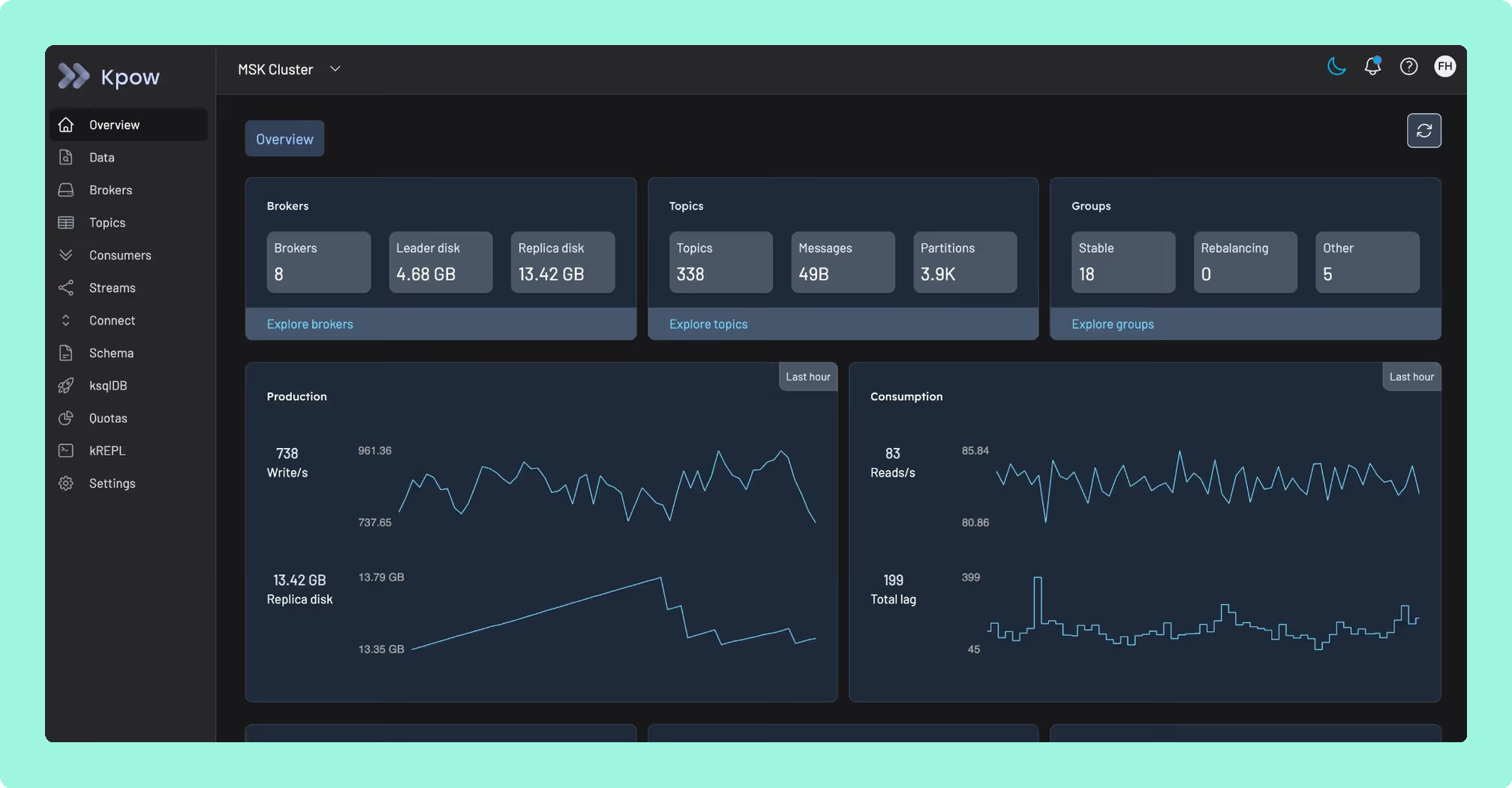
Kpow Community Edition is free for up to 3 clusters and 10 users. It runs the same interface and REST API as Kpow Enterprise: topic search and inspection, consumer group management, Schema Registry, Kafka Connect, and ACL management are all present in the free tier without a cut-down feature set.
 Rank 1
 Kpow Community Edition
106 out of 150 Total
Try Kpow in the live demo No signup needed.
- Free tier
- 3 clusters, 10 users
- Upgrade path
- From $4,500/cluster/yr, up to 100 users
- Open source
- No
- Cost as teams grow
- 7 out of 10
- Deployment footprint ×6 weight, this criterion counts 6 times toward the total
- 9 out of 10
- Support and maintenance ×6 weight, this criterion counts 6 times toward the total
- 6 out of 10
- Access control and audit
- 3 out of 10
- Multi-cluster reach
- 6 out of 10
Why these scores for Kpow Community Edition
- Cost as teams grow 7 out of 10
- Free for 3 clusters and 10 users, then per cluster at a published $4,500 with 100 users included, so adding an engineer does not change the bill; RBAC, masking and audit are held back from the free tier.
- Deployment footprint 9 out of 10
- The Kpow vs AKHQ comparison has one stateless container with no database, sidecar or volume, the Kpow Community Edition page has a single Docker container, and this page has air-gapped deployment supported. Kafdrop is named lighter elsewhere.
- Support and maintenance 6 out of 10
- Scored on Community Edition, where the Kpow pricing page support row is Community Slack and docs with no SLA, because priority support is Enterprise; releases ship continuously and it runs the same codebase as Enterprise, which the Kpow Community Edition FAQ and the Kpow vs CMAK comparison both record.
- Access control and audit 3 out of 10
- Scored on Community Edition, where the Kpow features page gives it simple user authentication only, with LDAP, SAML, OpenID, RBAC, data masking and the audit log all Enterprise and SSO ‘Coming soon’. This page says ‘RBAC and multi-tenancy, server-side data masking, and full audit logging are Enterprise features.’
- Multi-cluster reach 6 out of 10
- Scored on Community Edition, which reaches up to 3 clusters from one instance on any Kafka-compatible broker, with the Kpow Community Edition FAQ naming Apache Kafka, MSK, Confluent, Redpanda, Aiven and others; the 3-cluster cap keeps it at 6.
What's included free. Full data inspection and search, including kJQ filtering across topics. Both a UI and a REST API, so anything you can do by clicking, you can also automate or integrate into your own tooling. Broker metrics, consumer lag monitoring, and cluster health signals. Air-gapped deployment support, which none of the other commercial free tiers in this comparison offer. SSO/SAML integration is coming soon.
What's not included free. RBAC and multi-tenancy, server-side data masking, and full audit logging are Enterprise features. If you don’t need governance controls, none of that affects day-to-day operations.
The upgrade path. Kpow Enterprise is priced per cluster, not per seat, starting at $4,500/cluster/year and covering up to 100 users at that price. For a team of 100 across 3 clusters, that’s $13,500/year total. Since the cost is tied to cluster count rather than headcount, adding engineers to an existing cluster doesn’t change the bill.
Why not open source. Kpow is proprietary but not open source, which matters for organisations with software approval processes that treat unvetted open-source dependencies as a security or compliance risk. You get a vendor-supported product with a defined release process and a company to contact, without the licensing cost of Enterprise, if the free tier’s limits fit your environment.
Staying patched. Kpow’s release notes name the CVEs each release remediates, and the 96.4 image built on 5 August 2026 bundles 311 dependencies. What a licence buys here is not a different deployment model, because Kpow is self-hosted too. It is a company contracted to ship the fix. Every dependency figure on this page was read on 24 September 2026 from the published artefacts and from nvd.nist.gov.
Compare Kpow vs AKHQKpow vs Kafbat UIKpow vs Lenses.ioKpow vs Kadeck
There's going to be the community edition of Kpow, which is just going to be generally available and free for individual use, local development, probably a if you want to put it in a dev environment, that sort of thing.
Derek Troy-West, Co-founder and CEO of Factor House
2. Conduktor Console Community
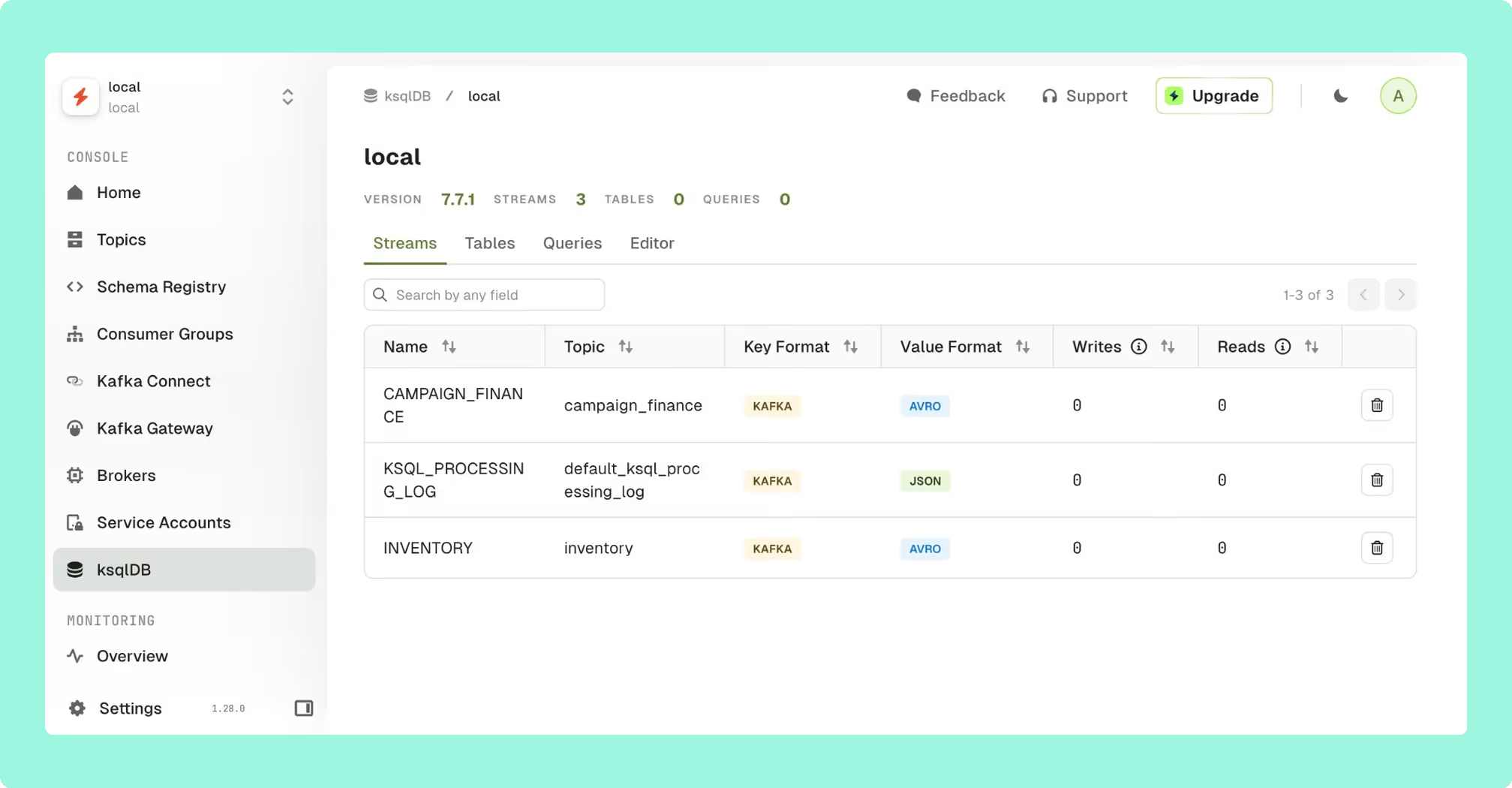
Conduktor Console Community is the most generous free tier on raw limits: up to 50 users and 3 clusters from a single instance, including SSO/LDAP authentication, which most competitors reserve for a paid tier. It also includes a full data explorer, message reprocessing, real-time metrics, consumer lag, and Kafka Streams support.
 Rank 6
 Conduktor Console Community
conduktor.io
75 out of 150 Total
- Free tier
- 3 clusters, 50 users
- Upgrade path
- $1,200/seat/yr, or $125/seat/month
- Open source
- No
- Cost as teams grow
- 5 out of 10
- Deployment footprint ×6 weight, this criterion counts 6 times toward the total
- 3 out of 10
- Support and maintenance ×6 weight, this criterion counts 6 times toward the total
- 7 out of 10
- Access control and audit
- 4 out of 10
- Multi-cluster reach
- 6 out of 10
Why these scores for Conduktor Console Community
- Cost as teams grow 5 out of 10
- The Conduktor vs Lenses comparison has it priced per seat, with Team Edition published at $1,200 per seat per year, and this page works that out as 100 users costing $120,000 a year, where ‘per-seat pricing scales against you as your team grows’.
- Deployment footprint 3 out of 10
- The Conduktor vs Kafdrop comparison has PostgreSQL 13+ as not optional, and this page adds that field-level encryption and policy enforcement need Conduktor Gateway, ‘a separate proxy that sits in front of your brokers’.
- Support and maintenance 7 out of 10
- Scored on the free tier, where a vendor under contract gives email support on Community, which the Conduktor vs Kafdrop comparison records, with continuous releases in the CMAK vs Conduktor comparison; business-hours support starts at Team.
- Access control and audit 4 out of 10
- Scored on the free tier, where SSO by OIDC or LDAP is included on this page and in the Conduktor vs Kafdrop comparison, but ‘Federated ownership models, RBAC, audit logs, data masking... require Team Edition’.
- Multi-cluster reach 6 out of 10
- Scored on the free tier, which this page gives as ‘3 clusters from a single instance’ on any distribution, as does the Conduktor vs Confluent Control Center comparison; unlimited clusters need Team Edition.
What's included free. SSO/LDAP auth, full Kafka operations, advanced data explorer, message reprocessing, Kafka Streams monitoring, and MCP/agentic workflow support.
What's not included free. Federated ownership models, RBAC, audit logs, data masking, and unlimited clusters require Team Edition.
The upgrade path. This is where Conduktor’s free tier stops being the deciding factor. Team Edition is priced per seat at $1,200/user/year, or $125/user/month billed monthly. For a team of 100 users, that’s $120,000/year at list price, nearly 9 times Kpow Enterprise’s cost at the same scale for 3 clusters. Conduktor’s free tier is genuinely strong, but the moment you need the governance features that free tier deliberately excludes, per-seat pricing scales against you as your team grows, which is the opposite of what you want from infrastructure tooling that more engineers will rely on over time.
The cost isn’t the only thing that changes as you outgrow Console. Some of Conduktor’s more advanced governance capabilities, including field-level encryption and policy enforcement, are not part of Console at all. They require Conduktor Gateway, a separate proxy that sits in front of your brokers. That’s additional infrastructure to deploy, operate, and secure, sitting directly in the path of your Kafka traffic, not just a licence upgrade. Outgrowing the free tier can mean taking on a new architectural dependency, not simply paying more for the tool you already run.
Compare Conduktor vs Kafbat UIConduktor vs LensesConduktor vs KadeckConduktor review
3. Lenses Community Edition
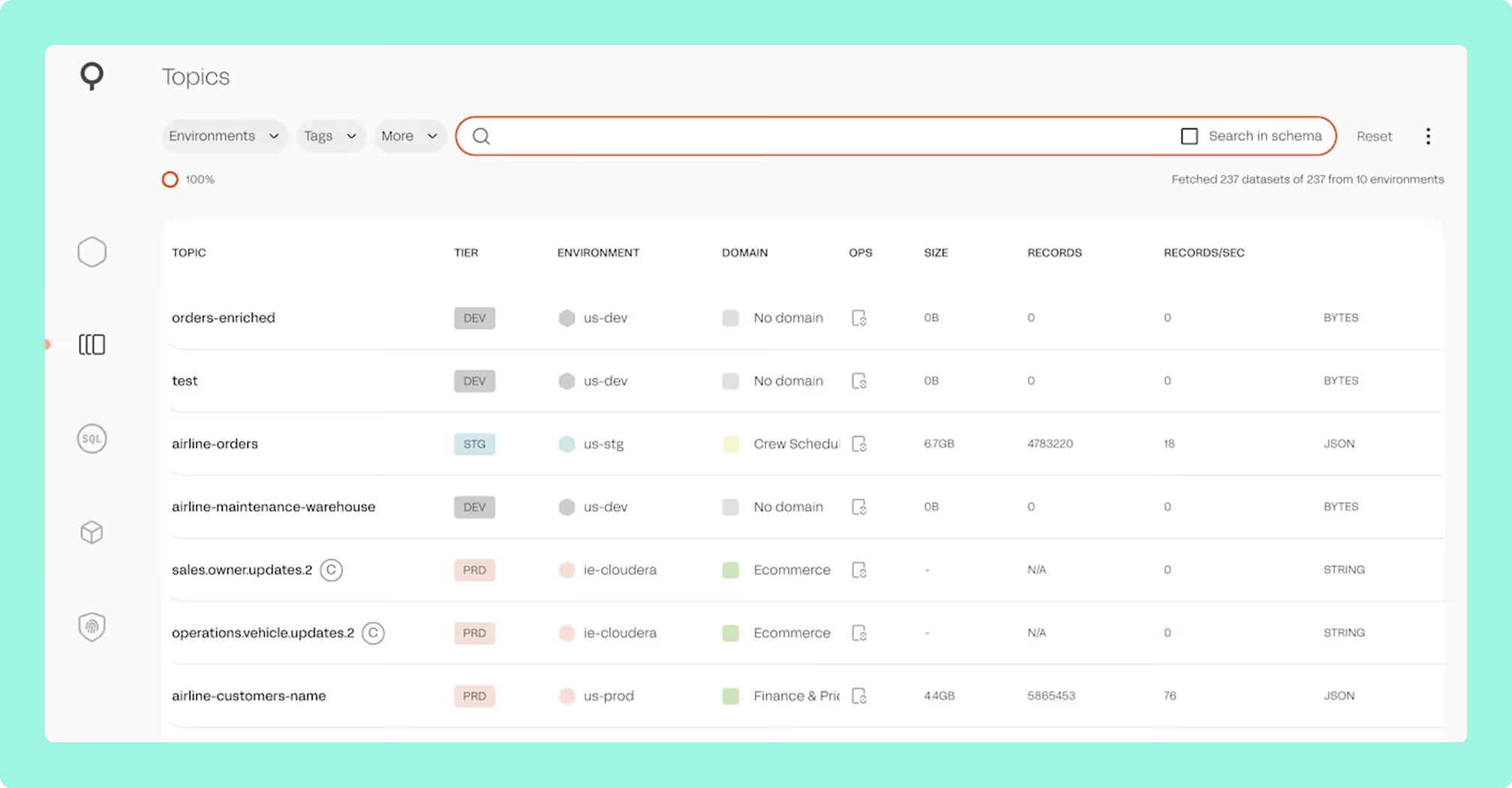
Lenses Community Edition covers 2 clusters and 5 users, the tightest limits of the three commercial free tiers here. Its standout free-tier feature is SQL Studio, letting you query topics with SQL directly, plus MCP server integration and a VS Code plugin.
 Rank 5
 Lenses Community Edition
lenses.io
60 out of 150 Total
- Free tier
- 2 clusters, 5 users
- Upgrade path
- From $4,000/yr (15 users, 1 cluster)
- Open source
- No
- Cost as teams grow
- 4 out of 10
- Deployment footprint ×6 weight, this criterion counts 6 times toward the total
- 2 out of 10
- Support and maintenance ×6 weight, this criterion counts 6 times toward the total
- 6 out of 10
- Access control and audit
- 3 out of 10
- Multi-cluster reach
- 5 out of 10
Why these scores for Lenses Community Edition
- Cost as teams grow 4 out of 10
- It is priced by capability with a user cap at each rung, Team from $4,000 a year for 15 users, and this page has Team as single-cluster, with multi-cluster ‘back to a sales conversation for Enterprise pricing’.
- Deployment footprint 2 out of 10
- HQ on PostgreSQL plus one Agent and one Agent database per cluster, on the free tier too (Kafdrop vs Lenses, Lenses vs Offset Explorer).
- Support and maintenance 6 out of 10
- Scored on the free tier, where it is vendor-maintained with a company to contact, which this page’s ‘The real decision’ section gives, but Team Support starts at Team in the AKHQ vs Lenses comparison and the review reports slow bug fixes; parent score 6.
- Access control and audit 3 out of 10
- Scored on the free tier, which is basic authentication only, where this page has ‘SSO requires Team Edition’ and the Kpow vs Lenses comparison has no RBAC on Community; the page’s ‘basic ACL management’ is Kafka ACLs, not access to the UI.
- Multi-cluster reach 5 out of 10
- Scored on the free tier, where the Conduktor vs Lenses comparison gives 2 clusters and one Agent per cluster, and this page calls them ‘the tightest limits of the three commercial free tiers’.
What's included free. Topic querying via SQL Studio, MCP integration, basic ACL management, and a free K2K (Kafka-to-Kafka) replication tier with limitations.
What's not included free. SSO requires Team Edition. Broker metrics are basic compared to Kpow or Conduktor’s free tiers.
The upgrade path. Lenses Team Edition starts at $4,000/year for up to 15 users, roughly $267/seat/year, the lowest nominal per-seat rate among the other per-seat-priced tools here (Conduktor and Kadeck). Kpow isn’t a fair comparison on a per-seat basis since it’s priced per cluster rather than per user, and works out cheaper than Lenses per seat once a cluster’s user count climbs past the high teens. The trade-off is that Lenses Team Edition is still single-cluster. If your team is small and stays on one cluster, this is a genuinely competitive upgrade path. If you need multi-cluster visibility as you scale, you’re back to a sales conversation for Enterprise pricing.
Compare Kpow vs Lenses.ioAKHQ vs LensesKafbat UI vs LensesConduktor vs LensesLenses review
4. Kadeck
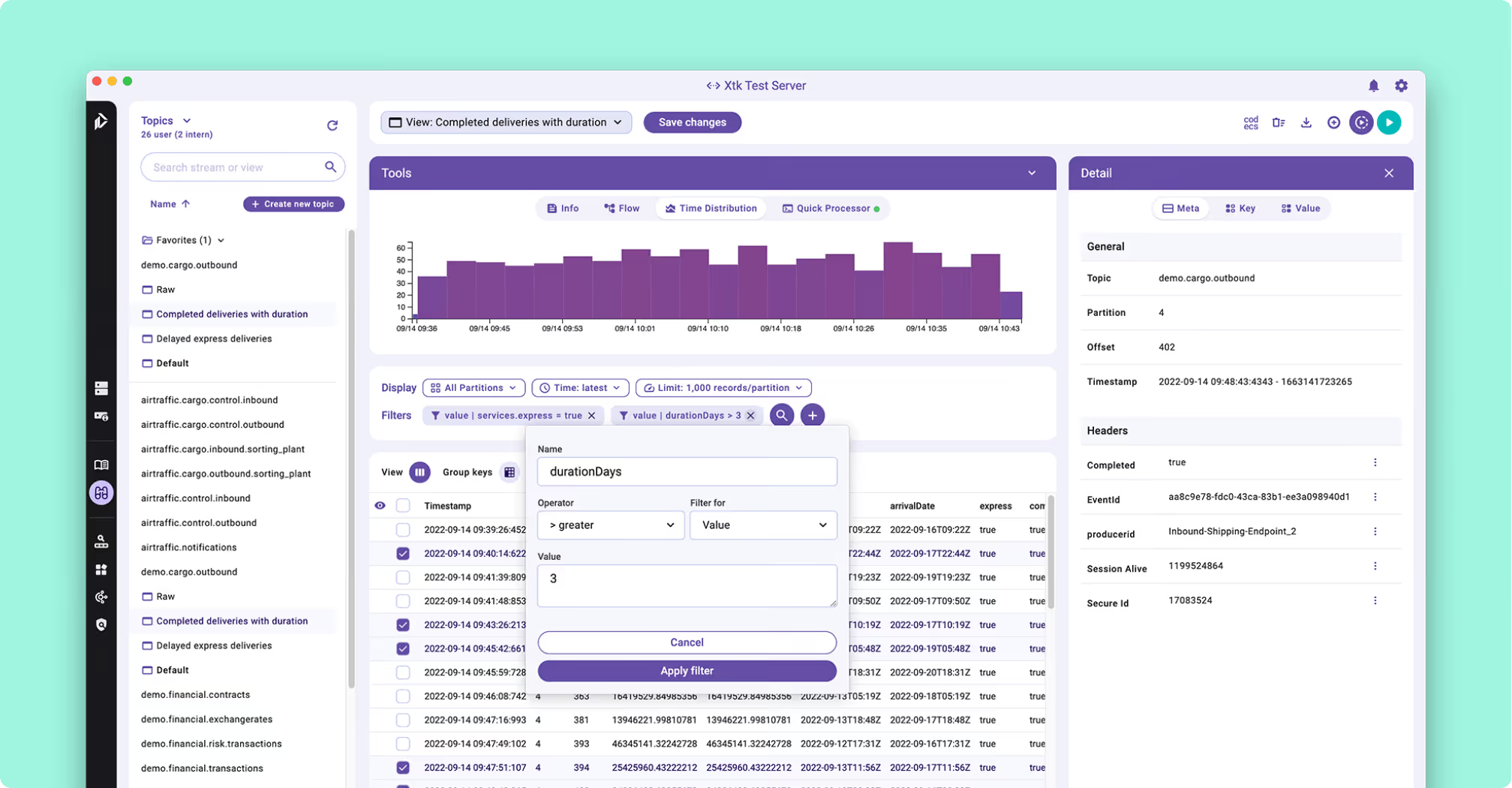
Kadeck offers two separate free products rather than one: Kadeck Teams Free, a web application capped at 5 users and 1 cluster, deployed as a container; and Kadeck Desktop Free, a native single-user desktop app also limited to 1 cluster. Both include a data catalogue, topic filtering and search, and consumer group management.
 Rank 4
 Kadeck
kadeck.com
70 out of 150 Total
- Free tier
- Teams Free: 1 cluster, 5 users
- Upgrade path
- From $32/user/month, 10-user minimum
- Open source
- No
- Cost as teams grow
- 4 out of 10
- Deployment footprint ×6 weight, this criterion counts 6 times toward the total
- 4 out of 10
- Support and maintenance ×6 weight, this criterion counts 6 times toward the total
- 6 out of 10
- Access control and audit
- 3 out of 10
- Multi-cluster reach
- 3 out of 10
Why these scores for Kadeck
- Cost as teams grow 4 out of 10
- It is per user per month on every paid tier, and this page has Enterprise at $32 per user per month with a 10-user minimum, so the entry price is $3,840 a year.
- Deployment footprint 4 out of 10
- Teams ships only as a Docker image, with no Helm chart, an external database on the Kubernetes path and an online licence check on every start (Kadeck vs Kafbat UI).
- Support and maintenance 6 out of 10
- Scored on the free tier, where it is vendor-maintained with a company to contact, which this page’s ‘The real decision’ section gives; the container does not start without the licence service, which the Confluent Control Center vs Kadeck comparison records; parent score 6.
- Access control and audit 3 out of 10
- Scored on Teams Free, where this page has ‘no RBAC or SSO in either free product’ and the Kadeck vs Redpanda Console comparison has free roles as admin and user only; LDAP, OpenID, masking and audit logs are Enterprise.
- Multi-cluster reach 3 out of 10
- Scored on the free tier, which is 1 cluster on Teams Free and on Desktop Free, and this page calls that ‘the tightest of any commercial tool in this comparison’. The Kpow vs Kadeck comparison has unlimited clusters only on paid tiers.
What's included free. Data catalogue, filter/search across topics, consumer group management, and basic collaboration features in the Teams edition.
What's not included free. No monitoring, no health/alerting features, and no RBAC or SSO in either free product. The single-cluster limit on both products is the tightest of any commercial tool in this comparison.
The upgrade path. Kadeck Enterprise starts at $32/user/month with a 10-user minimum, meaning the effective entry price is $3,840/year regardless of whether you need 10 seats. That adds RBAC, LDAP/OpenID SSO, audit logs, data masking, and alerting integrations, all features the free tier omits entirely. A separate Desktop Professional tier is available for individual developers at $19/user/month, an upgrade path aimed at solo use rather than team infrastructure.
Best for. Individual developers or very small teams doing ad hoc topic inspection, where the single-cluster limit isn’t a constraint and monitoring/alerting isn’t a requirement.
Compare Kpow vs KadeckAKHQ vs KadeckKadeck vs Kafbat UIConduktor vs KadeckKadeck review
5. AKHQ
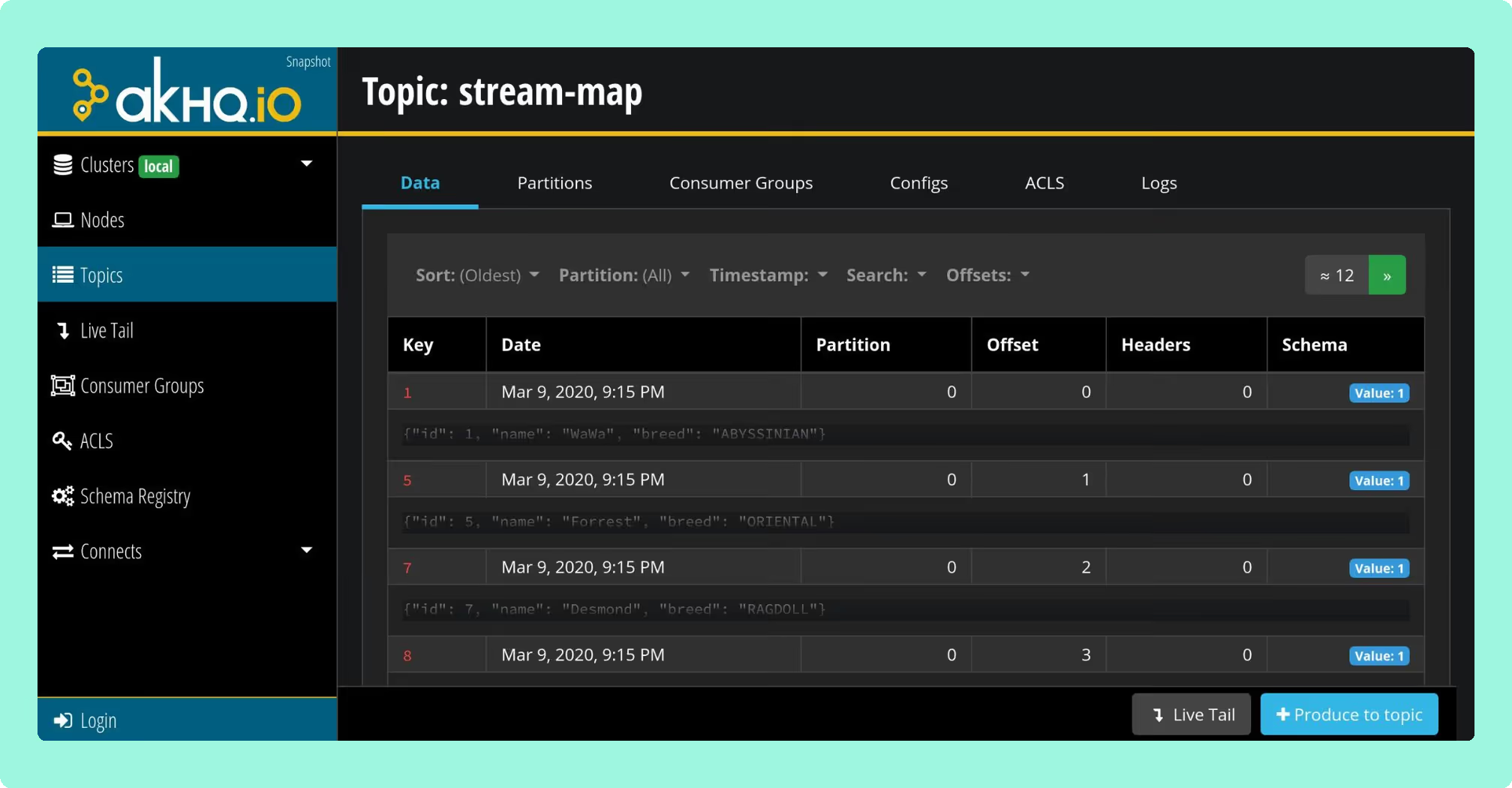
AKHQ is free and open source (Apache 2.0), with no cluster or user limits of any kind. Configuration is GitOps-first, defined in YAML and deployed via Helm, and it includes OIDC/OAuth2/LDAP/GitHub SSO and basic RBAC since v0.25. Enterprise users including Michelin and La Redoute have contributed features directly to the project, and multi-cluster deployments are documented in production at Michelin across on-premise and cloud clusters.
 Rank 3
 AKHQ
102 out of 150 Total
- Free tier
- Unlimited clusters and users
- Licence
- Apache 2.0
- Open source
- Yes
- Cost as teams grow
- 10 out of 10
- Deployment footprint ×6 weight, this criterion counts 6 times toward the total
- 8 out of 10
- Support and maintenance ×6 weight, this criterion counts 6 times toward the total
- 5 out of 10
- Access control and audit
- 5 out of 10
- Multi-cluster reach
- 9 out of 10
Why these scores for AKHQ
- Cost as teams grow 10 out of 10
- It is Apache 2.0, with the whole product free and no paid tier, and this page puts it as ‘no upgrade path and no license cost, ever’.
- Deployment footprint 8 out of 10
- One JVM container with no database or sidecar (AKHQ vs Kadeck); docked for the documented out-of-memory reports on high-throughput tailing (page, the AKHQ review).
- Support and maintenance 5 out of 10
- The AKHQ vs Kafbat UI comparison has three releases in eight months from one maintainer, the Kpow vs AKHQ comparison has GitHub issues and no SLA, and this page says ‘patching, upgrades, and incident response are your team’s responsibility’.
- Access control and audit 5 out of 10
- This page gives OIDC, OAuth2, LDAP and GitHub SSO with basic RBAC free, and the Kpow vs AKHQ comparison has masking as one global YAML filter per topic and audit as an opt-in Kafka topic with no view.
- Multi-cluster reach 9 out of 10
- ‘Multi-cluster management with no cap’ (page), documented in production at Michelin across on-premise and cloud clusters.
What's included. Multi-cluster management with no cap, Connect and Schema Registry integration, basic RBAC, and SSO options that Kpow and Lenses reserve for paid tiers.
What's missing. Data masking is global rather than role-aware: filters live in the application YAML, one per topic, and apply the same way to everyone who logs in. Audit logging is opt-in and writes to a Kafka topic the operator nominates, with no audit view in the product. For HIPAA, PCI-DSS, or GDPR work, the question is whether a global masking policy and a topic you build your own reader for satisfy the requirement. High-throughput topic tailing has documented out-of-memory failures even at large heap sizes, with no published fix as of the most recent releases. Michelin found the default authorisation model too coarse for multi-cluster, multi-team use and contributed a resource-level RBAC layer to address it, which is a reasonable proxy for how much RBAC work is left to the operator out of the box.
The open-source trade-off. There’s no vendor here, so there’s no upgrade path and no license cost, ever. What you’re taking on instead is the maintenance: patching, upgrades, and incident response are your team’s responsibility. AKHQ is one of the more mature options in this category, with a real production track record, but “free” for open-source tooling means free of license fees, not free of operational cost. See the full AKHQ review for a detailed breakdown of its limitations.
Staying patched. AKHQ has no CVE filed against its own code, and that is the wrong number to plan against. Release 0.28.0, cut on 6 August 2026, bundles 270 libraries and 18 of them carry a high or critical advisory. Sixteen were already public, with fixed versions already on Maven Central, on the day it shipped, and five are netty advisories Kpow had remediated three weeks earlier in 96.2: CVE-2026-44249, CVE-2026-45416, CVE-2026-45674, CVE-2026-47691 and CVE-2026-50010. The oldest has been open 108 days. That is exposure and remediation latency rather than a working attack, and every figure resolves against the published jar and nvd.nist.gov. Four releases in two years, and no security policy at any path GitHub reads.
Compare Kpow vs AKHQAKHQ vs Kafbat UIAKHQ vs LensesAKHQ vs KadeckAKHQ review
6. Kafbat UI
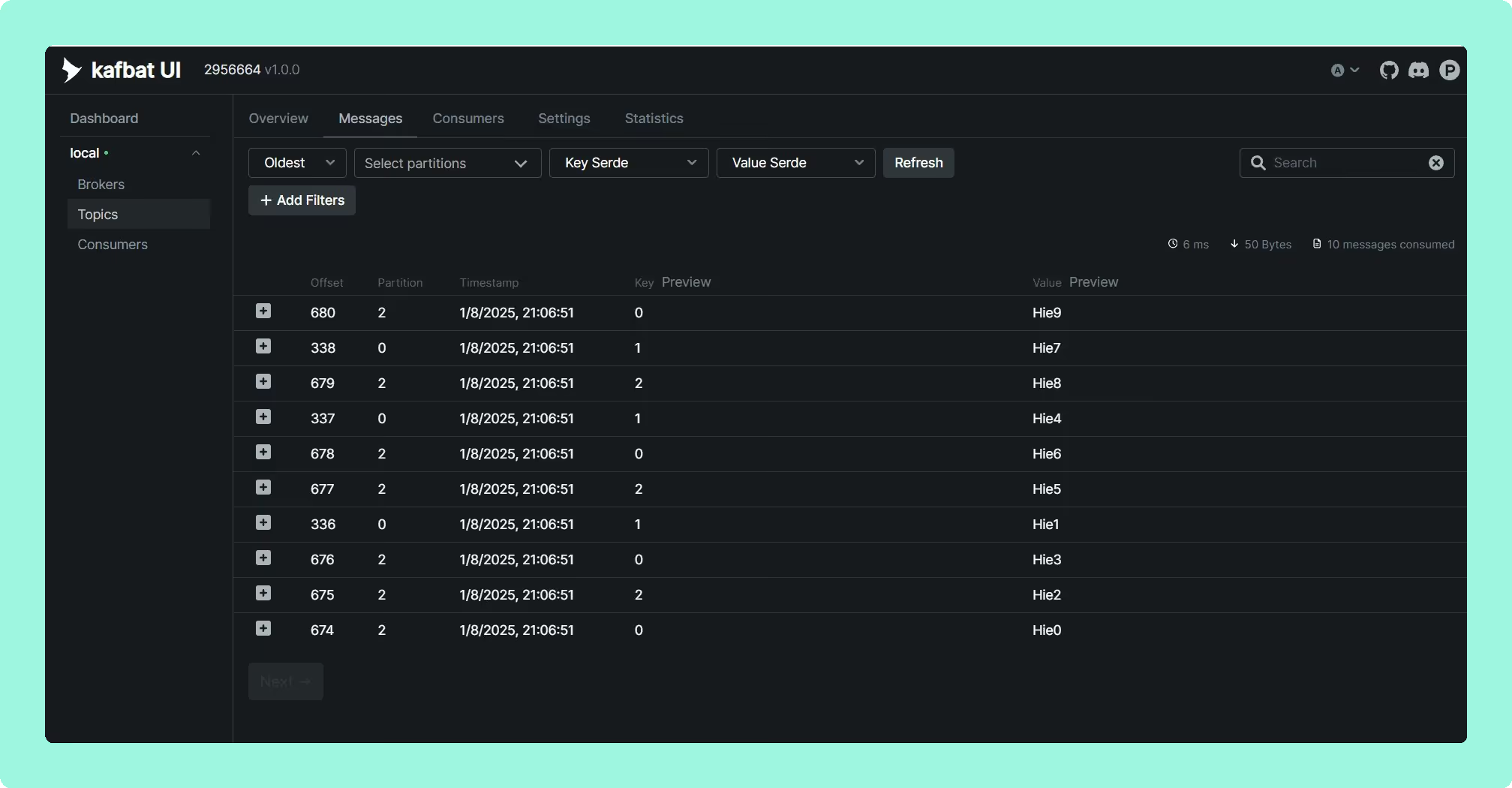
Kafbat UI is a fully open-source fork (Apache 2.0) of the abandoned provectus/kafka-ui project, with no user or cluster limits and no license required at any scale. It includes topic search with CEL filtering, schema registry management across several providers, Kafka Connect management, and a Prometheus-compatible metrics endpoint.
 Rank 2
 Kafbat UI
103 out of 150 Total
- Free tier
- Unlimited clusters and users
- Licence
- Apache 2.0
- Open source
- Yes
- Cost as teams grow
- 10 out of 10
- Deployment footprint ×6 weight, this criterion counts 6 times toward the total
- 8 out of 10
- Support and maintenance ×6 weight, this criterion counts 6 times toward the total
- 5 out of 10
- Access control and audit
- 6 out of 10
- Multi-cluster reach
- 9 out of 10
Why these scores for Kafbat UI
- Cost as teams grow 10 out of 10
- Apache 2.0, ‘no user or cluster limits and no license required at any scale’ (page).
- Deployment footprint 8 out of 10
- Stateless container with a published Helm chart (Kadeck vs Kafbat UI); a mounted volume is needed if the configuration wizard is used (Kpow vs Kafbat UI).
- Support and maintenance 5 out of 10
- The AKHQ vs Kafbat UI comparison has v1.5.0 in April 2026 with commits in August 2026, and the Kpow vs Kafbat UI comparison has GitHub issues or unpriced professional services, with no SLA.
- Access control and audit 6 out of 10
- The Kafbat UI vs Lenses comparison has roles per resource type and server-side REMOVE, REPLACE and MASK policies, with audit to a Kafka topic, but no per-role masking and no in-product audit view.
- Multi-cluster reach 9 out of 10
- ‘Unlimited clusters and users’ (page); adding a cluster is another config entry (Conduktor vs Kafbat UI); self-managed Kafka, MSK and other clouds.
What's included. Unlimited clusters and users, schema registry and Connect management, CEL-based message filtering, and Prometheus metrics.
What's missing. Data masking is server-side, with REMOVE, REPLACE and MASK policies set per cluster and driven by patterns, so coverage is only as complete as the patterns someone writes and keeps current, and it does not vary by role. RBAC is scoped per resource type, with no team or namespace ownership model.
The open-source trade-off. Kafbat publishes no support commitment and no SLA; support comes from professional services around the open-source product, quoted rather than listed and also sold through AWS Marketplace. The project it forked from was abandoned mid-development, which is the risk profile you’re accepting: an actively maintained fork today is not a guarantee of long-term commercial backing. Check release cadence on GitHub before committing to it for anything you’d call production infrastructure.
Staying patched. Kafbat UI released v1.5.0 in April 2026 and has not shipped since. In the 157 days since, at least 20 high or critical advisories have been published against libraries that release bundles, including the netty critical CVE-2026-75595. Only 150 of its 266 bundled jars resolved to a Maven coordinate, so that count is a floor and the state of the release itself is unmeasured. Kafbat does publish a security policy, which AKHQ and Kafdrop do not, and the one CVE filed against its own code, CVE-2025-49127, was already fixed in the release that preceded the advisory. Six releases in two years.
Compare Kpow vs Kafbat UIAKHQ vs Kafbat UIKafbat UI vs LensesKadeck vs Kafbat UIKafbat UI review
The real decision: open source vs. vendor-backed free
Before comparing feature checklists, decide which side of this line your organisation sits on, because it determines which half of this list you should even be considering.
Open source (AKHQ, Kafbat UI) means no license cost at any scale and no imposed user or cluster limits, in exchange for your team owning security patching, upgrade testing, and incident response, with no vendor SLA behind it when something breaks in production. For organisations with a software approval process that flags unvetted open-source dependencies as a risk, or that simply don’t have spare engineering capacity to maintain a third-party project, this is a real cost even though no invoice arrives for it.
Vendor-backed free tiers (Kpow, Conduktor, Lenses, Kadeck) are capped on users or clusters, but you get a supported product from a company you can contact, a defined release process, and, in Kpow’s case specifically, a proprietary (not open-source) tool that satisfies stricter procurement requirements without the cost of a full Enterprise licence.
Once you know which side of that line you’re on, the free-tier limits and upgrade costs above become the actual deciding factor.
Recommendation
If you want the most capable free tool without going open source: Kpow Community Edition. It’s the only option here with full data inspection through both a UI and API, production use included, and no open-source maintenance burden, at limits (3 clusters, 10 users) that fit most small and mid-size teams. It’s also the cheapest to scale out of: Kpow Enterprise’s per-cluster pricing means adding users doesn’t add cost, unlike Conduktor’s per-seat model.
If you need the most generous free-tier limits and don’t mind a per-seat upgrade cost later: Conduktor Console Community. 50 free users and SSO out of the box is hard to beat for a team that’s confident it won’t need RBAC or audit logs soon.
If you’re a solo developer or a very small team on one cluster: Kadeck Desktop or Teams Free, though be aware you’ll hit the single-cluster ceiling faster than anywhere else in this list.
If you’re fully committed to open source and can support it yourself: AKHQ, for its maturity and GitOps-native configuration, or Kafbat UI if you want the most actively developed option for a greenfield deployment.
FAQ
Is Kpow Community Edition really free for production use? Yes. Kpow Community Edition can be used in production, not just development or testing, for up to 3 clusters and 10 users, with the full data inspection UI and API included.
What’s the cheapest way to scale past a free Kafka UI tier? It depends on your team size. Kpow’s per-cluster Enterprise pricing is cheaper than Conduktor’s per-seat model once you have more than about 4 users per cluster ($4,500 per cluster against $1,200 per seat a year), since Conduktor’s cost scales with headcount and Kpow’s doesn’t. Lenses has the lowest nominal upgrade price ($4,000/year) but caps you at one cluster until you negotiate Enterprise pricing.
Is an open-source Kafka UI safe to run in production? AKHQ and Kafbat UI are both used in production by real organisations, but neither masks data by role (AKHQ’s masking is one global filter per topic, Kafbat UI’s covers whatever its patterns match) and neither comes with a vendor SLA. Without a vendor obligated to patch on a defined timeline, security fixes depend on volunteer maintainer availability: the original provectus/kafka-ui project carried an RCE vulnerability (CVE-2023-52251) that took roughly 4.5 months to patch after disclosure. If you have compliance requirements around PII or need someone to call during an incident, that’s a meaningful gap regardless of feature parity elsewhere.
Which free Kafka UI has the highest user limit? Conduktor Console Community, at 50 users, well above Kpow’s 10 or Lenses’ 5. AKHQ and Kafbat UI have no user limit at all, since they’re open source.
Do any of these free tiers include SSO? Conduktor Console Community includes SSO/LDAP for free. AKHQ also includes OIDC/OAuth2/LDAP/GitHub SSO free. Kpow Community Edition has SSO/SAML coming soon. Lenses Community Edition does not include SSO in its free tier.
For the rest of the tooling landscape, see the complete guide to Kafka.
How these tools were scored
Every option is scored from 0 to 10 on each criterion, from the evidence and sources this page cites, and the reason for each score is on its card. The criteria are weighted: Cost as teams grow counts once, Deployment footprint counts six times, Support and maintenance counts six times, Access control and audit counts once and Multi-cluster reach counts once, for a total out of 150. Deployment footprint and Support and maintenance count six times here. A free tool is only free if somebody can run it and somebody will still be shipping it next year, and those two are the recurring costs; the rest are settled once. Free-tier breadth, access control and audit, and multi-cluster reach each count once, so a reader who thinks the size of the free tier should decide this page can recompute every total from the bars on the cards. This page is published by Factor House, which makes Kpow Community Edition. Every option is scored on the same rubric and the same sources: Kpow Community Edition's per-criterion scores are set the same way as every other option's and are not adjusted, and the weights apply to every option alike. Kpow Community Edition ranks first on its total of 106 out of 150. The other options follow by total. Conduktor Console Community is listed last whatever its total; on its total of 75 it would place fourth.