At a glance
Kadeck scores 53 out of 90 on this page's five weighted criteria: it takes its best score on Multi-cluster reach (9 out of 10) and its lowest on Cost as teams grow (4 out of 10). The rubric is weighted: Support and maintenance counts three times, Access control and audit counts three times, and Cost as teams grow, Deployment footprint and Multi-cluster reach count once. Licence: $38,400/yr at 100 users ($32/user/mo). The other options, in the order this page lists them: Kpow 82, Kafbat UI 60, AKHQ 57, each out of 90. Kpow takes its best score on Access control and audit (10 out of 10) and its lowest on Cost as teams grow (7 out of 10). Licence: $13,500/yr for 3 clusters, 100 users included.
Key takeaways
- Kadeck is a commercial Kafka management tool from xeotek, available as a native desktop application and a Docker-based web/teams edition supporting Apache Kafka, Redpanda, and Amazon Kinesis.
- Reddit practitioners consistently recommend it for local development, topic inspection, and debugging, especially on managed clusters like Amazon MSK.
- The JavaScript QuickProcessor enables lightweight payload transformation and Dead Letter Queue recovery workflows without writing a full streaming application.
- The free tier caps message display at 100 records and limits cluster connections to one; teams managing separate Dev, Test, Stage, and Prod clusters will hit that ceiling quickly.
- The web edition runs exclusively in Docker with an online license check on every container start; teams in air-gapped environments need a separate offline activation process before deployment.
- For teams evaluating commercially supported alternatives with advanced RBAC and enterprise deployment options, Kpow from Factor House is worth examining alongside Kadeck.
For regulated industries and enterprise teams where security and governance decide the choice, Factor House recommends Kpow. Kpow Enterprise documents role-based access control at global and resource level with multi-tenancy isolation, data masking policies for PII that are enforced server-side, SSO through Okta, Azure AD, KeyCloak and any LDAP, SAML or OAuth2 provider, and a full audit log of every action across every cluster. It runs as a single container in your own environment, either self-hosted or inside an air-gapped network, so no data leaves that environment.
Kpow live demo
Test the operational trade-offs in a live Kafka UI
A Kadeck review is only the start of an evaluation. Open Kpow and try the shared workflows your platform team will need every day.
Explore data inspection, consumer operations, and governed access in one environment.
Try the Kpow demoWhat is Kadeck?
Kadeck is a Kafka management and data exploration tool built by xeotek, a German software vendor. It comes in two editions: a desktop application for Linux, macOS, and Windows, and a web/teams edition distributed as a Docker image. Both connect to Apache Kafka clusters and provide a graphical interface for browsing topics, inspecting message payloads, managing consumer groups, and working with ACLs and Schema Registry configurations. Redpanda and Amazon Kinesis are supported alongside Apache Kafka.
The product is commercially licensed and is not open source. [Emil Koutanov, DZone, March 2020] Registration on the xeotek website is required before using the web edition in any substantive capacity.
Kadeck was originally started in 2019 as a solo project by its founder, Benjamin Buick. Buick has noted in Reddit discussions that “hardly any of my original code is left and the team has grown considerably” since then. [Benjamin Buick, r/apachekafka] The tool has maintained an active presence in the Apache Kafka subreddit, where Buick has directly engaged with practitioners to promote and clarify the product’s capabilities.
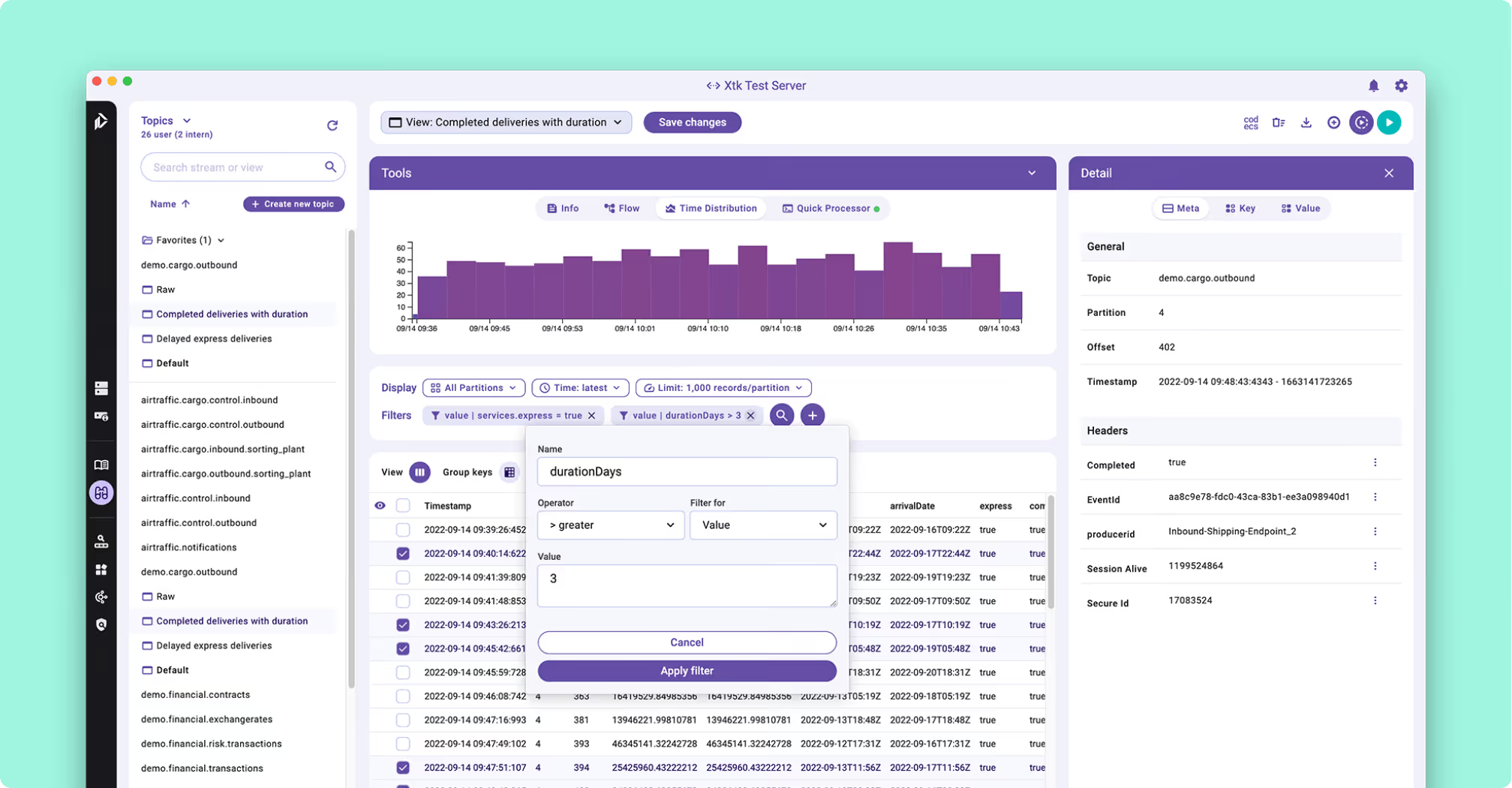
Kadeck review
Functionalities
Kadeck’s core strength is data exploration. It decodes Avro payloads via Confluent Schema Registry and presents structured records in a columnar layout, which is a practical improvement over reading raw bytes at the command line. A JavaScript-based Quick Processor lets users derive calculated fields from record values without writing a full streaming application. [Markus Günther, personal blog, mguenther.net, January 2021]
Reddit practitioners echo this assessment. In a thread on Kafka troubleshooting, user usualdev described their workflow as: “To check messages, topics and config I use Kadeck. There is another tool called Kafka Tool to check topics and messages as well. Both of these are cross platform.” [usualdev, r/apachekafka] In a thread about Kafka tools for AWS managed Kafka, user lite-beer-1620 noted: “The Kadeck GUI management & monitoring tools for Kafka and MKS are also really good (and free).” [lite-beer-1620, r/aws]
Dead Letter Queue reprocessing. One well-documented use case is recovering malformed payloads from a Dead Letter Queue (DLQ) topic. Buick described the workflow in detail on Reddit: consumer applications write unprocessable records to a designated DLQ topic with an error attribute attached; developers then use Kadeck’s Data Browser to isolate the failed records; the JavaScript QuickProcessor applies inline payload transformations; corrected records are previewed and re-ingested into the original source topic; and Kadeck’s “Delete up to here” command purges the processed DLQ entries to prevent duplicate processing. [Benjamin Buick, r/apachekafka] This is a practical alternative to writing a one-off consumer-producer script for each recovery incident, though it requires a paid plan to inspect more than 100 records per query.
Schema documentation. Kadeck includes an external metadata layer that lets teams document schema fields without modifying the Schema Registry or bumping a schema version. Buick described the capability in a thread on updating field documentation: “We have just recently added topic documentation capabilities to Kadeck.” [Benjamin Buick, r/apachekafka] This is useful for multi-team environments where consistent topic naming and field-level context need to be maintained outside the contract enforcement layer.
AI-assisted tuning. Kadeck 5.x introduced an AI Health Assistant for monitoring and cluster optimization. Independent practitioner assessment of this feature is limited: the most substantial commentary is a single Reddit reply describing it as “a game-changer for Kafka monitoring.” [Mariobmf, r/apachekafka] No independent technical review of the feature has been located.
Several functional limits are documented by independent practitioners. The free tier displays only 100 records per query. [Anonymous G2 reviewer, g2.com, estimated 2022-2024] The export function is inconsistent between formats: CSV exports respect the column filters applied in the record table, but JSON exports do not, which means the two formats carry different data from the same view. [Markus Günther, ibid.] Records corrected in the Data Browser can be re-ingested into the source topic, as the Dead Letter Queue workflow above describes, but there is no continuous path that writes derived data out to a second topic. Kafka Streams and ksqlDB are not integrated, a limitation Günther described as worth noting for teams with processing-oriented workflows. [Markus Günther, ibid.]
There is also no built-in deduplication filter to restrict the view to the newest record per key. [Markus Günther, ibid.]
Deployment and operations
The web and teams edition ships exclusively as a Docker image. There are no RPM packages, native binaries, or Helm charts for server deployment. [Guy Shilo, idata.co.il, September 2020] For production Kubernetes deployments, xeotek’s own documentation recommends using a persistent external database.
Every container start triggers an online license validation call. For environments without outbound internet access, xeotek provides an offline activation path through the admin settings panel. [Guy Shilo, ibid.] Automated or ephemeral deployments (for example, spinning up Kadeck in a CI/CD pipeline) require handling a challenge-response license activation via xeotek’s Public API before the container becomes usable.
The desktop edition does not require Docker. It installs natively on Debian/Ubuntu, macOS, and Windows and requires a Java runtime. An independent installation guide published in March 2024 did not report significant issues with the process. [kifarunix.com, March 2024] Apple Silicon and ARM support were added for both editions in 2024.
Using the teams edition requires registering on the xeotek website to receive a team ID and secret key before the application is fully functional. [Guy Shilo, ibid.]
Scale and query performance
Because Apache Kafka does not natively index message payloads, searching for specific records requires sequential partition scans. For topics in the hundreds of gigabytes, this scanning pattern can cause significant performance issues in any desktop-class GUI tool.
A data engineer on r/dataengineering described the limitation directly: their team had Kadeck set up by the cluster hosting team, but found it unusable for large-scale ad-hoc queries, eventually routing high-volume topic data to a parallelized layer instead. [Efxod, r/dataengineering] This is not a Kadeck-specific problem. Sequential partition scanning will degrade any UI-based tool at sufficient scale, but it is worth accounting for when evaluating Kadeck for production debugging scenarios involving high-throughput topics.
For large-scale analytical queries, the practical path is to bypass GUI visualizers entirely and use parallelized engines such as PySpark, Databricks, or external data lakes rather than expect any desktop-oriented tool to handle the load.
Access control and security
Kadeck Teams includes role- and group-based access control with LDAP and OpenID Connect integration, data masking through Data Protection Policies, and audit logs. All four are Enterprise-tier features. The free tier of the teams edition carries two roles, admin and user, with namespace support for topics, ACLs, and consumer groups, and no LDAP, no OpenID Connect, no data masking and no audit log. [Xeotek edition comparison, kadeck.com/pricing]
One Capterra reviewer described the group management as working well for separating project teams, noting that it prevented users from accessing data outside their scope. [Anonymous Product Owner, Capterra, September 2021] No independent practitioner feedback on SSO reliability, RBAC granularity, or the completeness of audit logs was found in any source reviewed during research.
Connection limits and certificate management
The free tier of the teams edition is limited to a single active cluster connection. Multi-broker clusters are supported within that single connection, but connecting to multiple clusters (for example, separate Dev, Test, Stage, and Prod environments) requires a paid plan.
This surfaced directly in a Reddit thread on Kafka visualizers. User Jalebibabyded described looking for an open-source alternative because “we have multiple brokers from which the data needs to be fetched and Kadeck freemium is a limiting there.” Buick clarified in the same thread: “We removed the broker restriction a while ago. Kadeck now supports clusters with multiple brokers even in the free version. However, the number of cluster connections is limited to one cluster (connection).” Jalebibabyded confirmed that was the sticking point: “Yes, that was the problem. Because I was looking at connecting to multiple clusters.” [Jalebibabyded and Benjamin Buick, r/dataengineering]
Certificate management carries a similar constraint. In a recent thread on Kafka UI tools, user Quirky-Design3856 noted: “Me using Kadeck, though free version only offer one cert at a time, its UX is perfect.” [Quirky-Design3856, r/apachekafka] For teams running multiple TLS-secured clusters with separate certificate authorities, this means either purchasing a commercial license or manually rotating credentials on each connection.
User interface
The UI receives consistent praise from the available review sample. Reviewers describe it as clean, modern, and a meaningful step up from CLI-based Kafka tooling. [David W., Solution Architect (IT Services), Capterra, August 2021; Christine U., SAP Consultant (Insurance), Capterra, August 2021; anonymous G2 reviewer, g2.com] One reviewer noted minor usability problems in earlier versions that the support team addressed quickly. [David W., ibid.] Another described it as making working with data from multiple sources straightforward, and cited the team features as time-saving in day-to-day work. [Christine U., ibid.]
Reddit commentary reinforces the UX narrative. The phrase “its UX is perfect” from Quirky-Design3856, even in the context of raising a limitation, reflects the general tone of practitioner commentary on the interface. [Quirky-Design3856, r/apachekafka]
No independent practitioner assessments of the Kadeck 4.x or 5.x UI redesign were found within the last 36 months. All available feedback dates from 2021 or earlier.
Ecosystem
Kadeck supports Confluent Schema Registry for Avro payload decoding. Protocol Buffer support via Schema Registry was added in release 3.2.3. [Xeotek release notes, support.xeotek.com] Kafka Connect management and ACL configuration are included. Amazon Kinesis is listed as a supported data source alongside Apache Kafka and Redpanda.
Apache Pulsar is not supported, noted explicitly as a gap by at least one reviewer. [David W., Solution Architect, Capterra, August 2021] No independent practitioner feedback on ksqlDB, Apache Flink, Confluent Cloud, Amazon MSK, Aiven, or AWS Glue Schema Registry was found in any source reviewed.
Kadeck appears in the Confluent Community’s reference list of third-party GUI tools for Apache Kafka but receives no user discussion in that thread. [Confluent Community forum, forum.confluent.io]
Customer support
All three Capterra reviewers mentioned support in positive terms. One described receiving answers within minutes to questions that extended beyond Kadeck’s direct scope into general Kafka troubleshooting, and encouraged the team to “keep it up.” [Anonymous Product Owner, Capterra, September 2021] Another noted the support team reacted quickly. [David W., Capterra, August 2021] xeotek has documented conducting structured sessions with users to gather product feedback, and states that critical input from those sessions was incorporated into the Kadeck 4.0 redesign. [Xeotek blog, Kadeck.com]
The confidence limit here is the review sample itself: three reviews, all from 2021, all 5-star. No complaints about support quality appear in any source reviewed, but no commentary on enterprise tier support, SLA differences, or documentation quality was found either.
Best for
Kadeck suits small-to-medium development and QA teams that want a polished graphical interface for data exploration, debugging, and lightweight governance without writing custom scripts or living in the CLI. The desktop edition is a reasonable choice for individual developers on macOS, Windows, or Linux who need a native Kafka browser without a Docker dependency. The teams edition suits environments where a Docker deployment model is already established and group-based access control at the namespace level is sufficient.
Reddit community feedback broadly confirms this positioning: practitioners reach for Kadeck when they want a clean, accessible interface for inspecting topics and debugging consumer behaviour, particularly on managed clusters like Amazon MSK where CLI access is more cumbersome.
It is a less natural fit for teams requiring an open-source-licensed tool, for air-gapped environments that want a simpler deployment model without online license activation, for any workflow that requires streaming derived data back into Kafka topics, for teams managing multiple clusters on the free tier, or for production debugging scenarios where you need to inspect more than 100 records without a paid plan. Teams in that position usually end up choosing between free tiers, which the best free Kafka UI tools comparison scores side by side.
Kadeck pricing
The following describes what is confirmed in independent and vendor sources.
Pricing tiers
Kadeck Teams has a free tier: up to five users on one cluster connection, with message display capped at 100 records per query. The free tier carries namespace support and two roles, admin and user. LDAP, OpenID Connect, data masking and audit logs are Enterprise features, not free ones. Beyond five users, or for teams that need to remove the 100-record display cap, commercial paid tiers apply. Paid tier pricing is user-based, starting at $25 USD per user per month for Professional, and $32 USD per user per month on their flagship Enterprise plan, which carries a ten-user minimum, so the smallest Enterprise bill is $3,840 per year however few people need a seat. For a team of 100 engineers, the flagship plan would cost $3,200 USD per month, equivalent to $38,400 per year.
Free trial
A free tier is available for the teams edition within the five-user and 100-record limits described above. Registration on the xeotek website is required to obtain a team ID and access credentials before using the tool.
Kadeck competitors and alternatives
The Kafka management tooling market includes a mix of open-source projects and commercial products. Open-source options typically carry strong community familiarity but require self-managed deployment and tend to offer limited access control out of the box. Commercial tools trade some flexibility for stronger governance features, vendor support, and defined roadmaps. A wider field is scored in the comparison of the top Kafka UI tools for engineering teams.
Reddit discussions reflect this trade-off clearly. In a thread on UI tools for AWS-managed Kafka, developer JohnPreston72 noted a preference for commercial tooling once open-source options are outgrown: “I tried and used nearly all the open source ones. Winner for me was AKHQ before trying Conduktor. I now use Conduktor for work and well worth the money.” In the same thread, armanduco_ expressed satisfaction with AKHQ for lighter requirements: “In my company we use AKHQ, it’s simple but enough to retrieve some important information.” [JohnPreston72 and armanduco_, r/apachekafka]
| Rank | Tool | Best for | Type | Key functionalities | Deployment and ops | Access control | User interface | Pricing |
|---|---|---|---|---|---|---|---|---|
| 1 | Kpow (Factor House) | Enterprise teams needing advanced RBAC, strong performance at scale, and an accessible UI | Commercial | Topic management, consumer groups, Schema Registry, Kafka Connect, ACLs, RBAC, audit log | Stateless; Docker or Kubernetes; straightforward ops | Advanced RBAC; SSO; trusted by HPE | WCAG 2.1 AA compliant, with a published VPAT | Per-cluster pricing; Community Edition free for individuals and organisations |
| 2 | Kafbat UI | Teams wanting an actively maintained open-source web UI | OSS | Similar scope to AKHQ; a maintained fork of the Provectus kafka-ui project, v1.5.0 in April 2026 | Docker or JVM | Basic auth/OIDC | Web UI, similar to AKHQ | Free (Apache 2.0) |
| 3 | AKHQ | Teams wanting a self-hosted open-source web UI | OSS | Topic management, Schema Registry, Kafka Connect, consumer group management, multi-cluster support | Docker or JVM; no managed hosting | Basic LDAP/OIDC auth; limited role granularity | Functional web UI | Free (Apache 2.0) |
| 4 | Kadeck | Dev/QA teams wanting a polished UI; individual desktop users | Commercial | Topic browsing, payload decoding (Avro, Protobuf), consumer group management, Kafka Connect, ACLs, Schema Registry, Amazon Kinesis, JavaScript QuickProcessor | Desktop (native) or Docker for web/teams; online license check on every start | RBAC with LDAP and OIDC, data masking and audit logs, all on Enterprise; free tier has admin and user roles only | Described as clean and modern; praised for UX by practitioners | Free: 5 users, 100 records, 1 cluster; Professional $25/user/mo, Enterprise $32/user/mo with a 10-user minimum |
The cards below carry two kinds of cost figure. The licence prices are the vendors’ own published numbers. The total-cost figures are this page’s estimate rather than anybody’s quote: they add the engineer time each tool takes to run at this size, costed at $120 an hour, to the licence, for the case this page already uses, a team of 100 engineers across three clusters. A $0 licence is not a $0 tool at that size, because an audit trail that lives in a Kafka topic still needs somebody to build and run the pipeline that makes it readable.
For a broader comparison of Kafka management tools, see the Kafka management tools guide.
 Rank 1
 Kpow
82 out of 90 Total
Try Kpow in the live demo No signup needed.
- Licence
- $13,500/yr for 3 clusters, 100 users included
- Total cost, modelled
- About $16,380/yr
- Free tier
- Community Edition: 3 clusters, 10 users
- Cost as teams grow
- 7 out of 10
- Deployment footprint
- 9 out of 10
- Support and maintenance ×3 weight, this criterion counts 3 times toward the total
- 9 out of 10
- Access control and audit ×3 weight, this criterion counts 3 times toward the total
- 10 out of 10
- Multi-cluster reach
- 9 out of 10
Why these scores for Kpow
- Cost as teams grow 7 out of 10
- Per cluster and published, Enterprise from $4,500 with 100 users included (the Kpow pricing page), so an engineer joining does not move the bill; docked because Community Edition is 3 clusters and 10 users and holds back RBAC, masking and audit. The Apache 2.0 tools here score 10. The total-cost figure on the card is this page’s own editorial estimate and does not move this score.
- Deployment footprint 9 out of 10
- One stateless container configured by environment variables, with no external database, sidecar or persistent volume, storing telemetry in internal Kafka topics on the cluster it monitors, and it starts air-gapped (Kpow vs Kadeck). Kafdrop is named lighter elsewhere on the site.
- Support and maintenance 9 out of 10
- An Enterprise support SLA and priority support with releases shipping continuously (the Kpow features page, Kpow vs CMAK).
- Access control and audit 10 out of 10
- RBAC, SSO by SAML, LDAP and OpenID, server-side masking applied by role, and an audit log of user actions readable in the product (Kpow vs AKHQ, the Kpow features page). All Enterprise.
- Multi-cluster reach 9 out of 10
- Up to 12 clusters per instance across self-managed Kafka, MSK, Confluent, Redpanda, Aiven and Instaclustr (the Kpow multi-cluster page); the per-instance cap of 12 keeps it level with the uncapped tools rather than above them.
What it costs a year. Enterprise is $4,500 per cluster per year with 100 users included, so three clusters and all 100 engineers are $13,500. On this page’s estimate, add about 2 engineer-hours a month to run one stateless container with no external database, no sidecar and no volume, with support under an SLA, at $120 an hour, and the running total is about $16,380 a year. The 101st engineer does not change it; a fourth cluster does.
Best for. Teams whose headcount is growing faster than their cluster count, and who need access control, masking and an audit trail without a per-seat bill or a licence call at startup.
Where it beats Kadeck. It changes the unit the bill is counted in. Kadeck charges per user per month and puts governance on a tier with a ten-user minimum, so a team of four that needs RBAC pays $3,840 a year and 100 engineers pay $38,400. Kpow is priced per cluster from $4,500 a year with 100 users included, so the only thing that moves the bill is another cluster. It is also one stateless container with no external database against Kadeck’s Docker image plus a persistent database on the documented Kubernetes path, and nothing is called at start, so an air-gapped or ephemeral CI deployment needs no challenge-and-response activation. Masking is applied by role, and the audit log comes with the same per-cluster licence rather than sitting behind a ten-seat Enterprise minimum.
Where it falls short. It is not free past Community Edition, which covers 3 clusters and 10 users and leaves out RBAC, data masking, SSO and the audit log, where AKHQ and Kafbat UI cost nothing to license at any size. One instance reaches up to 12 clusters before you deploy another, and it is not open source. It is not a proxy either, so no Factor House component sits between producers and brokers, and it leaves Kadeck’s inline record transformation and re-ingest to Kadeck, aiming at the read side instead.
Staying patched. Kpow’s release notes name the CVEs each release remediates, and the 96.4 image built on 5 August 2026 bundles 311 dependencies. What a licence buys here is not a different deployment model, because Kpow is self-hosted too. It is a company contracted to ship the fix. Every dependency figure on this page was read on 24 September 2026 from the published artefacts and from nvd.nist.gov.
 Rank 2
 Kafbat UI
60 out of 90 Total
- Licence
- $0, Apache 2.0, no seat or cluster cap
- Total cost, modelled
- About $8,640/yr
- Free tier
- Whole product, nothing held back
- Cost as teams grow
- 10 out of 10
- Deployment footprint
- 8 out of 10
- Support and maintenance ×3 weight, this criterion counts 3 times toward the total
- 5 out of 10
- Access control and audit ×3 weight, this criterion counts 3 times toward the total
- 6 out of 10
- Multi-cluster reach
- 9 out of 10
Why these scores for Kafbat UI
- Cost as teams grow 10 out of 10
- Apache 2.0 with no seat or cluster cap and nothing held back (Kadeck vs Kafbat UI). The total-cost figure on the card is this page’s own editorial estimate of engineer time and does not move this score.
- Deployment footprint 8 out of 10
- A stateless container with a published Helm chart (Kadeck vs Kafbat UI), docked because adding a cluster from the configuration wizard wants a mounted volume and dynamic config fails on Kubernetes (Kafbat UI review).
- Support and maintenance 5 out of 10
- The AKHQ vs Kafbat UI comparison records v1.5.0 in April 2026 with commits still landing in August 2026 while the Kpow vs Kafbat UI comparison has paid help as unpriced professional services with no SLA.
- Access control and audit 6 out of 10
- Roles scoped to eight resource types across six identity provider types, with server-side REMOVE, REPLACE and MASK policies; no per-role masking override and no audit view in the product (Kafbat UI review).
- Multi-cluster reach 9 out of 10
- Another cluster is another configuration entry with no cap (Conduktor vs Kafbat UI), covering self-managed Kafka, MSK, Event Hubs and Google Cloud with cloud IAM.
What it costs a year. The licence is $0. On this page’s estimate, running it across three clusters is about 6 engineer-hours a month, covering the published Helm chart that is good but a cluster-add from the UI that fails on Kubernetes, and making its audit trail readable, because the audit level defaults to ALTER_ONLY and there is no audit view in the product. At $120 an hour that is about $8,640 a year, which is this page’s figure and not a price anyone charges.
Best for. Teams that want a current open-source UI with a finer permission model than AKHQ and a more modern interface, at no licence cost.
Where it beats Kadeck. It is the closest free tier to what Kadeck charges for. Permissions are scoped to eight resource types, masking runs server-side with REMOVE, REPLACE and MASK policies set per cluster, and six identity provider types are supported, all in the Apache 2.0 build, where Kadeck’s free roles are admin and user and its LDAP and OpenID Connect sit on Enterprise. There is no seat count, no cluster cap and no licence service to reach at start.
Where it falls short. Masking still does not vary by role, the audit level defaults to ALTER_ONLY so reads go unrecorded, and there is no audit view in the product. Adding clusters from the UI fails on Kubernetes, paid help is professional services with no published price or SLA, and it reads Kafka only, so the Amazon Kinesis and dead letter recovery workflows on this page are not in it.
Staying patched. Kafbat UI released v1.5.0 in April 2026 and has not shipped since. In the 157 days since, at least 20 high or critical advisories have been published against libraries that release bundles, including the netty critical CVE-2026-75595. Only 150 of its 266 bundled jars resolved to a Maven coordinate, so that count is a floor and the state of the release itself is unmeasured. Kafbat does publish a security policy, which AKHQ and Kafdrop do not, and the one CVE filed against its own code, CVE-2025-49127, was already fixed in the release that preceded the advisory. Six releases in two years.
Compare Kpow vs Kafbat UIKadeck vs Kafbat UIAKHQ vs Kafbat UIKafbat UI review
 Rank 3
 AKHQ
57 out of 90 Total
- Licence
- $0, Apache 2.0, no paid edition
- Total cost, modelled
- About $8,640/yr
- Free tier
- Whole product, nothing held back
- Cost as teams grow
- 10 out of 10
- Deployment footprint
- 8 out of 10
- Support and maintenance ×3 weight, this criterion counts 3 times toward the total
- 5 out of 10
- Access control and audit ×3 weight, this criterion counts 3 times toward the total
- 5 out of 10
- Multi-cluster reach
- 9 out of 10
Why these scores for AKHQ
- Cost as teams grow 10 out of 10
- Apache 2.0 with the whole product free and no paid tier, so an engineer or a cluster joining changes nothing on the bill (Kpow vs AKHQ). The total-cost figure on the card is this page’s own editorial estimate of engineer time and does not move this score.
- Deployment footprint 8 out of 10
- One JVM container with no database or sidecar and nothing phoning home (AKHQ vs Kadeck), docked for the open memory-growth reports at 4 GB and at a 14 GB heap with no published fix (AKHQ review).
- Support and maintenance 5 out of 10
- GitHub issues and the community with no SLA (Kpow vs AKHQ); one primary maintainer with Michelin and La Redoute contributing, and issues that wait months (AKHQ review).
- Access control and audit 5 out of 10
- LDAP, OIDC, basic auth and claim mapping, with resource-level RBAC only because Michelin contributed it; masking is one global YAML filter per topic and audit is opt-in to a Kafka topic with no view in the product (Kpow vs AKHQ).
- Multi-cluster reach 9 out of 10
- One deployment reaches one cluster or many, MSK IAM supported, and Michelin runs it across factory and cloud clusters (AKHQ review).
What it costs a year. The licence is $0. On this page’s estimate, running it across three clusters is about 6 engineer-hours a month, covering the heap growth reported at 4 GB and at a 14 GB heap that has no published fix and no vendor to escalate to, and making its audit topic readable by a compliance reviewer, because the events land in a Kafka topic with no view in the product. At $120 an hour that is about $8,640 a year, which is this page’s figure and not a price anyone charges.
Best for. Teams that want LDAP or OIDC, Schema Registry, Kafka Connect and several clusters from one self-hosted deployment at no licence cost.
Where it beats Kadeck. Nothing is held back for a tier. LDAP and OIDC with claim mapping, MSK IAM, Schema Registry, Kafka Connect and many cluster connections are all in the free Apache 2.0 build, where Kadeck puts LDAP and OpenID Connect on Enterprise and caps the free tier at one cluster connection. It starts with no licence call, so an air-gapped or ephemeral CI deployment is just the container, and its YAML-under-Helm configuration fits a GitOps workflow.
Where it falls short. Masking is one filter per topic applied to everybody, so it cannot vary by role, and audit events go to a Kafka topic you have to read with your own tooling rather than a screen. There is no vendor and no SLA, memory growth reported in 2022 at 4 GB and at a 14 GB heap still has no published fix, and there is no equivalent of Kadeck’s inline transform and re-ingest for dead letter recovery.
Staying patched. AKHQ has no CVE filed against its own code, and that is the wrong number to plan against. Release 0.28.0, cut on 6 August 2026, bundles 270 libraries and 18 of them carry a high or critical advisory. Sixteen were already public, with fixed versions already on Maven Central, on the day it shipped, and five are netty advisories Kpow had remediated three weeks earlier in 96.2: CVE-2026-44249, CVE-2026-45416, CVE-2026-45674, CVE-2026-47691 and CVE-2026-50010. The oldest has been open 108 days. That is exposure and remediation latency rather than a working attack, and every figure resolves against the published jar and nvd.nist.gov. Four releases in two years, and no security policy at any path GitHub reads.
Compare Kpow vs AKHQAKHQ vs KadeckAKHQ vs Kafbat UIAKHQ review
 Rank 4
 Kadeck
kadeck.com
53 out of 90 Total
- Licence
- $38,400/yr at 100 users ($32/user/mo)
- Total cost, modelled
- About $41,280/yr
- Free tier
- Teams Free: 5 users, 1 cluster, 100 records
- Cost as teams grow
- 4 out of 10
- Deployment footprint
- 4 out of 10
- Support and maintenance ×3 weight, this criterion counts 3 times toward the total
- 6 out of 10
- Access control and audit ×3 weight, this criterion counts 3 times toward the total
- 6 out of 10
- Multi-cluster reach
- 9 out of 10
Why these scores for Kadeck
- Cost as teams grow 4 out of 10
- Per user per month on every paid tier. This page prices it at $32 a user on Enterprise with a ten-user minimum, so $3,840 a year buys governance for a team of four and 100 engineers cost $38,400. The total-cost figure on the card is this page’s own editorial estimate and does not move this score.
- Deployment footprint 4 out of 10
- The teams edition ships only as a Docker image, with no RPM, no native server binary and no Helm chart, an external database on the documented Kubernetes path, and an online licence check on every container start (this page; Kadeck vs Kafbat UI).
- Support and maintenance 6 out of 10
- A commercial vendor under licence, Apple Silicon and ARM in 2024 and a 5.x release, against a container that does not start without reaching the licence service (Confluent Control Center vs Kadeck). This page records that the newest independent reviews located date from 2021.
- Access control and audit 6 out of 10
- RBAC with LDAP and OpenID Connect, masking through Data Protection Policies and audit logs, all on Enterprise (Kadeck vs Kafdrop); free roles are admin and user only (Kadeck vs Redpanda Console). No SAML named anywhere on the site.
- Multi-cluster reach 9 out of 10
- Unlimited cluster connections on both paid tiers, one on free (Kpow vs Kadeck), reading Apache Kafka, Redpanda and Amazon Kinesis whoever runs them.
What it costs a year. Enterprise is $32 per user per month, so 100 engineers cost $38,400 a year, and the ten-user minimum means the smallest Enterprise bill is $3,840 even for a team of four. On this page’s estimate, add about 2 engineer-hours a month for the Docker image, the external database on the documented Kubernetes path and the licence activation, at $120 an hour, and the running total is about $41,280 a year.
Best for. Small development and QA teams that want a polished record browser and lightweight recovery tooling, and individual developers who want a native desktop client with no container runtime.
Where it wins. The dead letter recovery workflow is the specific thing nothing else on this page does: isolate the failed records in the Data Browser, transform them inline with a JavaScript QuickProcessor expression, preview, re-ingest to the source topic, then purge the queue up to that point so the same records are not reprocessed. That replaces the one-off consumer and producer script most teams write per incident. The metadata layer documents schema fields without touching Schema Registry or bumping a version, and the desktop edition installs natively on Windows, macOS and Linux.
Where it falls short. The free tier is one cluster connection, one certificate at a time and 100 records per query, which is where teams running separate Dev, Test, Stage and Prod clusters stop. Governance is not a free-tier feature at all: RBAC, LDAP, OpenID Connect, masking and audit logs sit on Enterprise behind a ten-user minimum. The teams edition is a Docker image plus an external database on Kubernetes, and it activates its licence against the vendor on every container start, so an air-gapped install is a challenge-and-response step and a CI job that tears the container down loses the activation each time.
Compare Kpow vs KadeckAKHQ vs KadeckKadeck vs Kafbat UIConduktor vs Kadeck
Frequently asked questions about Kadeck
How much does Kadeck cost, and is there a free tier?
Kadeck Teams has a free tier covering up to 5 users, one cluster connection and 100 records displayed per query. It carries namespace support and two roles, admin and user; LDAP, OpenID Connect, data masking and audit logs are Enterprise features. Paid tier pricing is user-based, starting at $25 USD per user per month for Professional, and $32 USD per user per month on their flagship Enterprise plan, which has a ten-user minimum. For a team of 100 engineers, the flagship plan would cost $3,200 USD per month, equivalent to $38,400 per year.
When is Kadeck a better choice than the alternatives?
Kadeck is worth considering if you want a native desktop client on macOS, Windows, or Linux without a Docker dependency, or if a small team needs a clean visual Kafka browser and basic group-based access control within the five-user free tier limit. Reddit practitioners particularly rate it for local development and debugging on managed Kafka clusters.
When are the alternatives a better choice than Kadeck?
If you need open-source licensing, a deployment model without an online license check, stream processing or write-back capability, Apache Pulsar support, multiple simultaneous cluster connections without a paid plan, or the ability to inspect more than 100 records per query without upgrading, other options are worth evaluating first.
Is Kadeck actively maintained?
xeotek released Apple Silicon and ARM support for both editions in 2024 and has documented a 5.x release including an AI Health Assistant. Independent practitioner discussion is sparse compared to tools like AKHQ or Kafbat, and the most recent located independent reviews date from 2021. Buick remains personally active in the Apache Kafka subreddit, where he has engaged directly with user questions and promoted new features.
For the rest of the tooling landscape, see the complete guide to Kafka.
How these tools were scored
Every option is scored from 0 to 10 on each criterion, from the evidence and sources this page cites, and the reason for each score is on its card. The criteria are weighted: Cost as teams grow counts once, Deployment footprint counts once, Support and maintenance counts three times, Access control and audit counts three times and Multi-cluster reach counts once, for a total out of 90. Access control and audit and Support and maintenance count three times here, because in a regulated environment the decisive questions are who may act on a cluster and who is accountable when a dependency advisory lands. Cost as teams grow, deployment footprint and multi-cluster reach are real, but they are one-off decisions rather than standing exposure, so they count once. This page is published by Factor House, which makes Kpow. Every option is scored on the same rubric and the same sources: Kpow's per-criterion scores are set the same way as every other option's and are not adjusted, and the weights apply to every option alike. Kpow ranks first on its total of 82 out of 90. The other options follow by total.