Best Kafka management tools for transport and logistics companies
ComparisonsThe best Kafka management tool for a transport or logistics company lets the developers, testers and operators on its shared clusters trace one load, parcel or order across topics, while it runs inside the company’s own environment and out of the path that scan, tracking and order events take. It also reaches Confluent, MSK and self-managed clusters from one deployment, keeps production changes such as offset resets behind an approval or a time-limited grant, names the person behind every action, and scopes each team to its own topics. Schneider, Knight-Swift, US Foods and 90POE run Kpow. Kpow, Kafbat UI, AKHQ, Lenses, Confluent Control Center and Conduktor each cover part of that. Scored on the six weighted criteria explained below the rankings, Kpow ranks first with 97 out of 110, ahead of Kafbat UI at 75 and AKHQ at 72.
Tools compared
| Rank | Tool | Total (out of 110) | Out of the data path | Inspecting topic data | On-prem and cloud together | Production access on request | Audit trail per person | Many teams, shared clusters | Cost a year (modelled) |
|---|---|---|---|---|---|---|---|---|---|
| 1 | Kpow | 97 | One container, state in your Kafka, not a proxy | kJQ search across topics by key, value or header | Any distribution, 12 clusters per instance | Staged mutations and expiring grants | Every action with the IdP user, data queries included | Tenants and per-action RBAC | $20,880 |
| 2 | Kafbat UI | 75 | One stateless container | Browse and filter one topic | Confluent Cloud connectivity broke in v1.4.x and v1.5.0 | Roles and read-only clusters, no approval | Optional log, no view in the product | Per-resource roles per cluster | $11,520 |
| 3 | AKHQ | 72 | One stateless container | Browse and filter one topic | Named connections, Confluent Cloud and MSK IAM | Regex roles, enforced only with the JWT secret | Opt-in, no reads, no view | Regex groups, no tenant view | $16,320 |
| 4 | Lenses | 67 | HQ on PostgreSQL, agent and database per cluster | SQL over topics | Any Kafka API, one agent per cluster | Strict masking, no approval or expiry | Readable in the product | Group roles only | $2,880 plus a quoted licence |
| 5 | Confluent Control Center | 40 | Dedicated host and a reporter on each broker | Topics view, one topic at a time | Confluent Platform only | Role bindings with no DENY rules | Broker log names the tool's principal | Admin access only, per TD's talk | $2,880 plus a quoted subscription |
| 6 | Conduktor | 68 | PostgreSQL, and Gateway, a proxy, for data-level controls | Browse and filter topic data | Confluent Cloud, Aiven, MSK, Cloudera | Owner-approved requests, no expiry | More than 70 event types, in the UI | User and group permissions; Virtual Clusters need Gateway | $122,880; $212,880 with Gateway Core and Protect |
No tool meets every column, and logistics platform teams commonly pair a management tool for people with broker ACLs or IAM policies for services.
The tools, ranked for transport and logistics companies
 Rank 1
 Kpow
97 out of 110 Total
Try Kpow in the live demo No signup needed.
- Cost a year
- $18,000 licence for 4 clusters plus $2,880 operator time, so $20,880 (modelled)
- Sign-in
- SAML, OIDC, LDAP; any SASL mechanism or mTLS to brokers
- Deployment
- One container or JAR, no external database
- Out of the data path ×3 weight, this criterion counts 3 times toward the total
- 9 out of 10
- Inspecting topic data ×2 weight, this criterion counts 2 times toward the total
- 9 out of 10
- On-prem and cloud together ×2 weight, this criterion counts 2 times toward the total
- 8 out of 10
- Production access on request ×2 weight, this criterion counts 2 times toward the total
- 9 out of 10
- Audit trail per person
- 9 out of 10
- Many teams, shared clusters
- 9 out of 10
Why these scores for Kpow
- Out of the data path 9 out of 10
- It is one container or JAR whose state lives in Kafka topics on your own cluster, and it connects as an ordinary Kafka client, so nothing sits between your applications and the brokers.
- Inspecting topic data 9 out of 10
- Data inspect searches across multiple topics with kJQ filters on key, value and headers, which its documentation says scan tens of thousands of messages a second from a topic, and streaming search keeps a query running until it reaches its result or scan limit; Lenses’ SQL scores higher.
- On-prem and cloud together 8 out of 10
- One deployment manages self-managed Apache Kafka, Confluent Platform, Confluent Cloud and MSK together, capped at 12 clusters per instance before you run another.
- Production access on request 9 out of 10
- Temporary policies grant time-boxed access that an admin or a change system calling the Kpow API can create, staged mutations hold any action for approval, and data policies mask fields in inspection, though masking is per resource rather than per viewer.
- Audit trail per person 9 out of 10
- Every action is recorded with the user from the identity provider and the policy that allowed it, including data inspect queries, with a seven-day view in the product, the record written to an audit topic on your own cluster, and webhooks that send it to a SIEM for long-term retention.
- Many teams, shared clusters 9 out of 10
- Tenants scope each team to its own topics, consumer groups and connectors on a shared cluster, and RBAC adds Allow, Deny or Stage per action.
For a transport or logistics company. Kpow runs inside the company’s own environment and gives every team a governed way into the shared clusters without touching the path that scan, tracking and order events take. Data Inspect finds one load or order across several topics by key, value or header, one instance manages up to 12 clusters across self-managed Kafka, Confluent Platform, Confluent Cloud and Amazon MSK, staged mutations and temporary policies keep production changes behind an approval or an expiry, and Kafka Connect management shows task errors and stack traces beside the clusters they write to. Factor House’s logistics page names Schneider, Knight-Swift and US Foods among the companies whose platform engineers use it.
Where it falls short. Kpow manages Kafka and Kafka Connect, not the message queues or ESB that often run beside Kafka in this industry, so the older side of a migration keeps its own tooling. It governs people working through Kpow, and applications still authenticate to the brokers with their own principals, so broker ACLs or IAM policies remain the control for services. Its search runs on kJQ filters and not SQL, its masking is set per resource and not per viewer, and one instance stops at 12 clusters. The in-app audit view covers seven days and Kpow’s own topics default to one week of retention, so long-term records belong in a SIEM through webhooks. Tenants, RBAC, masking and the audit log are Enterprise features; Community Edition is free for 3 clusters and 10 users.
Cost a year. $20,880 on this page’s model of a transport or logistics company running 4 clusters (development, test, and production clusters for freight operations and for customer tracking and orders) for 100 engineers, testers and analysts. Kpow Enterprise is published at $4,500 per cluster per year with 100 users included, so the licence is $18,000, and the model adds 2 engineer-hours a month at $120 an hour, $2,880, to run one container and keep it current. Kpow is also sold on AWS Marketplace as Kpow for Apache Kafka (Annual), which bills it on the company’s AWS invoice.
 Rank 2
 Kafbat UI
75 out of 110 Total
- Cost a year
- $0 licence, about $11,520 in operator time (modelled)
- Sign-in
- OAuth2, OIDC, LDAP or Active Directory; no SAML
- Deployment
- One stateless container
- Out of the data path ×3 weight, this criterion counts 3 times toward the total
- 9 out of 10
- Inspecting topic data ×2 weight, this criterion counts 2 times toward the total
- 8 out of 10
- On-prem and cloud together ×2 weight, this criterion counts 2 times toward the total
- 6 out of 10
- Production access on request ×2 weight, this criterion counts 2 times toward the total
- 4 out of 10
- Audit trail per person
- 6 out of 10
- Many teams, shared clusters
- 6 out of 10
Why these scores for Kafbat UI
- Out of the data path 9 out of 10
- It is one stateless container with no database and no proxy, the same pass as Kpow.
- Inspecting topic data 8 out of 10
- Message browsing and inspection are core features of the open-source UI, one topic at a time.
- On-prem and cloud together 6 out of 10
- It covers self-managed Kafka, MSK and other managed services, but Confluent Cloud connectivity broke in v1.4.x and v1.5.0.
- Production access on request 4 out of 10
- RBAC grants actions per resource and a cluster can be set read-only, but there is no approval step, no time-boxed grant, and its masking applies the same way to every viewer.
- Audit trail per person 6 out of 10
- Its audit log names the logged-in user and records reads when the level is set to ALL, but it writes to a topic or the console with no view in the product, so reading the trail is something you build.
- Many teams, shared clusters 6 out of 10
- Roles scope permissions per resource and list the clusters they apply to, with no tenant view of a team’s own resources.
For a transport or logistics company. Kafbat UI is the maintained open-source fork of the original kafka-ui, Apache 2.0, with free RBAC, server-side masking policies and an optional audit log. For a smaller carrier or forwarder with one engineering team and an OIDC identity provider, it covers browsing topics, inspecting messages and managing consumer groups and connectors at no licence cost.
Where it falls short. Roles grant actions per cluster, but there is no tenant that shows a team only its own resources, no approval step for an offset change and no grant that expires. The audit log has no view in the product, and Confluent Cloud connectivity broke in v1.4.x and v1.5.0, which matters to a company whose clusters sit on Confluent Cloud as well as MSK. There is no SLA, and paid help is a professional services engagement from the maintainers, quoted and not listed.
Cost a year. $11,520 on this page’s estimate, with no licence fee. Running, securing and upgrading it is 6 engineer-hours a month at $120 an hour, $8,640, and a company that signs people in with SAML also runs a proxy such as oauth2-proxy in front of it, 2 hours a month, $2,880.
 Rank 3
 AKHQ
72 out of 110 Total
- Cost a year
- $0 licence, about $16,320 in operator time and review (modelled)
- Sign-in
- LDAP, OIDC, header auth; no SAML
- Deployment
- One stateless container
- Out of the data path ×3 weight, this criterion counts 3 times toward the total
- 9 out of 10
- Inspecting topic data ×2 weight, this criterion counts 2 times toward the total
- 8 out of 10
- On-prem and cloud together ×2 weight, this criterion counts 2 times toward the total
- 7 out of 10
- Production access on request ×2 weight, this criterion counts 2 times toward the total
- 3 out of 10
- Audit trail per person
- 4 out of 10
- Many teams, shared clusters
- 5 out of 10
Why these scores for AKHQ
- Out of the data path 9 out of 10
- It is one stateless container with no database and no proxy, the same pass as Kpow.
- Inspecting topic data 8 out of 10
- Topic data browsing is a core AKHQ feature.
- On-prem and cloud together 7 out of 10
- Each cluster is a named connection, with Confluent Cloud and MSK IAM examples in its documentation.
- Production access on request 3 out of 10
- Groups bind actions to resources by regex, but there is no approval step or time-boxed grant, masking is global, and without the JWT signing secret the restriction is in the UI only.
- Audit trail per person 4 out of 10
- Audit events are opt-in to a Kafka topic, reads are not recorded, and there is no view for the trail.
- Many teams, shared clusters 5 out of 10
- Groups combine resource types with regex patterns on names and clusters, which limits what a role can reach, but there is no tenant view of a team’s own resources.
For a transport or logistics company. AKHQ is free under Apache 2.0 and configured in YAML that fits a GitOps review, with named connections to Confluent Cloud and MSK. It is a common first step up from command-line scripts for a team that mostly needs to browse topics and consumer groups, and US Foods ran it before it moved to Kpow, as its case study describes.
Where it falls short. Its documentation warns that if the JWT signing secret is not set, the API will not enforce the group role, so a misconfiguration turns access control into a UI restriction. There is no approval step or expiring grant for an offset change, audit is opt-in and reads are not in it, and there is no tenant view of a team’s own resources.
Cost a year. $16,320 on this page’s estimate, with no licence fee. Running, securing and upgrading it is 6 engineer-hours a month at $120 an hour, $8,640; a company on SAML runs oauth2-proxy in front of it, 2 hours a month, $2,880; and the model adds one access review a year, 40 hours or $4,800, because of the JWT secret behaviour above.
Compare Kpow vs AKHQAKHQ review
 Rank 4
 Lenses
lenses.io
67 out of 110 Total
- Cost a year
- $2,880 operator time, plus a licence quoted above 15 users (modelled)
- Sign-in
- SSO with Okta, Keycloak, OneLogin, Google, Entra ID
- Deployment
- HQ on PostgreSQL, an agent and database per cluster
- Out of the data path ×3 weight, this criterion counts 3 times toward the total
- 4 out of 10
- Inspecting topic data ×2 weight, this criterion counts 2 times toward the total
- 10 out of 10
- On-prem and cloud together ×2 weight, this criterion counts 2 times toward the total
- 7 out of 10
- Production access on request ×2 weight, this criterion counts 2 times toward the total
- 4 out of 10
- Audit trail per person
- 7 out of 10
- Many teams, shared clusters
- 6 out of 10
Why these scores for Lenses
- Out of the data path 4 out of 10
- It runs a central HQ on PostgreSQL plus an agent and an agent database beside every cluster, and HQ has no high-availability option.
- Inspecting topic data 10 out of 10
- SQL over topics is the centre of the product and the strongest query model on this page, ahead of Kpow’s kJQ.
- On-prem and cloud together 7 out of 10
- It connects to any provider exposing a Kafka-compatible API, one agent per cluster.
- Production access on request 4 out of 10
- Its masking is the strictest view-time model, global with no escape even for admins, but no approval step or time-boxed grant is described.
- Audit trail per person 7 out of 10
- Audit logs can be read in the product, with no need to build a consumer first.
- Many teams, shared clusters 6 out of 10
- Roles attach to groups only, never to individuals, and no scoped view per team is described.
For a transport or logistics company. Lenses brings vendor-backed RBAC, SSO, in-product audit logs and SQL Studio for querying topics, which is the reason to choose it if operations analysts need SQL over shipment and order events.
Where it falls short. Every cluster adds an agent and a database to deploy and patch, and HQ is a single node that every cluster depends on, which is a weak point for a business whose events never stop. Roles attach to groups only, and no approval step or expiring grant for a production change is described.
Cost a year. $2,880 of operator time on this page’s estimate, 2 hours a month at $120 an hour, plus a licence that is not published. The published Team Edition is $4,000 a year for up to 15 users on one cluster, so 100 people across 4 clusters is Multi-Kafka Enterprise at a custom quote.
 Rank 5
 Confluent Control Center
confluent.io
40 out of 110 Total
- Cost a year
- $2,880 operator time, plus a Confluent Platform subscription that is quoted (modelled)
- Sign-in
- OIDC on self-managed; no SAML
- Scope
- Confluent Platform clusters only
- Out of the data path ×3 weight, this criterion counts 3 times toward the total
- 4 out of 10
- Inspecting topic data ×2 weight, this criterion counts 2 times toward the total
- 6 out of 10
- On-prem and cloud together ×2 weight, this criterion counts 2 times toward the total
- 2 out of 10
- Production access on request ×2 weight, this criterion counts 2 times toward the total
- 2 out of 10
- Audit trail per person
- 4 out of 10
- Many teams, shared clusters
- 4 out of 10
Why these scores for Confluent Control Center
- Out of the data path 4 out of 10
- It is not a proxy, but it needs a dedicated host of 4 cores, 8 GB and 200 GB and the Confluent Metrics Reporter on each broker.
- Inspecting topic data 6 out of 10
- Its Topics > Messages view browses topic data, and its review records a rendering bug for compound, nested Avro keys in that view and a Safari authentication failure when browsing messages.
- On-prem and cloud together 2 out of 10
- It documents Confluent Platform clusters only, and cannot monitor MSK, Redpanda or Aiven.
- Production access on request 2 out of 10
- Access runs through Confluent RBAC role bindings, which have no DENY rules, and no approval step, time-boxed grant or masking is described.
- Audit trail per person 4 out of 10
- Confluent Server’s audit logs record authorization decisions for the connection’s principal, which is not always the person behind a tool.
- Many teams, shared clusters 4 out of 10
- TD’s platform team said in its talk that Control Center could only accept admin access and was not scalable for their clients, which is why those clients moved to Kpow.
For a transport or logistics company. Control Center is the console that comes with Confluent Platform, with Confluent RBAC extending the same role bindings to Connect, ksqlDB and Schema Registry. On a topology that is Confluent Platform and nothing else, it is already there.
Where it falls short. It is built for Confluent Platform clusters, so it does not follow a company’s clusters to Confluent Cloud, where the management UI is the Confluent Cloud Console, and it does not reach MSK or other distributions, which rules it out for the mixed topologies that the companies on this page run. Its role bindings cannot carve an offset reset or a delete out of a broader role because they have no DENY rules.
Cost a year. $2,880 of engineering time on this page’s estimate, 2 hours a month at $120 an hour, on top of a Confluent Platform subscription that Confluent quotes and does not publish, so the total cannot be compared with the others here.
Compare Kpow vs Confluent Control CenterConfluent Control Center review
 Rank 6
 Conduktor
conduktor.io
68 out of 110 Total
- Cost a year
- 100 seats at $1,200 plus $2,880 operator time, so $122,880; Gateway Core adds $60,000 and Gateway Protect, which carries encryption and masking, a further $30,000 (modelled)
- Sign-in
- LDAP, OIDC; no SAML described
- Deployment
- Console on PostgreSQL 13+; data-level controls through Gateway, a proxy
- Out of the data path ×3 weight, this criterion counts 3 times toward the total
- 3 out of 10
- Inspecting topic data ×2 weight, this criterion counts 2 times toward the total
- 8 out of 10
- On-prem and cloud together ×2 weight, this criterion counts 2 times toward the total
- 8 out of 10
- Production access on request ×2 weight, this criterion counts 2 times toward the total
- 6 out of 10
- Audit trail per person
- 8 out of 10
- Many teams, shared clusters
- 7 out of 10
Why these scores for Conduktor
- Out of the data path 3 out of 10
- Console needs PostgreSQL 13 or later, and its encryption, data-level masking and Virtual Clusters only work when client traffic goes through Gateway, a proxy in the data path.
- Inspecting topic data 8 out of 10
- Console browses and filters topic data.
- On-prem and cloud together 8 out of 10
- Its cluster configuration covers Confluent Cloud, Aiven, Amazon MSK and Cloudera, and Console works across clusters.
- Production access on request 6 out of 10
- Masking can exempt users or groups, which beats every other tool here on who sees unmasked data, and cross-team access requests are approved by the owning team, but no expiring grant is described and topic creation that passes policy is a direct API call.
- Audit trail per person 8 out of 10
- Console logs produce, consume and admin requests across more than 70 event types with user, IP and timestamp, browsable in the UI and exported as CloudEvents.
- Many teams, shared clusters 7 out of 10
- Permissions are set per user or group across clusters, but a user in several groups inherits the most permissive grant, and Virtual Clusters for multi-tenancy need Gateway.
For a transport or logistics company. Conduktor pairs Console, a web UI, with Gateway, a Kafka protocol proxy. Console’s audit trail and its cross-team access requests are strong for a company with many teams. The full picture is in the Conduktor review.
Where it falls short. Conduktor’s Gateway documentation describes it as “a Kafka-compliant middle layer between clients and Kafka clusters”, and that is where field encryption, masking of the data itself, policy enforcement on client traffic and Virtual Clusters are applied. A carrier that buys Conduktor for those controls connects its producers and consumers through Gateway, which puts a vendor’s proxy on the path that scan and tracking events take at every hour. Console alone connects to clusters directly, but it needs its own PostgreSQL. Per-seat pricing grows with every developer, tester and analyst who needs access.
Cost a year. $122,880 on this page’s model of 100 people. Conduktor’s published Team Edition price is $1,200 a seat a year, $120,000, and the model adds 2 engineer-hours a month at $120 an hour, $2,880. On AWS Marketplace, Conduktor Enterprise lists Gateway Core, which carries Virtual Clusters and policy enforcement, at $60,000 a year and Gateway Protect, the add-on for encryption and masking, at a further $30,000, so the data-level controls take the total to $212,880. Conduktor prices Gateway per cluster with a 3-cluster minimum, and the listing does not say how many clusters that figure covers.
Compare Conduktor review
What transport and logistics companies need from a Kafka management tool
This page ranks tools against what carriers, freight and parcel companies, distributors and shipping software companies need from Kafka tooling, as far as those needs can be read from what the companies and Factor House’s own customers have published. Factor House also publishes a product page for this industry, Kafka for logistics, which names Schneider, Knight-Swift and US Foods. A distributor whose Kafka mostly serves ordering and stores is closer to best Kafka management tools for supermarkets and food distributors, a company whose events come from its own vehicles to best Kafka management tools for automotive companies, and a passenger carrier to best Kafka management tools for airlines and travel companies. For the regulated version of the shared-cluster problem, see best Kafka management tools for banks and best Kafka governance tools for financial services.
Kafka carries the operational record of this industry. Kai Waehner’s survey of real-time logistics, shipping and transportation with Apache Kafka describes the United States Postal Service processing 900 million scans a day on a hybrid, multi-cloud Kafka platform, Austrian Post running parcel track and trace on Confluent Cloud on Azure, and Hermes feeding predictive delivery planning with change data capture. His account of FourKites’ logistics platform puts the visibility side at more than 3 million shipments tracked a day. When customers watch a shipment move in real time, the tooling that people use to inspect and fix Kafka should not sit on the path those events take, which is why this page weights staying out of the data path highest.
Older messaging does not leave when Kafka arrives. The same survey describes DHL Express complementing IBM MQ and its ESB with Kafka rather than replacing them, and Swiss Post moving from ETL and ESB integration to events over time. While both run, the Kafka side tends to grow one project at a time, and often on whichever provider the project chose: Factor House’s logistics page describes its customers’ platform engineers working across Confluent, MSK and self-hosted clusters. A management tool for this industry therefore has to reach every Kafka provider the company uses from one place, and has to be useful to people who are new to Kafka because they came from the queue side.
Most of the people who open the tool only need to read. US Foods’ case study describes about 130 developers with access and only two solution architects who can delete anything, with everyone else working inside self-service plans. The work that does change production, such as resetting or skipping a consumer group’s offsets, moving a message to a retry topic or republishing it, is rare and consequential, so the tool has to make it a deliberate, recorded step rather than a standing right.
Consumer lag is how a logistics team learns that tracking updates or order confirmations are late, and two details of lag catch teams out. Not every consumer is a consumer group member: Flink, Spark and any client that assigns partitions itself, such as a Spring @KafkaListener with explicit topicPartitions, read without coordinator-managed membership, and Kafka’s admin API reports them as simple consumer groups through ConsumerGroupListing.isSimpleConsumerGroup. A lag view that shows only classic groups misses them, and that is often where the streaming jobs that compute arrival times live. Lag figures also differ between tools because of what they count: lag computed from a group’s active assignments ignores topics the group used to read, while a tool that counts every committed offset shows lag on those stale topics, and an open-source checker such as LinkedIn’s Burrow applies its own definition again. Before comparing two dashboards during an incident, check which definition each uses.
Each of the six criteria this page scores comes from one of those needs, and each has a detail that general lists of Kafka tools leave out.
Out of the data path. A management tool reaches a cluster either as an ordinary Kafka client beside the applications or as a proxy that producers and consumers connect through. Conduktor Console connects to clusters directly, but it needs an external PostgreSQL database, and Conduktor’s field encryption, masking of the data itself, policy enforcement on client traffic and Virtual Cluster multi-tenancy run through Conduktor Gateway, which Conduktor’s own documentation describes as a Kafka proxy between client applications and brokers. For a carrier, a proxy on the path of scan and status events is one more component whose outage delays what a customer sees on a tracking page, and one more system in every change window. The published accounts above describe scan, position and order events rather than card or health records, so the data-level controls that a proxy adds carry less weight on this page than on a bank’s or a payment company’s, while its operational cost stays the same.
Inspecting topic data. The question a logistics team answers most often is what happened to one load, parcel or order, and its events usually sit in several topics owned by different teams, keyed by a shipment or order ID. Kafka keeps order only within a partition, and the producer configuration shows how a record’s partition is chosen from its key by the default partitioner unless the producer sets a partitioner.class of its own. That matters when a message is republished or copied to another topic, which US Foods’ teams do through Kpow: producing the original key with the default partitioner lands the copy on the same partition number only if the target topic has the same partition count and the original producer did not use a custom partitioner, otherwise the order of one shipment’s events on the target is not the order on the source. A tool that searches several topics at once by key, value or header, on the server, answers the first question without a throwaway consumer, and one that copies the original key and headers keeps the second problem visible.
On-prem and cloud together. USPS runs Kafka across its own data centres and more than one cloud, Austrian Post on Confluent Cloud on Azure, and Factor House’s logistics customers across Confluent, MSK and their own clusters, so the clusters a logistics platform team manages are rarely on one provider. A tool that reaches all of them from one deployment gives the team one place to look during an incident that crosses providers, and it stays the same while workloads move from the message queue side to Kafka and between Kafka providers.
Production access on request. Skipping one malformed message so a consumer can continue, or resetting a group to an earlier time to reprocess a window of scans, are changes to production that most developers should be able to ask for and not hold permanently. Reprocessing also has a design trap. A retry flow that writes back to the topic it reads from can loop without end, and replaying dead-lettered messages onto the main topic makes every consumer of that topic process them again. Uber Engineering’s design for reliable reprocessing with dead letter queues uses separate retry topics and a dead letter topic instead. The tool should let an operator move a message to a retry topic or skip it under an approval, rather than through a standing admin role.
Audit trail per person. The brokers see the tool’s own service account and not the engineer, so only the tool’s log can name the person who skipped an offset on a tracking topic or reset a billing consumer. When a customer asks why a delivery update never arrived, that record is the difference between a guess and an answer.
Many teams, shared clusters. A logistics platform team typically runs Kafka for freight operations, tracking, billing, warehouse and customer teams at once. The arrangement that keeps that sustainable is an on-call split by cause, in which product teams answer for problems they create, such as a misconfigured topic or an incompatible schema change, and the platform team answers for the infrastructure, as described in the talk Journey to an open lakehouse. That split only works if each team can see and fix its own topics, consumer groups and connectors without a ticket to the platform team.
What transport and logistics companies use Kpow for
Four Kpow customers in transport, logistics and distribution are named here: Schneider, Knight-Swift, US Foods and 90POE. US Foods has described its setup in a case study; Schneider and Knight-Swift are named on Factor House’s Kafka for logistics page, and 90POE is a customer without a published account.
Which customer shows which criterion
- Inspecting topic data
- Schneider, Knight-Swift and US Foods
- On-prem and cloud together
- Schneider and Knight-Swift
- Production access on request
- US Foods
- Many teams, shared clusters
- US Foods
-

Schneider
- Inspecting topic data
- On-prem and cloud together
- Consumer lag
- Connector failures
Schneider National, based in Green Bay, Wisconsin, provides truckload, intermodal and logistics services across North America and runs about 12,500 trucks, as Wikipedia describes it. Factor House’s logistics page names its platform engineers, with those of Knight-Swift and US Foods, among the people who use Kpow to trace message flows, diagnose connector failures and monitor consumer lag across Confluent, MSK and self-hosted clusters. Schneider has not published its own account of its Kpow setup.
-

Knight-Swift
- Inspecting topic data
- On-prem and cloud together
- Message flows
- Several providers
Knight-Swift Transportation Holdings, based in Phoenix, Arizona, is the holding company for the truckload carriers Knight Transportation and Swift Transportation and for AAA Cooper, a less-than-truckload carrier, with about 28,000 employees, according to Wikipedia. Factor House’s logistics page names Knight-Swift’s platform engineers among those who use Kpow to trace message flows, diagnose connector failures and monitor consumer lag across Confluent, MSK and self-hosted clusters. Knight-Swift has not published its own account of its Kpow setup.
-

US Foods
- Many teams, shared clusters
- Production access on request
- Inspecting topic data
- Self-service for 12 product teams
- Republishing messages
US Foods distributes to about 250,000 restaurants and foodservice operators from more than 70 locations, and its case study puts Kafka at the centre of MOXē, the ordering platform its customers use. About 130 developers across 12 product teams have Kpow and 60 to 70 use it every day, signing in through single sign-on, QA teams in India and Argentina included. Only two solution architects hold delete access; everyone else works within self-service plans. Teams use Kpow to inspect and republish messages and to run scheduled offset changes as part of production deployments, work that previously ran on CLI scripts and AKHQ. Factor House’s logistics page names US Foods with Schneider and Knight-Swift.
Source: How US Foods gave 130 developers self-service Kafka access with Kpow
-

90POE
- Shipping
Public context about the company. How it uses the product has not been published.
90POE builds OpenOcean Studio, a platform that ship owners, operators and managers use to run voyages, vessel performance, crew and procurement, as its own site describes it, and the company publishes Kafka tooling of its own on GitHub, such as connectctl, a command-line utility for Kafka Connect. 90POE is a Kpow customer.
Source: 90POE
How transport and logistics companies run their Kafka with Kpow
The workflows below are how a logistics platform team puts Kpow to work on shared clusters. Each one is built from documented Kpow features, and where a customer has described the same work in public, it says so.
Install it beside the clusters. Kpow runs as one Docker container or Java JAR, or on Kubernetes with the Helm charts, inside the company’s own network or cloud account. It needs no external database, because its state lives in topics on the company’s own clusters, and it connects as an ordinary Kafka client with the same cluster security settings as any other client, so scan, tracking and order events keep travelling from applications to brokers directly. Where the network sends outbound traffic through a corporate proxy, the HTTP_PROXY and HTTPS_PROXY environment variables route Kpow’s calls to AWS, schema registries and Kafka Connect through it.
Reach every provider from one place. One instance manages up to 12 clusters, whether they are self-managed Apache Kafka, Confluent Platform, Confluent Cloud or Amazon MSK, which is the mix of Confluent, MSK and self-hosted clusters that Factor House’s logistics customers work across.
Read by default, change on request. Simple access control turns individual write actions on or off for everyone, and RBAC sets Allow, Deny or Stage per action and resource, so developers can inspect topics and consumer groups while deletes stay with a few people, as at US Foods. With staged mutations, an offset reset or a topic delete in production waits in Kpow until an administrator approves it, and for a single incident an admin, or a ticketing system calling the Kpow API, creates a temporary policy that expires on its own.
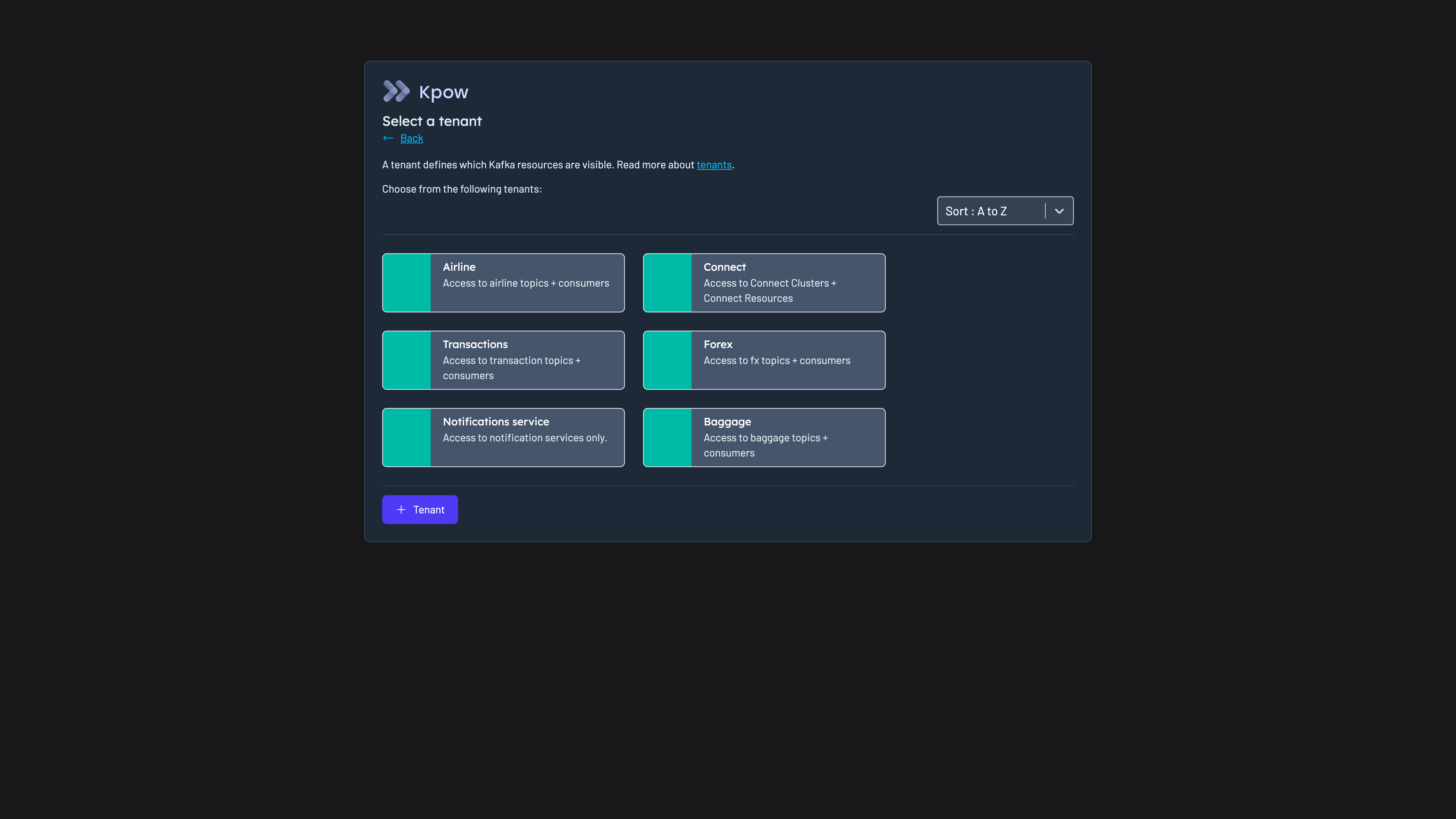
Give each team its own view. A tenant includes or excludes topics, consumer groups and whole Connect clusters or schema registries by name, prefix or suffix, so a tracking team whose topics start with tracking- sees only those. People sign in through SAML from Okta or Microsoft Entra ID, any OpenID Connect provider, or LDAP, and directory groups map to roles and tenants.
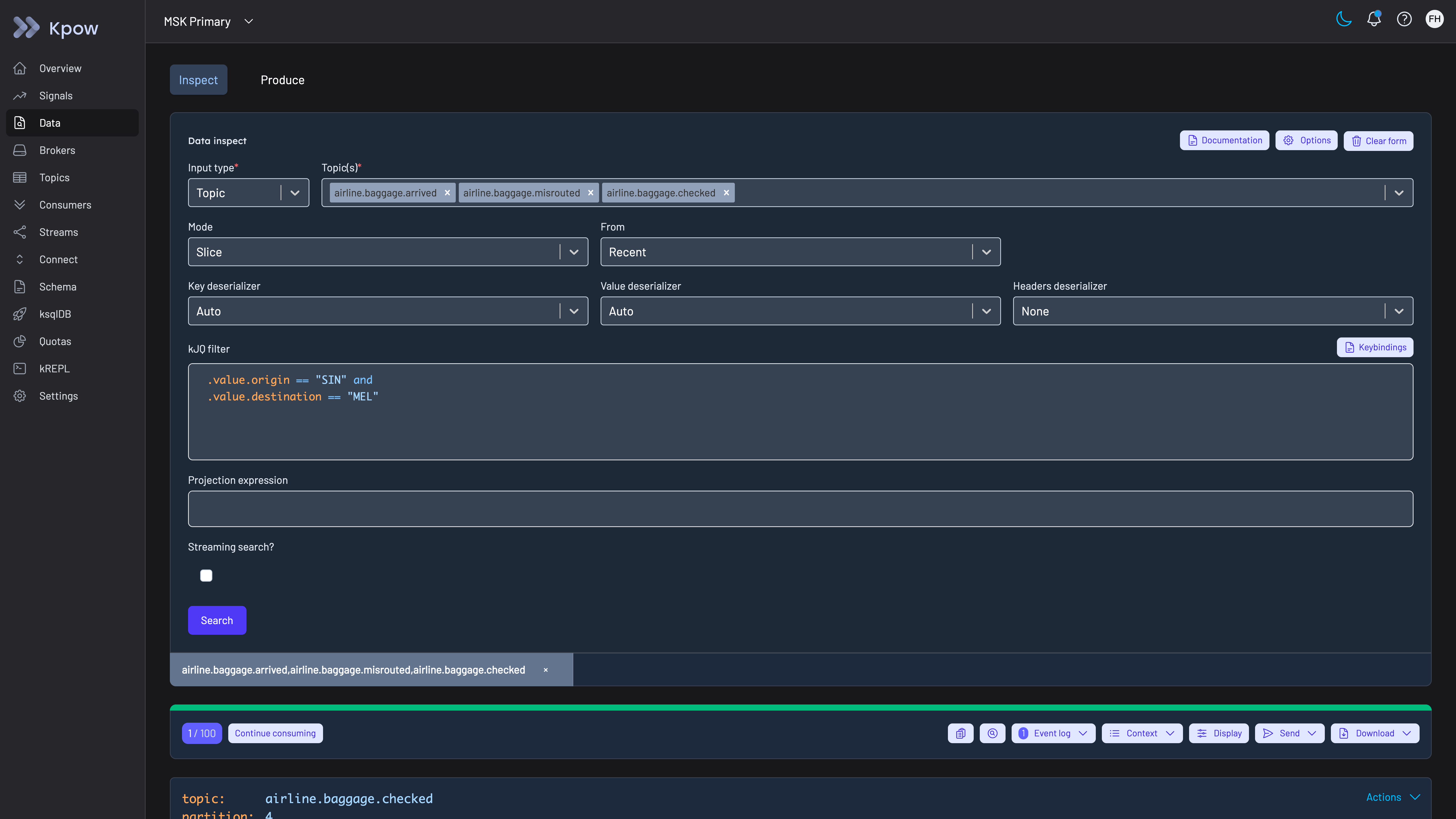
Trace one shipment across topics. When a load, parcel or order looks wrong, an engineer uses Data Inspect with a kJQ filter to search for its ID across several topics at once, on the server, by key, value or header, with a headers deserializer selected so that correlation IDs carried in headers appear in the results.
Republish or produce a message. Teams at US Foods republish messages through Kpow, and data produce writes a message to a topic under the same RBAC and audit log as every other action. Copying messages between topics is its own permission in simple access control, so it can be granted separately from producing new ones, which matters given the partitioning point above.
Follow lag, including jobs that are not group members. Kpow shows each consumer group’s lag by group, broker, topic and partition, and its consumer group documentation describes how it identifies simple consumers, those that assign partitions manually with no group coordination, and tracks them as well. The same lag is published with broker, topic and connector metrics on Prometheus endpoints, so it can feed the monitoring the company already runs. When a consumer has to skip a malformed message or reprocess a window, the group actions reset offsets to a value or a timestamp, clear them, or skip one offset on a single partition.
Fix a failed connector. Kpow manages Kafka Connect clusters beside the Kafka clusters they serve, so the team that owns a connector pulling events from a transport management system or a warehouse database can pause or restart it, restart an individual task, and read the stack trace of a task in an error state from the same UI, within its tenant.
Keep a record of who did what. The audit log records each action, data inspect queries included, with the user from the directory and the policy that allowed it. Kpow shows the last seven days in the product and writes the record to the __oprtr_audit_log topic on the company’s own cluster, where Kpow’s topics default to one week of retention, so for a longer record webhooks send mutations, queries or both to Slack, Microsoft Teams or the company’s SIEM.
To see these screens before installing anything, the live Kpow demo needs no signup and shows data inspect, consumer groups, topic management and the audit trail in the __oprtr_audit_log topic on MSK Secondary. The demo has no SSO, tenants or data policies configured, so sign-in, per-team views and approvals are the things to test in the company’s own environment. To run the workflows against the company’s own clusters, install Kpow from its container image or JAR; tenants, RBAC, temporary policies, staged mutations, masking and the audit log are Kpow Enterprise features, and Community Edition is free for 3 clusters and 10 users.
Kpow live demo
Trace an event the way a logistics platform team would
The live Kpow demo needs no signup. It runs on two Amazon MSK clusters: search several topics for one key, follow a consumer group's lag by partition, then read the audit trail on the __oprtr_audit_log topic of the MSK Secondary cluster.
For platform teams running Kafka for freight, tracking and order events across Confluent, MSK and their own clusters.
Try the Kpow demoFAQ
What is the best Kafka UI for a logistics company?
On this page’s rubric, Kpow: it runs as one container with no external database and nothing in the data path, searches several topics at once by key, value or header, manages Confluent, MSK and self-managed clusters from one deployment, holds production changes for approval or grants them for a limited time, records every action and data query with the person, and scopes each team to its own resources. Kafbat UI is the strongest free option for a single team, and Lenses has the strongest query model.
Which logistics companies use Kpow?
Factor House’s logistics page names Schneider, Knight-Swift and US Foods, whose platform engineers use Kpow to trace message flows, diagnose connector failures and monitor consumer lag across Confluent, MSK and self-hosted clusters. US Foods describes its setup in a published case study, and 90POE, which builds software for ship operators, is also a Kpow customer.
Does a Kafka management tool need to be a proxy to govern access?
No. Governing what people can see and do in a tool, with tenants, RBAC, approvals and an audit log, works from a tool that connects as an ordinary Kafka client. A proxy is needed to enforce policy on application traffic or to encrypt records before they reach the brokers, and it puts a component in front of every producer and consumer that sends or reads a tracking or order event.
Can one tool manage Kafka while a company moves off older messaging?
For the Kafka side, yes. Kpow manages self-managed Apache Kafka, Confluent Platform, Confluent Cloud and Amazon MSK from one instance, up to 12 clusters, together with the Kafka Connect clusters that move data in and out. It does not manage the message queues or ESB themselves, which keep their own tooling until they are retired. Best tools to manage multiple Kafka clusters from one place compares the options.
How should a logistics team monitor consumer lag?
Watch lag per partition and not only per group, include simple consumers such as Flink and Spark jobs, and know which definition of lag each tool uses before comparing them. Kpow shows lag in the product and publishes it on Prometheus endpoints; best tools to monitor Kafka consumer lag compares the dedicated options, and best tools to monitor Kafka Connect connectors covers connector health.
Is a free Kafka UI enough for a logistics company?
For a small team browsing topics and consumer groups, often yes. Kafbat UI and AKHQ are free and run as one container each, and Kpow Community Edition is free for up to 3 clusters and 10 users, with topic search and inspection, consumer group and offset management, schema registry and Kafka Connect. None of the free options holds a production change for approval or gives each team its own view of a shared cluster; in Kpow those are Enterprise features.
How these tools were scored
Six criteria, each taken from published accounts of how transport, logistics and distribution companies run Kafka, score every option from 0 to 10. They are listed here in order of weight; the weights add up to 11, so the total is out of 110.
1. Out of the data path. A management tool that runs in the company’s own environment, connects as an ordinary Kafka client and keeps no data outside the company’s clusters adds nothing between the company’s tracking, freight and order services and the brokers. Scored lower: tools that need an external database, and tools whose controls work only when application traffic passes through a vendor’s proxy. A self-hosted container with no external database and no proxy scores 9, a tool with a database of its own 6, one with several databases or a component on the brokers 4, and one that needs both a database and a proxy for its controls 3; 10 is kept for an option with nothing to deploy at all. This criterion is scored the same way on every Factor House page that uses it, and only its weight changes with the reader.
2. Inspecting topic data. Tracing a load, parcel or order means finding specific messages by key, value or header across several topics, on the server, without writing a consumer against production. SQL over topics scores highest, filtered search across topics next, and browsing or filtering one topic at a time a point lower. Scores are the same as on the airlines and travel page, and best tools to search messages across Kafka topics covers search in detail.
3. On-prem and cloud together. The companies in the published accounts above run Kafka in their own data centres, on Confluent Cloud and on MSK, often at once. One deployment of the tool should reach all of them; the general comparison is best tools to manage multiple Kafka clusters from one place. Scores are the same as on the banking page.
4. Production access on request. Can a developer be given rights to skip an offset or reset a group in production for one task, approved and time-boxed, without a standing grant? Can such changes be held for a second person’s approval? The wider set of controls over deletes and offset resets is compared in best tools to control destructive Kafka operations. Scores are the same as on the automotive page.
5. Audit trail per person. When people work through a shared tool, the broker only sees the tool’s service account, so only the tool’s own log can name the person. A logistics company needs that log to include data reads as well as changes, and to be readable without building a consumer first. Best tools for Kafka audit logging compares the layers in detail. Scores are the same as on the banking page.
6. Many teams, shared clusters. Freight, tracking, billing, warehouse and customer teams on a handful of clusters need each team scoped to its own topics, consumer groups and connectors, so the platform team can onboard a team with a policy and not a cluster. This criterion uses the same scores as the banking page; best tools for Kafka role-based access control (RBAC) compares the permission models in more detail.
Who can see unmasked data is not scored on this page, because the published accounts above describe scan, position and order events rather than card or health records; best tools for Kafka data masking scores it, and Conduktor leads there. Directory sign-in is not scored either, since every tool here signs people in through LDAP, OIDC or SAML in some form. Connector and consumer lag monitoring appear in the workflows above and on their own comparison pages rather than in this rubric. Who has bought each tool is also left out of the scores.
The cost figures model a transport or logistics company running 4 clusters (development, test, and production clusters for freight operations and for customer tracking and orders) for 100 engineers, testers and analysts at $120 an engineer-hour, and each card prints its own assumptions. The general listicle view, without this weighting, is in best Kafka management tools for 2026.
Every option is scored from 0 to 10 on each criterion, from the evidence and sources this page cites, and the reason for each score is on its card. The criteria are weighted: Out of the data path counts three times, Inspecting topic data counts twice, On-prem and cloud together counts twice, Production access on request counts twice, Audit trail per person counts once and Many teams, shared clusters counts once, for a total out of 110. Out of the data path counts three times because a carrier's or distributor's Kafka carries scans, positions, load status and orders at every hour, and a tool that sits between the applications and the brokers becomes part of the chain that tells a customer where a shipment is, while a tool with a database of its own is one more system to patch and keep available. Inspecting topic data, reaching clusters on several providers and production access on request count twice: tracing one load or order across topics is the daily work of these teams, their Kafka runs on Confluent, MSK and their own clusters beside older messaging, and most of the people who open the tool should read and not change anything. The per-person audit trail and scoping teams on shared clusters count once each. The weights add up to 11, so the total is out of 110. This page is published by Factor House, which makes Kpow. Every option is scored on the same rubric and the same sources: Kpow's per-criterion scores are set the same way as every other option's and are not adjusted, and the weights apply to every option alike. Kpow ranks first on its total of 97 out of 110. The other options follow by total. Conduktor is listed last whatever its total; on its total of 68 it would place fourth.
Related reading
- Kafka: the complete guide
- Kafka for logistics
- Best Kafka management tools for supermarkets and food distributors
- Best Kafka management tools for automotive companies
- Best Kafka management tools for airlines and travel companies
- Best Kafka management tools for retailers
- Best Kafka management tools for banks
- Best Kafka governance tools for financial services
- Best tools to monitor Kafka consumer lag
- Best tools to monitor Kafka Connect connectors
- How US Foods gave 130 developers self-service Kafka access with Kpow