Best Kafka management tools for automotive companies
ComparisonsThe best Kafka management tool for an automotive company is the one that lets engineers work with plant, vehicle and dealer data in Kafka without slowing the flow of telemetry or opening customer data to everyone: it runs inside the company’s own environment and stays out of the data path, reaches plant and cloud clusters from one deployment, finds one vehicle’s or device’s messages across topics, grants production access for a task and then removes it, names the person behind every action, and scopes each team on shared clusters. Kpow, Kafbat UI, AKHQ, Lenses, Confluent Control Center and Conduktor each cover part of that. Scored on the six weighted criteria explained below the rankings, Kpow ranks first with 88 out of 100, ahead of Kafbat UI at 71 and AKHQ at 69.
Tools compared
| Rank | Tool | Total (out of 100) | Out of the data path | On-prem and cloud together | Inspecting topic data | Production access on request | Audit trail per person | Many teams, shared clusters | Cost a year (modelled) |
|---|---|---|---|---|---|---|---|---|---|
| 1 | Kpow | 88 | One container, state in your Kafka, not a proxy | Any distribution, 12 clusters per instance | kJQ search across topics, on the server | Time-boxed temporary policies via API, staged approvals, masking per resource | Every action with the IdP user, data queries included | Tenants and per-action RBAC | $20,880 |
| 2 | Kafbat UI | 71 | One stateless container | Confluent Cloud broke in v1.4.x and v1.5.0 | Message browsing | Per-resource RBAC, no approvals, masking for all viewers | Optional, reads at level ALL, no view | Per-resource roles per cluster | $11,520 |
| 3 | AKHQ | 69 | One stateless container | Named connections | Topic data browsing | Regex groups, UI-only if JWT secret unset | Opt-in, no reads, no view | Groups by resource and cluster pattern | $16,320 |
| 4 | Lenses | 63 | HQ on PostgreSQL, agent and database per cluster | Any Kafka API, agent per cluster | SQL over topics | Strict global masking, no approvals | In-product audit log from Team tier | Roles on groups only | $2,880 plus quoted licence |
| 5 | Confluent Control Center | 38 | Dedicated host, broker reporter JAR | Confluent Platform only | Topics > Messages view | Confluent RBAC, no DENY, no approvals | Broker principal, not always the person | Admin access only, per TD Bank | $2,880 plus quoted subscription |
| 6 | Conduktor | 62 | Console on PostgreSQL; Gateway proxy in the data path | Confluent Cloud, Aiven, MSK, Cloudera | Browse and filter | Per-viewer masking, cross-team access requests | 70+ event types with user, in the UI | Per user or group, most permissive grant wins | $122,880; $212,880 with Gateway Core and Protect |
No tool meets every column, and automotive companies commonly pair a management tool for people with broker ACLs or an authorizer for services.
The tools, ranked for automotive companies
 Rank 1
 Kpow
88 out of 100 Total
Try Kpow in the live demo No signup needed.
- Cost a year
- $18,000 licence for 4 clusters plus $2,880 operator time, so $20,880 (modelled)
- Clusters
- Any distribution, up to 12 per instance
- Deployment
- One container or JAR, no external database
- Out of the data path ×3 weight, this criterion counts 3 times toward the total
- 9 out of 10
- On-prem and cloud together ×2 weight, this criterion counts 2 times toward the total
- 8 out of 10
- Inspecting topic data ×2 weight, this criterion counts 2 times toward the total
- 9 out of 10
- Production access on request
- 9 out of 10
- Audit trail per person
- 9 out of 10
- Many teams, shared clusters
- 9 out of 10
Why these scores for Kpow
- Out of the data path 9 out of 10
- It is one container or JAR whose state lives in Kafka topics on your own cluster, and it connects as an ordinary Kafka client, so nothing sits between your applications and the brokers.
- On-prem and cloud together 8 out of 10
- One deployment manages self-managed Apache Kafka, Confluent Platform, Confluent Cloud and MSK together, capped at 12 clusters per instance before you run another. Its documentation asks for it to run close to its clusters and does not officially support multi-region installations.
- Inspecting topic data 9 out of 10
- Data inspect searches across multiple topics with kJQ filters, which its documentation says scan tens of thousands of messages a second from a topic, and streaming search keeps a query running until it reaches its result or scan limit; Lenses’ SQL scores higher.
- Production access on request 9 out of 10
- Temporary policies grant time-boxed access that an admin or a change system calling the Kpow API can create, staged mutations hold any action for approval, and data policies mask fields in inspection, though masking is per resource rather than per viewer.
- Audit trail per person 9 out of 10
- Every action is recorded with the user from the identity provider and the policy that allowed it, including data inspect queries, with a seven-day view in the product, the record written to an audit topic on your own cluster, and webhooks that send it to a SIEM for long-term retention.
- Many teams, shared clusters 9 out of 10
- Tenants scope each team to its own resources on a shared cluster, which is how TD Bank sets up every onboarded team, and RBAC adds Allow, Deny or Stage per action.
For an automotive company. Kpow runs inside the company’s own environment, beside the brokers, at the plant or in the cloud, and gives every team a governed way into Kafka. One instance reaches up to 12 clusters across self-managed Apache Kafka, Confluent Platform, Confluent Cloud and Amazon MSK. Data inspect searches across topics with kJQ filters, so an engineer can find one vehicle’s or one device’s messages by an identifier without writing a consumer, while data policies mask customer and location fields on the server. Temporary policies grant a role extra actions on a named resource for a fixed time, tenants give each team its own view of a shared cluster, and the audit log records each action and data query with the person who took it.
Where it falls short. Kpow governs people working through Kpow, while vehicle, plant and dealer services still authenticate to the brokers with their own principals, so broker ACLs or an authorizer remain the control for services. One instance manages up to 12 clusters, and its documentation asks for it to run close to the clusters it manages and does not officially support installations across regions, so a company with plants and cloud regions far apart runs an instance near each group of clusters. Its masking is set per resource, not per viewer. The in-app audit view covers seven days and Kpow’s own topics default to one week of retention, so the long-term record belongs in a SIEM, sent there by webhook. RBAC, masking, tenants, temporary policies and the audit log are Enterprise features; Community Edition is free for 3 clusters and 10 users.
Cost a year. $20,880 on this page’s model of an automotive company running 4 clusters (one at a plant, one in the cloud for connected-vehicle data, and development and test) for 100 engineers. Kpow Enterprise is published at $4,500 per cluster per year with 100 users included, so the licence is $18,000, and the model adds 2 engineer-hours a month at $120 an hour, $2,880, to run one container and keep it current. Factor House prices Kpow per cluster, not per seat. Kpow is also sold on AWS Marketplace as Kpow for Apache Kafka (Annual), which lets a company on AWS buy it through its existing AWS account.
 Rank 2
 Kafbat UI
71 out of 100 Total
- Cost a year
- $0 licence, about $11,520 in operator time (modelled)
- Sign-in
- OAuth2, OIDC, LDAP or Active Directory; no SAML
- Deployment
- One stateless container
- Out of the data path ×3 weight, this criterion counts 3 times toward the total
- 9 out of 10
- On-prem and cloud together ×2 weight, this criterion counts 2 times toward the total
- 6 out of 10
- Inspecting topic data ×2 weight, this criterion counts 2 times toward the total
- 8 out of 10
- Production access on request
- 4 out of 10
- Audit trail per person
- 6 out of 10
- Many teams, shared clusters
- 6 out of 10
Why these scores for Kafbat UI
- Out of the data path 9 out of 10
- It is one stateless container with no database and no proxy, the same pass as Kpow.
- On-prem and cloud together 6 out of 10
- It covers self-managed Kafka, MSK and other managed services, but Confluent Cloud connectivity broke in v1.4.x and v1.5.0.
- Inspecting topic data 8 out of 10
- Message browsing and inspection are core features of the open-source UI.
- Production access on request 4 out of 10
- RBAC grants actions per resource and a cluster can be set read-only, but there is no approval step, no time-boxed grant, and its masking applies the same way to every viewer.
- Audit trail per person 6 out of 10
- Its audit log names the logged-in user and records reads when the level is set to ALL, but it writes to a topic or the console with no view in the product, so reading the trail is something you build.
- Many teams, shared clusters 6 out of 10
- Roles scope permissions per resource and list the clusters they apply to, with no tenant view of a team’s own resources.
For an automotive company. Kafbat UI is the maintained open-source fork of the original kafka-ui, Apache 2.0, with free RBAC, server-side remove, replace and mask policies, and an optional audit log. It stays out of the data path the same way Kpow does, and for a small team on one set of clusters, at a plant or in the cloud, it covers day-to-day message inspection and topic work at no licence cost.
Where it falls short. Confluent Cloud connectivity broke in v1.4.x and v1.5.0, which matters to a company whose cloud clusters run there. There is no way to grant production access for one task and have it expire, no approval before a change runs, and masking cannot exempt the team that owns the data. Reading its audit trail means building a consumer first, and there is no tenant view of a team’s own resources on a shared cluster. There is no SLA, and paid help is a professional services engagement from the maintainers, quoted rather than listed.
Cost a year. $11,520 on this page’s estimate, with no licence fee. Running, securing and upgrading it is 6 engineer-hours a month at $120 an hour, $8,640, and a company that signs people in with SAML also runs a proxy such as oauth2-proxy in front of it, 2 hours a month, $2,880.
 Rank 3
 AKHQ
69 out of 100 Total
- Cost a year
- $0 licence, about $16,320 in operator time and review (modelled)
- Sign-in
- LDAP, OIDC, header auth; no SAML
- Deployment
- One stateless container
- Out of the data path ×3 weight, this criterion counts 3 times toward the total
- 9 out of 10
- On-prem and cloud together ×2 weight, this criterion counts 2 times toward the total
- 7 out of 10
- Inspecting topic data ×2 weight, this criterion counts 2 times toward the total
- 8 out of 10
- Production access on request
- 3 out of 10
- Audit trail per person
- 4 out of 10
- Many teams, shared clusters
- 5 out of 10
Why these scores for AKHQ
- Out of the data path 9 out of 10
- It is one stateless container with no database and no proxy, the same pass as Kpow.
- On-prem and cloud together 7 out of 10
- Each cluster is a named connection, with Confluent Cloud and MSK IAM examples in its documentation.
- Inspecting topic data 8 out of 10
- Topic data browsing is a core AKHQ feature.
- Production access on request 3 out of 10
- Groups bind actions to resources by regex, but there is no approval step or time-boxed grant, masking is global, and without the JWT signing secret the restriction is in the UI only.
- Audit trail per person 4 out of 10
- Audit events are opt-in to a Kafka topic, reads are not recorded, and there is no view for the trail.
- Many teams, shared clusters 5 out of 10
- Groups combine resource types with regex patterns on names and clusters, which limits what a role can reach, but there is no tenant view of a team’s own resources.
For an automotive company. AKHQ is free under Apache 2.0, configured in YAML that fits a GitOps review, with each cluster a named connection and roles that combine resource types and cluster patterns, and it browses topic data well. Its latest release, 0.28.0, shipped in August 2026.
Where it falls short. Its documentation warns that if the JWT signing secret is not set, the API will not enforce the group role, so a misconfiguration turns access control into a UI restriction, which matters on topics that carry vehicle identifiers and customer data. Audit is opt-in and reads are not in it, so it cannot show who looked at a vehicle’s messages, and there is no approval step or expiring grant.
Cost a year. $16,320 on this page’s estimate, with no licence fee. Running, securing and upgrading it is 6 engineer-hours a month at $120 an hour, $8,640; a company that signs people in with SAML runs oauth2-proxy in front of it, 2 hours a month, $2,880; and the model adds one access review a year, 40 hours or $4,800, because of the JWT secret behaviour above.
Compare Kpow vs AKHQAKHQ review
 Rank 4
 Lenses
lenses.io
63 out of 100 Total
- Cost a year
- $2,880 operator time, plus a licence quoted above 15 users (modelled)
- Search
- SQL over topics in SQL Studio
- Deployment
- HQ on PostgreSQL, an agent and database per cluster
- Out of the data path ×3 weight, this criterion counts 3 times toward the total
- 4 out of 10
- On-prem and cloud together ×2 weight, this criterion counts 2 times toward the total
- 7 out of 10
- Inspecting topic data ×2 weight, this criterion counts 2 times toward the total
- 10 out of 10
- Production access on request
- 4 out of 10
- Audit trail per person
- 7 out of 10
- Many teams, shared clusters
- 6 out of 10
Why these scores for Lenses
- Out of the data path 4 out of 10
- It runs a central HQ on PostgreSQL plus an agent and an agent database beside every cluster, and HQ has no high-availability option.
- On-prem and cloud together 7 out of 10
- It connects to any provider exposing a Kafka-compatible API, one agent per cluster.
- Inspecting topic data 10 out of 10
- SQL over topics is the centre of the product and the strongest query model on this page, ahead of Kpow’s kJQ.
- Production access on request 4 out of 10
- Its masking is the strictest view-time model, global with no escape even for admins, but no approval step or time-boxed grant is described.
- Audit trail per person 7 out of 10
- Audit logs can be read in the product, with no need to build a consumer first.
- Many teams, shared clusters 6 out of 10
- Roles attach to groups only, never to individuals, and no scoped view per team is described.
For an automotive company. Lenses brings vendor-backed RBAC, SSO, in-product audit logs and SQL Studio for querying topics, which is the reason to choose it if analysts or quality engineers need SQL over vehicle and plant events. It connects to any Kafka-compatible provider, so plant and cloud clusters can sit in one HQ.
Where it falls short. Every cluster adds an agent and a database to deploy and patch, which at an automotive company means one more database beside each plant cluster, and HQ is a single node that every cluster depends on. Its policies apply to Lenses interfaces only, and no approval step or expiring grant is described.
Cost a year. $2,880 of operator time on this page’s estimate, 2 hours a month at $120 an hour, plus a licence that is not published. The published Team Edition is $4,000 a year for up to 15 users on one cluster, so 100 engineers across 4 clusters is Multi-Kafka Enterprise at a custom quote.
 Rank 5
 Confluent Control Center
confluent.io
38 out of 100 Total
- Cost a year
- $2,880 operator time, plus a Confluent Platform subscription that is quoted (modelled)
- Sign-in
- OIDC on self-managed; no SAML
- Scope
- Confluent Platform clusters only
- Out of the data path ×3 weight, this criterion counts 3 times toward the total
- 4 out of 10
- On-prem and cloud together ×2 weight, this criterion counts 2 times toward the total
- 2 out of 10
- Inspecting topic data ×2 weight, this criterion counts 2 times toward the total
- 6 out of 10
- Production access on request
- 2 out of 10
- Audit trail per person
- 4 out of 10
- Many teams, shared clusters
- 4 out of 10
Why these scores for Confluent Control Center
- Out of the data path 4 out of 10
- It is not a proxy, but it needs a dedicated host of 4 cores, 8 GB and 200 GB and the Confluent Metrics Reporter on each broker.
- On-prem and cloud together 2 out of 10
- It documents Confluent Platform clusters only, and cannot monitor MSK, Redpanda or Aiven.
- Inspecting topic data 6 out of 10
- Its Topics > Messages view browses topic data, and its review records a rendering bug for compound, nested Avro keys in that view and a Safari authentication failure when browsing messages.
- Production access on request 2 out of 10
- Access runs through Confluent RBAC role bindings, which have no DENY rules, and no approval step, time-boxed grant or masking is described.
- Audit trail per person 4 out of 10
- Confluent Server’s audit logs record authorization decisions for the connection’s principal, which is not always the person behind a tool.
- Many teams, shared clusters 4 out of 10
- TD Bank’s platform team said in its talk that Control Center could only accept admin access and was not scalable for their clients, which is why those clients moved to Kpow.
For an automotive company. Control Center is the natural console on a topology that is Confluent Platform and nothing else, with Confluent RBAC extending the same bindings to Connect, ksqlDB and Schema Registry.
Where it falls short. It does not reach clusters outside Confluent Platform, so a company whose plants run Confluent Platform and whose connected-vehicle data runs on Confluent Cloud, Amazon MSK or self-managed Kafka needs a second tool. It offers no approval step, expiring grant or masking, and its role bindings cannot carve a delete out of a broader role because they have no DENY rules.
Cost a year. $2,880 of engineering time on this page’s estimate, 2 hours a month at $120 an hour, on top of a Confluent Platform subscription that Confluent quotes rather than publishes, so the total cannot be compared with the others here.
Compare Kpow vs Confluent Control CenterConfluent Control Center review
 Rank 6
 Conduktor
conduktor.io
62 out of 100 Total
- Cost a year
- 100 seats at $1,200 plus $2,880 operator time, so $122,880; Gateway Core adds $60,000 and Gateway Protect, which carries encryption and masking, a further $30,000 (modelled)
- Sign-in
- LDAP, OIDC; no SAML described
- Deployment
- Console on PostgreSQL 13+; data-level controls through Gateway, a proxy
- Out of the data path ×3 weight, this criterion counts 3 times toward the total
- 3 out of 10
- On-prem and cloud together ×2 weight, this criterion counts 2 times toward the total
- 8 out of 10
- Inspecting topic data ×2 weight, this criterion counts 2 times toward the total
- 8 out of 10
- Production access on request
- 6 out of 10
- Audit trail per person
- 8 out of 10
- Many teams, shared clusters
- 7 out of 10
Why these scores for Conduktor
- Out of the data path 3 out of 10
- Console needs PostgreSQL 13 or later, and its encryption, data-level masking and Virtual Clusters only work when client traffic goes through Gateway, a proxy in the data path that Conduktor sizes at around 20 to 30 MB/s of sustained throughput per instance, with at least three instances in production.
- On-prem and cloud together 8 out of 10
- Its cluster configuration covers Confluent Cloud, Aiven, Amazon MSK and Cloudera, and Console works across clusters.
- Inspecting topic data 8 out of 10
- Console browses and filters topic data.
- Production access on request 6 out of 10
- Masking can exempt users or groups, which beats every other tool here on who sees unmasked data, and cross-team access requests are approved by the owning team, but no expiring grant is described and topic creation that passes policy is a direct API call.
- Audit trail per person 8 out of 10
- Console logs produce, consume and admin requests across more than 70 event types with user, IP and timestamp, browsable in the UI and exported as CloudEvents.
- Many teams, shared clusters 7 out of 10
- Permissions are set per user or group across clusters, but a user in several groups inherits the most permissive grant, and Virtual Clusters for multi-tenancy need Gateway.
For an automotive company. Conduktor pairs Console, a web UI, with Gateway, a Kafka protocol proxy. Conduktor’s Gateway documentation describes it as “a Kafka-compliant middle layer between clients and Kafka clusters” and says it can “mask sensitive data at the proxy layer”, and that is where field encryption, masking of the data itself, policy enforcement on client traffic and Virtual Clusters are applied. Console alone connects to clusters directly and masks in its UI, with exemptions per user or group. The full picture is in the Conduktor review.
Where it falls short. The controls an automotive company would buy Conduktor for need every producer and consumer to connect through Gateway, which puts a vendor’s proxy, and a tier the company has to size to its telemetry traffic, between the services that ingest vehicle and plant data and the brokers. Console also needs its own PostgreSQL, and per-seat pricing grows with every engineer who needs access.
Cost a year. $122,880 on this page’s model of 100 engineers. Conduktor’s published Team Edition price is $1,200 a seat a year, $120,000, and the model adds 2 engineer-hours a month at $120 an hour, $2,880. On AWS Marketplace, Conduktor Enterprise lists Gateway Core, which carries Virtual Clusters and policy enforcement, at $60,000 a year and Gateway Protect, the add-on for encryption and masking, at a further $30,000, so the data-level controls take the total to $212,880. Conduktor prices Gateway per cluster with a 3-cluster minimum, and the listing does not say how many clusters that figure covers.
Compare Conduktor review
What automotive companies need from a Kafka management tool
This page is about automotive companies: carmakers, tier-1 suppliers, connected-vehicle and telematics companies, and the businesses that sell, auction and service vehicles, and it covers the Kafka behind their vehicle, dealer and customer systems as well as their plants. Kafka that runs production lines, machines and plant sensors is covered in best Kafka management tools for manufacturers. For banks that run Kafka as shared infrastructure for many business lines, see best Kafka management tools for banks.
Kai Waehner’s survey of Kafka deployments in the automotive industry describes BMW running mission-critical workloads in its factories and in the public cloud, Audi processing sensor data from connected cars in real time, and Tesla building a Kafka-based data platform “to support millions of devices and trillions of data points per day”. A carmaker that follows that pattern runs Kafka at its plants beside Kafka in the cloud for connected vehicles, analytics and customer systems, and a management tool that reaches only one of them leaves the other teams without one.
Connected-vehicle data also arrives in very large volumes. Spireon, a telematics company in the cards below, reports 3.5 billion raw telemetry messages a month on its own site, and Tesla’s Kafka platform, in the survey above, was built for trillions of data points a day. Once traffic of that size runs through Kafka, every producer and consumer depends on the brokers staying fast. Vehicles themselves rarely connect to Kafka directly; Kai Waehner notes that Kafka “does not work well in unreliable networks”, so telemetry usually reaches the brokers through ingestion services such as MQTT gateways. A tool whose controls work through a proxy puts it in that path: Kai Waehner’s Kafka Proxy Demystified notes that a proxy “adds an extra network hop between clients and brokers, which can slightly increase end-to-end latency”, and that proxies must be deployed for high availability or they “risk becoming a single point of failure”. A management tool that connects as an ordinary Kafka client, and needs no database of its own beside each plant cluster, avoids both.
Much of the day-to-day work is tracing a message: a vehicle event does not reach the dealer system, a device stops reporting, or a bid on a live auction does not arrive, and an engineer has to find the messages for one vehicle identification number, device or lot across several topics, on the server, without writing a consumer against production. Pickles’ case study describes the everyday version of that work: browsing topics, filtering message payloads and confirming that a message was delivered, in place of a custom microservice. Those topics also carry vehicle identifiers, locations and customer details, so the tool has to grant production access for the task, mask the sensitive fields, and record who looked.
The six criteria this page scores come from those needs, and for a carmaker one regulation sits behind several of them. UN Regulation No. 155, which a manufacturer has to satisfy before a vehicle type is approved in the countries that apply it, requires a cyber security management system whose risk assessment considers the threats listed in its Annex 5. That list opens with back-end servers related to vehicles in the field, ahead of the threats to a vehicle’s own communication channels. A Kafka cluster that receives data from vehicles in the field, or feeds the services those vehicles rely on, is one of those back-end systems, and so is the tool engineers use to reach it. The paragraphs below take the criteria in order of weight.
Out of the data path. Annex 5 lists an attack that stops a back-end server from functioning, which in its words “prevents it from interacting with vehicles and providing services they rely on”, and the mitigation it gives asks for recovery measures wherever back-end servers are critical to the provision of services. A proxy that every producer and consumer connects through is a server of that kind, because ingestion stops when the proxy does, while a tool that connects as a client can be stopped, upgraded or removed without the services that take in vehicle data changing how they connect. Conduktor Console connects to clusters directly and masks data in its own UI, but it needs an external PostgreSQL database, and Conduktor’s encryption, masking of the data itself, policy enforcement on client traffic and Virtual Cluster multi-tenancy all run through Conduktor Gateway, which Conduktor’s own documentation describes as a Kafka proxy between client applications and brokers. Kpow gives people RBAC, masking in inspection, temporary access, tenants and an audit log without putting anything in front of the brokers, and the trade runs in both directions, because Gateway can enforce policy on applications and Kpow does not attempt that.
A tier-1 supplier meets the same question through TISAX, the assessment scheme governed by the ENX Association. Its requirements catalogue is used for assessments of the suppliers and service providers in the automotive supply chain, and the information it sets out to protect includes customer information and prototypes. A console hosted by its vendor that can read topics holding a carmaker’s data adds one more service provider to that chain, while software the supplier runs in its own environment is assessed with the supplier’s other systems.
On-prem and cloud together. Plant data commonly reaches the cloud by replication between clusters, and replication changes topic names. Apache Kafka’s MirrorMaker by default names a replicated topic after its source cluster, in the form {source}.{source_topic_name}, so the same vehicle or plant event sits under one name on the plant cluster and under another on the cloud cluster. An engineer following an event from the line to the cloud looks on two clusters and under two topic names, which is one task in a tool that reaches both clusters and two separate ones where each cluster has its own console. Mixed providers widen the gap, because a company with Amazon MSK in the cloud and Confluent Platform at the plant has two vendor consoles and two sets of metrics: MSK reports through Amazon CloudWatch and open monitoring with Prometheus, Confluent Control Center reaches Confluent Platform clusters only, and neither shows the other’s clusters.
Inspecting topic data. Apache Kafka’s own introduction uses a vehicle ID as its example of an event key: events with the same key are written to the same partition, and Kafka guarantees the order of events only within a partition. A vehicle’s events on one topic are in order when they are keyed by its identifier, and the sequence across several topics has to be rebuilt from keys and timestamps, which is why this criterion scores search by key, value and header across topics. Timestamps need care where vehicles are the source. A record’s timestamp is by default the time its producer created it, since the topic setting message.timestamp.type defaults to CreateTime, and the producer is usually an ingestion service, because vehicles lose coverage and send stored data when they reconnect. A search for what a vehicle did at eight in the morning can miss records that reached Kafka at noon, unless the time window is widened or the filter reads the event time inside the payload.
Telemetry topics are also large. Spireon’s 3.5 billion raw messages a month is more than 100 million a day, so a search on a feed of that size is narrowed to a time window before it is filtered. Kpow runs a search as a query plan executed in parallel, and draws records evenly from every partition, so one busy partition does not dominate the result. Vehicles in the field do not all run the same software version, and a record written by an older version can fail to decode against the schema the engineer expects; Data Inspect can show only the records that fail to deserialise, with the schema ID and deserializer each record used. Lenses’ SQL remains the stronger query model for analysts who think in SQL.
Production access on request. Annex 5 names abuse of privileges by staff, an insider attack, twice: as a way of using back-end servers to attack a vehicle or extract data, and as a cause of a breach of the vehicle data those servers hold. The mitigation it gives for that threat is security controls on back-end systems to minimise the risk of insider attack, and the same table asks that system design and access control make it impossible for unauthorised personnel to access personal or system critical data. A standing read grant on production telemetry topics is the kind of privilege that threat describes, and a grant that names the topic and expires leaves nothing in place between tasks. Which fields to mask follows from the European Data Protection Board’s guidelines on connected vehicles. They say that a vehicle’s technical data, such as the wear on its parts, can be related to a person by cross-referencing with the vehicle identification number, and they single out location data, biometric data and data that could reveal offences or traffic violations, such as instantaneous speed combined with precise location, as warranting special attention. The tools differ on each part: Kafbat UI and AKHQ have roles and no expiring grant or approval step, Lenses masks strictly and describes neither, and Conduktor can exempt named users or groups from masking, which Kpow’s per-resource policies cannot do, without an expiring grant.
Audit trail per person. The data that has drawn enforcement in this industry is location and driving behaviour. In what it called its first action related to connected vehicle data, the US Federal Trade Commission alleged that General Motors and OnStar collected, used and sold drivers’ precise geolocation and driving behaviour data without adequately notifying consumers and obtaining their consent. The order it finalised in January 2026 bans GM from disclosing that data to consumer reporting agencies for five years and requires consent before connected vehicle data is collected, used or shared. Annex 5 of UN Regulation No. 155 separately lists an information breach by unintended sharing of data, with admin errors as its example. Telemetry topics hold the same kinds of data, so a record of who queried which topic, and when, is how a company shows where a vehicle’s location data went inside its own engineering teams. The broker cannot supply that record for people working through a shared tool, because it sees only the tool’s principal.
Many teams, shared clusters. The number of teams reading vehicle data is growing. The EU Data Act, which has applied since 12 September 2025, gives users control over the data generated by their connected devices, names cars among those devices, and requires connected devices to be designed to allow data sharing, and the European Commission has published guidance on vehicle data to accompany it. Each new data-sharing service is another team consuming vehicle topics, and on a shared cluster each has to be limited to its own. Kafka ACLs do that for service principals, but they are written per principal and per resource, and Uber’s engineers describe plugging a custom authorizer into their brokers that delegates authorization policy to the company’s identity and access management framework. For people, a tool can scope each team with one tenant definition, which is what this criterion scores.
What automotive companies use Kpow for
Four automotive businesses that run Kpow are named here: a vehicle auction marketplace, a carmaker, a connected-vehicle telematics company and a driver-assistance sensor supplier. Only Pickles has described its use in public, through its case study, so that card describes how Kpow is used and is tagged with the rubric criteria its evidence speaks to. The other three cards carry public information about the company itself, not a description of its Kpow setup.
Which customer shows which criterion
- Inspecting topic data
- Pickles
- Production access on request
- Pickles
-

Pickles
- Inspecting topic data
- Production access on request
- Live auctions
- Avro and schemas
- Consumer lag
Pickles, which its case study describes as Australia’s leading auction marketplace, sold 228,000 vehicles in its last full financial year. Its 20 engineers in Australia and India run the Kafka behind PicklesLIVE, which lets customers bid remotely at live auctions, and PicklesONLINE, automated bidding for auctions that run over several days. Before Kpow, the team wrote a custom microservice to read a topic and confirm that a message had been delivered. With Data Inspect, engineers browse messages as soon as they are persisted, filter payloads with JQ-like queries, read Avro through Kpow’s serdes, check schema names and versions, and confirm that consumer group names are unique. Role-based access control and data masking keep sensitive auction and customer data restricted as more of the team uses the tool, and consumer lag in the Kpow UI warns of processing delays before they affect a live auction. Krishnakumar Arjunan, Solutions Architect at Pickles: “If there’s a problem with our Kafka system, there’s no way to track it unless you have Kpow.”
Source: Pickles case study
-

Toyota Motor North America
- Carmaker
- Canada, Mexico and the United States
Public context about the company. How it uses the product has not been published.
Toyota Motor North America oversees the operations of Toyota Motor Corporation in Canada, Mexico and the United States, from research and development and manufacturing to sales and after sales, and is headquartered in Plano, Texas. Toyota is among the customer logos on Factor House’s home page, and Toyota Motor North America is a Kpow customer. It has not described its Kpow use in public.
-

Spireon
- Connected vehicles
- Telemetry at scale
Public context about the company. How it uses the product has not been published.
Spireon describes itself as North America’s largest device-independent telematics company, with brands including LoJack, FleetLocate and GoldStar for car dealers, fleet managers and trailer and asset managers. Its site gives 3.5 million active subscribers, 3.5 billion raw telemetry messages a month and 75 billion enhanced messages a month. Spireon is a Kpow customer and has not described its Kpow use in public.
Source: Spireon
-

ADC (Aumovio)
- Tier-1 supplier
- Radar sensors
Public context about the company. How it uses the product has not been published.
Aumovio publishes the type approvals for the radar products of ADC Automotive Distance Control Systems GmbH, including its ARS and SRR radar sensor families. Aumovio, formed in 2025 as a spin-off of Continental’s Automotive business, develops hardware, software and integrated systems for passenger and commercial vehicles and has about 82,000 employees. ADC is a Kpow customer and has not described its Kpow use in public.
Source: Aumovio, ADC radar homologation
How an automotive company runs its Kafka with Kpow
Each workflow below uses documented Kpow features, linked to the Factor House docs, the way an automotive company’s platform and application teams would run them across plant and cloud clusters; the Pickles case study describes several of them in daily use.
Install it beside each group of clusters. Kpow runs as one Docker container or Java JAR, or on Kubernetes with the Helm charts, inside the company’s own network. It connects to the brokers as an ordinary Kafka client with the same cluster security settings as any other client, and it needs no external database, because its state lives in topics on the company’s own clusters. Vehicle, plant and dealer services keep talking to the brokers directly. Kpow runs fully offline, so the same install works on a plant network with no route to the internet, and Kafka data stays in the company’s environment unless the company connects one of Kpow’s optional AI features to a hosted model provider.
Put plant and cloud clusters in one view. One instance connects to self-managed Apache Kafka, Confluent Platform, Confluent Cloud and Amazon MSK together, up to 12 clusters, so a plant’s on-prem cluster and the cloud clusters for connected-vehicle data sit side by side. Kpow’s system requirements ask for it to run near the clusters it manages and do not officially support one installation across regions, so a company with plants on several continents runs an instance near each group of clusters. Because Kpow is licensed per cluster, a plant can be added when its cluster is.
Find one vehicle’s messages across topics. When a vehicle event goes missing between two systems, an engineer opens data inspect, selects the topics the event passes through, sets a time window, and filters by key, value or header with kJQ, for example on a vehicle identification number or a device ID. The search runs on the server, so nobody writes a throwaway consumer against production, and the query itself lands in the audit log. SerDes decode Avro, JSON and Protobuf, and the schema view shows the subjects and versions each topic should carry. Pickles’ case study describes checking schema names and versions in Data Inspect. Where a plant topic is replicated to the cloud with MirrorMaker’s default naming, the engineer looks for it under both names, the original on the plant cluster and the name prefixed with the source cluster on the cloud cluster. Kpow’s documentation says kJQ scans tens of thousands of messages a second from a topic, which suits a narrowed time window on a busy telemetry topic and not a full day, and for vehicles that were out of coverage the window should run later than the event itself, because the record timestamp is normally the time the ingestion service produced it.
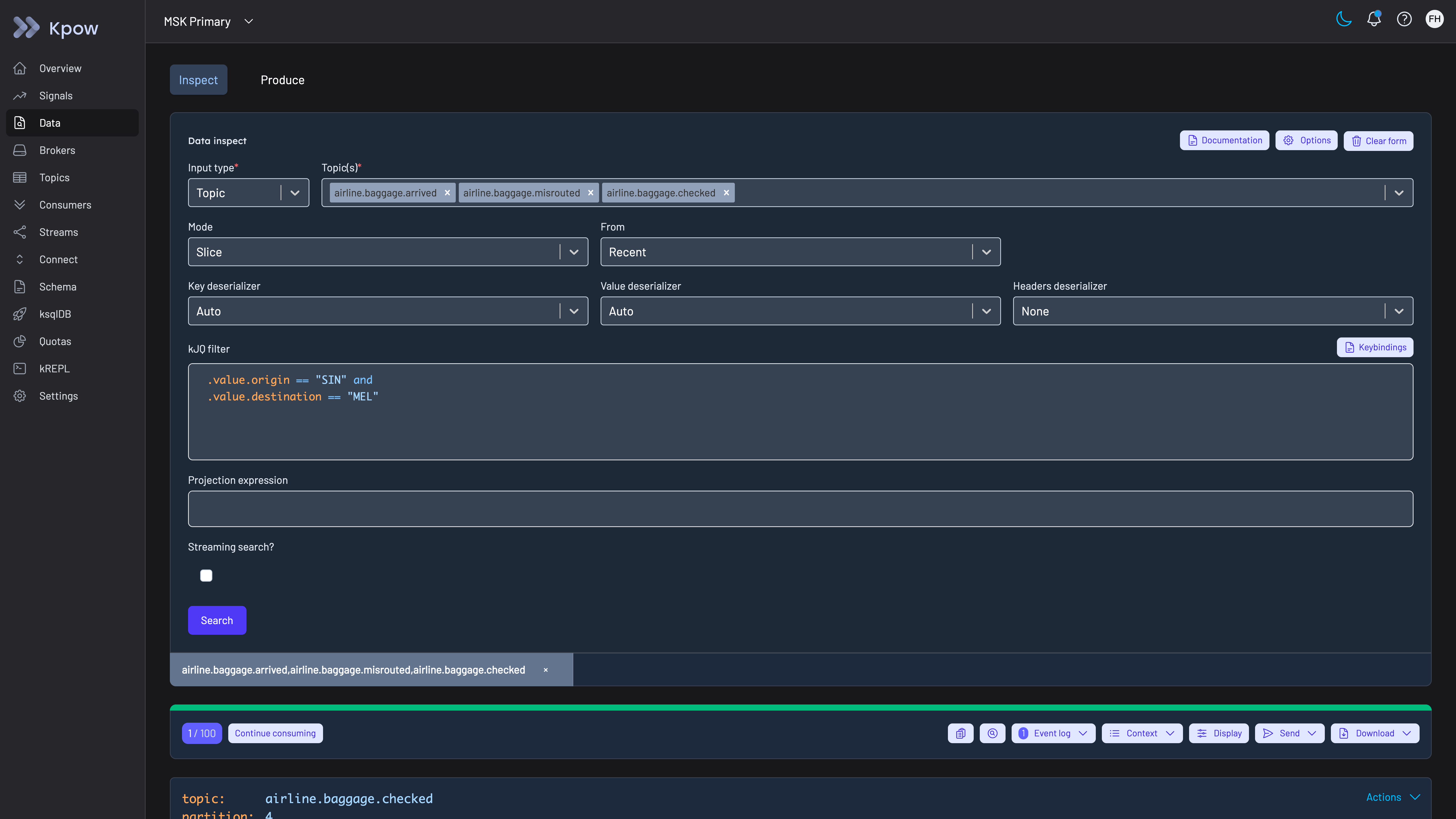
Kpow Data Inspect searching three topics at once with one kJQ filter. The topics in this demo carry airline baggage events; an automotive company filters its vehicle, plant and dealer topics the same way.
Onboard each team with its own tenant. Plant, vehicle software, dealer and data teams often share clusters. When a team needs access, the platform team adds a tenant scoped to that team’s topics, consumer groups and connectors, and maps the team’s directory group to a role through LDAP or SAML with Microsoft Entra ID. RBAC then sets Allow, Deny or Stage per action and resource, with Deny winning where policies overlap, so production can stay read-only for everyone outside the operations team. Evaluation follows the model AWS IAM uses, in which an action is denied unless a policy allows it and an explicit deny overrides any allow, so a broad role given to one team cannot undo a restriction placed on production.
Grant production access for one task. An engineer who needs to inspect a production topic raises a request in the company’s change system. Once it is approved, that system calls the Kpow API to create a temporary policy that grants inspect access on the named topics for an hour or two. Temporary policies joined the admin API endpoints in release 94.1, and self-service Kafka governance with ServiceNow walks through the request and approval flow. The policy expires on its own, is capped at seven days by default, and is recorded in the audit log.
Mask customer and location fields. Data policies redact customer names, contact details, locations and other sensitive fields in Data Inspect and ksqlDB results on the server, so an engineer tracing a vehicle event sees its structure and status without the customer’s personal data. Pickles uses role-based access and masking for the same reason, to keep auction and customer data restricted as more of its team uses the tool. On telemetry topics the three categories in the EDPB’s guidelines give the first fields to redact: location, anything biometric, and speed or other values that could reveal a traffic offence, with the vehicle identification number beside them because it is what ties the rest to a person.
Hold risky changes for a second person. With staged mutations, a role can be set to Stage on actions such as creating a topic, resetting a consumer group’s offsets or deleting a topic, so the request waits in Kpow until an administrator approves or denies it, and the full history lands in the audit log. On telemetry topics the change most worth holding is a cut to retention made when disks are filling. Kafka applies retention by discarding old log segments, by age and, where a size limit is set with retention.bytes, by size for each partition, and a discarded segment cannot be brought back, so a consumer that was behind, such as a sink loading a data lake, loses whatever it had not yet read.
Keep the record of who did what. The audit log records each action, data inspect queries included, with the user from the company’s directory and the policy that allowed it. Kpow shows the last seven days in the product and writes the record to the __oprtr_audit_log topic on the company’s own cluster, where Kpow’s topics default to one week of retention, so for a longer record webhooks send mutations, data inspect queries or both to Slack, Microsoft Teams or any endpoint the company chooses, such as its SIEM.
Watch lag on telemetry and plant feeds. Kpow shows consumer lag in its UI, which Pickles uses as an early warning before delays reach a live auction, and publishes consumer group offsets and lag, with broker, topic and connector metrics, on Prometheus endpoints for Prometheus, Grafana or the company’s own monitoring, so the owning team sees a consumer falling behind on a vehicle or plant feed before downstream systems do.
Govern Flink jobs the same way. Automotive companies that run Apache Flink beside Kafka for telemetry processing can put the same directory sign-in and Allow, Deny or Stage policies over their Flink jobs with Flex.
Keep broker ACLs for services. Kpow governs people working through Kpow, not services connecting to brokers, so broker ACLs or an authorizer remain the control for vehicle, plant and dealer services. Kpow also has limits an automotive company should plan for: its masking is set per resource and not per viewer, Lenses’ SQL is a stronger query model than kJQ for analysts who think in SQL, one instance manages up to 12 clusters and is meant to run close to them, so a company with many plants runs more than one instance, and every governance feature on this page is Enterprise, with Community Edition, free for 3 clusters and 10 users, holding none of them.
To see these screens before installing anything, the live Kpow demo needs no signup and shows data inspect with kJQ, consumer groups, topic management and the audit log topic on two MSK clusters. A reader can check the rubric against the product there by running a kJQ search across topics and following a consumer group’s lag, and then opening the __oprtr_audit_log topic on MSK Secondary to see what the audit trail records. The demo has no SSO and no data policies configured, so sign-in and masking are the two things to test in the company’s own environment. To run the workflows against the company’s own clusters, install Kpow from its container image or JAR; tenants, RBAC, temporary policies, staged mutations, masking and the audit log are Kpow Enterprise features, and Community Edition is free for 3 clusters and 10 users.
Kpow live demo
Search Kafka topics for one record's messages in the live Kpow demo
The live Kpow demo needs no signup. Filter topic data with kJQ across several topics, follow consumer groups and lag on two clusters, then read the audit trail on the __oprtr_audit_log topic of the MSK Secondary cluster.
For platform and application teams running Kafka under plant, vehicle and dealer systems.
Try the Kpow demoFAQ
What is the best Kafka tool for an automotive company?
On this page’s rubric, Kpow: it runs as one container with no external database and nothing in the path of vehicle telemetry, reaches plant and cloud clusters on any distribution from one deployment, searches message content across topics with kJQ, grants time-boxed production access through its API, records every action and data query with the person from the company’s directory, and scopes teams with tenants. Kafbat UI is the strongest free option, but it has no expiring access grants, no tenants and no view of its audit trail, and its Confluent Cloud connectivity broke in v1.4.x and v1.5.0. For a small team that only needs to browse, search and manage topics, Kpow Community Edition is free for 3 clusters and 10 users, without the governance features scored here.
How do automotive companies use Kafka?
Kafka carries connected-vehicle telemetry, plant and shop-floor events, and the data between dealer, sales, auction and customer systems. Kai Waehner’s survey of Kafka in the automotive industry describes BMW running Kafka in its factories and in the public cloud, Audi processing connected-car sensor data in real time, and Tesla’s Kafka platform for millions of devices. Telematics volumes are large, with Spireon reporting 3.5 billion raw telemetry messages a month on its own site, and Pickles runs its live and online vehicle auctions on Kafka. That is why a management tool for these companies has to reach plant and cloud clusters, stay out of the path of the traffic, and find one vehicle’s messages across topics.
Can one Kafka tool manage plant clusters and cloud clusters together?
Kpow can: one instance connects to self-managed Apache Kafka, Confluent Platform, Confluent Cloud and Amazon MSK together, up to 12 clusters, and runs fully offline as one container or JAR, so it can sit on a plant network. Its documentation asks for it to run close to the clusters it manages, so plants far from the cloud region get an instance of their own. Confluent Control Center reaches Confluent Platform clusters only. The general comparison is best tools to manage multiple Kafka clusters from one place.
How can an engineer find one vehicle’s messages across Kafka topics?
Search the topics on the server instead of writing a consumer. In Kpow, data inspect takes several topics at once, narrows the search to a time window and filters by key, value or header with kJQ, for example on a vehicle identification number or a device ID, and the query is recorded in the audit log with the person who ran it. Data policies can mask customer and location fields in the results. Best Kafka message search tools compares search across tools.
What is the best Kafka tool for a connected-vehicle or telematics company that runs Kafka only in the cloud?
Kpow still ranks first. Without the on-prem and cloud criterion the other five total 80, and Kpow scores 72, ahead of Kafbat UI at 59 and AKHQ at 55, because staying out of the data path and searching topics carry the most weight for a company whose telemetry runs through Kafka. Platform-specific rankings for the same tools are in best Kafka UI tools for Amazon MSK and best Kafka UI tools for Confluent Cloud.
Does a Kafka management tool sit in the path of vehicle telemetry?
Not if it connects as an ordinary Kafka client, as Kpow, Kafbat UI and AKHQ do. It still reads from the brokers like any consumer, and Kpow keeps its own topics on the first cluster it is configured with, so a company can point that at a cluster that does not carry telemetry. A tool whose controls work through a proxy, such as Conduktor Gateway (see the Conduktor review), is different: every producer and consumer connects through it, and Conduktor’s own documentation sizes each Gateway instance at around 20 to 30 MB/s of sustained throughput, with at least three instances in production.
Does UN Regulation No. 155 apply to the Kafka behind a connected-vehicle platform?
It applies to the vehicle manufacturer, and the Kafka falls inside what the manufacturer has to assess. The regulation requires a cyber security management system that considers the threats in its Annex 5, and that annex lists threats to back-end servers related to vehicles in the field: abuse of privileges by staff, unauthorised access to the server, an attack that stops the server functioning, and breaches of the vehicle data it holds. A Kafka cluster that takes in data from vehicles or feeds services they rely on is a back-end system in that sense. The mitigations the annex gives, controls against insider attack and access control over personal and system critical data, are the ones that time-boxed access, masking and an audit log in a management tool support. The regulation does not name Kafka or any tool.
Is a vehicle identification number personal data?
Under EU data protection law it usually is. The European Data Protection Board’s guidelines on connected vehicles say that most data associated with connected vehicles is personal data to the extent that it can be linked to an identifiable individual, and that technical data, such as the wear on vehicle parts, can be related to a person by cross-referencing with the vehicle identification number. For Kafka that means a topic keyed by that number carries personal data even when no name appears in it, so read access to it should be granted for the task and recorded.
Do automotive companies need a different Kafka tool from banks?
The tool can be the same, but the priorities differ. This page weights the rubric for automotive companies, where Kafka runs at plants and in the cloud and carries very large volumes of vehicle data, so it weights on-prem plus cloud and inspecting topic data twice and drops directory sign-in as a scored criterion. The banking page weights production access and the audit trail for regulated teams on shared clusters.
How these tools were scored
Six criteria, each taken from a situation automotive companies have described in public, score every option from 0 to 10. They are listed here in order of weight; the weights add up to 10, so the total is out of 100.
1. Out of the data path. A management tool that runs in the company’s own environment, connects as an ordinary Kafka client and keeps no data outside the company’s clusters adds nothing between the company’s vehicle-data, plant and dealer services and the brokers, and gives the shortest answer when the company asks which third parties can see its vehicle and customer data. Scored lower: tools that need an external database, and tools whose controls work only when application traffic passes through a vendor’s proxy. A self-hosted container with no external database and no proxy scores 9, a tool with a database of its own 6, one with several databases or a component on the brokers 4, and one that needs both a database and a proxy for its controls 3; 10 is kept for an option with nothing to deploy at all. This criterion is scored the same way on every Factor House page that uses it, and only its weight changes with the reader.
2. On-prem and cloud together. BMW, in Kai Waehner’s survey, runs mission-critical Kafka workloads both in its factories and in the public cloud. One deployment of the tool should reach both; the general comparison is best tools to manage multiple Kafka clusters from one place.
3. Inspecting topic data. Finding one vehicle’s, device’s or auction lot’s events means finding specific messages by key, value or header across several topics, on the server, without writing a consumer against production. SQL over topics scores highest, filtered search across topics next, and browsing or filtering one topic at a time a point lower. Best Kafka message search tools covers search in detail.
4. Production access on request. Can an engineer be given read access to a production topic for a task, approved and time-boxed, without a standing grant? Can production changes such as offset resets be held for a second person’s approval? And are customer and location fields masked for the people who do get in? The wider set of controls over deletes and offset resets is compared in Kafka destructive operations tools, and masking in best Kafka data masking tools.
5. Audit trail per person. When people work through a shared tool, the broker only sees the tool’s service account, so only the tool’s own log can name the person. An automotive company needs that log to include data reads as well as changes, so it can show who looked at a vehicle’s messages as well as who changed a topic’s configuration, and to be readable without building a consumer first. Kafka audit logging tools compares the layers in detail.
6. Many teams, shared clusters. Plant, vehicle software, dealer and data teams share clusters across development, test and production, so each team needs to be scoped to its own topics, consumer groups and connectors, and the platform team should onboard a team with a policy rather than a cluster. Directory sign-in is not scored here; every tool on the page signs people in through LDAP, OIDC or SAML in some form, and Kafka SSO tools compares the protocol detail.
The cost figures model an automotive company running 4 clusters (one at a plant, one in the cloud for connected-vehicle data, and development and test) for 100 engineers at $120 an engineer-hour, and each card prints its own assumptions. The model assumes the plant and the cloud region are near enough for one deployment of each tool; a plant far from the cloud region needs a second deployment and the operator time that goes with it. The general listicle view, without the automotive weighting, is in best Kafka management tools.
Every option is scored from 0 to 10 on each criterion, from the evidence and sources this page cites, and the reason for each score is on its card. The criteria are weighted: Out of the data path counts three times, On-prem and cloud together counts twice, Inspecting topic data counts twice, Production access on request counts once, Audit trail per person counts once and Many teams, shared clusters counts once, for a total out of 100. Out of the data path counts three times because connected-vehicle platforms and plants push very large, continuous volumes of events through Kafka, so a tool that every producer and consumer has to connect through adds a network hop and a tier that has to be sized to that traffic, and a tool that keeps its state in a database of its own is one more system to run beside the clusters. On-prem and cloud together counts twice, because carmakers run Kafka at the plant and in the cloud for vehicles, analytics and customers, and one tool has to reach both. Inspecting topic data also counts twice, because browsing topics and filtering message payloads to confirm what was delivered is the work the one public account of Kpow in the industry, Pickles, describes doing day to day. Production access on request, the per-person audit trail and shared clusters count once: they matter most to the few engineers who touch production and to the platform team, while reaching every cluster and finding messages are what every engineer who opens the tool does. This page is published by Factor House, which makes Kpow. Every option is scored on the same rubric and the same sources: Kpow's per-criterion scores are set the same way as every other option's and are not adjusted, and the weights apply to every option alike. Kpow ranks first on its total of 88 out of 100. The other options follow by total. Conduktor is listed last whatever its total; on its total of 62 it would place fifth.