Best Kafka management tools for manufacturers
ComparisonsThe best Kafka management tool for a manufacturer is one that can be installed beside the Kafka clusters in each plant without becoming something the production line depends on: it stays out of the data path and needs no database of its own, works the same way on plant clusters and cloud clusters, names the person behind every change and data query, holds risky changes for approval and grants production access for a task, signs people in through the company directory, and scopes plant, IT and data teams on shared clusters. Kpow from Factor House, Kafbat UI, AKHQ, Lenses, Confluent Control Center and Conduktor each cover part of that. Scored on the six weighted criteria explained below the rankings, Kpow ranks first with 88 out of 100, ahead of Kafbat UI at 68 and AKHQ at 63.
Tools compared
| Rank | Tool | Total (out of 100) | Out of the data path | On-prem and cloud together | Audit trail per person | Production access on request | Directory and Kafka sign-in | Many teams, shared clusters | Cost a year (modelled) |
|---|---|---|---|---|---|---|---|---|---|
| 1 | Kpow | 88 | One container, state in your Kafka, not a proxy | Any distribution, 12 clusters per instance, an instance per site | Every action with the IdP user, data queries included | Time-boxed temporary policies via API, staged approvals, masking per resource | SAML, OIDC, LDAP; Kerberos, SCRAM or mTLS to brokers | Tenants and per-action RBAC | $29,880 |
| 2 | Kafbat UI | 68 | One stateless container | Self-managed and MSK; Confluent Cloud broke in v1.4.x and v1.5.0 | Optional, reads at level ALL, no view | Per-resource RBAC, no approvals, masking for all viewers | OAuth2, OIDC, LDAP; no SAML | Per-resource roles per cluster | $11,520 |
| 3 | AKHQ | 63 | One stateless container | Named connection per cluster, Confluent Cloud and MSK IAM examples | Opt-in, no reads, no view | Regex groups, UI-only if JWT secret unset | LDAP, OIDC; no SAML | Groups by resource and cluster pattern | $16,320 |
| 4 | Lenses | 57 | HQ on PostgreSQL, agent and database per cluster | Any Kafka-compatible API, one agent per cluster | In-product audit log from Team tier | Strict global masking, no approvals | SSO incl. Entra ID and Okta | Roles on groups only | $2,880 plus quoted licence |
| 5 | Confluent Control Center | 35 | Dedicated host, broker reporter JAR | Confluent Platform only | Broker principal, not always the person | Confluent RBAC, no DENY, no approvals | OIDC on self-managed | Admin access only, per TD Bank | $2,880 plus quoted subscription |
| 6 | Conduktor | 61 | Console on PostgreSQL; Gateway proxy in the data path | Confluent Cloud, Aiven, MSK and Cloudera | 70+ event types with user, in the UI | Per-viewer masking, cross-team access requests | LDAP, OIDC | Per user or group, most permissive grant wins | $122,880; $212,880 with Gateway Core and Protect |
No tool meets every column, and manufacturers commonly pair a management tool for people with broker ACLs or an authorizer for plant applications and connectors.
The tools, ranked for manufacturers
 Rank 1
 Kpow
88 out of 100 Total
Try Kpow in the live demo No signup needed.
- Cost a year
- $27,000 licence for 6 clusters plus $2,880 operator time, so $29,880 (modelled)
- Search
- kJQ filters across topics, run on the server, with masking
- Deployment
- One container or JAR, no external database
- Out of the data path ×3 weight, this criterion counts 3 times toward the total
- 9 out of 10
- On-prem and cloud together ×2 weight, this criterion counts 2 times toward the total
- 8 out of 10
- Audit trail per person ×2 weight, this criterion counts 2 times toward the total
- 9 out of 10
- Production access on request
- 9 out of 10
- Directory and Kafka sign-in
- 9 out of 10
- Many teams, shared clusters
- 9 out of 10
Why these scores for Kpow
- Out of the data path 9 out of 10
- It is one container or JAR whose state lives in Kafka topics on your own cluster, and it connects as an ordinary Kafka client, so nothing sits between your applications and the brokers.
- On-prem and cloud together 8 out of 10
- One deployment manages self-managed Apache Kafka, Confluent Platform, Confluent Cloud and MSK together, capped at 12 clusters per instance before you run another. Its documentation asks for it to run close to its clusters and does not officially support multi-region installations.
- Audit trail per person 9 out of 10
- Every action is recorded with the user from the identity provider and the policy that allowed it, including data inspect queries, with a seven-day view in the product, the record written to an audit topic on your own cluster, and webhooks that send it to a SIEM for long-term retention.
- Production access on request 9 out of 10
- Temporary policies grant time-boxed access that an admin or a change system calling the Kpow API can create, staged mutations hold any action for approval, and data policies mask fields in inspection, though masking is per resource rather than per viewer.
- Directory and Kafka sign-in 9 out of 10
- People sign in with SAML, OpenID or LDAP through Jetty JAAS, and Kpow connects to brokers with any SASL mechanism, GSSAPI by default, or SSL.
- Many teams, shared clusters 9 out of 10
- Tenants scope each team to its own resources on a shared cluster, which is how TD Bank sets up every onboarded team, and RBAC adds Allow, Deny or Stage per action.
For a manufacturer. Kpow installs as one container or JAR beside the brokers at each site and keeps its state in topics on that site’s own cluster, so adding a plant means one more container with the same configuration and no database to stand up. The same product manages self-managed Apache Kafka in a plant and a managed service in the cloud, with one RBAC model and one directory behind it. Staged mutations hold a broker, topic or connector change for a second person, the audit log records each action and data query with the person who took it, data inspect finds the events for one serial number or machine across topics with kJQ filters, and the Kafka Connect view shows the connectors that bring machine data in.
Where it falls short. Kpow’s documentation says multi-cluster does not mean multi-region and asks for Kpow to run close to the clusters it manages, so a manufacturer with Kafka at several plants runs an instance at each site, not one central console, and there is no single screen across all of them. One instance manages up to 12 clusters. Kpow governs people working through Kpow: plant applications and connectors still authenticate to the brokers with their own principals, so broker ACLs or an authorizer remain the control for services. Its masking is set per resource, not per viewer. The in-app audit view covers seven days and Kpow’s own topics default to one week of retention, so the long-term record belongs in the manufacturer’s SIEM, sent there by webhook. RBAC, masking, tenants, temporary policies, staged mutations and the audit log are Enterprise features; Community Edition is free for 3 clusters and 10 users.
Cost a year. $29,880 on this page’s model of a manufacturer running 6 clusters at 4 sites (one production cluster at each of three plants, and production, development and test clusters in one cloud region) for 100 engineers. Kpow Enterprise is published at $4,500 per cluster per year for up to 100 users, so the licence is $27,000, and the model adds 2 engineer-hours a month at $120 an hour, $2,880, to run an instance at each site from one shared configuration and keep it current. Factor House prices Kpow per cluster, not per seat, so a new plant adds one cluster to the licence. Kpow is also sold on AWS Marketplace as Kpow for Apache Kafka (Annual), which lets a manufacturer on AWS buy it through its existing AWS account.
 Rank 2
 Kafbat UI
68 out of 100 Total
- Cost a year
- $0 licence, about $11,520 in operator time (modelled)
- Sign-in
- OAuth2, OIDC, LDAP or Active Directory; no SAML
- Deployment
- One stateless container
- Out of the data path ×3 weight, this criterion counts 3 times toward the total
- 9 out of 10
- On-prem and cloud together ×2 weight, this criterion counts 2 times toward the total
- 6 out of 10
- Audit trail per person ×2 weight, this criterion counts 2 times toward the total
- 6 out of 10
- Production access on request
- 4 out of 10
- Directory and Kafka sign-in
- 7 out of 10
- Many teams, shared clusters
- 6 out of 10
Why these scores for Kafbat UI
- Out of the data path 9 out of 10
- It is one stateless container with no database and no proxy, the same pass as Kpow.
- On-prem and cloud together 6 out of 10
- It covers self-managed Kafka, MSK and other managed services, but Confluent Cloud connectivity broke in v1.4.x and v1.5.0.
- Audit trail per person 6 out of 10
- Its audit log names the logged-in user and records reads when the level is set to ALL, but it writes to a topic or the console with no view in the product, so reading the trail is something you build.
- Production access on request 4 out of 10
- RBAC grants actions per resource and a cluster can be set read-only, but there is no approval step, no time-boxed grant, and its masking applies the same way to every viewer.
- Directory and Kafka sign-in 7 out of 10
- It supports OAuth2 and OIDC, including Microsoft Entra ID, and LDAP or Active Directory, and its documentation does not list SAML.
- Many teams, shared clusters 6 out of 10
- Roles scope permissions per resource and list the clusters they apply to, with no tenant view of a team’s own resources.
For a manufacturer. Kafbat UI is the maintained open-source fork of the original kafka-ui, Apache 2.0, with free RBAC, server-side remove, replace and mask policies, and an optional audit log. It stays out of the data path the same way Kpow does and has no database to run at a plant, and for a small team on one set of clusters it covers day-to-day message inspection, topic work and connector status at no licence cost.
Where it falls short. There is no approval before a change runs, so a broker or topic setting on a plant cluster can be changed by anyone whose role allows it, and no way to grant production access for one task and have it expire. Reading its audit trail means building a consumer first, and there is no tenant view of a team’s own resources on a shared cluster. Its last release, v1.5.0, shipped in April 2026. There is no SLA, and paid help is a professional services engagement from the maintainers, quoted rather than listed.
Cost a year. $11,520 on this page’s estimate, with no licence fee. Running, securing and upgrading it is 6 engineer-hours a month at $120 an hour, $8,640, and a manufacturer that signs people in with SAML also runs a proxy such as oauth2-proxy in front of it, 2 hours a month, $2,880.
 Rank 3
 AKHQ
63 out of 100 Total
- Cost a year
- $0 licence, about $16,320 in operator time and review (modelled)
- Sign-in
- LDAP, OIDC, header auth; no SAML
- Deployment
- One stateless container
- Out of the data path ×3 weight, this criterion counts 3 times toward the total
- 9 out of 10
- On-prem and cloud together ×2 weight, this criterion counts 2 times toward the total
- 7 out of 10
- Audit trail per person ×2 weight, this criterion counts 2 times toward the total
- 4 out of 10
- Production access on request
- 3 out of 10
- Directory and Kafka sign-in
- 6 out of 10
- Many teams, shared clusters
- 5 out of 10
Why these scores for AKHQ
- Out of the data path 9 out of 10
- It is one stateless container with no database and no proxy, the same pass as Kpow.
- On-prem and cloud together 7 out of 10
- Each cluster is a named connection, with Confluent Cloud and MSK IAM examples in its documentation.
- Audit trail per person 4 out of 10
- Audit events are opt-in to a Kafka topic, reads are not recorded, and there is no view for the trail.
- Production access on request 3 out of 10
- Groups bind actions to resources by regex, but there is no approval step or time-boxed grant, masking is global, and without the JWT signing secret the restriction is in the UI only.
- Directory and Kafka sign-in 6 out of 10
- It supports LDAP, OIDC and header authentication from a proxy, does not list SAML, and ships with security disabled until you enable it.
- Many teams, shared clusters 5 out of 10
- Groups combine resource types with regex patterns on names and clusters, which limits what a role can reach, but there is no tenant view of a team’s own resources.
For a manufacturer. AKHQ is free under Apache 2.0, configured in YAML that fits a GitOps review and can be copied from one plant to the next, with roles that combine resource types and cluster patterns, and it browses topic data well. Its latest release, 0.28.0, shipped in August 2026.
Where it falls short. Its documentation warns that if the JWT signing secret is not set, the API will not enforce the group role, so a misconfiguration at one site turns access control into a UI restriction. Audit is opt-in and reads are not in it, there is no view for the trail, and there is no approval step or expiring grant, so it cannot hold a change to a plant cluster for a second person.
Cost a year. $16,320 on this page’s estimate, with no licence fee. Running, securing and upgrading it is 6 engineer-hours a month at $120 an hour, $8,640; a manufacturer that signs people in with SAML runs oauth2-proxy in front of it, 2 hours a month, $2,880; and the model adds one access review a year, 40 hours or $4,800, because of the JWT secret behaviour above.
Compare Kpow vs AKHQAKHQ review
 Rank 4
 Lenses
lenses.io
57 out of 100 Total
- Cost a year
- $2,880 operator time, plus a licence quoted above 15 users (modelled)
- Search
- SQL over topics in SQL Studio
- Deployment
- HQ on PostgreSQL, an agent and database per cluster
- Out of the data path ×3 weight, this criterion counts 3 times toward the total
- 4 out of 10
- On-prem and cloud together ×2 weight, this criterion counts 2 times toward the total
- 7 out of 10
- Audit trail per person ×2 weight, this criterion counts 2 times toward the total
- 7 out of 10
- Production access on request
- 4 out of 10
- Directory and Kafka sign-in
- 7 out of 10
- Many teams, shared clusters
- 6 out of 10
Why these scores for Lenses
- Out of the data path 4 out of 10
- It runs a central HQ on PostgreSQL plus an agent and an agent database beside every cluster, and HQ has no high-availability option.
- On-prem and cloud together 7 out of 10
- It connects to any provider exposing a Kafka-compatible API, one agent per cluster.
- Audit trail per person 7 out of 10
- Audit logs can be read in the product, with no need to build a consumer first.
- Production access on request 4 out of 10
- Its masking is the strictest view-time model, global with no escape even for admins, but no approval step or time-boxed grant is described.
- Directory and Kafka sign-in 7 out of 10
- SSO spans Okta, Keycloak, OneLogin, Google and Entra ID, with basic authentication only on Community.
- Many teams, shared clusters 6 out of 10
- Roles attach to groups only, never to individuals, and no scoped view per team is described.
For a manufacturer. Lenses brings vendor-backed RBAC, SSO, in-product audit logs and SQL Studio for querying topics, which is the reason to choose it if process engineers or quality analysts need SQL over Kafka. Its central HQ gives one screen across every cluster an agent is attached to.
Where it falls short. Every cluster adds an agent and a database to deploy and patch, which at a manufacturer means an agent and a database at each plant, and HQ is a single node that every cluster’s view depends on. Its policies apply to Lenses interfaces only, and no approval step or expiring grant is described.
Cost a year. $2,880 of operator time on this page’s estimate, 2 hours a month at $120 an hour, plus a licence that is not published. The published Team Edition is $4,000 a year for up to 15 users on one cluster, so 100 engineers across 6 clusters is Multi-Kafka Enterprise at a custom quote.
 Rank 5
 Confluent Control Center
confluent.io
35 out of 100 Total
- Cost a year
- $2,880 operator time, plus a Confluent Platform subscription that is quoted (modelled)
- Sign-in
- OIDC on self-managed; no SAML
- Scope
- Confluent Platform clusters only
- Out of the data path ×3 weight, this criterion counts 3 times toward the total
- 4 out of 10
- On-prem and cloud together ×2 weight, this criterion counts 2 times toward the total
- 2 out of 10
- Audit trail per person ×2 weight, this criterion counts 2 times toward the total
- 4 out of 10
- Production access on request
- 2 out of 10
- Directory and Kafka sign-in
- 5 out of 10
- Many teams, shared clusters
- 4 out of 10
Why these scores for Confluent Control Center
- Out of the data path 4 out of 10
- It is not a proxy, but it needs a dedicated host of 4 cores, 8 GB and 200 GB and the Confluent Metrics Reporter on each broker.
- On-prem and cloud together 2 out of 10
- It documents Confluent Platform clusters only, and cannot monitor MSK, Redpanda or Aiven.
- Audit trail per person 4 out of 10
- Confluent Server’s audit logs record authorization decisions for the connection’s principal, which is not always the person behind a tool.
- Production access on request 2 out of 10
- Access runs through Confluent RBAC role bindings, which have no DENY rules, and no approval step, time-boxed grant or masking is described.
- Directory and Kafka sign-in 5 out of 10
- OIDC is the only single sign-on protocol on self-managed deployments, with users and groups from LDAP or OIDC through Confluent RBAC.
- Many teams, shared clusters 4 out of 10
- TD Bank’s platform team said in its talk that Control Center could only accept admin access and was not scalable for their clients, which is why those clients moved to Kpow.
For a manufacturer. Control Center is the natural console where every plant runs Confluent Platform and nothing else, with Confluent RBAC extending the same bindings to Connect, ksqlDB and Schema Registry.
Where it falls short. It does not reach clusters outside Confluent Platform, so a manufacturer that also runs Amazon MSK or another managed service in the cloud needs a second tool. Each installation needs a dedicated host and a reporter on every broker, which is more to place at a plant than a single container. It offers no approval step or expiring grant, and its role bindings cannot carve a delete out of a broader role because they have no DENY rules.
Cost a year. $2,880 of engineering time on this page’s estimate, 2 hours a month at $120 an hour, on top of a Confluent Platform subscription that Confluent quotes rather than publishes, so the total cannot be compared with the others here.
Compare Kpow vs Confluent Control CenterConfluent Control Center review
 Rank 6
 Conduktor
conduktor.io
61 out of 100 Total
- Cost a year
- 100 seats at $1,200 plus $2,880 operator time, so $122,880; Gateway Core adds $60,000 and Gateway Protect, which carries encryption and masking, a further $30,000 (modelled)
- Sign-in
- LDAP, OIDC; no SAML described
- Deployment
- Console on PostgreSQL 13+; data-level controls through Gateway, a proxy
- Out of the data path ×3 weight, this criterion counts 3 times toward the total
- 3 out of 10
- On-prem and cloud together ×2 weight, this criterion counts 2 times toward the total
- 8 out of 10
- Audit trail per person ×2 weight, this criterion counts 2 times toward the total
- 8 out of 10
- Production access on request
- 6 out of 10
- Directory and Kafka sign-in
- 7 out of 10
- Many teams, shared clusters
- 7 out of 10
Why these scores for Conduktor
- Out of the data path 3 out of 10
- Console needs PostgreSQL 13 or later, and its encryption, data-level masking and Virtual Clusters only work when client traffic goes through Gateway, a proxy in the data path that Conduktor sizes at around 20 to 30 MB/s of sustained throughput per instance, with at least three instances in production.
- On-prem and cloud together 8 out of 10
- Its cluster configuration covers Confluent Cloud, Aiven, Amazon MSK and Cloudera, and Console works across clusters.
- Audit trail per person 8 out of 10
- Console logs produce, consume and admin requests across more than 70 event types with user, IP and timestamp, browsable in the UI and exported as CloudEvents.
- Production access on request 6 out of 10
- Masking can exempt users or groups, which beats every other tool here on who sees unmasked data, and cross-team access requests are approved by the owning team, but no expiring grant is described and topic creation that passes policy is a direct API call.
- Directory and Kafka sign-in 7 out of 10
- Its SSO configuration covers LDAP and OIDC, with guides for Okta, Entra ID and Keycloak, and does not describe SAML.
- Many teams, shared clusters 7 out of 10
- Permissions are set per user or group across clusters, but a user in several groups inherits the most permissive grant, and Virtual Clusters for multi-tenancy need Gateway.
For a manufacturer. Conduktor pairs Console, a web UI, with Gateway, a Kafka protocol proxy. Conduktor’s Gateway documentation describes it as “a Kafka-compliant middle layer between clients and Kafka clusters” and says it can “mask sensitive data at the proxy layer”, and that is where field encryption, masking of the data itself, policy enforcement on client traffic and Virtual Clusters are applied. Console alone connects to clusters directly and masks in its UI, with exemptions per user or group. The full picture is in the Conduktor review.
Where it falls short. The controls a manufacturer would buy Conduktor for need every producer and consumer to connect through Gateway, which puts a vendor’s proxy, and a tier the manufacturer has to size to its machine and sensor traffic and keep highly available, between plant applications and the brokers at each site. Console also needs its own PostgreSQL. Per-seat pricing grows with every engineer who needs access.
Cost a year. $122,880 on this page’s model of 100 engineers. Conduktor’s published Team Edition price is $1,200 a seat a year, $120,000, and the model adds 2 engineer-hours a month at $120 an hour, $2,880. On AWS Marketplace, Conduktor Enterprise lists Gateway Core, which carries Virtual Clusters and policy enforcement, at $60,000 a year and Gateway Protect, the add-on for encryption and masking, at a further $30,000, so the data-level controls take the total to $212,880. Conduktor prices Gateway per cluster with a 3-cluster minimum, and the listing does not say how many clusters that figure covers.
Compare Conduktor review
What manufacturers need from a Kafka management tool
This page is about manufacturers that run Kafka in and around their plants, from electronics and industrial equipment makers to vehicle assembly, with machine, sensor and production data on the clusters. Vehicle telemetry, connected cars and dealer systems are covered in best Kafka management tools for automotive companies. For banks, where the pressure comes from regulators and third-party risk reviews, see best Kafka management tools for banks, and for the comparison without any industry weighting, see best Kafka management tools.
In a plant, Kafka usually sits between the machines and the applications that use their data. Kai Waehner’s Apache Kafka landscape for automotive and manufacturing describes manufacturers fitting networked sensors for temperature and vibration into existing factories and using Kafka to process that sensor and telemetry data continuously, for condition monitoring, predictive maintenance and quality assurance, the industrial IoT and Industry 4.0 projects his landscape covers. The data reaches Kafka through connectors: machines are connected with open protocols such as MQTT, and legacy protocols such as Siemens S7 and Modbus through a framework such as Apache PLC4X running on Kafka Connect. A management tool for a plant therefore has to show connectors and their tasks as well as topics and consumer groups, because a failed connector task is often the reason a dashboard or a maintenance model stops receiving data.
Plant clusters are also the ones a manufacturer can least afford to disturb. In Real-World Deployments of Kafka in the Automotive Industry, Waehner’s notes on BMW’s smart shop floor, taken from a Kafka Summit conversation with the person responsible for BMW’s plant digitalisation, record that BMW operates mission-critical workloads at the edge, in the factories, and in the public cloud, and that each minute of downtime costs a fortune. A management tool on those clusters should not add to that risk. His Kafka Proxy Demystified notes that a proxy “adds an extra network hop between clients and brokers, which can slightly increase end-to-end latency”, and that proxies have to be deployed for high availability or “they risk becoming a single point of failure”. A tool that connects as an ordinary Kafka client beside the brokers can be stopped, upgraded or removed without the line noticing, and a tool with no database of its own is one less system to install and patch at every site.
The same two articles describe the topology a tool has to cover. Waehner lists what he has seen at carmakers and manufacturers: new applications in the public cloud, hybrid integration between data-centre systems and cloud services, edge computing in a smart factory, and factories that stay in service for decades after they are built. For a manufacturer that usually means self-managed Kafka on a plant’s own network beside a managed service in the cloud. The tool has to work on every distribution, be quick to add at a new site, and give the people at each site the same sign-in, the same roles and the same record of who changed what. That record matters on plant clusters because broker, topic and connector settings apply to every application using the cluster, and when people work through a shared tool, only the tool’s own log can name the person who changed one.
A manufacturer also tends to end up with two sets of Kafka clusters under two owners, one run by corporate IT for business systems and one run by the operations side for the plants and the supply chain. The corporate platform team can publish a blueprint, but the plant side chooses and paces its own stack, and it works to different rules. NIST’s Guide to Operational Technology Security puts the lifetime of deployed operational technology at 10 to 15 years and sometimes longer, against three to five years for typical IT components, and says that software updates there cannot always be applied on a timely basis, because they have to be tested first and the owner “must plan and schedule OT outages days or weeks in advance”. Two requirements follow for a management tool, the first being that it has to run on what the plant side already has, which can mean an older Java runtime than head office would choose; Factor House publishes Kpow as JARs for Java 8, 11 and 17 as well as a container, and describes the Java 8 build as legacy support that will be phased out. It also has to manage clusters that are several Kafka versions apart, because Apache Kafka 4.0 runs without ZooKeeper and requires Java 17 on brokers, so a plant cluster that is upgraded only in planned outages can stay on a 3.x release long after the cloud clusters have moved to 4.x, and a tool that reads cluster metadata from ZooKeeper cannot manage the newer ones.
The shape of machine data in Kafka decides what an engineer asks of the tool each day. Waehner’s comparison of the Unified Namespace and data products describes plants publishing to a hierarchical MQTT topic tree that mirrors the plant floor, with a path for each factory, line, machine and sensor, and describes that tree being mapped into broader Kafka topics with the machine-specific detail kept in the message key, headers or schema fields. One Kafka topic therefore holds many machines, and finding one of them is a filter on a key or header, not a choice of topic. Where a plant uses Sparkplug, the Sparkplug specification encodes payloads with Protocol Buffers and sends data by exception, only when a value changes, after a birth message that has to include every metric the node will ever report. A quiet machine and a failed connector therefore look the same on a dashboard, which makes the connector’s task state the first thing to check, and a single data message shows only the values that changed, so reading a machine’s full state means finding its last birth message. Counts need the same care, because MQTT’s quality of service level 1 guarantees only that a message arrives at least once, so the same reading can reach Kafka twice, and on a topic that keeps the latest state of each machine through log compaction, Kafka removes superseded records while every remaining record keeps its original offset. A count of parts or readings taken from offsets is therefore an estimate, and settling a disputed count means searching the topic for the serial numbers themselves.
The six criteria this page scores come from those conditions. The paragraphs below take them in order of weight and describe what each one means in a plant.
Out of the data path. NIST’s guide says an operational technology security programme prioritises safety, “followed by availability, integrity, and confidentiality”, where an IT programme usually puts confidentiality first, and that ordering sits behind the weight this criterion carries, three times that of the last three. A proxy that every producer and consumer connects through is part of the path a line’s data takes, so patching or upgrading it is a change to that path, of the kind NIST says is planned days or weeks ahead, while a tool that connects as a client can be upgraded on any shift. The same reasoning covers what a tool brings with it, since a database beside the tool at every plant is one more system to patch under those rules, and a metrics reporter on every broker is a change to the brokers themselves. Kafbat UI and AKHQ pass this test the same way Kpow does, as single containers with no database and no proxy. Conduktor Console connects to clusters directly and masks data in its own UI, but it needs an external PostgreSQL database, and Conduktor’s encryption, masking of the data itself, policy enforcement on client traffic and Virtual Cluster multi-tenancy all run through Conduktor Gateway, which Conduktor’s own documentation describes as a Kafka proxy between client applications and brokers. Kpow gives people RBAC, masking in inspection, temporary access, tenants and an audit log without putting anything in front of the brokers, and the trade runs in both directions, because Gateway can enforce policy on applications and Kpow does not attempt that.
On-prem and cloud together. Waehner’s account of Kafka at Brose, an automotive supplier with about 70 locations, cites the company’s director of IT platforms on its regional on-premise Kafka clusters embedded in the production platform, and on an architecture that has to manage latencies between sites and central IT. That distance is behind the limit this page marks Kpow down for, since its documentation asks for an instance close to each set of clusters and does not support one installation across regions. Network rules at a plant point the same way, since NIST recommends a DMZ so that no traffic passes directly between the corporate and OT networks, and Waehner’s survey of edge-to-cloud data movement says that industrial sites sit behind firewalls where security teams do not open inbound ports, and that remote sites go offline for hours or days, so local operation has to continue. A Kafka client keeps connections to several brokers, because it has to talk to whichever broker holds the data, so a console at head office that connects to a plant’s brokers directly needs a route through that boundary to every broker in the plant, and it loses sight of the plant whenever the link drops. An instance inside the plant connects to the brokers locally, keeps working through an outage of the link to head office, and is reached from outside through one web address, which can be published through the DMZ like any other internal application. The cost is the one the score records: there is no single screen across plants, which Lenses’ HQ and Conduktor Console do provide. Mixed distributions are also normal in a company of any age: TD Bank’s platform team describes more than 20 clusters in four flavours, on-premises and managed, and a manufacturer that grows by acquiring plants inherits whatever each one ran, which is why Confluent Control Center’s limit to Confluent Platform clusters costs it most on this criterion.
Audit trail per person. NIST’s guide observes that “shared credentials are often used on OT systems” and that shared credentials limit “the ability to positively identify the individual person, process, or device that accessed a protected resource”. Kafka makes the same habit easy: an ACL names a principal, a principal is usually a service account, and when several engineers use the same one the broker’s log cannot tell them apart. That gap is what this criterion measures a tool against. For makers of drugs and medical devices the expectation is written down in 21 CFR 11.10, which requires, for the electronic records it covers, “secure, computer-generated, time-stamped audit trails” of operator entries and actions that create, modify or delete records, kept at least as long as the records themselves, and it limits system access to authorised individuals. Whether a Kafka topic holds such a record is for the manufacturer’s quality unit to decide, and the regulation does not mention Kafka, but a team that works to it will expect an audit log to outlive a seven-day view and a one-week topic retention, which is why the webhook to a SIEM belongs in the first installation at a plant and not a later one. The same record answers a question particular to a company with many plants, because Kafka lets many broker settings be changed on a single broker without a restart, so one broker at one plant can run differently from the blueprint with nothing to show for it until it fails, and a log of each configuration change, with the person and the time, is how a platform team finds where a plant has moved away from the blueprint.
Production access on request. The people who need occasional access to a plant cluster are often not employees, since machine builders and system integrators support the equipment they supplied, and NIST’s guide treats that as a case for temporary access: “In critical situations or when vendor support is needed, temporary remote access may be requested to perform maintenance.” A standing account for an integrator outlives the visit it was created for, while a temporary policy in Kpow names the action, the resource and the role, expires on its own, and is capped at seven days unless the manufacturer changes the limit. For changes, the question at a plant is who approves: a staged change waits for an administrator, and Kpow requires the approving administrator to hold the permission being requested, so a manufacturer can leave approval of changes to a plant cluster with that plant’s own engineers, who know whether the line is running. The other tools differ on each part: Kafbat UI and AKHQ have roles and no approval step or expiring grant, Lenses describes neither, and Conduktor has cross-team access requests approved by the owning team, with no expiring grant described.
Directory and Kafka sign-in. NIST recommends “separate authentication mechanisms and credentials for users of the OT network and the corporate network”, and its example architecture shows a separate authentication server on the operations side. A manufacturer that follows it has a plant directory that head office’s identity provider does not cover, and an instance at each site can sign people in against that site’s directory, which a single central console that signs everyone in through one identity provider does not do. The protocol matters where plant servers have no outbound route, because the three options depend on the network in different ways. Kpow’s LDAP sign-in reads users and groups from a directory server on the plant network. Its SAML configuration reads the identity provider’s metadata from a file, and in SAML the provider’s response is posted back to the application through the engineer’s browser, so the sign-in does not depend on the Kpow server reaching the provider. With OpenID Connect the application redeems an authorisation code at the provider’s token endpoint, which Kpow’s OpenID configuration sets as a URI, so the server needs a route to the provider.
Many teams, shared clusters. Because machine data is consolidated into broad topics, the topic name is the unit a tool can scope by. Kpow’s tenants include or exclude topics and consumer groups by name, prefix or suffix, so a convention that starts every topic name with its site and area lets one tenant definition cover a plant, while a topic that mixes several plants’ machines cannot be divided between their teams by any tool that scopes on topic names. That makes Kafka topic naming a decision to take when the MQTT tree is first mapped into Kafka, before the teams arrive. Roles need the same restraint, since a role for each team at each plant multiplies until the role file is as hard to review as the ACLs it replaced, and the role-based model NIST describes assigns privileges to roles and people to roles, which in a plant topology means a handful of generic roles combined with a tenant for each plant or team. Kpow declares tenants in the same YAML file as its RBAC policies and assigns them to roles, so the access model for every plant can be reviewed and versioned as one file.
What manufacturers use Kpow for
Two manufacturers that run Kpow are named here: a vehicle manufacturer and an electronics maker with its own factories. Neither has described its Kpow use in public, so each card carries public information about the company itself, not a description of its Kpow setup, and neither is tagged with a rubric criterion. The workflows in the next section show how a manufacturer’s teams use the features scored above.
-

Toyota Motor North America
- Vehicle assembly plants
- Canada, Mexico and the United States
Public context about the company. How it uses the product has not been published.
Toyota Motor North America is the operating subsidiary that runs Toyota Motor Corporation’s operations in Canada, Mexico and the United States, from research and development and manufacturing to sales and after sales, with its headquarters in Plano, Texas. Toyota is among the customers shown on Factor House’s Kpow page, and Toyota Motor North America is a Kpow customer that has not described its Kpow use in public.
-

Garmin
- Electronics manufacturing
- Own factories
Public context about the company. How it uses the product has not been published.
Garmin designs, develops, manufactures, markets and distributes GPS-enabled products and other navigation, communication and sensor-based products for the automotive, aviation, marine, outdoors and sport markets. It was founded in 1989, is based in Olathe, Kansas, and opened a manufacturing facility in Taiwan in 1991. Garmin is a Kpow customer and has not described its Kpow use in public.
Source: Wikipedia, Garmin
How a manufacturer runs its Kafka with Kpow
The workflows below are how a manufacturer’s platform and plant engineering teams put Kpow to work across their Kafka clusters. Each one is built from documented Kpow features.
Install it beside the clusters at each site. Kpow runs as one Docker container or Java JAR, or on Kubernetes with the Helm charts, inside the manufacturer’s own network. It connects to the brokers as an ordinary Kafka client with the same cluster security settings as any other client, and its system requirements list no dependency beyond Kafka, because its state lives in topics on the cluster it manages. The same page asks for Kpow to be installed close to its Kafka resources, so each plant gets its own instance next to its brokers, and the cloud clusters get one in their region. Where a plant server offers only an older Java runtime, the JAR builds for Java 8 and 11 run there. Kpow creates its internal topics with a replication factor of 3 unless the REPLICATION_FACTOR setting says otherwise, and Kafka’s replication factor is the number of servers that hold each message, so on a plant cluster with fewer than three brokers the setting should be lowered to match before Kpow first starts. Kafka data stays in the manufacturer’s environment unless the manufacturer connects one of Kpow’s optional AI features to a hosted model provider.
Bring a new plant on with the same configuration. Kpow is configured with environment variables and a role file, so the platform team keeps one configuration in version control and changes only the bootstrap and connection settings for each site. When a plant runs more than one cluster, multi-cluster management puts up to 12 clusters, with their Kafka Connect and Schema Registry instances, in one instance. The same installation steps apply to self-managed Apache Kafka, Confluent Platform and Amazon MSK. Tenants and RBAC policies sit in the same role file, so a new plant inherits the access model along with the configuration.
Sign everyone in through one directory. People sign in with SAML, including Microsoft Entra ID, OpenID Connect or LDAP, and directory groups map to roles. RBAC then sets Allow, Deny or Stage per action and resource, with Deny winning where policies overlap, so the same group has the same rights at every site and a plant’s production cluster can stay read-only for everyone outside its operations team. At a plant whose servers have no outbound route, LDAP against the site’s own directory and SAML are the two options that do not depend on the Kpow server reaching the identity provider.
Keep the connectors to the machines running. The Kafka Connect view lists source and sink connectors and their tasks. An engineer can pause, restart or delete a connector, restart a single task, read the stack trace of a task in an error state, and view or edit a connector’s configuration, with sensitive values shown as redacted. Creating and editing connectors are RBAC actions like a topic change, so a role can be allowed to work on connectors, staged for approval, or limited to a read-only view of their configuration. For alerting, Kpow’s Prometheus metrics include the number of failed tasks for each connector as a gauge, so a failed task on a machine connector is a one-line alert rule in the monitoring the plant already runs. On a Sparkplug feed that alert says more than a quiet topic does, because data sent by exception goes quiet whenever nothing changes. Where a sink connector writes its failed records to a dead letter queue topic, that topic is worth reading and grouping by error: a Siemens engineer’s talk on schema validation, hosted by Factor House, reports a 16-hour test run that produced 400,000 error messages, 97.7 percent of which traced back to a single defect from one producer.
Find the events for one part, machine or batch. When a reading looks wrong or a record is missing downstream, an engineer opens data inspect, selects the topics the event passes through, sets a time window, and filters by key, value or header with kJQ, for example on a serial number or a machine identifier. The search runs on the server, so nobody writes a throwaway consumer against a plant cluster, and the query lands in the audit log. Payloads in a format of the manufacturer’s own can be read by loading custom SerDes, and the schema view shows the structure each payload should have. Where MQTT topics have been mapped into a broader Kafka topic, the machine’s path is usually in the key or a header, so the filter is on that field. A reading that MQTT delivered twice shows up as two records with the same payload, which tells the engineer whether a doubled count came from the plant side or from a consumer downstream.
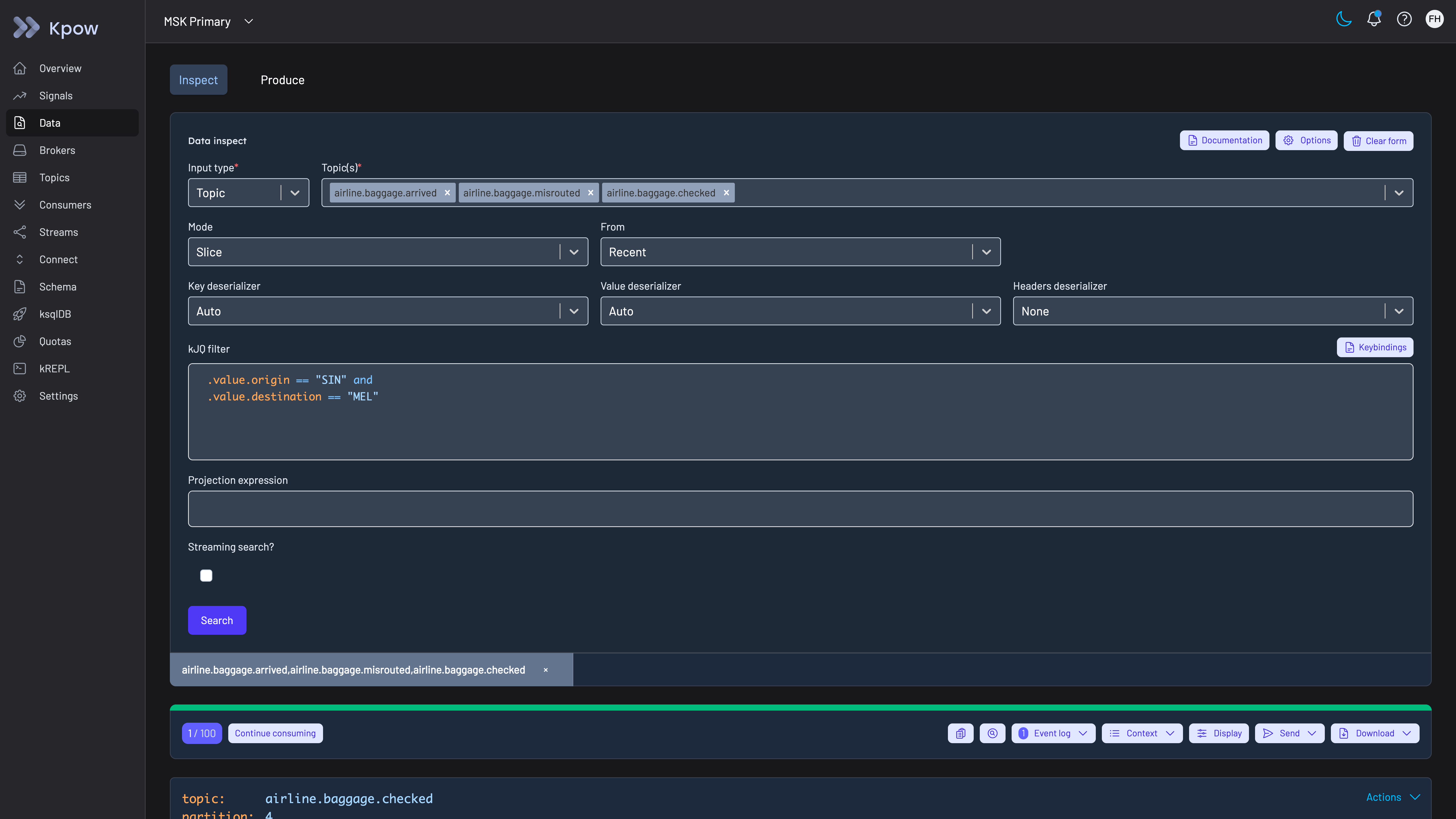
Kpow Data Inspect searching three topics at once with one kJQ filter. The topics in this demo carry airline baggage events; a manufacturer filters its machine, sensor and production topics the same way.
Hold risky changes for a second person. With staged mutations, a role can be set to Stage on actions such as editing broker configuration, changing a topic’s settings, resetting a consumer group’s offsets or deleting a topic, so the request waits in Kpow until an administrator approves or denies it. A manufacturer that prefers to keep configuration changes in its own tooling can set those actions to Deny and use Kpow to read the configuration only. A topic delete deserves the hold on a plant cluster for a reason that comes with producers that never stop. Kafka’s auto.create.topics.enable is on by default, so a connector or bridge that is still publishing recreates a deleted topic at once, with the broker’s default partition count and retention in place of the ones it had.
Give access to production for one task. An engineer who needs more than read access on a plant cluster raises a request in the manufacturer’s change system. Once it is approved, an administrator, or that system calling the Kpow API, creates a temporary policy that grants the action on the named resource for a fixed time. The policy expires on its own and is recorded in the audit log. The same grant fits a machine builder or integrator who needs to see one machine’s topics during a support visit: the policy covers that machine’s topics for the length of the visit, and nothing is left standing afterwards.
Keep the record of who changed what. The audit log records each action, data inspect queries included, with the user from the directory and the policy that allowed it. Kpow shows the last seven days in the product and writes the record to the __oprtr_audit_log topic on the cluster it manages, where Kpow’s topics default to one week of retention, so for a longer record webhooks send mutations, data inspect queries or both to Slack, Microsoft Teams or any endpoint the manufacturer chooses, such as its SIEM. Sending every site’s webhooks to the same endpoint gives one record across plants. A manufacturer that keeps records under a rule such as 21 CFR Part 11 sets the retention at that endpoint to the period its records require.
Scope plant, IT and data teams. A tenant limits a team to its own topics, consumer groups and connectors on a shared cluster, so a data team sees the topics it consumes without seeing, or being able to change, the plant’s own. A tenant includes topics by name, prefix or suffix, so topic names that begin with the site and area let one definition cover a plant.
Watch lag and broker health from the monitoring already in place. Kpow publishes consumer group offsets and lag, with broker, topic and connector metrics, on Prometheus endpoints for Prometheus, Grafana or the manufacturer’s own monitoring, so the team that owns a consumer sees it falling behind a line’s output before the downstream system does. Its /healthy endpoint, described in the deployment notes, gives the orchestration platform at each site a liveness check for Kpow itself.
Govern Flink jobs the same way. Manufacturers that run Apache Flink beside Kafka for streaming analytics can put the same directory sign-in and Allow, Deny or Stage policies over their Flink jobs with Flex.
Keep broker ACLs for services. Kpow governs people working through Kpow, not services connecting to brokers, so broker ACLs or an authorizer remain the control for plant applications and connectors. Kpow has further limits a manufacturer should plan for: its documentation asks for an instance close to each set of clusters, so several plants mean several instances and no single screen across them, where Lenses’ HQ or Conduktor Console gives one; its masking is set per resource, not per viewer; Lenses’ SQL is a stronger query model than kJQ for engineers and analysts who think in SQL; and every governance feature on this page is Enterprise, with Community Edition, free for 3 clusters and 10 users, holding none of them.
To see these screens before installing anything, the live Kpow demo needs no signup and shows data inspect with kJQ, consumer groups, topic management and the audit log topic on two MSK clusters. A reader can check the rubric against the product there by switching between the two clusters, running a kJQ search across topics and following a consumer group’s lag, and then opening the __oprtr_audit_log topic on MSK Secondary to see what the audit trail records. The demo has no SSO and no data policies configured, so sign-in and masking are the two things to test in the manufacturer’s own environment. To run the workflows against the manufacturer’s own clusters, install Kpow from its container image or JAR; tenants, RBAC, temporary policies, staged mutations, masking and the audit log are Kpow Enterprise features, and Community Edition is free for 3 clusters and 10 users.
Kpow live demo
Open Kpow the way a plant's engineers would
The live Kpow demo needs no signup. Switch between two clusters, search topic data with kJQ, follow consumer groups and lag, then read the audit trail on the __oprtr_audit_log topic of the MSK Secondary cluster.
For platform and plant engineering teams running Kafka under machine, sensor and production data.
Try the Kpow demoFAQ
What is the best Kafka tool for a manufacturer?
On this page’s rubric, Kpow: it runs as one container with no external database and nothing in the data path, manages self-managed and managed clusters with one access model, records every action and data query with the person from the directory, holds risky changes for approval, searches message content across topics with kJQ, and scopes teams with tenants. Kafbat UI is the strongest free option, but it has no approval step, no expiring access grants, no tenants and no view of its audit trail. For a small team that only needs to browse, search and manage topics, Kpow Community Edition is free for 3 clusters and 10 users, without the governance features scored here.
How do manufacturers use Kafka?
Kai Waehner’s survey of Kafka in industrial IoT and Industry 4.0 describes Kafka processing sensor and telemetry data from the shop floor for condition monitoring, predictive maintenance and quality assurance, connecting machines through MQTT and through legacy protocols on Kafka Connect, replacing or complementing proprietary data historians, integrating MES and ERP systems, and moving workloads from on-premise data centres to the public cloud with replication between the two. His notes on BMW describe mission-critical workloads in the factories and in the cloud, with IoT data collected once and consumed by several applications.
Should a Kafka management tool run in each plant or centrally?
The answer depends on the tool: Kpow’s documentation asks for it to be installed close to the Kafka resources it manages and says that multi-cluster does not mean multi-region, so the supported shape is an instance at each plant and one beside the cloud clusters, all with the same configuration and directory. Lenses and Conduktor offer a central console, at the cost of a database, and for Lenses an agent beside every cluster. Whichever shape a manufacturer picks, a tool that is not in the data path can be unreachable from head office without affecting the plant’s producers and consumers. The plant’s network rules often settle the question. NIST’s Guide to Operational Technology Security describes a DMZ between the enterprise network and the operations management level, with communication between the two going through services in the DMZ, and a Kafka client needs connections to several brokers, not one. A tool installed with the plant’s brokers needs no Kafka traffic to cross that boundary, since engineers reach it as a web application, while a console that connects to plant brokers from the centre needs a Kafka route into every plant.
Can Kpow run on a plant network with no route to the internet?
Kpow’s system requirements list no dependency beyond the Kafka cluster it manages, and its licence is set as environment variables copied from the licence email, so an instance at a plant needs network access to its brokers and to the people who use it. Factor House’s Kpow page says Kpow runs fully offline and works the same way inside an air-gapped network. A manufacturer with a segmented plant network should confirm the details of its own setup with Factor House before installing.
Can a Kafka UI manage the connectors that bring machine data in?
Yes, if it talks to the Kafka Connect REST API. Kpow lists connectors and tasks, restarts a failed task, shows its stack trace, and edits connector configuration with sensitive values redacted, under the same RBAC and audit log as topic changes. Best Kafka Connect monitoring tools compares how each tool handles task state, restarts and alerting.
Does a management tool add latency to plant data?
Not to producers and consumers, if it connects as an ordinary Kafka client. A UI that reads topics and calls the admin API sits beside the brokers, and applications never pass through it, though like any consumer its reads use broker capacity, and a Kpow search stops once it has found 100 matching records or reached its time limit, seven seconds by default. A proxy is different, because every message from the clients routed through it takes an extra network hop and the proxy has to be kept highly available.
Does NIS2 apply to the Kafka in a manufacturer’s plants?
It can, depending on the company’s size and what it makes. The European Commission’s summary of the NIS2 Directive lists critical product manufacturing among the sectors the directive added, and says that medium-sized and large entities in those sectors have to take appropriate cybersecurity risk-management measures. Article 21 names those measures, and they include supply chain security covering an entity’s direct suppliers and service providers, access control policies, and security in the acquisition and maintenance of network and information systems. A Kafka cluster that plant systems depend on is among the systems a manufacturer in scope has to cover, although the directive does not name Kafka or any tool. A tool that runs in the manufacturer’s own network, signs people in through its directory and records what they did supports the access control and supplier parts of that list, and each manufacturer should take its own advice on whether it is in scope.
Do manufacturers need a different Kafka tool from banks?
The tool can be the same, but the priorities differ. The banking page weights production access on request twice and on-prem plus cloud once, because regulators and third-party risk reviews ask first who could read or change production. This page reverses those two weights, because a manufacturer’s clusters are spread across plants and the cloud, and the tool has to work the same way at every site.
How these tools were scored
Six criteria, drawn from Kai Waehner’s accounts of Kafka in manufacturing and from what shared Kafka clusters ask of any management tool, score every option from 0 to 10. They are listed here in order of weight; the weights add up to 10, so the total is out of 100.
1. Out of the data path. A management tool that runs in the manufacturer’s own environment, connects as an ordinary Kafka client and keeps no data outside the manufacturer’s clusters adds nothing between plant applications and the brokers, and nothing extra to install and keep running at each site. Scored lower: tools that need an external database, and tools whose controls work only when application traffic passes through a vendor’s proxy. A self-hosted container with no external database and no proxy scores 9, a tool with a database of its own 6, one with several databases or a component on the brokers 4, and one that needs both a database and a proxy for its controls 3; 10 is kept for an option with nothing to deploy at all. This criterion is scored the same way on every Factor House page that uses it, and only its weight changes with the reader.
2. On-prem and cloud together. Manufacturers rarely run one distribution: self-managed Kafka on a plant’s network sits beside a managed service in the cloud. The same tool should reach all of them, so one set of roles and one way of working applies at every site. Kpow scores 8 rather than higher because one instance is capped at 12 clusters and its documentation asks for it to run close to its clusters, so a manufacturer with several plants runs more than one instance. The general comparison is best tools to manage multiple Kafka clusters from one place.
3. Audit trail per person. When people work through a shared tool, the broker only sees the tool’s service account, so only the tool’s own log can name the person. A manufacturer needs that log to cover configuration changes and data reads, so a review of a change to a plant cluster starts from a name and a time, and it needs the log to be readable without building a consumer first. Kafka audit logging tools compares the layers in detail.
4. Production access on request. Can a change to a production cluster, such as a broker setting, an offset reset or a topic delete, be held for a second person’s approval? Can an engineer be given access for a task, time-boxed, without a standing grant? And is sensitive data masked for the people who do get in? The wider set of controls over deletes and offset resets is compared in Kafka destructive operations tools.
5. Directory and Kafka sign-in. People should sign in through the company directory, whether that is LDAP directly or SAML and OIDC in front of Active Directory or Entra ID, with directory groups mapped to roles, so a person has the same rights at every site. On the cluster side the tool has to connect the way each cluster already authenticates clients, whether that is SASL, Kerberos or mutual TLS. Kafka SSO tools covers the protocol detail.
6. Many teams, shared clusters. Plant engineering, IT and data teams share clusters, so each team needs to be scoped to its own topics, consumer groups and connectors, and the platform team should onboard a team with a policy instead of a cluster.
Two things a manufacturer does every day are not scored here. Searching topic data for the events of one part or machine is compared in best Kafka message search tools, where Lenses’ SQL scores above Kpow’s kJQ, and managing the connectors that bring machine data in is compared in best Kafka Connect monitoring tools.
The cost figures model a manufacturer running 6 clusters at 4 sites (one production cluster at each of three plants, and production, development and test clusters in one cloud region) for 100 engineers at $120 an engineer-hour. Every option is costed at the same hours for its class as on every other page of this site, whether it runs as one deployment or one at each site, and each card prints its own assumptions. The general listicle view, without the manufacturing weighting, is in best Kafka management tools.
Every option is scored from 0 to 10 on each criterion, from the evidence and sources this page cites, and the reason for each score is on its card. The criteria are weighted: Out of the data path counts three times, On-prem and cloud together counts twice, Audit trail per person counts twice, Production access on request counts once, Directory and Kafka sign-in counts once and Many teams, shared clusters counts once, for a total out of 100. Out of the data path counts three times because machine, sensor and production events move between plant applications over Kafka while the line is running, so a tool that sits between applications and brokers is one more component that has to stay up on that path, and a tool that keeps its state in a database of its own is one more system to install, patch and keep running at every plant. On-prem and cloud together and the per-person audit trail count twice: Kai Waehner's notes on BMW describe mission-critical workloads in the factories and in the public cloud side by side, and on clusters shared by plant, IT and data teams the tool's own log is the only record that names the person behind a change, because the broker sees only the tool's service account. Production access on request, directory sign-in and shared clusters count once. This page is published by Factor House, which makes Kpow. Every option is scored on the same rubric and the same sources: Kpow's per-criterion scores are set the same way as every other option's and are not adjusted, and the weights apply to every option alike. Kpow ranks first on its total of 88 out of 100. The other options follow by total. Conduktor is listed last whatever its total; on its total of 61 it would place fourth.