At a glance
Kpow and Offset Explorer are scored here on the same five criteria, 50 points in all: Kpow 44 out of 50, Offset Explorer 26 out of 50. Kpow takes its best score on Access control and audit (10 out of 10) and its lowest on Cost as teams grow (7 out of 10). Cost a year: $13,500 for 3 clusters, plus about $2,880 in ops (this page's estimate). Offset Explorer takes its best score on Deployment footprint (7 out of 10) and its lowest on Access control and audit (1 out of 10). Cost a year: $5,950 once for 50 users, then $2,300, plus about $11,520 in ops.
Kpow vs Offset Explorer, compared
Kpow meets 6 of 7 requirements on this page. One row is not a yes or no question.
Key takeaway
Offset Explorer is licensed per named user and Kpow by Factor House per cluster, so the decision turns on whether your headcount or your cluster count is growing faster. Offset Explorer is installed on each engineer’s own machine, and a per-workstation tool runs nothing server-side: no shared audit log, and no identity of its own for a role model to key on. Its message search and command line tool are genuinely good. Kpow is one container a platform team deploys once and shares.
Kpow live demo
See Kpow in a working Kafka environment
You have seen how Kpow compares on paper. Open the live demo to test the workflows your platform team will depend on during an incident.
Built for platform and data teams managing shared Kafka clusters.
Try the Kpow demoWhat is Offset Explorer?
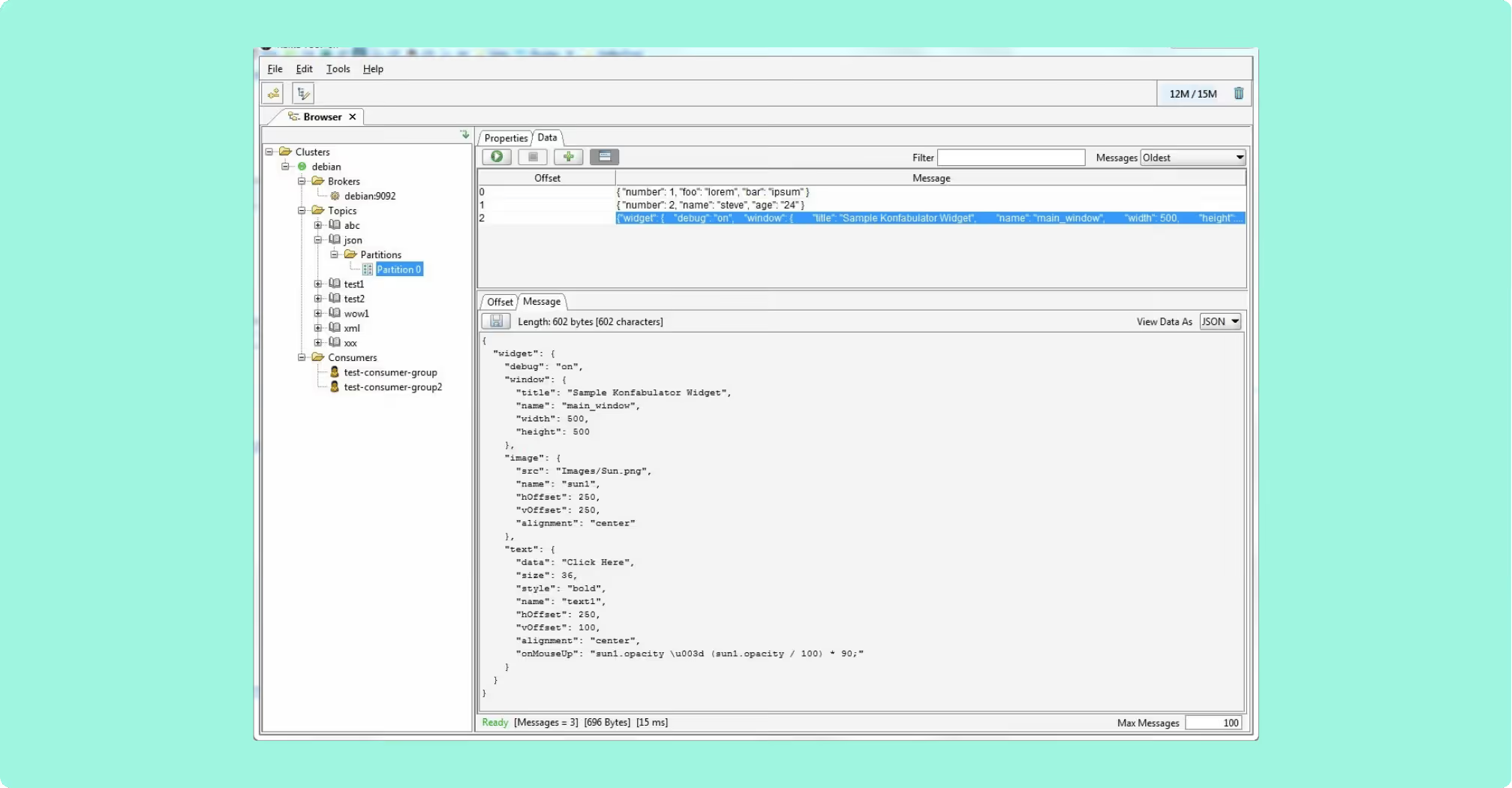
Offset Explorer is a GUI application for managing and using Apache Kafka clusters, installed on Windows, Linux or macOS rather than deployed as a service. It supports Kafka 0.11 and above. The Windows and macOS builds carry a bundled JRE, so installation there is a single download; the Linux build does not, so Java 21 or later has to be present first. It was renamed from Kafka Tool, and both names cover one product.
- Search: string, binary, Avro, Protobuf, JSON Schema, regular expressions and JsonPath, with payloads pretty-printed as JSON or XML.
- Consumer groups: Kafka consumer group operations browsable beside the topics they read from.
- Command line tool: exports, imports, test data generation, script generation and cluster comparison from saved JSON project files, with real exit codes.
- ACLs: managed from that same command line tool.
What it is not is shared: the licence is held by a named person, and the cluster list is configured per workstation.
What is Kpow?
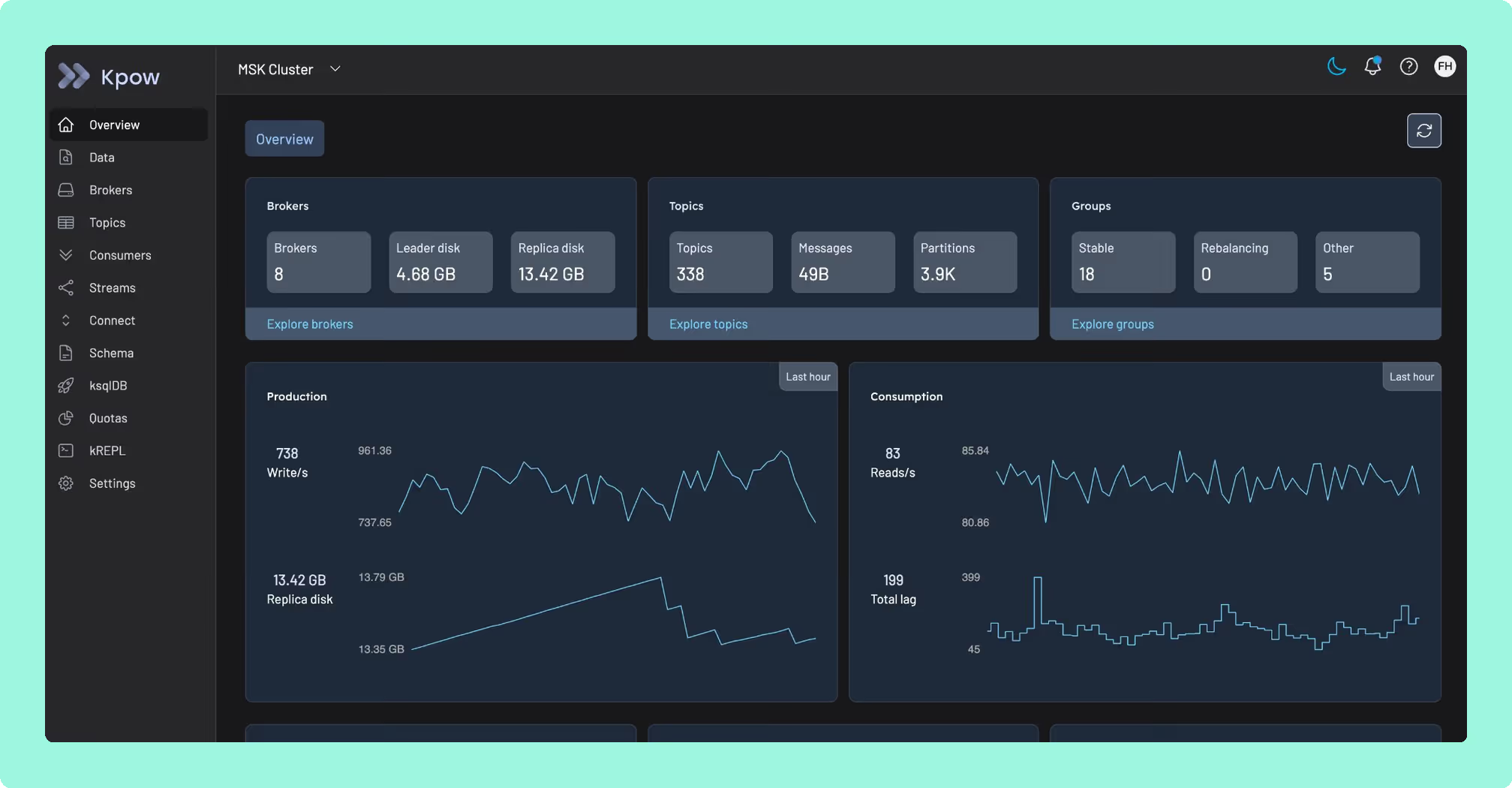
Kpow by Factor House is engineer-facing tooling for Apache Kafka. Factor House does not sell Kafka and does not run the cluster. Kpow runs against whatever cluster you already have: self-managed Kafka, Amazon MSK, Confluent Cloud, Redpanda, Aiven or Instaclustr. It is a single stateless JVM container, configured entirely through environment variables, with no external database, no sidecar and no persistent volume, keeping its telemetry in internal Kafka topics on the cluster it already monitors. One instance manages up to 12 Kafka clusters, on-premise, in any cloud or air-gapped.
Because the deployment is shared, there is somewhere to put the things a shared tool needs. Role-based access control and multi-tenancy sit over the one installation, and multi-topic search with JQ filtering runs across hundreds of topics at once, which is how an incident-causing message is found without writing a throwaway consumer. That is what Kafka cluster management becomes once more than one person is doing it. It is also a deployment: somebody has to run the container, hold the licence and keep it current.
What is the official 2026 pricing of Kpow and Offset Explorer?
Offset Explorer is priced per named user, from 139 US dollars a licence, and the seat price falls as the count rises. The unit is the person, not the machine and not the cluster, so a workstation several people share needs a licence for each of them. Kpow is priced per cluster, and the price is published, so adding an engineer changes nothing on the bill.
Work it through. Five engineers on Offset Explorer is five licences at 139 US dollars, so 695 in the first year and 230 a year after it to stay current. Fifty engineers is fifty licences at 119, so 5,950, with 2,300 a year in maintenance behind it, and neither number moves when a cluster is added or retired. Under a per-cluster licence the arithmetic runs the other way: fifty engineers on three clusters cost what five engineers on three clusters cost. Neither model is wrong, and the question worth settling first is which of your two numbers, headcount or cluster count, is growing faster.
Where does each one run out?
Both tools are marked out of 10 on the same five criteria, for a total out of 50, and every criterion counts once. Nothing sits behind a multiplier, so a total is the sum of its five marks and a reader can recompute it. The five are cost as teams grow, deployment footprint, support and maintenance, access control and audit, and multi-cluster reach, because those are the questions a Kafka interface is actually measured against after the first month: a second cluster, an access review with a date on it, an upgrade nobody owns, and a bill that moves when the team does. The widest gap between the two marks is on access control and audit, where Kpow marks 10 and Offset Explorer marks 1. The marks come from the same matrix used on every comparison on this site, so a tool scores the same here as it does anywhere else, and the reason behind each mark is in the card below, under Why these scores.
 Rank 1
 Kpow
44 out of 50 Total
Try Kpow in the live demo No signup needed.
- Cost a year
- $13,500 for 3 clusters, plus about $2,880 in ops (this page's estimate)
- Who the tool authenticates
- A person, with RBAC and multi-tenancy over one deployment
- What it needs to run
- One stateless container, no database, no volume
- Cost as teams grow
- 7 out of 10
- Deployment footprint
- 9 out of 10
- Support and maintenance
- 9 out of 10
- Access control and audit
- 10 out of 10
- Multi-cluster reach
- 9 out of 10
Why these scores for Kpow
- Cost as teams grow 7 out of 10
- Per cluster and published, Enterprise from 4,500 US dollars a cluster with 100 users included, so this page’s fifty engineers and its five engineers pay the same. Held at 7 because Community Edition stops at 3 clusters and 10 users and holds RBAC, masking and audit back from it.
- Deployment footprint 9 out of 10
- One stateless JVM container configured through environment variables, with no external database, no sidecar and no persistent volume, against an installer on every engineer’s own machine. Kafdrop is named lighter elsewhere on the site.
- Support and maintenance 9 out of 10
- Releases ship continuously with an Enterprise support SLA and priority support, against 365 days of support included at purchase and 46 US dollars per licence a year after it on the other side.
- Access control and audit 10 out of 10
- A person is authenticated, with role-based access control and multi-tenancy over the shared deployment, server-side masking, and a user action audit log in the product. On this page, Offset Explorer authenticates the connection only, which is why it scores 1.
- Multi-cluster reach 9 out of 10
- Up to 12 clusters from one instance across self-managed Kafka, Amazon MSK, Confluent Cloud, Redpanda, Aiven and Instaclustr; the per-instance cap of 12 keeps it at 9 rather than 10.
Kpow runs out at the other end: it is a shared service, so it has to be deployed, licensed and kept running by somebody, and one engineer who wants something working on a laptop this afternoon is not the reader it is built for. That same deployment is what makes the role model, the audit trail and the shared record possible in the first place, which is the thing Offset Explorer has no way to offer.
Kpow answers each of those directly: a user action audit log ships in the product, so there’s a shared record instead of a file exchange to reconstruct one; it authenticates a person, with role-based access control and multi-tenancy over the shared deployment; and it’s priced per cluster, so adding an engineer doesn’t move the bill at all.
It also finds a message across the whole topology rather than one topic at a time: multi-topic search with JQ filtering runs across hundreds of topics from that same shared deployment, which reaches up to 12 clusters on-premise, in any cloud or air-gapped.
What it costs a year: 13,500 US dollars for the three clusters this page keeps returning to, at the published 4,500 per cluster with 100 users included, so fifty engineers and five engineers are billed the same. This page’s estimate rather than a vendor price for what running it takes: one stateless container with no database and no volume, at two engineer-hours a month, is 2,880 US dollars a year at 120 US dollars an hour, so about 16,380 all in. The number does not move when the fifty-first engineer arrives, and it includes the audit log the other side has no way to produce.
 Rank 2
 Offset Explorer
kafkatool.com
26 out of 50 Total
- Cost a year
- $5,950 once for 50 users, then $2,300, plus about $11,520 in ops
- Who the tool authenticates
- The connection only, with no login and no SSO
- What it needs to run
- Nothing server-side, an install per workstation
- Cost as teams grow
- 5 out of 10
- Deployment footprint
- 7 out of 10
- Support and maintenance
- 6 out of 10
- Access control and audit
- 1 out of 10
- Multi-cluster reach
- 7 out of 10
Why these scores for Offset Explorer
- Cost as teams grow 5 out of 10
- Per named user. This page prices it at 139 US dollars at 1 to 10 users, 128 at 11 to 20 and 119 at 21 to 50, plus 46 a year per licence after the first 365 days, so fifty engineers is 5,950 once and 2,300 a year, and a workstation several people share needs a licence for each of them.
- Deployment footprint 7 out of 10
- Nothing server-side at all, with a bundled JRE on the Windows and macOS builds and Java 21 or later needed on the machine first for Linux, docked because the cluster list is configured per workstation and travels as exported files.
- Support and maintenance 6 out of 10
- It includes 365 days of support and maintenance at purchase, then 46 US dollars per licence a year to stay current.
- Access control and audit 1 out of 10
- This page states that authentication is client to broker, so nothing authenticates a person to the application itself and there is no identity inside the tool for a role model or an audit trail to key on. Masking is not among the documented features.
- Multi-cluster reach 7 out of 10
- Kafka 0.11 and above, with a mixed topology across Amazon MSK, Confluent Cloud, Redpanda and self-managed Kafka all reachable, docked because each workstation holds its own list and nothing keeps two engineers in step.
Offset Explorer runs nothing server-side. That is what makes it quick to adopt, and it is also the ceiling. Authentication is client-to-broker, so nothing authenticates a person to the application itself, and with no identity inside the tool there is nothing for a role model or an audit trail to key on.
Shared record: no shared deployment, no server-side audit log, and no single place to see what an engineer did to production last Tuesday.
ACLs: managed from the command line tool. Kafka’s own authorization model governs what a principal may do on the cluster, which is not a role model over the tool.
Masking: not among the documented features.
Bill: scales with headcount, with maintenance on a separate annual line.
What it costs a year: 5,950 US dollars once for fifty engineers at the 119 band rate, then 2,300 a year to stay current, which is the smaller of the two licence lines on this page. This page’s estimate rather than a vendor price for what that leaves undone: fifty workstation installs, fifty cluster lists exported and imported as files, and a decoder jar copied into a plugins folder one machine at a time, at eight engineer-hours a month, is 11,520 US dollars a year at 120 US dollars an hour. That is about 17,470 in the first year and 13,820 a year after it, against 16,380 for Kpow on three clusters at its published 4,500 each. No part of either number buys an audit log here, because there is nothing server-side to write one, so an access review on this tool has nothing to produce at any price.
Compare CMAK vs Offset ExplorerLenses vs Offset ExplorerKafka Tool download
How do you switch, or run both?
Neither tool owns cluster state, so running both is close to free: a second one is an installer or a container and a connection, and nothing in the cluster has to be told about either. Moving off Offset Explorer is an uninstall on each machine, because nothing ran server-side. What has to be recreated is each engineer’s own cluster list, and server connections export and import as files, so that list travels rather than being retyped. What a file exchange does not give a team is a shared store keeping two engineers in step after one changes a connection. Moving off Kpow is a container, and the telemetry lives in Kafka topics on the monitored cluster, so any consumer offsets reset through it stay exactly where they were set.
Which should you pick?
Kpow by Factor House is the pick for a team that has to answer who did what, scoring 44 against Offset Explorer’s 26, because a per-workstation tool runs nothing server-side, so there is no shared audit log and no identity for a role model to key on. Offset Explorer is the better choice for an individual engineer, and its message search and command line tool are genuinely good.
Pick Offset Explorer if:
- the tool is for one engineer doing local development and one-off investigation
- personal use keeps it free
- a workstation install is easier to get approved than a deployment
- its message search and script generation are what is actually wanted
Pick Kpow if:
- several people need the same view of the same cluster
- a question about who did what to production has to have an answer
- headcount is growing faster than cluster count
- the estate is mixed across MSK, Confluent Cloud, Redpanda and self-managed Kafka
If the shortlist is wider than these two, the Kafka management tools roundup and the practical comparison of the field cover what else is on it.
We model our company on JetBrains who make IntelliJ. They make phenomenal tools for engineers and they generally have the community version, which is really well featured and free, and it gives engineers great tools to be effective in what they're doing. And then they've got the pro version or the enterprise version which companies can pick up.
Derek Troy-West, Co-founder and CEO of Factor House
Which number does the bill keep?
Offset Explorer’s message search is genuinely good: string, binary, Avro, Protobuf, JSON Schema, regular expression and JsonPath search, with payloads pretty-printed as JSON or XML. Its command line tool handles exports, imports, test data generation, script generation and cluster comparison from saved JSON project files, with real exit codes, and consumer groups browse right beside the topics they read from.
Nevertheless, running nothing server-side is also the ceiling. There’s no shared server-side audit log and no single place to see what an engineer did to production last Tuesday. Authentication is client-to-broker, so nothing authenticates a person to the application itself, and with no identity inside the tool there’s nothing for a role model to key on. And the bill scales with headcount, with maintenance sitting on its own annual line on top of that. Kpow answers each of those directly: a user action audit log ships in the product, so there’s a shared record instead of a file exchange to reconstruct one; it authenticates a person, with role-based access control and multi-tenancy over the shared deployment; and it’s priced per cluster, so adding an engineer doesn’t move the bill at all.
It also finds a message across the whole topology rather than one topic at a time: multi-topic search with JQ filtering runs across hundreds of topics from that same shared deployment, which reaches up to 12 clusters on-premise, in any cloud or air-gapped. The Community Edition covers up to 3 clusters and 10 users, so start on Kpow and see which number your own bill would track. Offset Explorer tells one engineer what happened on one machine. Kpow tells the whole team what happened on the cluster.
How these tools were scored
Every option is scored from 0 to 10 on each criterion, from the evidence and sources this page cites, and the reason for each score is on its card. Each criterion counts once, for a total out of 50. This page is published by Factor House, which makes Kpow. Every option is scored on the same rubric and the same sources: Kpow's per-criterion scores are set the same way as every other option's and are not adjusted, and the weights apply to every option alike. Kpow ranks first on its total of 44 out of 50. The other options follow by total.
Sources
- Apache Kafka documentation on authorization and ACLs
- Apache Kafka documentation on consumer groups