Lenses.io is a commercial Kafka management platform that sits on top of your existing Kafka clusters, adding a SQL querying interface, topology visualisation, and a data catalog for multi-cluster environments. This review draws on practitioner feedback collected through mid-2026 to give you an honest picture of where the product delivers value and where it falls short.
At a glance
Lenses.io scores 52 out of 90 on this page's five weighted criteria: it takes its best score on Access control and audit (7 out of 10) and its lowest on Deployment footprint (2 out of 10). The rubric is weighted: Support and maintenance counts three times, Access control and audit counts three times, and Cost as teams grow, Deployment footprint and Multi-cluster reach count once. Cost, 3 clusters: $14,880 a year, this page's estimate. The other options, in the order this page lists them: Kpow (Factor House) 82, Kafbat UI 60, AKHQ 57, Redpanda Console 55, Confluent Control Center 46, each out of 90. Kpow (Factor House) takes its best score on Access control and audit (10 out of 10) and its lowest on Cost as teams grow (7 out of 10). Cost, 3 clusters: $16,380 a year, licence and run time.
Key takeaways
- Lenses.io’s SQL Studio is its standout feature, giving non-Kafka-savvy team members a familiar interface for inspecting and troubleshooting topics without writing consumer code.
- Multi-cluster topology and cross-cluster data lineage are genuine differentiators for organisations running several Kafka deployments across clouds or regions.
- Deployment complexity, upgrade friction, and the absence of a high-availability option for the Lenses HQ control plane are recurring concerns in practitioner reviews through 2025-2026.
- The community edition caps at two clusters and five users with basic authentication only; SSO, RBAC, and SAML all require the Team tier at a minimum of $4,000/year.
- Lenses was acquired by Celonis in early 2022, leading to uncertainty about future development. The product has continued as a standalone offering and has received some version updates since then.
- If your primary need is operational observability, audit logging, or data masking across Kafka clusters, Kpow by Factor House is worth evaluating alongside Lenses.io.
Kpow live demo
Test the operational trade-offs in a live Kafka UI
A Lenses.io review is only the start of an evaluation. Open Kpow and try the shared workflows your platform team will need every day.
Explore data inspection, consumer operations, and governed access in one environment.
Try the Kpow demoWhat is Lenses.io?
Lenses.io is a Kafka governance and data exploration platform. It connects to one or more Kafka clusters and surfaces topic data, schema information, consumer group state, and Kafka Connect configuration through a browser-based UI. Its primary differentiator is SQL Studio, a proprietary SQL interface that lets engineers and analysts query Kafka topics using familiar syntax without writing Kafka consumer code.
The platform also provides a topology view that maps data lineage across topics, connectors, and applications (including externally registered Flink jobs). A data catalog groups topics by logical domain and supports schema registry integration.
Lenses operates as a Kafka client; it does not sit in the data path and does not act as a proxy. The current architecture consists of a central Lenses HQ node and lightweight agents deployed per cluster. KRaft clusters are supported without modification, since the agent connects as a standard Kafka client.
Within the Kafka tooling ecosystem, practitioners draw a distinction between lightweight desktop clients designed for quick topic inspection and enterprise control planes that add governance, RBAC, and audit workflows. Lenses.io sits firmly in the latter category: its value becomes most apparent once multiple teams are sharing a cluster infrastructure and need guardrails around access, configuration changes, and data visibility.
The product is available in three tiers: a free community edition, a Team edition, and an Enterprise edition.
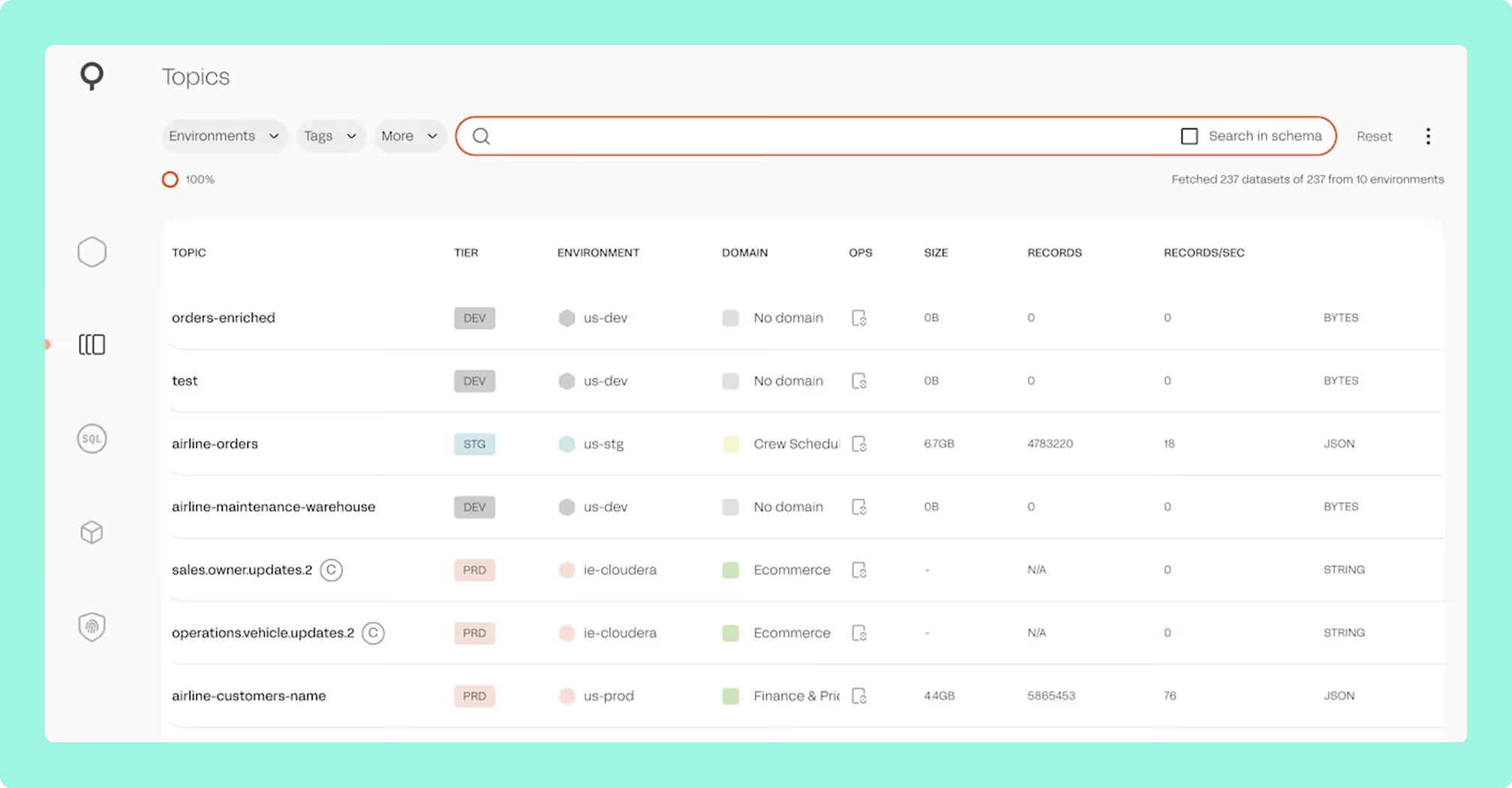
Lenses.io review
Functionalities
The SQL Studio is consistently the most praised aspect of Lenses.io in practitioner reviews. Juan Luis d. on G2 (November 2025) described it as “providing a straightforward way to troubleshoot problem cases and check topic metrics,” with the broader UI characterised as “accessible for both experienced individuals as well as those who are not very familiar with Kafka development.” Community discussion on r/apachekafka echoes this: engineers highlight that SQL Studio lowers the barrier for team members who are not comfortable with Kafka’s internal mechanics, replacing the need to search through millions of raw JSON, Avro, or Protobuf payloads with familiar query syntax.
The topology and lineage view is the second most cited strength. In multi-cluster environments where teams need a single pane of glass across producers, topics, connectors, and consumers, the topology view reduces the operational overhead of maintaining that picture manually.
Lenses.io also provides SQL Processors, Kubernetes-native stream processing engines built on Kafka Streams. These allow teams to define stateful and stateless processing rules in SQL, compiled and executed within a Kubernetes cluster, without maintaining a dedicated Flink or Spark infrastructure. For straightforward transformation and filtering tasks, this can be a practical option. However, the proprietary nature of SQL Processors is a meaningful consideration. Jose Manuel C. on G2 (November 2025) wrote: “Some of Lenses’ functionalities that are not open-source create a vendor lock-in, with SQL Processors being the most clear example… the tradeoff doesn’t pay off in the long run.” Teams considering SQL Processors as a core part of their architecture should weigh portability before committing.
The limitations are equally consistent across reviews. The ACL management interface has not advanced meaningfully across major releases: one unnamed G2 reviewer from the retail sector noted that version 6 “introduced a new interface, but the same issues remain: the ACLs listing is still too basic.” Bug resolution is perceived as slow, with Juan Luis d. noting “ongoing bugs within Lenses that remain unresolved, highlighting a potential lack of responsiveness in bug fixes.” One practitioner on r/apachekafka put it more directly: “I often felt like a QA for Lenses developers as a customer and it was exhausting.”
Schema Registry integration exists but was described by Berta m. on G2 (November 2025) as “not entirely optimal” in terms of schema inference accuracy.
Deployment and operations
Lenses.io supports Helm-based Kubernetes deployment, which is the recommended path. In practice, practitioners have encountered meaningful friction here.
The platform runs a server-side JVM backend alongside its web interface, which makes it a relatively resource-intensive deployment. This comes up frequently in community discussions: developers who only need to inspect local topics during development find the Docker and JVM overhead excessive compared to lighter alternatives. Starting with version 5, the community edition also restricts connections to single-node clusters, which has frustrated users attempting to test multi-broker SSL-enabled environments locally. Several have reported rolling back to version 4.3 to retain multi-broker support in their trial setups.
Upgrades to Lenses 6 HQ triggered Liquibase database migration errors in at least one documented case on the community forum (ask.lenses.io, November 2025), where a column-rename operation failed depending on the source version and database backend. A separate reported issue involved Traefik ingress login loops caused by the default secureSessionCookies: true setting, which breaks non-HTTPS environments; the workaround requires adding lensesHq.http.secureSessionCookies: false to values.yaml.
A third operational issue affects teams connecting Lenses to Amazon MSK: the default broker metrics refresh interval (approximately 5 seconds) generates an unexpectedly high volume of JMX requests against MSK’s OpenMetrics/Prometheus-backed JMX exporter. The recommended workaround is to set the interval to 30 seconds or higher (ask.lenses.io, April-May 2026).
Lenses HQ does not support high availability in the current architecture. Multiple G2 reviewers in 2025 identified this as a gap, particularly in production environments where the control plane itself needs to be resilient. The community edition further limits deployment to two clusters with five users and basic authentication only; a Helm chart for community edition was still a feature request as recently as May 2025.
Access control and security
SSO (Okta, Keycloak, OneLogin, Google, Azure/Entra ID) and RBAC are available but gated to the Team tier at $4,000/year minimum. The community edition provides only username/password authentication.
LDAP integration has had documented instability across recent releases. A connection-reset bug was fixed in v5.5.14 (December 2024). Version 5.5.6 (August 2024) introduced a breaking behaviour change: new LDAP users are no longer automatically created unless they belong to a mapped group, which silently broke access for teams relying on the previous behaviour.
Azure Entra ID SAML integration has a documented limitation: Azure exposes only Group UUIDs (not group names) via SAML, requiring administrators to use UUID strings as group identifiers within Lenses. Google SSO requires custom attribute mapping because Google does not expose user groups or organisation units to SAML applications by default.
The read-only account use case, a common requirement for giving stakeholders visibility without change permissions, was an unanswered question on the community forum as of August 2025, which suggests RBAC granularity for viewer-only roles is either not well-documented or not straightforward to configure in v6.
It is worth noting that identity provider support has historically been a point of friction with Lenses. The team behind Kowl (now Redpanda Console) cited Lenses’ lack of support for their preferred identity provider and group configurations as one of the motivating reasons they built their own tool.
User interface
The general UI receives consistently positive marks in practitioner reviews. Descriptions include “simple and effective” (unnamed reviewer, retail sector, G2, November 2025), “user friendly, easy to use” (unnamed reviewer, apparel sector, G2, November 2025), and praise for the ease with which non-engineers can interact with topic configurations.
The version 6 redesign refreshed the visual style but did not resolve the underlying capability gaps that existed in v5. The ACL management views remain limited, and the deployment experience was still described as “complicated” by reviewers writing after the v6 release. Documentation quality is also cited as a persistent concern, with multiple reviewers in 2025 describing it as “insufficient and unclear.”
Ecosystem
Lenses operates as a Kafka client and integrates with Schema Registry, Kafka Connect, and the Topology view can include externally registered Flink jobs for monitoring (though Flink is not natively managed through the platform). KRaft clusters are supported; the only known limitation is a minor display bug where the controller count is not shown correctly on KRaft clusters (confirmed by a Lenses team member on ask.lenses.io, July 2025).
The open-source Stream Reactor connector library extends Lenses with a range of sinks and sources. Active GitHub issues from late 2025 through early 2026 show a maintenance backlog for the S3 connector (ByteArrayConverter envelope restoration failures, ConnectionClosedException on S3 Source), an MQTT source SchemaParseException triggered by topic names containing hyphens, and Azure Data Lake Gen2 connector header errors.
Teams connecting to MSK Serverless with IAM authentication should note a documented access-denied issue: Lenses 6 Agent requires kafka-cluster:* IAM actions, not the broader kafka:* scope. A well-documented workaround exists on the community forum.
Celonis acquisition and product continuity
Celonis acquired Lenses.io in early 2022. At the time, the acquisition generated significant uncertainty within the Kafka community, with several engineers on r/dataengineering and r/apachekafka speculating that Celonis had bought the company primarily for its core technology and planned to discontinue the standalone product.
Lenses.io continues to operate as a standalone commercial product, and the cadence of version releases (including 5.3, 5.4, and the version 6 UI redesign) indicates that Celonis has maintained some active development. For teams evaluating the product, the acquisition risk appears lower than it did in 2022 and 2023, though Celonis has not publicly committed to a long-term standalone roadmap in specific terms.
Customer support
Community edition users rely on the public forum (ask.lenses.io) and documentation. The forum is actively monitored by a small number of Lenses team members, and response quality for technical issues is generally fair. Enterprise support SLAs are available at the Team and Enterprise tiers.
Independent review coverage is thin. Gartner Peer Insights has two ratings as of mid-2026, giving Lenses a 3.7/5 overall with a 50% willingness to recommend. TrustRadius and PeerSpot had insufficient or no reviews to report an aggregate score at the time of this research. Roadmap clarity and documentation quality were the most frequently cited support-related concerns in 2025 G2 reviews.
Best for
Lenses.io is a good fit for teams where the primary use case is giving business analysts or less Kafka-savvy engineers self-service access to Kafka topic data through a familiar SQL interface, without requiring them to write consumer code or understand Kafka internals. It is also well-suited to organisations running multiple Kafka clusters across regions or cloud accounts who need unified topology visibility and cross-cluster querying, which is the job the comparison of Kafka multi-cluster management tools scores every option on.
It is worth evaluating carefully if your organisation is small or budget-constrained (the step from the community edition to the Team tier is significant), if high availability for the control plane is a hard requirement, or if you are building on Kafka primarily for operational observability and governance rather than SQL-based data exploration.
Lenses.io pricing
Lenses.io uses a tiered model with a free community edition and two paid tiers. Pricing details are based on the Lenses pricing page and community forum sources.
Pricing tiers
| Tier | Price | Clusters | Users | Notable limits |
|---|---|---|---|---|
| Community | Free | 2 | 5 | Basic authentication only; no SSO, no RBAC; single-node clusters only from v5 |
| Team | From $4,000/year | 1 | Up to 15 | SSO, SAML, RBAC, and team-level support included; a second cluster is a second licence |
| Enterprise | Contact sales | Unlimited | Unlimited | Enterprise support SLAs, advanced governance |
The jump from Community to Team is steep for smaller teams. SSO and any form of role-based access control require the paid Team tier, which starts at $4,000/year. The community edition’s two-cluster ceiling also limits its usefulness for anything beyond a single development or staging environment.
Self-hosting context
One recurring theme in community discussion is the financial case for self-hosting Kafka on Kubernetes with an operator like Strimzi, combined with a commercial management plane. Engineers on r/apachekafka have noted that managed Kafka pricing can change significantly with billing model updates: one example cited a partition-based fee change that would have increased monthly costs from $30 to $1,200 for a single team. Against that backdrop, the predictability of a fixed annual licence for Lenses (or an alternative like Kpow) can be attractive, even at the Team tier price point.
Free trial
A time-limited trial of the Team or Enterprise edition is not available from the Lenses website.
Lenses.io competitors and alternatives
Lenses.io occupies a specific niche: SQL-based self-service access and multi-cluster topology for teams investing in a DataOps model. Depending on your actual requirements, other tools may be a better fit. The table below ranks Lenses.io against the most relevant alternatives across open-source and commercial options, in the same order as the scored cards underneath it.
Prices in the table are the vendors’ own published figures. The cost totals on the scored cards below are this page’s, not any vendor’s: they price one scenario, three Kafka clusters and fifteen engineers, by adding the published licence to the time each option takes to deploy, secure, upgrade and work around the gaps this review names, at a blended $120 an engineer-hour. Every card shows its own arithmetic, so you can substitute your own rate and cluster count. A free licence is not a free tool, and on this scenario a published per-cluster licence with one container to run comes in under every free option here. The two numbers on each card answer different questions and will not always point the same way: the “Cost as teams grow” score rates the licence model on the rubric every Kafka UI page here uses, so a tool with no licence at all scores 10 on it, while the dollar figure is the total for this scenario once the time is counted.
| Rank | Tool | Best for | Type | Key functionalities | Deployment and ops | Access control | User interface | Pricing |
|---|---|---|---|---|---|---|---|---|
| 1 | Kpow by Factor House | Platform teams needing stateless deployment, air-gap operation, per-cluster pricing, and comprehensive RBAC with audit logging | Commercial | Topic inspection with kJQ filtering, consumer lag, Kafka Streams topology, schema-aware deserialization, staged approval workflows | Docker, Kubernetes, JAR; stateless, no external DB; air-gap capable; deploys in minutes | SSO (Okta, Azure AD, Keycloak, LDAP, SAML, OAuth2), RBAC, data masking, full audit log | Focused and fast; no SQL layer | Community free; Enterprise from $4,500/year per cluster; 30-day trial, no credit card |
| 2 | Kafbat UI (kafka-ui) | Teams wanting a lightweight, actively maintained OSS alternative to the archived kafka-ui | OSS | Topic/consumer group browser, schema registry, Connect, basic ACL management | Docker, Kubernetes; self-managed | Basic auth, OAuth2 | Modern, configurable | Free (self-hosted) |
| 3 | AKHQ | Development teams wanting a zero-cost, self-hosted Kafka UI | OSS | Topic browser, consumer group management, schema registry, Connect | Docker, Kubernetes; self-managed | Basic auth, LDAP, OAuth2; limited fine-grained RBAC | Functional; suited to engineers | Free (self-hosted) |
| 4 | Redpanda Console | Teams using Redpanda or wanting a lightweight Kafka-compatible UI | OSS / Commercial | Topic browser, consumer groups, schema registry, Connect | Docker, Kubernetes; lightweight | Basic auth; SSO in enterprise tier | Minimal, fast | Free OSS; paid tiers for enterprise |
| 5 | Lenses.io | Teams giving analysts and non-Kafka engineers SQL self-service over topics, plus cross-cluster topology | Commercial | SQL Studio over topics, topology and lineage, data catalog, SQL Processors, Schema Registry, Connect | Kubernetes via Helm; a central HQ node on PostgreSQL plus an agent per cluster; no HA for HQ | Basic authentication on Community; SSO, SAML and RBAC from the Team tier; audit logs in the product | Praised as simple and effective; ACL views still limited after the v6 redesign | Community free for 2 clusters and 5 users; Team from $4,000/year for up to 15 users; Enterprise on request |
| 6 | Confluent Control Center | Teams fully committed to the Confluent Platform stack | Commercial | Cluster health, ksqlDB, stream lineage, connector management | Bundled with Confluent Platform; cloud or on-prem | Confluent RBAC | Polished; tightly coupled to Confluent | Included in Confluent Platform licensing |
| 7 | Conduktor | Governance-first organisations needing proxy-level policy enforcement, data masking, and audit trails | Commercial | Consumer group management, schema registry, Connect, gateway proxy for policy enforcement | Kubernetes, Docker; proxy sits in data path | SSO, RBAC, data masking, audit log | Clean and opinionated; strong governance UI | Tiered; community plan available |
For a more detailed comparison of Kafka UI tooling, see the guide to Kafka UI tools in 2026.
 Rank 1
 Kpow (Factor House)
82 out of 90 Total
Try Kpow in the live demo No signup needed.
- Cost, 3 clusters
- $16,380 a year, licence and run time
- Enterprise
- From $4,500 per cluster a year, 100 users
- Free tier
- Community: 3 clusters, 10 users
- Cost as teams grow
- 7 out of 10
- Deployment footprint
- 9 out of 10
- Support and maintenance ×3 weight, this criterion counts 3 times toward the total
- 9 out of 10
- Access control and audit ×3 weight, this criterion counts 3 times toward the total
- 10 out of 10
- Multi-cluster reach
- 9 out of 10
Why these scores for Kpow (Factor House)
- Cost as teams grow 7 out of 10
- This page’s cost model of 3 clusters and 15 engineers puts the published licence at 3 x $4,500 = $13,500 with 100 users per cluster included, plus 2 engineer-hours a month at $120 for one stateless container, which is 24 hours or $2,880, so $16,380 a year. That is not the smallest figure in this table, because the two Apache 2.0 tools are $8,640 each in engineer time alone and Lenses on three Team licences is $14,880 all in at this page’s three clusters, which is why cost scores 7 and not 10. What the figure buys is a total that stops moving, because the next eighty five users on those three clusters are already paid for. The Kpow pricing page and the Kpow vs Lenses comparison publish a price per cluster from $4,500 a year with 100 users included, with a 30-day trial, and Community Edition free for 3 clusters and 10 users with RBAC, masking and audit held back. The free Apache 2.0 tools here score higher.
- Deployment footprint 9 out of 10
- It runs as one stateless JVM container configured through environment variables, with no external database, sidecar or persistent volume, storing telemetry in Kafka topics on the cluster it already monitors, as the Kpow vs Lenses comparison sets out. Kafdrop is named lighter elsewhere on the site.
- Support and maintenance 9 out of 10
- The Kpow features page lists email support and an Enterprise support SLA, and the Kpow vs CMAK comparison has it shipping continuously, with priority support on Enterprise.
- Access control and audit 10 out of 10
- It has RBAC, multi-tenancy, data masking, audit logs and staged approval workflows in the Kpow vs Lenses comparison, masking applied by role in the Kpow vs AKHQ comparison, and SAML, LDAP and OpenID on the Kpow features page, all Enterprise.
- Multi-cluster reach 9 out of 10
- One instance reaches up to 12 clusters across Apache Kafka, Confluent, Amazon MSK, Redpanda, Aiven and Instaclustr, on the Kpow multi-cluster page, and the per-instance cap of 12 keeps it at 9 rather than 10.
What it costs a year. The licence is the published number: $4,500 per cluster a year, so $13,500 for three, with 100 users per cluster included, which covers fifteen engineers with no per-seat step. This page’s estimate of what it costs to run is 2 engineer-hours a month, because it is one stateless container with no database, no sidecar and no broker-side component, and Enterprise carries a support SLA. At $120 an hour that is $2,880 a year, for $16,380 all in. That is not the smallest number in this table: the two Apache 2.0 tools come to $8,640 each in engineer time alone, and Lenses on three Team licences comes to $14,880 all in. It is the figure that stops moving, because the next eighty five users on those three clusters are already paid for, where the Lenses Team tier ends at fifteen users on one cluster and Conduktor is billed per seat.
Against Lenses.io. Lenses answers a question about one topic through a control plane you own: HQ, its PostgreSQL, an agent beside each cluster and a database behind each agent. Kpow is one stateless container with no external database, and the same container reaches one cluster or twelve. The price is published per cluster rather than by capability rung, so 100 users on a cluster you already licence do not change the bill, where the Lenses Team tier caps at 15 users and the tier above it is custom priced.
Where it falls short. There is no SQL Studio. This page’s own table records Kpow as having no SQL layer, so a team buying Lenses for analyst self-service over topics is not buying what Kpow sells. RBAC, server-side data masking and the audit log are Enterprise features, Community Edition stops at 3 clusters and 10 users, and one instance manages up to 12 clusters before you deploy another.
Staying patched. Kpow’s release notes name the CVEs each release remediates, and the 96.4 image built on 5 August 2026 bundles 311 dependencies. What a licence buys here is not a different deployment model, because Kpow is self-hosted too. It is a company contracted to ship the fix. Every dependency figure on this page was read on 24 September 2026 from the published artefacts and from nvd.nist.gov.
Compare Kpow vs Lenses.ioKpow vs AKHQKpow vs Kafbat UIKpow vs Redpanda ConsoleKpow vs Confluent Control Center
 Rank 2
 Kafbat UI
60 out of 90 Total
- Cost, 3 clusters
- $8,640 a year, this page's estimate
- Licence
- Apache 2.0, no paid tier
- Latest release
- v1.5.0, April 2026
- Cost as teams grow
- 10 out of 10
- Deployment footprint
- 8 out of 10
- Support and maintenance ×3 weight, this criterion counts 3 times toward the total
- 5 out of 10
- Access control and audit ×3 weight, this criterion counts 3 times toward the total
- 6 out of 10
- Multi-cluster reach
- 9 out of 10
Why these scores for Kafbat UI
- Cost as teams grow 10 out of 10
- At 3 clusters and 15 engineers this page’s cost model carries no licence, plus 6 engineer-hours a month at $120 for upgrades, the cluster-add failure on Kubernetes, and the pipeline that reads its audit topic, which is 72 hours or $8,640 a year. Free on licence, which is why it scores 10 here, and above the Kpow total once the time is counted. This page’s table records it as free and self-hosted, and the Kadeck vs Kafbat UI comparison has Apache 2.0 with no seat or cluster cap, so adding an engineer changes nothing.
- Deployment footprint 8 out of 10
- This page’s table gives Docker, Kubernetes and self-managed, the Kadeck vs Kafbat UI comparison a stateless container with no database, and it is docked from 10 because the Kafbat UI review records adding clusters from the UI failing on Kubernetes.
- Support and maintenance 5 out of 10
- It shipped v1.5.0 in April 2026 with commits still landing in August 2026, and the Kpow vs Kafbat UI comparison offers GitHub issues or professional services quoted on request, with no SLA.
- Access control and audit 6 out of 10
- Basic auth and OAuth2 appear in this page’s table, permissions cover eight resource types, and server-side REMOVE, REPLACE and MASK policies are in place, but masking does not vary by role and the audit level defaults to ALTER_ONLY.
- Multi-cluster reach 9 out of 10
- Another cluster is another configuration entry, with no cap.
What it costs a year. Nothing to licence under Apache 2.0, at any number of clusters or engineers. The cost lands in engineering time instead, and this page puts it at 6 hours a month: upgrades, the cluster-add path that fails on Kubernetes so cluster changes go back into configuration and a restart, and the pipeline somebody has to build to read the audit topic, because there is no audit view in the product. At $120 an hour that is $8,640 a year.
Against Lenses.io. It costs nothing at any team size, where the Lenses step from Community to SSO and RBAC is $4,000 a year, and it runs as one stateless container against many clusters where Lenses needs HQ, a PostgreSQL, and an agent with a database of its own for every cluster. For a team that wants topic, consumer group, schema and Connect management rather than SQL for analysts, that is the whole difference.
Where it falls short. There is no SQL interface over topics, no topology or lineage view and no data catalog, which are the three capabilities this review finds teams buying Lenses for. Masking runs server-side but cannot vary by role, the audit level defaults to ALTER_ONLY so reads go unrecorded, and support is GitHub issues or services quoted on request with no SLA to hold anyone to.
Staying patched. Kafbat UI released v1.5.0 in April 2026 and has not shipped since. In the 157 days since, at least 20 high or critical advisories have been published against libraries that release bundles, including the netty critical CVE-2026-75595. Only 150 of its 266 bundled jars resolved to a Maven coordinate, so that count is a floor and the state of the release itself is unmeasured. Kafbat does publish a security policy, which AKHQ and Kafdrop do not, and the one CVE filed against its own code, CVE-2025-49127, was already fixed in the release that preceded the advisory. Six releases in two years.
Compare Kpow vs Kafbat UIKafbat UI vs LensesAKHQ vs Kafbat UIConduktor vs Kafbat UIKafbat UI review
 Rank 3
 AKHQ
57 out of 90 Total
- Cost, 3 clusters
- $8,640 a year, this page's estimate
- Licence
- Apache 2.0, no paid tier
- Latest release
- 0.28.0, July 2026
- Cost as teams grow
- 10 out of 10
- Deployment footprint
- 8 out of 10
- Support and maintenance ×3 weight, this criterion counts 3 times toward the total
- 5 out of 10
- Access control and audit ×3 weight, this criterion counts 3 times toward the total
- 5 out of 10
- Multi-cluster reach
- 9 out of 10
Why these scores for AKHQ
- Cost as teams grow 10 out of 10
- This page’s cost model at 3 clusters and 15 engineers carries no licence, plus 6 engineer-hours a month at $120 for heap sizing against the unresolved memory-growth reports, per-topic YAML masking and the audit-topic pipeline, which is 72 hours or $8,640 a year. Free on licence, which is why it scores 10 here. This page’s table records it as free and self-hosted, and the AKHQ review has the Apache 2.0 release as the whole product, with no paid edition and nothing held back.
- Deployment footprint 8 out of 10
- One JVM container holds no state and needs no database, on Docker, Kubernetes or self-managed in this page’s table, docked from 10 for the open memory-growth reports at heaps up to 14 GB with no published fix in the AKHQ review.
- Support and maintenance 5 out of 10
- The AKHQ review finds one primary maintainer, no SLA, and issues that wait months, against three releases in eight months.
- Access control and audit 5 out of 10
- Basic auth, LDAP and OAuth2 come with limited fine-grained RBAC, masking lives in application YAML keyed on topic and field path, one filter per topic for everybody looking, and the audit trail is opt-in to a Kafka topic with no view in the product.
- Multi-cluster reach 9 out of 10
- One deployment reaches one cluster or many, with no cap, and the AKHQ review records MSK IAM as supported.
What it costs a year. Nothing to licence under Apache 2.0, with no paid edition to move up to. This page’s estimate of the time is 6 hours a month, the same as the other maintained free UI here: sizing and watching a JVM heap against out-of-memory reports at heaps up to 14 GB that still have no published fix, keeping one masking filter per topic current in YAML, and building the pipeline that reads its opt-in audit topic. At $120 an hour that is $8,640 a year.
Against Lenses.io. Free under Apache 2.0 at any team size, with LDAP and OIDC in the free build where Lenses Community is basic authentication only, and one deployment reaches every cluster where each Lenses cluster adds an agent and a database. Its YAML-under-Helm configuration fits a GitOps workflow, which the Lenses community edition still did not have a Helm chart for as of May 2025.
Where it falls short. No SQL over topics, no topology or lineage view and no data catalog. Masking is one filter per topic applied to everyone, and audit events land in a Kafka topic you have to read with your own tooling rather than in an audit view inside the product. There is no vendor to call: support is one primary maintainer and the issue tracker, and the memory-growth reports from 2022 still have no published fix.
Staying patched. AKHQ has no CVE filed against its own code, and that is the wrong number to plan against. Release 0.28.0, cut on 6 August 2026, bundles 270 libraries and 18 of them carry a high or critical advisory. Sixteen were already public, with fixed versions already on Maven Central, on the day it shipped, and five are netty advisories Kpow had remediated three weeks earlier in 96.2: CVE-2026-44249, CVE-2026-45416, CVE-2026-45674, CVE-2026-47691 and CVE-2026-50010. The oldest has been open 108 days. That is exposure and remediation latency rather than a working attack, and every figure resolves against the published jar and nvd.nist.gov. Four releases in two years, and no security policy at any path GitHub reads.
Compare Kpow vs AKHQAKHQ vs LensesAKHQ vs Kafbat UIAKHQ vs Redpanda ConsoleAKHQ review
 Rank 4
 Redpanda Console
redpanda.com
55 out of 90 Total
- Cost, 3 clusters
- $8,640 a year before any licence
- Licence
- Business Source License, free to run
- Reach
- One broker cluster per deployment
- Cost as teams grow
- 6 out of 10
- Deployment footprint
- 8 out of 10
- Support and maintenance ×3 weight, this criterion counts 3 times toward the total
- 7 out of 10
- Access control and audit ×3 weight, this criterion counts 3 times toward the total
- 6 out of 10
- Multi-cluster reach
- 2 out of 10
Why these scores for Redpanda Console
- Cost as teams grow 6 out of 10
- For 3 clusters and 15 engineers this page’s cost model has no licence on the free Business Source License build, but three deployments because one reaches one broker cluster, and 6 engineer-hours a month at $120, which is 72 hours or $8,640 a year, before the unpublished Redpanda Enterprise licence any access control needs. Corrected, this page’s table makes the community build free under the Business Source License rather than Apache 2.0, and the Kpow vs Redpanda Console comparison has access control needing a Redpanda Enterprise licence whose price is not published.
- Deployment footprint 8 out of 10
- It holds no state, plus an external Schema Registry, and this page’s table calls it Docker, Kubernetes and lightweight.
- Support and maintenance 7 out of 10
- It reached v3.11.0 on 25 August 2026, and Redpanda supports it under contract where licensed.
- Access control and audit 6 out of 10
- Basic auth is what this page’s table gives, with SSO in the enterprise tier, while OIDC SSO and RBAC are licence-gated and the free community build has no access control of any kind.
- Multi-cluster reach 2 out of 10
- AKHQ vs Redpanda Console and Kafdrop vs Redpanda Console: one broker cluster per deployment at any price, against the cross-cluster topology this page names as the Lenses differentiator.
What it costs a year. The community build costs nothing to licence, but it reaches one broker cluster per deployment, so three clusters means three Consoles to run, upgrade and secure. This page puts that at 6 engineer-hours a month, or $8,640 a year at $120 an hour, and that figure buys no authentication at all: turning on SSO or RBAC needs a Redpanda Enterprise licence whose price is not published, so the real number is higher than this and this page cannot say by how much.
Against Lenses.io. It ships far more often, with v3.11.0 in August 2026 against the slow bug resolution this review records, and it is quick to stand up: one lightweight container against a cluster, where Lenses wants HQ, a PostgreSQL and an agent before it shows you anything.
Where it falls short. One deployment reaches one broker cluster at any price, so the unified topology and cross-cluster querying this review names as the reason to buy Lenses are not on offer at all. The free build ships under the Business Source License rather than Apache 2.0 and has no access control of any kind: authentication and RBAC both need a Redpanda Enterprise licence, and that price is not published.
Compare Kpow vs Redpanda ConsoleAKHQ vs Redpanda ConsoleConduktor vs Redpanda ConsoleRedpanda Console review
 Rank 5
 Lenses.io
lenses.io
52 out of 90 Total
- Cost, 3 clusters
- $14,880 a year, this page's estimate
- Free tier
- Community: 2 clusters, 5 users
- Team
- From $4,000 a year, up to 15 users
- Cost as teams grow
- 4 out of 10
- Deployment footprint
- 2 out of 10
- Support and maintenance ×3 weight, this criterion counts 3 times toward the total
- 6 out of 10
- Access control and audit ×3 weight, this criterion counts 3 times toward the total
- 7 out of 10
- Multi-cluster reach
- 7 out of 10
Why these scores for Lenses.io
- Cost as teams grow 4 out of 10
- On this page’s cost model of 3 clusters and 15 engineers, the published Team licence is $4,000 a year for up to 15 users on one cluster, so three clusters is $12,000, plus 2 engineer-hours a month at $120 to run HQ, its PostgreSQL, three agents and three agent databases, which is 24 hours or $2,880, so $14,880 a year. This page’s pricing table makes Community free for 2 clusters and 5 users on basic authentication and Team from $4,000 a year, and the Kpow vs Lenses comparison puts the Team cap at 15 users with custom pricing above it.
- Deployment footprint 2 out of 10
- A central Lenses HQ node sits over an agent per cluster, with a JVM backend reviewers call resource-intensive, Liquibase migration failures on the v6 upgrade, and no high availability for HQ. The AKHQ vs Lenses comparison records PostgreSQL as HQ’s only supported storage, plus a database per Agent.
- Support and maintenance 6 out of 10
- It offers enterprise support SLAs from the Team tier and a forum monitored by Lenses staff, set against bug fixes reviewers describe as slow and documentation called insufficient and unclear.
- Access control and audit 7 out of 10
- SSO spans Okta, Keycloak, OneLogin, Google and Entra ID, with RBAC from the Team tier and audit read in the product, docked for basic authentication only on Community, the LDAP behaviour break in 5.5.6, and the read-only role question still unanswered in August 2025.
- Multi-cluster reach 7 out of 10
- Multi-cluster topology and cross-cluster lineage are its stated differentiators, and the Conduktor vs Lenses comparison gives one Agent per cluster, with federated multi-Kafka only at the custom-priced top tier.
What it costs a year. On this page’s own scenario of three Kafka clusters and fifteen engineers, the published Team licence is $4,000 a year for up to 15 users on one cluster, which is exactly the fifteen-user cap but covers one cluster, so three clusters is $12,000 a year at that rung. What it costs to run is this page’s estimate: HQ plus its PostgreSQL, an agent and an agent database for each of the three clusters, the v6 Liquibase migration, and no HA for HQ, which this page puts at 2 engineer-hours a month. At $120 an hour that is $2,880 a year, for $14,880 all in.
The full review is above: functionalities, deployment and operations, access control and security, user interface, ecosystem, the Celonis acquisition, customer support and pricing.
Where it wins. SQL Studio is the reason teams buy it: analysts and engineers who do not know Kafka internals query topics in familiar syntax instead of searching through millions of raw JSON, Avro or Protobuf payloads. The topology view renders one picture across producers, topics, connectors and consumers, including externally registered Flink jobs, and the data catalog groups topics by logical domain across clusters.
Where it falls short. Lenses HQ has no high-availability option, so the control plane every cluster depends on is a single node. The ACL listing reviewers called too basic in v5 is still too basic after the v6 redesign, SQL Processors are proprietary and compile into Kubernetes, so anything built on them is re-implementation rather than reconfiguration on the way out, and the step from Community to SSO and RBAC is $4,000 a year.
Compare Kpow vs Lenses.ioAKHQ vs LensesConduktor vs LensesConfluent Control Center vs LensesKafbat UI vs Lenses
Confluent Control Center
confluent.io
46 out of 90 Total
- Cost, 3 clusters
- $2,880 a year before the licence
- Pricing
- Not published, enterprise licence only
- Dedicated nodes
- 4 cores, 8 GB, 200 GB to 100,000 replicas
- Cost as teams grow
- 2 out of 10
- Deployment footprint
- 2 out of 10
- Support and maintenance ×3 weight, this criterion counts 3 times toward the total
- 6 out of 10
- Access control and audit ×3 weight, this criterion counts 3 times toward the total
- 7 out of 10
- Multi-cluster reach
- 3 out of 10
Why these scores for Confluent Control Center
- Cost as teams grow 2 out of 10
- This page’s cost model for 3 clusters and 15 engineers finds no published price, so the figure covers running it only, at 2 engineer-hours a month at $120 for three dedicated nodes, the Metrics Reporter JAR on every broker and about 50 internal topics, which is 24 hours or $2,880 a year before any Confluent Platform licence. This page’s table puts it inside Confluent Platform licensing, and the Kpow vs Confluent Control Center comparison records no published price and no free tier beyond a time-limited evaluation.
- Deployment footprint 2 out of 10
- It needs dedicated nodes at 4 cores, 8 GB and 200 GB up to 100,000 replicas, and the Metrics Reporter JAR goes on every broker, where the Lenses agent installs nothing broker-side.
- Support and maintenance 6 out of 10
- A vendor under enterprise contract backs it, with quarterly patches for the current version only and no public issue tracker.
- Access control and audit 7 out of 10
- The comparison table on this page has Confluent RBAC, with audit logging for authentication and authorisation events capped at 10,000 rules per cluster, OIDC only on self-managed, no SAML and no masking described.
- Multi-cluster reach 3 out of 10
- It covers Confluent Platform only, and the reporter JAR cannot be installed on Amazon MSK, Redpanda or Aiven brokers.
What it costs a year. There is no published price, so the only number this page can put on it is what it costs to run, and that is this page’s estimate rather than a Confluent one. Three dedicated nodes at 4 cores, 8 GB and 200 GB each, the Metrics Reporter JAR installed and kept current on every broker, and the roughly 50 internal topics the legacy interceptors add, this page puts at 2 engineer-hours a month, or $2,880 a year at $120 an hour. The Confluent Platform licence is on top of that, and it is not published.
Against Lenses.io. For a team already standardised on Confluent Platform it arrives inside a licence they are paying for, and Stream Lineage with native ksqlDB development is in the box, which is the closest thing in this table to the lineage and SQL pairing Lenses is bought for.
Where it falls short. It is tied to one distribution: the Confluent Metrics Reporter JAR it needs cannot be installed on Amazon MSK, Redpanda or Aiven brokers, where the Lenses agent connects as an ordinary Kafka client and works against any of them. There is no published price and no free tier beyond a time-limited evaluation, it wants dedicated nodes at 4 cores, 8 GB and 200 GB up to 100,000 replicas, and SAML is not available on self-managed deployments.
Compare Kpow vs Confluent Control CenterConfluent Control Center vs LensesAKHQ vs Confluent Control CenterConfluent Control Center review
 Rank 7
 Conduktor
conduktor.io
74 out of 90 Total
- Cost, 3 clusters
- $20,880 a year, this page's estimate
- Free tier
- Community: 3 clusters, 50 users
- Upgrade path
- Team from $1,200 per seat a year
- Cost as teams grow
- 5 out of 10
- Deployment footprint
- 3 out of 10
- Support and maintenance ×3 weight, this criterion counts 3 times toward the total
- 9 out of 10
- Access control and audit ×3 weight, this criterion counts 3 times toward the total
- 10 out of 10
- Multi-cluster reach
- 9 out of 10
Why these scores for Conduktor
- Cost as teams grow 5 out of 10
- With 3 clusters and 15 engineers, this page’s cost model takes the published Team price of $1,200 per seat a year to 15 x $1,200 = $18,000, plus 2 engineer-hours a month at $120 for Console, PostgreSQL 13 and the proxy, which is 24 hours or $2,880, so $20,880 a year. Highest total here, because the licence tracks headcount. This page’s table calls it tiered, with a community plan available, Community is capped at 3 clusters and 50 users, and Team is $1,200 per seat a year, so the bill tracks headcount.
- Deployment footprint 3 out of 10
- Kubernetes and Docker carry it, with the proxy sitting in the data path, and PostgreSQL 13 or later is not optional.
- Support and maintenance 9 out of 10
- It is commercial, from a vendor under contract, SOC2 Type II.
- Access control and audit 10 out of 10
- It has SSO, RBAC, data masking and an audit log, with an audit trail of more than 70 event types.
- Multi-cluster reach 9 out of 10
- It reaches unlimited clusters on Team Edition, and three of them on the free tier.
What it costs a year. Team Edition is published at $1,200 per seat a year, so fifteen engineers is $18,000 before anything is running. This page puts the run cost at 2 engineer-hours a month, lower than the free tools because there is a vendor under contract, but it still covers Console, the PostgreSQL 13 it requires and a proxy sitting in the data path: 24 hours, or $2,880 a year at $120 an hour, for $20,880 all in. The free Community tier stops at 3 clusters and 50 users and is the tier without the governance.
Against Lenses.io. This page’s own FAQ already sends governance-first teams here: the gateway proxy enforces policy in the data path, which Lenses cannot do because it connects as a client and stays out of it. Single sign-on by OIDC or LDAP is in the free Community tier where Lenses Community is basic authentication only, and the audit trail covers more than 70 event types.
Where it falls short. Team Edition is priced per seat from $1,200 a year each, so the bill tracks headcount rather than cluster count, and Community stops at 3 clusters and 50 users. Console needs PostgreSQL 13 or later, so the dependency bill has the same shape as Lenses HQ’s, and putting a proxy in the data path changes how every client connects, which the Lenses agent never asks for.
Compare Conduktor vs LensesConduktor vs Kafbat UIConduktor vs Redpanda ConsoleConduktor vs Confluent Control CenterConduktor review
Frequently asked questions about Lenses.io
How much does Lenses.io cost, and is there a free tier?
The community edition is free and supports 2 clusters and 5 users with basic authentication only. From version 5, the community edition is also restricted to single-node clusters. SSO and RBAC require the Team tier, which starts at $4,000/year. Enterprise pricing is available on request.
When is Lenses.io a better choice than the alternatives?
Lenses.io is strongest when your team needs SQL-based self-service access to Kafka topics for non-engineering stakeholders, or when you need unified topology visibility and cross-cluster querying across multiple Kafka deployments. No comparable OSS tool provides an equivalent SQL Studio experience.
When are the alternatives a better choice than Lenses.io?
If your primary need is operational governance (audit logging, data masking, gateway-level policy enforcement), Conduktor’s proxy architecture is better suited. For teams whose main requirement is comprehensive RBAC, audit logging, and stateless deployment without an external database dependency, Kpow is worth evaluating. For small teams or single-cluster deployments, the community edition’s limits and the $4,000/year jump to SSO make the cost-to-value ratio difficult to justify against open-source alternatives.
Does Lenses.io support KRaft?
Yes. Lenses connects to Kafka clusters as a standard client, so KRaft clusters work without modification. There is a minor known display issue where the controller count is not shown correctly on KRaft clusters, confirmed by the Lenses team in July 2025.
Is there high availability for the Lenses control plane?
Not in the current architecture. Lenses HQ is a single-node deployment. Multiple practitioner reviews from 2025 identified the absence of native HA as a gap for production control-plane resilience. Manual workarounds are possible but are not a supported configuration.
Is Lenses.io still actively developed following the Celonis acquisition?
Yes. Celonis acquired Lenses.io in early 2022, which initially prompted concern in the community about product continuity. The product has continued as a standalone offering since then, with version updates including a full v6 UI redesign and ongoing connector and feature development. Community forum support from Lenses team members has remained active.
For the rest of the tooling landscape, see the complete guide to Kafka.
How these tools were scored
Every option is scored from 0 to 10 on each criterion, from the evidence and sources this page cites, and the reason for each score is on its card. The criteria are weighted: Cost as teams grow counts once, Deployment footprint counts once, Support and maintenance counts three times, Access control and audit counts three times and Multi-cluster reach counts once, for a total out of 90. Access control and audit and Support and maintenance count three times here, because in a regulated environment the decisive questions are who may act on a cluster and who is accountable when a dependency advisory lands. Cost as teams grow, deployment footprint and multi-cluster reach are real, but they are one-off decisions rather than standing exposure, so they count once. This page is published by Factor House, which makes Kpow. Every option is scored on the same rubric and the same sources: Kpow's per-criterion scores are set the same way as every other option's and are not adjusted, and the weights apply to every option alike. Kpow ranks first on its total of 82 out of 90. The other options follow by total. Conduktor is listed last whatever its total; on its total of 74 it would place second.