At a glance
Lenses and Confluent Control Center are scored here on the same five criteria, 50 points in all: Lenses 26 out of 50, Confluent Control Center 20 out of 50. Lenses takes its best score on Access control and audit (7 out of 10) and its lowest on Deployment footprint (2 out of 10). Cost a year (modelled): $4,000 Team licence for one cluster, plus $2,880 in ops time. Confluent Control Center takes its best score on Access control and audit (7 out of 10) and its lowest on Cost as teams grow (2 out of 10). Cost a year (modelled): Licence not published, plus $2,880 in ops time.
Confluent Control Center vs Lenses, compared
Kpow meets 5 of 6 requirements on this page. 2 rows are not a yes or no question.
Key takeaway
Control Center only reaches brokers running Confluent Platform, because the proprietary reporter it depends on cannot be installed on Amazon MSK, Redpanda or Aiven, and it carries no price of its own, arriving inside an enterprise licence Confluent does not publish. Lenses reaches any of those clusters instead, and publishes two ladders: DevX starts at 4,000 US dollars a year at Team, though it puts a Postgres database behind HQ and behind every per-cluster agent. Kpow by Factor House is licensed per cluster at a published price.
Kpow live demo
Test the trade-offs in a live Kafka UI
You have compared Confluent Control Center vs Lenses. Open a live Kpow environment to test the everyday workflows a shared Kafka platform needs.
Built for platform and data teams managing shared Kafka clusters.
Try the Kpow demoWhat is Confluent Control Center?
Control Center is a web management and monitoring interface bundled with Confluent Platform, Confluent’s commercial Kafka distribution. It is closed source, it arrives under an enterprise licence, and it is not available on its own. One dashboard covers brokers, topics, consumer groups, Kafka Connect workers, Schema Registry, ksqlDB and Kafka Streams topologies. The current release line is 2.6.x, and 2.6.0 shipped on 14 July 2026.
Kafka publishes its own metrics over JMX, and a console reads them rather than producing them, which is why the prerequisite matters more than the screens do. Control Center needs the proprietary Confluent Metrics Reporter JAR in the broker classpath, and that JAR cannot be installed on Amazon MSK, Redpanda or Aiven. That is what the product is rather than a shortcoming of it: it is the console for a distribution.
Confluent Control Center
confluent.io
20 out of 50 Total
- Cost a year (modelled)
- Licence not published, plus $2,880 in ops time
- Needs on the broker
- The proprietary Confluent Metrics Reporter JAR
- Dedicated nodes
- 4 cores, 8 GB, 200 GB for 100,000 replicas
- Cost as teams grow
- 2 out of 10
- Deployment footprint
- 2 out of 10
- Support and maintenance
- 6 out of 10
- Access control and audit
- 7 out of 10
- Multi-cluster reach
- 3 out of 10
Why these scores for Confluent Control Center
- Cost as teams grow 2 out of 10
- This page has it on the Confluent Platform enterprise licence, which Confluent does not publish, with Control Center, multi-tenancy and encryption each billed above the base, and no free tier beyond a time-limited evaluation. Cost of ownership modelled at $2,880 a year in ops time on top of an unpublished platform licence (this page’s estimate, 2 engineer-hours a month at $120 an hour).
- Deployment footprint 2 out of 10
- This page gives dedicated nodes that cannot share a host with the platform packages, sized at 4 cores, 8 GB of memory and 200 GB of disk for a 100,000-replica cluster, plus the proprietary reporter JAR in the broker classpath.
- Support and maintenance 6 out of 10
- On this page, the Enterprise licence covers quarterly patch updates for the current version only, the Platinum support tier is not available, and legacy to next generation is a migration run in parallel for 7 to 15 days.
- Access control and audit 7 out of 10
- This page gives RBAC with no metrics-only mode, so full management has to be enabled, and no SAML SSO for self-managed deployments, where OIDC is the only protocol.
- Multi-cluster reach 3 out of 10
- This page gives Confluent Platform only, because the brokers have to carry a proprietary reporter JAR, which MSK, Redpanda and Aiven do not permit.
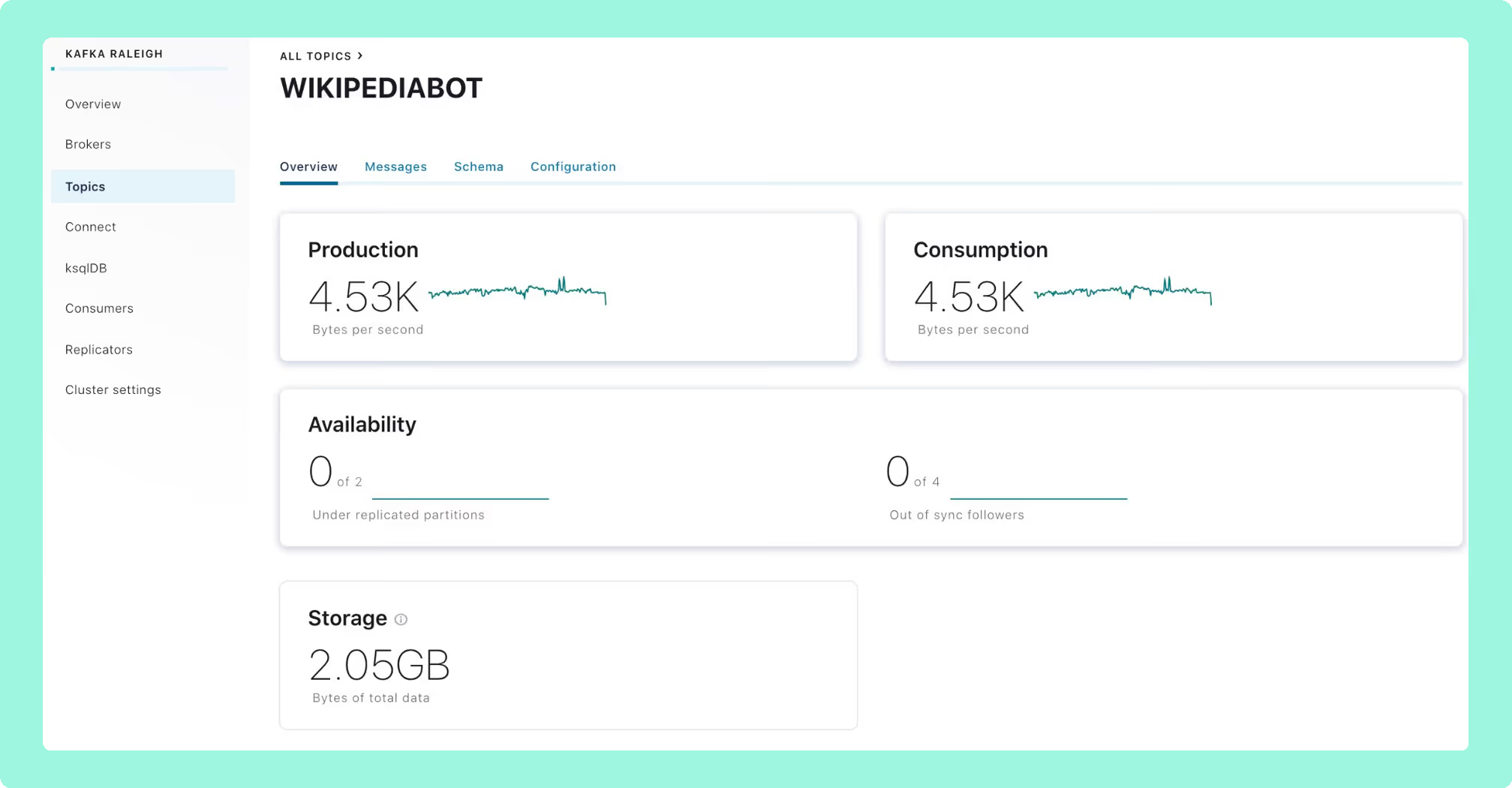
Legacy architecture: a Kafka Streams metrics pipeline, shipped with 7.x and earlier.
Next generation: Prometheus-based, generally available with Confluent Platform 8.0 in May 2025.
What changed: startup fell from 15 to 50 minutes to about one, and supported partition scale rose from 120,000 to 400,000.
Unmatched: Kafka Streams topology visualisation and native ksqlDB development.
RBAC: no metrics-only mode. Full management has to be enabled, which is all or nothing.
Footprint: dedicated nodes, never sharing a host with Confluent Platform packages, at 4 cores, 8 GB of RAM and 200 GB of storage for clusters up to 100,000 replicas.
Upgrades: legacy to next generation is a migration. Historical metrics do not carry over, and 7 to 15 days in parallel is recommended.
Alerting: plenty of teams run Prometheus and Confluent’s own Grafana dashboards for production alerting even where Control Center is deployed.
Cost of ownership (modelled): Confluent does not publish a price for Control Center, so there is no licence line to quote. What can be counted is the running cost: a dedicated node to size and patch, a reporter to keep on every broker, and a legacy to next generation migration run in parallel for 7 to 15 days. At 2 engineer-hours a month at $120 an hour that is $2,880 a year before the platform licence itself, against a published Kpow licence of $4,500 per cluster a year for up to 100 users.
Compare Kpow vs Confluent Control CenterAKHQ vs Confluent Control CenterConfluent Control Center review
What is Lenses?
Lenses is a commercial Kafka governance and data exploration platform that sits on top of clusters you already run. It operates as a Kafka client and does not sit in the data path. The architecture is a central Lenses HQ node with lightweight agents deployed one per cluster, and because an agent connects as a standard Kafka client, a KRaft cluster needs no modification to be reached. Celonis acquired Lenses in early 2022, and 6.2.6 shipped on 19 August 2026.
 Rank 1
 Lenses
lenses.io
26 out of 50 Total
- Cost a year (modelled)
- $4,000 Team licence for one cluster, plus $2,880 in ops time
- Free tier
- Community: 5 users, no SSO and no RBAC
- What has to run
- HQ on PostgreSQL, an agent and a database per cluster
- Cost as teams grow
- 4 out of 10
- Deployment footprint
- 2 out of 10
- Support and maintenance
- 6 out of 10
- Access control and audit
- 7 out of 10
- Multi-cluster reach
- 7 out of 10
Why these scores for Lenses
- Cost as teams grow 4 out of 10
- On this page, Community is free and reaches five users with no SSO and no RBAC, Team starts at 4,000 US dollars a year on a single cluster and caps at fifteen users, and a sixteenth is custom priced. Cost of ownership modelled at about $6,880 a year for fifteen users on one cluster: the published $4,000 Team licence plus $2,880 in ops time (this page’s estimate, 2 engineer-hours a month at $120 an hour).
- Deployment footprint 2 out of 10
- This page gives a central HQ on PostgreSQL, plus an agent and a database of its own for every cluster, and the Community edition carries the same dependency.
- Support and maintenance 6 out of 10
- This page gives a vendor under contract with team support from the Team tier, against a Helm chart that pins replicas to 1 and sets the update strategy to Recreate, so an upgrade takes the control plane down.
- Access control and audit 7 out of 10
- This page gives SSO, SAML and RBAC from Team, and data policies that match on field name across every registered dataset and are global, with no escape even for an admin.
- Multi-cluster reach 7 out of 10
- This page gives any Kafka, because the agent is a standard client, but one agent per cluster, so the component count climbs with the estate.
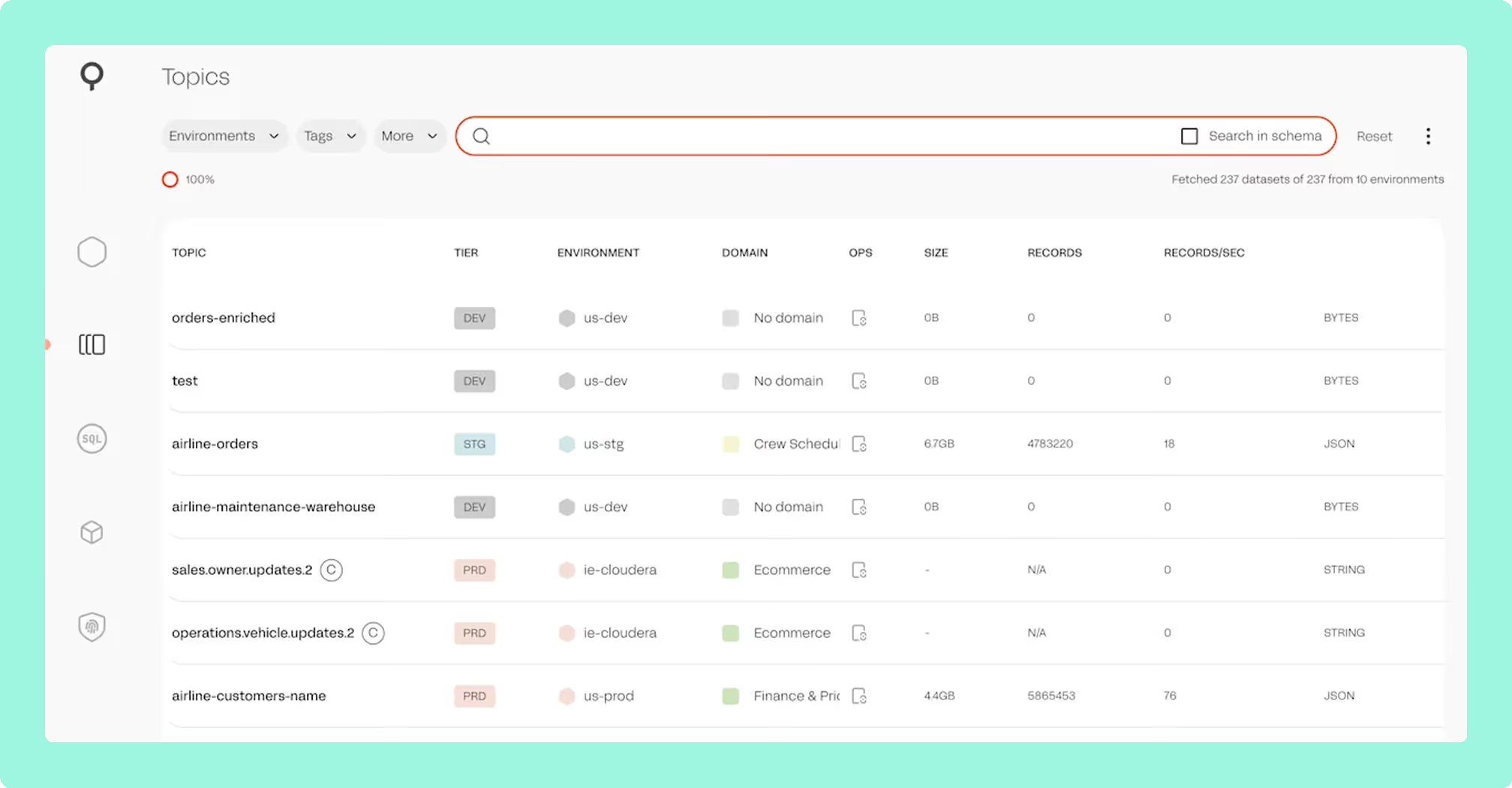
SQL Studio: a SQL interface for querying topics without writing consumer code, aimed at people who are not Kafka-savvy.
Topology and lineage: one picture across producers, topics, connectors and consumers.
SQL Processors: Kubernetes-native stream processing defined in SQL and built on Kafka Streams.
Portability: those processors are proprietary and compiled, which is the part that is hardest to leave.
Availability: the Helm chart pins replicas to 1 as a literal and sets the update strategy to Recreate, so an upgrade takes the control plane down.
Masking: data policies match on field name across every registered dataset and are global, with no escape even for an admin.
Permissions: 6.2.5 split UpdateTopicDetails into two actions, so custom roles granting the old one needed re-granting by hand.
Reach: one agent per cluster, so the component count climbs with the estate.
Cost of ownership (modelled): Team is a published $4,000 a year for up to fifteen users on a single cluster, so a second cluster is a second licence. The part that is not on the price list is the control plane: HQ on PostgreSQL, plus an agent and a database of its own for every cluster, and an upgrade that takes HQ offline because the chart pins replicas to 1. On this page’s estimate that is 2 engineer-hours a month at $120 an hour, or $2,880 a year, so about $6,880 all in for fifteen users on one cluster, against a published Kpow licence of $4,500 per cluster a year for up to 100 users.
Compare Kpow vs Lenses.ioKafbat UI vs LensesLenses.io review
What is the official 2026 pricing of Confluent Control Center and Lenses?
Control Center is not sold on its own. It arrives with a Confluent Platform enterprise licence, and Confluent does not publish a price for it. Control Center, multi-tenancy support and encryption each carry cost above the base licence, and the unit is the platform rather than a cluster or a seat, so it cannot be bought for a cluster somebody else runs. The Enterprise licence covers quarterly patch updates for the current version only, and the Platinum support tier is not available for this product.
Lenses publishes two ladders. DevX is tiered by capability and user count: Community is free and reaches five users with basic authentication, no SSO and no RBAC; Team starts at 4,000 US dollars a year, caps at fifteen users, and adds SSO, SAML, RBAC and team support; Multi-Kafka Enterprise is custom priced. K2K replication is a second meter, from 1,000 US dollars a month with five clusters included and additional clusters at 200 US dollars a month. For a team of five that needs SSO, Lenses is 4,000 a year on the first day. For a team of fifty, Lenses is past the Team cap and into a sales conversation, while Control Center’s bill has not moved on headcount at all.
Where does each one run out?
The scoring is the same on both sides: five criteria, 10 points each, 50 in all, with every criterion counting once. Nothing sits behind a multiplier, so a total is the sum of its five marks and a reader can recompute it. The five are cost as teams grow, deployment footprint, support and maintenance, access control and audit, and multi-cluster reach, because those are the questions a Kafka interface is actually measured against after the first month: a second cluster, an access review with a date on it, an upgrade nobody owns, and a bill that moves when the team does. The widest gap between the two marks is on multi-cluster reach, where Confluent Control Center marks 3 and Lenses marks 7. The marks come from the same matrix used on every comparison on this site, so a tool scores the same here as it does anywhere else, and the reason behind each mark is in the card below, under Why these scores.
Control Center’s limits begin where Confluent Platform ends. MSK’s native IAM authentication is not supported, and neither is SAML SSO for self-managed deployments, where OIDC is the only protocol.
Lenses puts its cost in the control plane. HQ requires PostgreSQL and it is the only supported storage option. Each agent needs its own database as well, and an agent connects to one Kafka cluster at a time, so a four-cluster estate is one HQ, four agents and five databases. The Community edition carries the same dependency.
Which should you pick?
Lenses scores 26 against Control Center’s 20 and is the pick for a mixed estate, because Control Center’s proprietary reporter cannot be installed on Amazon MSK, Redpanda or Aiven. Lenses publishes a ladder from 4,000 US dollars a year at Team, and puts a Postgres database behind HQ and behind every per-cluster agent. For the same reach without the control plane, shortlist Kpow by Factor House.
Pick Control Center if:
- the estate is Confluent Platform and is going to stay that way
- the licence is already paid
- a Kafka Streams topology or a ksqlDB query under development is what you need to see
Pick Lenses if:
- the estate is mixed, or is not Confluent at all
- the people who need the tool are not all Kafka engineers
- a SQL query should replace a search through raw JSON, Avro or Protobuf payloads
Be honest about the price of the second: Postgres for each component, an agent for each cluster, and a control plane that goes down during its own upgrade. The question underneath both is whose Kafka this is. If the answer is Confluent Platform, both are available and the comparison is real. If it is anything else, only one of them is. For a wider shortlist, the best Kafka management tools scores the field, and the tools that manage several Kafka clusters from one place takes the agent-per-cluster question on directly.
Kpow: a bill that tracks the cluster, not the distribution or the org chart
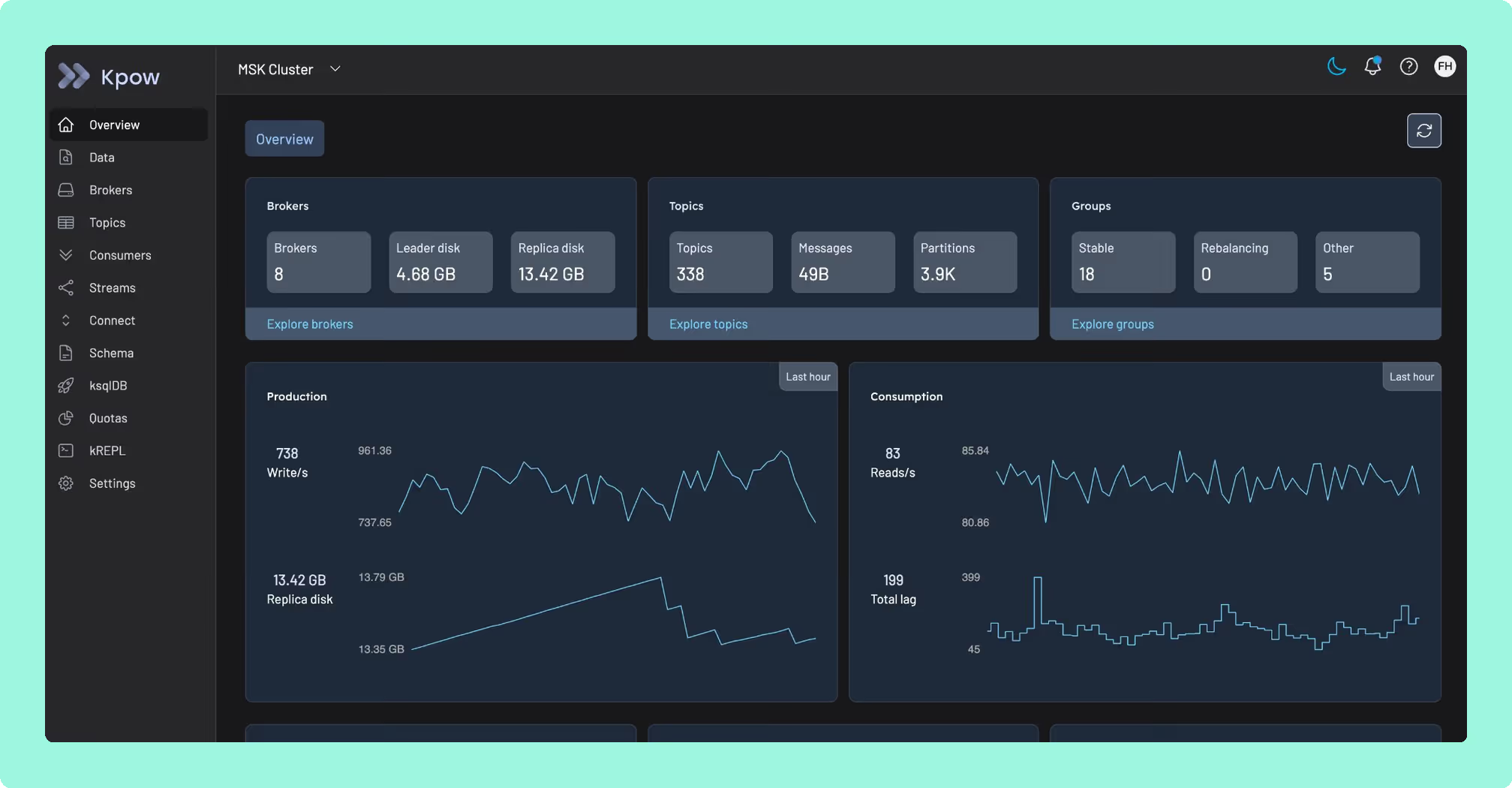
Control Center and Lenses each price something other than the cluster in front of you. Control Center’s unit is the Confluent Platform licence, so the bill answers to a distribution you have committed to, not to the clusters underneath it, and it never reaches Amazon MSK, Redpanda or Aiven. Lenses’ unit is the user count: Team caps at fifteen users for 4,000 US dollars a year, a sixteenth person moves the whole team into a custom-priced conversation, and that is before the Postgres database behind HQ and another behind every per-cluster agent. Kpow by Factor House is licensed per cluster at a published price, so neither a distribution commitment nor a growing headcount changes it. It is a single stateless JVM container with no external database, running on top of a cluster you already operate.
A bill that tracks the clusters you run, not the distribution you’re locked into or the team you hire, is worth comparing on your own numbers. Start with Kpow on that cluster and see.
How these tools were scored
Every option is scored from 0 to 10 on each criterion, from the evidence and sources this page cites, and the reason for each score is on its card. Each criterion counts once, for a total out of 50. The options are listed by total.
Sources
- Apache Kafka documentation on monitoring
- Apache Kafka documentation on authorization
- Apache Kafka documentation on basic operations