Confluent Control Center: pricing and alternatives
ComparisonsAt a glance
Confluent Control Center scores 46 out of 90 on this page's five weighted criteria: it takes its best score on Access control and audit (7 out of 10) and its lowest on Cost as teams grow (2 out of 10). The rubric is weighted: Support and maintenance counts three times, Access control and audit counts three times, and Cost as teams grow, Deployment footprint and Multi-cluster reach count once. Licence: Not published, inside Confluent Platform. The other options, in the order this page lists them: Kpow (Factor House) 82, AKHQ / Kafbat 57, Lenses 52, AxonOps 42, each out of 90. Kpow (Factor House) takes its best score on Access control and audit (10 out of 10) and its lowest on Cost as teams grow (7 out of 10). Licence: From $4,500 per cluster per year, 100 users.
Key takeaways
- Confluent Control Center is built exclusively for Confluent Platform. It cannot monitor Amazon MSK, Redpanda, or Aiven clusters, and requires the proprietary Confluent Metrics Reporter JAR installed on each broker.
- The next-generation Control Center, released with Confluent Platform 8.0 in May 2025, reduced startup time from up to 50 minutes to approximately one minute, but upgrading from the legacy version is a full migration that discards all historical metrics.
- Pricing is the most frequently cited complaint across practitioner reviews; Control Center, multi-tenancy support, and encryption each carry costs beyond the base Confluent Platform licence.
- IBM’s acquisition of Confluent, completed in March 2026, is actively prompting installed-base customers to evaluate alternatives, citing concerns about future pricing pressure and roadmap direction.
- At large cluster scale, the legacy interceptor-based telemetry architecture creates measurable overhead: Control Center adds approximately 50 internal topics to broker metadata and can become unresponsive when the number of consumer groups is high. Many enterprise teams bypass it for production alerting, using Prometheus with Grafana instead.
- For teams that need Kafka tooling across distributions, or that cannot accept Confluent’s pricing and ecosystem constraints, alternatives such as Kpow offer broader distribution support with more predictable per-cluster pricing.
Kpow live demo
Test the operational trade-offs in a live Kafka UI
A Confluent Control Center review is only the start of an evaluation. Open Kpow and try the shared workflows your platform team will need every day.
Explore data inspection, consumer operations, and governed access in one environment.
Try the Kpow demoWhat is Confluent Control Center?
Confluent Control Center is a web-based management and monitoring interface bundled with Confluent Platform, Confluent’s commercial Kafka distribution. It provides a single dashboard for monitoring brokers, topics, consumer groups, Kafka Connect workers, Schema Registry, ksqlDB, and Kafka Streams topologies across Confluent-managed clusters.
Two generations of Control Center are currently in active deployment. The legacy version, shipped with Confluent Platform 7.x and earlier, has been widely deployed since Confluent’s earliest commercial releases. The next-generation Control Center, released as generally available with Confluent Platform 8.0 in May 2025, replaces the internal Kafka Streams-based metrics pipeline with a Prometheus-based architecture and delivers substantially faster startup and improved partition scale limits.
Control Center is closed-source and requires an enterprise Confluent Platform licence. It is not available as a standalone product.
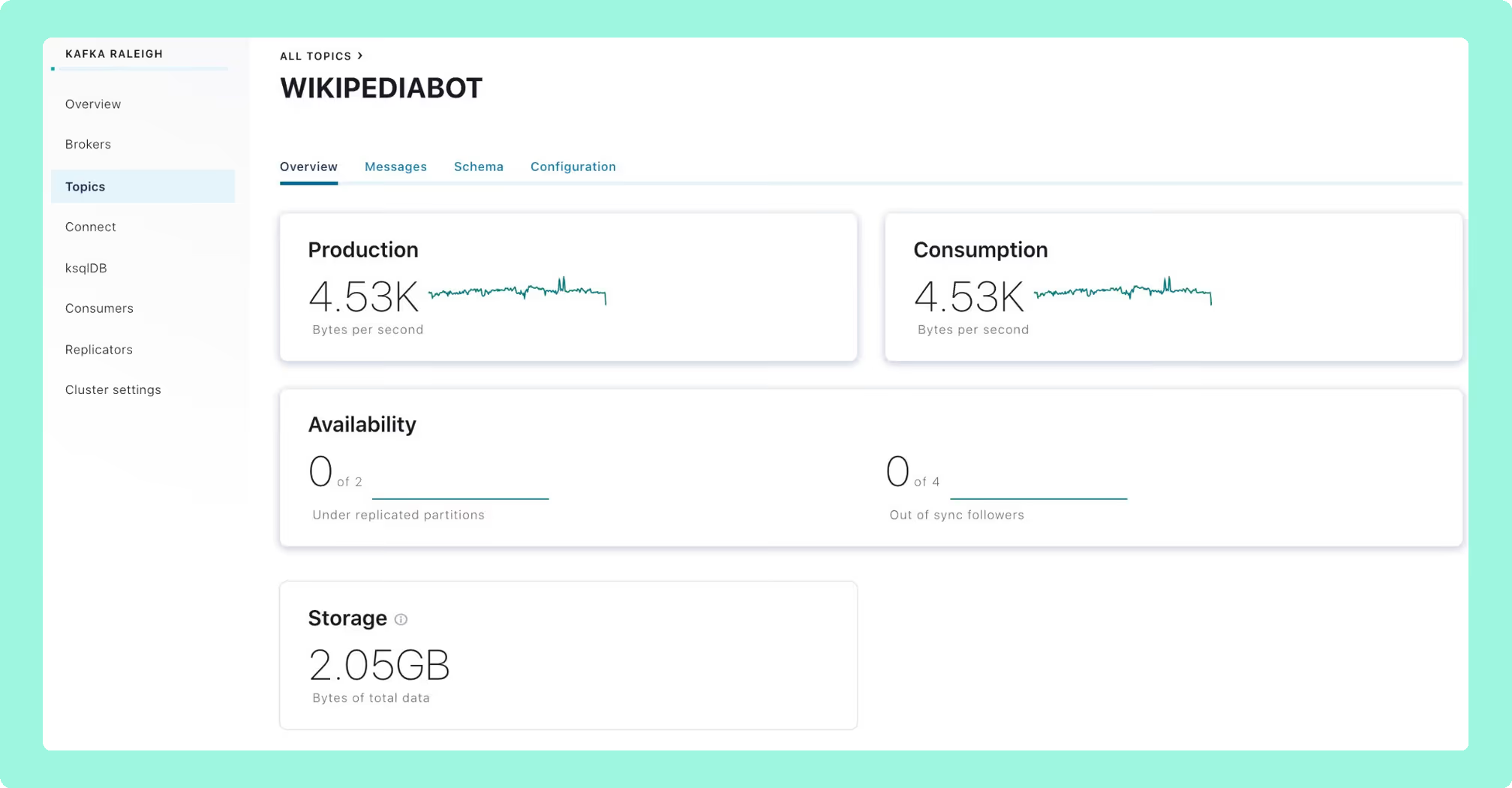
Confluent Control Center review
Functionalities
Control Center offers comprehensive monitoring within the Confluent ecosystem. Practitioners describe it as providing “a panoramic view into all the elements in Confluent Platform: brokers, consumers, Connect workers, ksqlDB objects.” [Ben, Confluent Community Forum, February 2021] The monitoring module has been described as “impressive” by at least one named enterprise reviewer. [Ahmed Emad, Territory Sales Leader at Sumerge, PeerSpot, January 2024]
The specific functional differentiators that justify Control Center over open-source alternatives are Kafka Streams topology visualisation and native ksqlDB development integration. No open-source Kafka UI provides a comparable native view of these Confluent-specific components.
Consumer lag monitoring has documented boundaries. Consumers using the assign() method rather than subscribe() are not tracked, and Metrics API lag values do not update during a rebalance. [Confluent documentation] A UI rendering bug also affects compound, nested Avro keys in the Topics > Messages view; because Control Center has no public issue tracker, there is no way for users to monitor for a fix. [Ben, Confluent Community Forum, February 2021]
Deployment and operations
The legacy Control Center has a well-documented reputation for slow startup and high resource consumption. Confluent’s own engineering blog acknowledged startup times of 15 to 50 minutes after a restart, and described customer ABANCA’s experience of service restarts as “tedious.” [Philip Wang and Surabhi Singh, Confluent Engineering Blog, May 2025] The next-generation release reduces startup to approximately one minute, increases partition scale support from 120,000 to 400,000, narrows metrics freshness to two to three minutes, and eliminates the requirement for a separate Kafka cluster to store metrics. [Philip Wang and Surabhi Singh, Confluent Engineering Blog, May 2025]
The upgrade path from legacy to next-gen is a full migration, not a standard upgrade. Historical metrics do not carry over, and Confluent recommends running both versions in parallel for 7 to 15 days. Starting with CP 8.0, Confluent Monitoring Interceptors are also removed; teams that embedded interceptors for producer and consumer tracing will need to reconfigure for the Prometheus-based architecture. [Confluent documentation; Confluent release notes]
Interceptor overhead at scale. In the legacy architecture, Control Center relies on client-side interceptors to collect producer and consumer telemetry. A practitioner on r/apachekafka warned that deploying Control Center with interceptors “will add like 50 topics to your kafka brokers.” [xkillac4, r/apachekafka] At high consumer group counts, this metadata burden can become structurally unworkable. One platform engineer on the same thread described the scale failure directly: “Interceptors destroy CCC with the number of consumers/consumer groups we have.” [lord_pirax, r/apachekafka] The same engineer noted that restarts without wiping state or changing the application ID were unreliable on their cluster. These are cluster-size-dependent conditions; the same engineer explicitly noted that “for people without crazy clusters: CCC will probably work fine.”
A documented practitioner response to this overhead is to decouple monitoring from Control Center entirely. On the same thread, an engineer stated: “I use Prometheus with the Confluent provided Grafana dashboards for all production deployments even when the Confluent Control Center is present.” [aerialbyte, r/apachekafka] This pattern of treating Control Center as an ad-hoc debugging tool while routing production alerting through external Prometheus pipelines is reported across multiple community discussions.
Several operational issues in the legacy version remain unresolved. A user running version 7.5.0 reported continuous RAM growth until all available memory was exhausted, with no vendor response. [NhatDuy11, Confluent Community Forum, November 2024] Control Center 7.6.0 on Confluent for Kubernetes was separately reported to stop after a few hours with RackId doesn't exist for process errors; the GitHub issue remained open with no assigned owner. [Mohamed Aziz Tousli, GitHub issue #305, confluentinc/confluent-kubernetes-examples, June 2024] A recurring pattern involves Kafka Streams entering a rebalancing loop on startup, leaving the UI on a “Loading data” spinner for 20 to 30 minutes. Confluent’s own mitigation recommends dedicated hardware at the level of an m4.2xl instance with 6 GB JVM heap and 8 stream threads, meaning Control Center can require compute comparable to the brokers themselves. [Elizabeth Bennett (Stitch Fix) and Xavier Léauté (Confluent), Google Groups, April 2017; older source, flagged] Current Confluent sizing for Control Center is smaller but still dedicated: 4 cores, 8 GB of RAM and 200 GB of storage for clusters up to 100,000 replicas, and 8 cores, 16 GB and 300 GB above that. [Confluent documentation]
Horizontal Pod Autoscaling is not supported for Control Center pods in Kubernetes, and the cp-helm-charts repository was archived in February 2024, narrowing the supported Kubernetes deployment path to Confluent for Kubernetes (CFK). [Confluent documentation; GitHub, confluentinc/cp-helm-charts]
GitOps and configuration drift. A related operational concern for teams managing Control Center via CFK or Helm is configuration drift. Any cluster changes made through the Control Center UI (connector configurations, topic settings) are applied directly to the cluster state rather than through the declarative Git-managed manifest. One DevOps engineer noted the specific friction: “Only problem I have is not being able to easy persist my connector configs or being able to mount them as configmaps.” [r/devops] Teams running strict GitOps pipelines need to treat Control Center as a read-only observability surface in production, or accept that UI-driven changes will diverge from the declared state.
Access control and security
RBAC in Control Center covers the expected enterprise use cases, with audit logging available for authentication and authorisation events across Confluent-managed clusters. [Confluent documentation]
The most consequential security limitation for many organisations is that SAML SSO is not supported for self-managed, on-premises Control Center deployments. OIDC is the only supported SSO protocol for Confluent Platform; SAML is available only on Confluent Cloud. [Confluent documentation] Teams with a SAML-only identity provider have no supported path for SSO on self-managed deployments.
Initial RBAC setup requires the SystemAdmin role for the first role bindings, and in RBAC-enabled environments you cannot send only metrics to Control Center: full management must be enabled, which is an all-or-nothing constraint. [Confluent documentation] A scale limit of 10,000 rules per cluster adds friction for fine-grained access management at larger deployments. [Anonymous tech manager at a 1,001-5,000 employee tech services company, PeerSpot, August 2024] Principals who are Kafka super.user but have no RBAC role assignment cannot view or assign roles through the UI; the CLI must be used as a workaround. [Confluent documentation]
ACL configuration is a recurring pain point in community discussions. One engineer running Control Center in production described the experience as: “ACLs wise, was a pain, as for most of the confluent components, where ACLs are not really well documented.” [r/devops, Gathering opinions on Kafka management tools] This documentation gap is particularly notable given that RBAC is one of the headline enterprise features Confluent uses to justify the licence cost.
For regulated industries and enterprise teams that need governance across several Kafka distributions, Factor House documents Kpow Enterprise as providing role-based access control at global and resource level with multi-tenancy isolation, a complete audit log of every action across every cluster, server-side data masking policies for PII, and SSO through Okta, Azure AD, KeyCloak, or any LDAP, SAML, or OAuth2 provider. Kpow runs as a single container in the customer’s own environment and works offline inside an air-gapped network.
User interface
Practitioners who use Control Center within the full Confluent Platform describe it as feature-rich and appropriate for day-to-day operations. One named reviewer called it “more than just an ordinary topic checking tool,” while a named solutions architect offered a less favourable view: “From the control center perspective, there is a lot of room for improvement in the visualization.” [German Osin, Towards Data Science, September 2021; Ravi Bhati, Solutions Architect at a 10,000+ employee tech services company, PeerSpot, October 2021]
The production versus ad-hoc distinction is a consistent thread in community feedback. One platform engineer summarised the trade-off concisely: Control Center is “great for debugging” but “sadly not really reliable/stable/performant” as a continuous production observability tool. [lord_pirax, r/apachekafka] This matches the pattern of enterprise teams who keep Control Center available for incident investigation while routing routine alerting to Prometheus. A separate report from a practitioner running a local or dockerised instance described the experience as buggy, with errors not surfacing correctly, plugin integration issues, and no historical data available. [Accomplished-Map-984, r/apachekafka]
The next-generation UI has received positive feedback. A known WebKit issue in Safari causes authentication failures when browsing topic messages; the documented workaround is Chrome or Firefox. [Confluent documentation] In the legacy version, the “Initialising” spinner can persist for 20 to 30 minutes after a restart, which is most disruptive during incidents. [Google Groups, April 2017; pattern confirmed in current Confluent troubleshooting documentation]
Ecosystem
Control Center integrates natively with Kafka Connect, Schema Registry, ksqlDB, and Kafka Streams. Schema Registry integration in particular receives positive mention: one software architect credited it with “significantly enhancing our organisation’s data quality assurance.” [Gustavo Barbosa dos Santos, Software Architect at C&A Brasil, PeerSpot, January 2024]
The hard boundary is distribution compatibility. Control Center requires the Confluent Metrics Reporter JAR installed in broker classpaths to function fully. This prerequisite cannot be satisfied on Amazon MSK, Redpanda, or Aiven, and MSK’s native IAM authentication is not supported. The result is that Control Center is not viable for any team outside a pure Confluent Platform deployment. [Factor House, March 2026; Hayato Shimizu, AxonOps Blog, December 2025]
IBM’s acquisition of Confluent, completed in March 2026, has introduced meaningful uncertainty about pricing and roadmap direction. One VP Engineering at an unnamed fintech company stated: “We started evaluating alternatives the day the acquisition was announced. Not to leave Confluent, but to understand our options.” [Stéphane Derosiaux, Medium, December 2025]
Customer support
Enterprise tier users generally describe Confluent support as responsive. Below that tier, most issues are handled through documentation and community forums. “We continuously face issues, such as Kafka being down and slow responses from the support team,” noted one SDE II at Nutanix. [Mayank Aggarwal, PeerSpot, February 2025]
A recurring pattern across practitioner reviews is that the complexity of getting Control Center to work correctly requires deep engagement with Confluent professional services, and results have not always matched the investment: one reviewer described “many problems and limitations during implementation despite professional services.” [IT Security and Risk Management Associate at an IT services company, Gartner Peer Insights, January 2025; anonymous, flagged; included for pattern]
Because Control Center is closed-source, there is no public issue tracker. A GitHub issue raised in September 2024 proposing that the README be updated to state clearly that an enterprise licence is required remained open with no vendor response, pointing to a recurring source of user confusion. [Mark Sallee, GitHub issue #105, confluentinc/control-center-images, September 2024] The Platinum support tier is not available; the maximum is Enterprise, with quarterly patch updates for the current version only. [Confluent documentation]
Pricing is the most consistently cited complaint across practitioner platforms. Multiple named reviewers describe multi-year contracts as “very costly” and rate pricing at 5 to 6 out of 10. “High fees while not offering features that match those of other tools” and “hundreds of configurations that application teams must understand” are both flagged as operational burdens. [PavanManepalli, Wells Fargo, PeerSpot, September 2025; RameshJogula, PeerSpot, April 2024; Praveeen Manvi, PeerSpot, March 2024; Clara Riva, PeerSpot, November 2023] Community feedback reinforces this: one engineer, asked why their team uses Control Center, replied simply: “we pay for it so might as well use it.” [r/devops, Gathering opinions on Kafka management tools] For teams running open-source Kafka rather than full Confluent Platform, the licensing cost of Control Center is rarely justified by features that modern open-source alternatives do not cover. [r/apachekafka community consensus]
Best for
Control Center is a well-matched tool for organisations running Confluent Platform on-premises or on their own infrastructure, with the full stack in place: Kafka Streams, ksqlDB, Kafka Connect, and Schema Registry. If Kafka Streams topology visualisation or native ksqlDB tooling integrated with your monitoring UI is a hard requirement, there is currently no open-source alternative that provides an equivalent view.
It suits large enterprise deployments where the Confluent ecosystem is already established and where in-house Kafka operations are not the preferred model. [Mayank Aggarwal, Nutanix, PeerSpot, February 2025] Community experience also suggests it is effective as an ad-hoc debugging and incident investigation tool, even for teams who have moved routine alerting elsewhere.
It is a weaker fit for teams on MSK, Redpanda, or Aiven (where it simply cannot function), for organisations that require SAML SSO for self-managed tooling, for cost-sensitive or smaller environments, and for teams running mixed-distribution environments or actively managing vendor lock-in risk in the wake of the IBM acquisition. Teams operating at high consumer group counts should evaluate the interceptor overhead against their broker capacity before committing to the legacy architecture.
Confluent Control Center pricing
Confluent Control Center is not priced or sold separately. It is bundled with Confluent Platform under an enterprise licence. Pricing is not published and requires direct engagement with Confluent’s sales team.
Pricing tiers
Confluent Platform is sold under an enterprise licence. Features including Control Center, multi-tenancy support, and encryption carry costs beyond the base tier, meaning the all-in cost of a production Control Center deployment is higher than the licence headline suggests. Multiple named practitioners rate pricing at 5 to 6 out of 10 and describe multi-year contracts as “very costly.” [RameshJogula, PeerSpot, April 2024; Clara Riva, PeerSpot, November 2023; Praveeen Manvi, PeerSpot, March 2024] Additional charges for scaling have also been noted: “They charge a lot for scaling, which makes it expensive.” [Mayank Aggarwal, Nutanix, PeerSpot, February 2025]
The Enterprise licence includes quarterly patch updates for the current version only. The Platinum support tier is not available for Control Center. [Confluent documentation]
Free trial
A time-limited evaluation of Confluent Platform may be available through Confluent’s website.
Confluent Control Center competitors and alternatives
For teams evaluating Kafka management tooling in 2026, the competitive landscape ranges from lightweight open-source options to commercial platforms designed for multi-distribution or multi-technology environments. The most important filtering decision is which Kafka distribution you run: if you are outside Confluent Platform, Control Center is not in the running. For a wider field than the five scored here, the best Kafka management tools for 2026 covers the commercial and open-source options side by side, and where the budget is the constraint the best free Kafka UI tools sets out what each free tier actually includes.
| Rank | Best for | Tool | Type | Key functionalities | Deployment and ops | Access control | User interface | Pricing |
|---|---|---|---|---|---|---|---|---|
| 1 | Enterprise Kafka teams on any distribution | Kpow (Factor House) | Commercial | Topic, consumer group, schema, and connector management; advanced RBAC; audit log | Stateless; no external database dependency; Docker, Helm, JAR; straightforward ops | Advanced RBAC; SAML, OIDC, LDAP | WCAG 2.1 AA compliant, with a published VPAT; high performance at scale | Per-cluster pricing that scales without penalising team growth |
| 2 | Lightweight developer UI for small teams | AKHQ / Kafbat | OSS | Topic, consumer group, schema management; basic ACL management | Self-hosted; low resource overhead; no external dependencies | RBAC; LDAP and OIDC login | Web UI | Free |
| 3 | Data exploration and SQL on streams | Lenses | Commercial | Data exploration, SQL on streams, topology view, connector management | Self-hosted and SaaS | RBAC | Web UI | Community free (2 clusters, 5 users); Team from $4,000 a year for 15 users; Enterprise custom |
| 4 | Kafka operations visibility across distributions | AxonOps | Commercial (with OSS tier) | Monitoring, alerting, backup and restore, topic management | Self-hosted; Cassandra backend | Role-based | Ops-focused web UI | Free tier; commercial tiers available |
| 5 | Full Confluent Platform users on-premises | Confluent Control Center | Commercial (bundled) | Kafka Streams topology, ksqlDB, Schema Registry, Kafka Connect, broker and consumer monitoring | Bundled with Confluent Platform; Kubernetes via CFK; HPA not supported | Confluent RBAC; OIDC only (no SAML on self-managed) | Web UI; legacy version slow to load; next-gen improved significantly | Included with Confluent Platform enterprise licence; extra costs for Control Center, multi-tenancy, encryption |
For a broader comparison of Kafka management tools in 2026, see Top Kafka UI tools in 2026: a practical comparison for engineering teams.
 Rank 1
 Kpow (Factor House)
82 out of 90 Total
Try Kpow in the live demo No signup needed.
- Licence
- From $4,500 per cluster per year, 100 users
- Cost estimate
- About $16,380 a year for 3 clusters
- Free tier
- Community: 3 clusters, 10 users
- Cost as teams grow
- 7 out of 10
- Deployment footprint
- 9 out of 10
- Support and maintenance ×3 weight, this criterion counts 3 times toward the total
- 9 out of 10
- Access control and audit ×3 weight, this criterion counts 3 times toward the total
- 10 out of 10
- Multi-cluster reach
- 9 out of 10
Why these scores for Kpow (Factor House)
- Cost as teams grow 7 out of 10
- Licensing runs per cluster, from $4,500 a year with 100 users included on the Kpow pricing page, and Community Edition is free for 3 clusters and 10 users with RBAC, masking and audit held back, as the Kpow Community Edition page states. This page’s table calls it ‘Per-cluster pricing that scales without penalising team growth’. Total cost of ownership is modelled at about $16,380 a year (this page’s estimate: 3 clusters at $4,500 plus 2 hours a month at $120 an hour).
- Deployment footprint 9 out of 10
- One stateless container runs it from environment variables, with no database, sidecar or volume and no broker-side component, as the Kpow vs AKHQ and Kpow vs Lenses comparisons record. This page’s table gives ‘Stateless; no external database dependency; Docker, Helm, JAR’. Kafdrop is named lighter elsewhere on the site.
- Support and maintenance 9 out of 10
- Email support and an Enterprise support SLA appear on the Kpow features page, and the Kpow vs CMAK comparison has it shipping continuously, with priority support on Enterprise and community Slack on Community Edition.
- Access control and audit 10 out of 10
- RBAC, SSO, server-side masking and an audit log of user actions sit in the product, with masking applied by role, and the Kpow features page adds SAML, LDAP and OpenID, all on Enterprise. This page’s table gives ‘Advanced RBAC; SAML, OIDC, LDAP’.
- Multi-cluster reach 9 out of 10
- One instance reaches up to 12 clusters across Apache Kafka, Confluent Cloud and Platform, MSK, Redpanda, Aiven and others, according to the Kpow multi-cluster page, and the per-instance cap of 12 keeps it at 9 rather than 10.
Against Control Center. Kpow is licensed per cluster, from $4,500 a year with 100 users included and the price published, where Control Center has no published price and arrives inside a Confluent Platform licence that charges again for multi-tenancy and encryption. It connects as an ordinary Kafka client, so there is no Metrics Reporter JAR to install on brokers and no dedicated node to size, and one instance reaches up to 12 clusters across Apache Kafka, Confluent, Amazon MSK, Redpanda and Aiven, including the distributions Control Center cannot see at all.
What a year costs. Three clusters at the published $4,500 each is $13,500 a year, with 100 users included at that price, so headcount does not move it. It runs as one stateless container with no database, modelled at 2 engineer-hours a month, which is $2,880 a year at $120 an hour. That is about $16,380 a year all in. This page’s estimate uses three clusters and $120 an hour throughout; the licence figure is the published one.
Where it falls short. It shows Kafka Streams topologies only for applications that include the Kpow Streams Agent, and ksqlDB management and the Streams view are Kpow Enterprise features, so Control Center keeps the deeper native view of those two components. Advanced RBAC, server-side data masking and the audit log are Enterprise features, and the free Community Edition stops at 3 clusters and 10 users.
Staying patched. Kpow’s release notes name the CVEs each release remediates, and the 96.4 image built on 5 August 2026 bundles 311 dependencies. What a licence buys here is not a different deployment model, because Kpow is self-hosted too. It is a company contracted to ship the fix. Every dependency figure on this page was read on 24 September 2026 from the published artefacts and from nvd.nist.gov.
Compare Kpow vs Confluent Control CenterKpow vs AKHQKpow vs Kafbat UIKpow vs Lenses.io
AKHQ / Kafbat
akhq.io, kafbat.io
57 out of 90 Total
- Licence
- Apache 2.0, $0, no seat or cluster cap
- Cost estimate
- About $8,640 a year in engineer time
- Latest release
- Kafbat UI v1.5.0, April 2026
- Cost as teams grow
- 10 out of 10
- Deployment footprint
- 8 out of 10
- Support and maintenance ×3 weight, this criterion counts 3 times toward the total
- 5 out of 10
- Access control and audit ×3 weight, this criterion counts 3 times toward the total
- 5 out of 10
- Multi-cluster reach
- 9 out of 10
Why these scores for AKHQ / Kafbat
- Cost as teams grow 10 out of 10
- Apache 2.0 makes the whole product free with no paid tier, so adding an engineer changes nothing, and this page’s table gives OSS and Free. The licence is $0 and total cost of ownership is modelled at about $8,640 a year of engineer time (this page’s estimate: 6 hours a month at $120 an hour).
- Deployment footprint 8 out of 10
- One JVM container runs it, with no database or sidecar, and it is docked from 10 for the open memory-growth reports on AKHQ noted in the AKHQ review. This page’s table gives ‘Self-hosted; low resource overhead; no external dependencies’.
- Support and maintenance 5 out of 10
- Three AKHQ releases landed in eight months, with 441 commits from one maintainer, and Kafbat UI v1.5.0 shipped in April 2026. Support is GitHub issues and the community, with no SLA.
- Access control and audit 5 out of 10
- LDAP, OIDC, basic auth and claim mapping are supported, with resource-level RBAC contributed by Michelin, while masking is global YAML with one filter per topic and the audit trail is opt-in to a Kafka topic with no view in the product. The grouped card takes the lower of the two. This page’s access-control cell was corrected from ‘ACL-based’.
- Multi-cluster reach 9 out of 10
- One deployment reaches one cluster or many, with no cap, and the AKHQ review has MSK IAM supported.
Against Control Center. Both are free under Apache 2.0 with no seat or cluster cap, both run as a single container with nothing installed on the brokers, and both connect to any distribution, including the Amazon MSK clusters Control Center cannot monitor. For a team that wants a UI for topics, consumer groups and schemas rather than a Confluent Platform console, neither costs anything to try.
What a year costs. The licence is $0 under Apache 2.0, which is not the same as costing nothing. Running and upgrading it across three clusters, together with the governance the product does not do, role-aware masking and an audit trail somebody can actually read, is 6 engineer-hours a month. At $120 an hour that is 72 hours, or about $8,640 a year, against about $16,380 for Kpow on the same three clusters. This page’s estimate, not a vendor price; the licence really is free.
Where they fall short. Governance is where the gap shows. AKHQ masks data globally from its YAML configuration, one filter per topic, and its audit trail is opt-in to a Kafka topic with no view in the product; Kafbat UI applies masking server-side but cannot vary it by role. Neither has a vendor SLA: support is GitHub issues, and AKHQ’s release record is three releases in eight months carried largely by one maintainer.
Staying patched. Both are Apache-2.0 and community-maintained, and the patching question is not whether either project has a CVE of its own. It is what the current release ships. AKHQ 0.28.0, cut on 6 August 2026, bundles 270 libraries of which 18 carry a high or critical advisory, 16 of them already public with fixes available on the day it shipped and the oldest now open 108 days. Kafbat UI last released v1.5.0 in April 2026, and at least 20 high or critical advisories have been published against what it bundles in the 157 days since, with no release to carry a fix; only 150 of its 266 jars could be measured, so that number is a floor and the two are not comparable on it.
Compare Kpow vs AKHQKpow vs Kafbat UIAKHQ vs Confluent Control CenterConfluent Control Center vs Kafbat UIAKHQ reviewKafbat UI review
 Rank 3
 Lenses
lenses.io
52 out of 90 Total
- Licence
- Team from $4,000 a year, up to 15 users
- Cost estimate
- About $14,880 a year for 3 clusters
- Free tier
- Community: 2 clusters, 5 users
- Cost as teams grow
- 4 out of 10
- Deployment footprint
- 2 out of 10
- Support and maintenance ×3 weight, this criterion counts 3 times toward the total
- 6 out of 10
- Access control and audit ×3 weight, this criterion counts 3 times toward the total
- 7 out of 10
- Multi-cluster reach
- 7 out of 10
Why these scores for Lenses
- Cost as teams grow 4 out of 10
- It is priced by capability with a user cap at each rung, Team from $4,000 a year for 15 users and custom above that, while Community is 2 clusters and 5 users with basic auth and no SSO or RBAC. This page’s pricing cell was corrected from ‘contact for pricing’. Total cost of ownership is modelled at about $14,880 a year (this page’s estimate: $12,000 of Team licence plus 2 hours a month at $120 an hour).
- Deployment footprint 2 out of 10
- A central HQ on PostgreSQL sits alongside one Agent and one Agent database for every cluster, on the free tier too, and HQ runs a single replica.
- Support and maintenance 6 out of 10
- The vendor supports it under contract, with Team Support starting at Team, and the Lenses review records that HQ has no HA and that bug fixes are reported as slow.
- Access control and audit 7 out of 10
- SSO, SAML and RBAC start at Team with built-in roles, and audit logs sit in the product, but masking is global by field name and does not vary by role. This page’s table gives ‘RBAC’.
- Multi-cluster reach 7 out of 10
- It runs one Agent per cluster, reaches any Kafka, and federated multi-Kafka comes only at the custom-priced top tier.
Against Control Center. Lenses publishes its ladder where Control Center does not: Community is free for 2 clusters and 5 users, and Team starts at $4,000 a year for up to 15 users. Its Agent connects as an ordinary Kafka client, so it runs against any Kafka rather than one distribution, and SQL on streams and the topology view are the kind of data exploration Control Center leaves to ksqlDB.
What a year costs. Team is a published $4,000 a year for up to 15 users on one cluster, so three clusters is $12,000 a year at that rung, before any Enterprise quote for federated multi-Kafka. The stack is a central HQ on PostgreSQL plus an Agent and an Agent database for every cluster, modelled at 2 engineer-hours a month, which is $2,880 a year at $120 an hour. That is about $14,880 a year, against about $16,380 for Kpow. This page’s estimate around the published Team price.
Where it falls short. The footprint is the heaviest of the five: a central HQ on PostgreSQL plus one Agent and one Agent database for every cluster, on the free tier too, with HQ running a single replica and no HA. SSO, SAML and RBAC start at Team, masking is global by field name rather than by role, and federated multi-Kafka is only on the custom-priced top tier.
Compare Kpow vs Lenses.ioConfluent Control Center vs LensesLenses review
Confluent Control Center
confluent.io
46 out of 90 Total
- Licence
- Not published, inside Confluent Platform
- Cost estimate
- About $2,880 a year to run, plus that licence
- Dedicated nodes
- 4 cores, 8 GB, 200 GB to 100,000 replicas
- Cost as teams grow
- 2 out of 10
- Deployment footprint
- 2 out of 10
- Support and maintenance ×3 weight, this criterion counts 3 times toward the total
- 6 out of 10
- Access control and audit ×3 weight, this criterion counts 3 times toward the total
- 7 out of 10
- Multi-cluster reach
- 3 out of 10
Why these scores for Confluent Control Center
- Cost as teams grow 2 out of 10
- It is bundled into a Confluent Platform licence, with no published price and no free tier beyond a time-limited evaluation, and this page notes that ‘Control Center, multi-tenancy support, and encryption carry costs beyond the base tier’, with practitioners rating pricing 5 to 6 out of 10. Total cost of ownership is modelled at about $2,880 a year of engineer time on top of the unpriced platform licence (this page’s estimate: 3 clusters, $120 an hour).
- Deployment footprint 2 out of 10
- It needs dedicated nodes at 4 cores, 8 GB and 200 GB up to 100,000 replicas, and the Metrics Reporter JAR goes on every broker. The page’s own prose adds that HPA is not supported, that legacy startup takes 15 to 50 minutes, and that the interceptors create about 50 internal topics.
- Support and maintenance 6 out of 10
- Support comes from the vendor under an enterprise contract, with quarterly patches for the current version only, no Platinum tier and no public issue tracker. The page’s own prose describes the Enterprise tier as responsive and legacy to next-gen as a full migration.
- Access control and audit 7 out of 10
- RBAC comes with audit logging for authentication and authorisation events and 10,000 rules per cluster, while OIDC is the only protocol on self-managed, with no SAML and no masking described. This page says the same three things.
- Multi-cluster reach 3 out of 10
- It reaches Confluent Platform only, because the reporter JAR cannot go on MSK, Redpanda or Aiven, and this page states that it ‘cannot monitor Amazon MSK, Redpanda, or Aiven clusters’.
The full review is above: functionalities, deployment and operations, access control and security, user interface, ecosystem, customer support and pricing.
What a year costs. The licence is not published and arrives inside a Confluent Platform contract, so it cannot be priced here. The work around it can be. Dedicated nodes at 4 cores, 8 GB and 200 GB, the Metrics Reporter JAR on every broker, the legacy startup of 15 to 50 minutes, the interceptor overhead and a second tool for any cluster outside Confluent Platform come to 2 engineer-hours a month, so 24 hours a year at $120 an hour is $2,880. That is this page’s estimate, not a Confluent price, and it sits on top of the platform licence. The same model puts Kpow at about $16,380 all in.
Where it falls short. It cannot monitor Amazon MSK, Redpanda or Aiven, because the Confluent Metrics Reporter JAR it needs cannot be installed on those brokers, and MSK IAM authentication is not supported. SAML SSO is not available for self-managed deployments, leaving OIDC as the only protocol, and RBAC stops at 10,000 rules per cluster. In the legacy architecture the interceptors add around 50 internal topics to broker metadata, which teams running high consumer group counts report as unworkable.
Compare Kpow vs Confluent Control CenterAKHQ vs Confluent Control CenterConfluent Control Center vs Kafbat UIConfluent Control Center vs Lenses
 Rank 5
 AxonOps
axonops.com
42 out of 90 Total
- Licence
- No price published on any tier
- Cost estimate
- About $2,880 a year, before any licence
- Backend
- Self-hosted on Cassandra
- Cost as teams grow
- 4 out of 10
- Deployment footprint
- 3 out of 10
- Support and maintenance ×3 weight, this criterion counts 3 times toward the total
- 5 out of 10
- Access control and audit ×3 weight, this criterion counts 3 times toward the total
- 5 out of 10
- Multi-cluster reach
- 5 out of 10
Why these scores for AxonOps
- Cost as teams grow 4 out of 10
- This page’s table and the Conduktor review table both give a free tier with commercial tiers available and no price on any site page, and the Redpanda Console review, where it is grouped with Lenses, calls it a ‘higher price point’. There is no published licence; total cost of ownership is modelled at about $2,880 a year before licence (this page’s estimate: 2 hours a month at $120 an hour).
- Deployment footprint 3 out of 10
- This page’s table and the Conduktor review table both have it self-hosted with a Cassandra backend, so it carries its own datastore.
- Support and maintenance 5 out of 10
- Only the review tables cover it, as commercial with an OSS tier, and no site page describes its support terms or release record. The evidence is thin.
- Access control and audit 5 out of 10
- This page’s table gives ‘Role-based’, and the Redpanda Console review credits RBAC, SSO, masking and audit to a grouped ‘Lenses / AxonOps’ row, which is not attributable to AxonOps alone. The evidence is thin.
- Multi-cluster reach 5 out of 10
- It is listed as ‘Kafka operations visibility across distributions’ in this page’s table, with no cluster count stated anywhere on the site.
Against Control Center. It is built as an operations surface across distributions rather than for one vendor’s platform, so it is not ruled out by the broker JAR that keeps Control Center inside Confluent Platform, and it has a free tier where Control Center’s only free route is a time-limited Confluent Platform evaluation. Backup and restore is on its feature list, which Control Center does not offer.
What a year costs. No price is published on any AxonOps tier, so no licence figure can be quoted and this estimate leaves it out. The Cassandra backend and its agents, plus the topic, schema and consumer group work it does not cover, are modelled at 2 engineer-hours a month, so 24 hours a year at $120 an hour is $2,880 before a single licence dollar. This page’s estimate, on the same three clusters as the others, where Kpow models at about $16,380 all in.
Where it falls short. It carries its own state: self-hosted with a Cassandra backend to run and operate, which is a heavier footprint than the single container the open-source UIs need. No price is published on any tier, its access control is described only as role-based, and no cluster count is stated, so this is the thinnest evidence of the five options here.
Frequently asked questions about Confluent Control Center
How much does Confluent Control Center cost, and is there a free tier?
Control Center is bundled with Confluent Platform under an enterprise licence. Pricing is not published. Named practitioners rate it 5-6 out of 10, describing multi-year contracts as very costly. Additional charges apply for Control Center, multi-tenancy, and encryption beyond the base licence.
When is Confluent Control Center a better choice than the alternatives?
If you run Confluent Platform on-premises with Kafka Streams and ksqlDB, Control Center provides native topology visualisation and ksqlDB tooling that no open-source alternative matches. The next-gen release (CP 8.0, May 2025) also resolves longstanding startup time and partition scaling complaints. It is also well-regarded as an ad-hoc debugging and investigation console even by teams who use external tools for production alerting.
When are the alternatives a better choice than Confluent Control Center?
If you run Amazon MSK, Redpanda, or Aiven, Control Center is not viable. Teams that need SAML SSO for self-managed deployments, have cost constraints, operate at high consumer group counts where interceptor overhead becomes a concern, or are managing mixed-distribution environments will find broader support and more predictable pricing elsewhere.
Does Confluent Control Center work with Amazon MSK?
No. MSK’s native IAM authentication is not supported, and the Confluent Metrics Reporter JAR (required for full Control Center functionality) cannot be installed on MSK broker classpaths. Control Center is not a viable option for MSK deployments.
What changed in the next-generation Control Center released with CP 8.0?
CP 8.0 (May 2025) cut startup from 15-50 minutes to ~1 minute, raised partition support from 120,000 to 400,000, and improved metrics freshness to 2-3 minutes. The new release also removes the legacy interceptor-based telemetry architecture in favour of Prometheus, which eliminates the interceptor overhead that affected large-scale deployments. Upgrading from the legacy version is a full migration; historical metrics do not carry over.
For the rest of the tooling landscape, see the complete guide to Kafka.
How these tools were scored
Every option is scored from 0 to 10 on each criterion, from the evidence and sources this page cites, and the reason for each score is on its card. The criteria are weighted: Cost as teams grow counts once, Deployment footprint counts once, Support and maintenance counts three times, Access control and audit counts three times and Multi-cluster reach counts once, for a total out of 90. Access control and audit and Support and maintenance count three times here, because in a regulated environment the decisive questions are who may act on a cluster and who is accountable when a dependency advisory lands. Cost as teams grow, deployment footprint and multi-cluster reach are real, but they are one-off decisions rather than standing exposure, so they count once. This page is published by Factor House, which makes Kpow. Every option is scored on the same rubric and the same sources: Kpow's per-criterion scores are set the same way as every other option's and are not adjusted, and the weights apply to every option alike. Kpow ranks first on its total of 82 out of 90. The other options follow by total.