At a glance
Kpow and Redpanda Console are scored here on the same five criteria, 50 points in all: Kpow 44 out of 50, Redpanda Console 29 out of 50. Kpow takes its best score on Access control and audit (10 out of 10) and its lowest on Cost as teams grow (7 out of 10). Cost a year: $13,500 for 3 clusters, plus about $2,880 in ops (this page's estimate). Redpanda Console takes its best score on Deployment footprint (8 out of 10) and its lowest on Multi-cluster reach (2 out of 10). Cost a year: $0 licence, about $8,640 in ops, plus an unpublished licence.
Kpow vs Redpanda Console, compared
Kpow meets 5 of 6 requirements on this page. 2 rows are not a yes or no question.
Key takeaway
Console’s governance layer is licensed to the broker vendor, so a team on vanilla Apache Kafka or Amazon MSK buys a Redpanda Enterprise licence to get RBAC, single sign-on or masking, and that price is by negotiation. Broker-tier multi-cluster has not shipped, so dev, staging and production means three deployments. Console’s message viewer is the genuine strength: time-travel offset debugging, JavaScript filtering, Protobuf decoding without a registry. Kpow by Factor House prices per cluster, publishes the price, and manages up to 12 clusters from one instance.
Kpow live demo
See Kpow in a working Kafka environment
You have seen how Kpow compares on paper. Open the live demo to test the workflows your platform team will depend on during an incident.
Built for platform and data teams managing shared Kafka clusters.
Try the Kpow demoWhat is Redpanda Console?
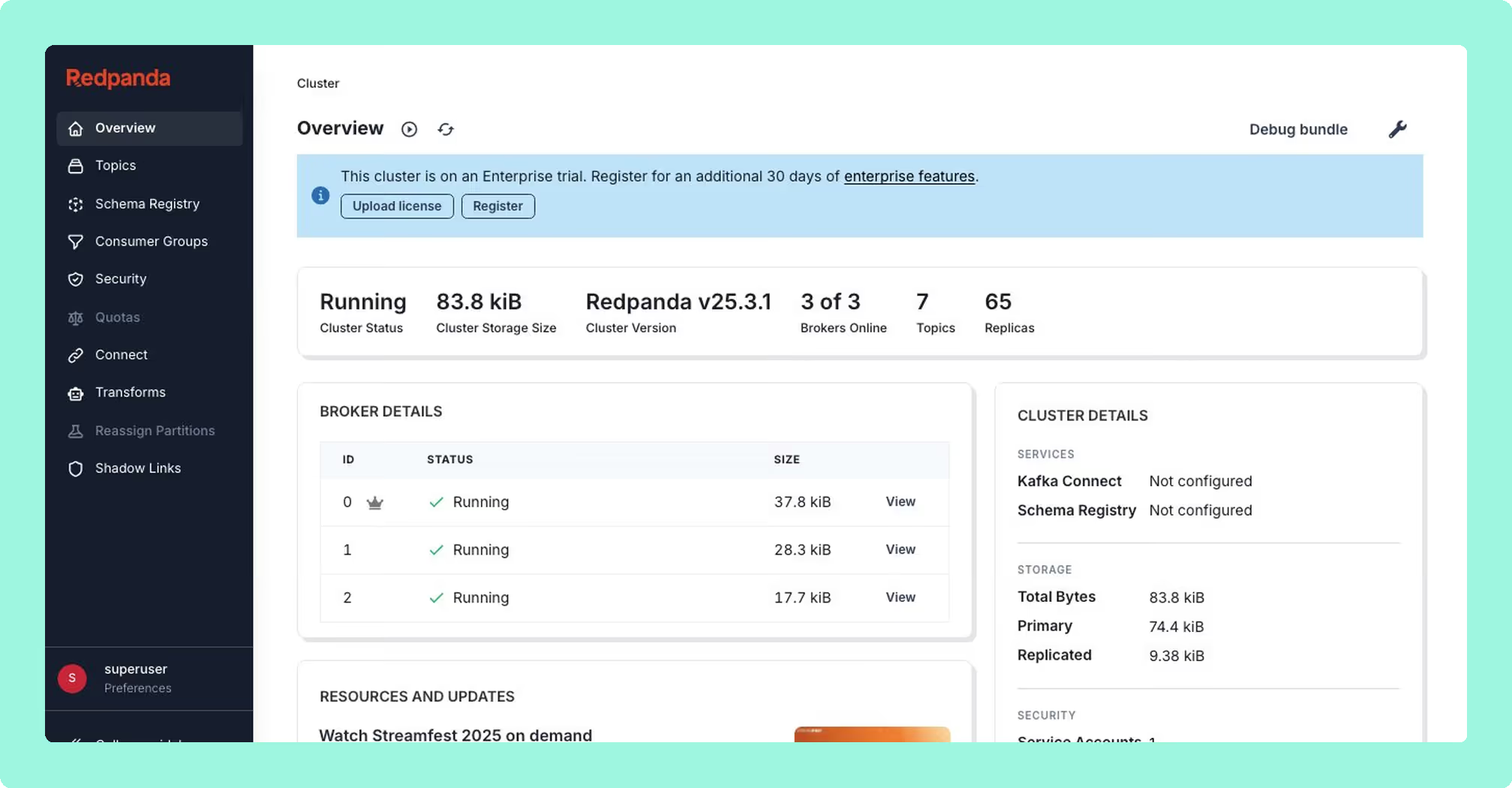
Redpanda Console is an open-source web interface for inspecting and managing Kafka-compatible clusters, written in Go and React and shipped as a Docker image and a Helm chart. It began as Kowl, by CloudHut, and Redpanda acquired it in April 2022. It serves Redpanda clusters, where it integrates with the Redpanda admin API, and it also serves vanilla Apache Kafka, Amazon MSK and Confluent Platform. The community edition is under the Business Source License: free for internal use, with commercial SaaS use restricted.
- Message viewer: time-travel offset debugging and JavaScript message filtering.
- Decoding: Avro, Protobuf, JSON, XML, CBOR, MessagePack and binary hex.
- Protobuf without a registry: local proto descriptor maps declare which schema applies to which topic.
- Observer Mode: browses and streams topic messages without joining a consumer group.
That last one matters at exactly the point in an incident where nobody wants an extra step: an inspection triggers no rebalance and pollutes no offsets on the group somebody else is relying on.
What is Kpow?
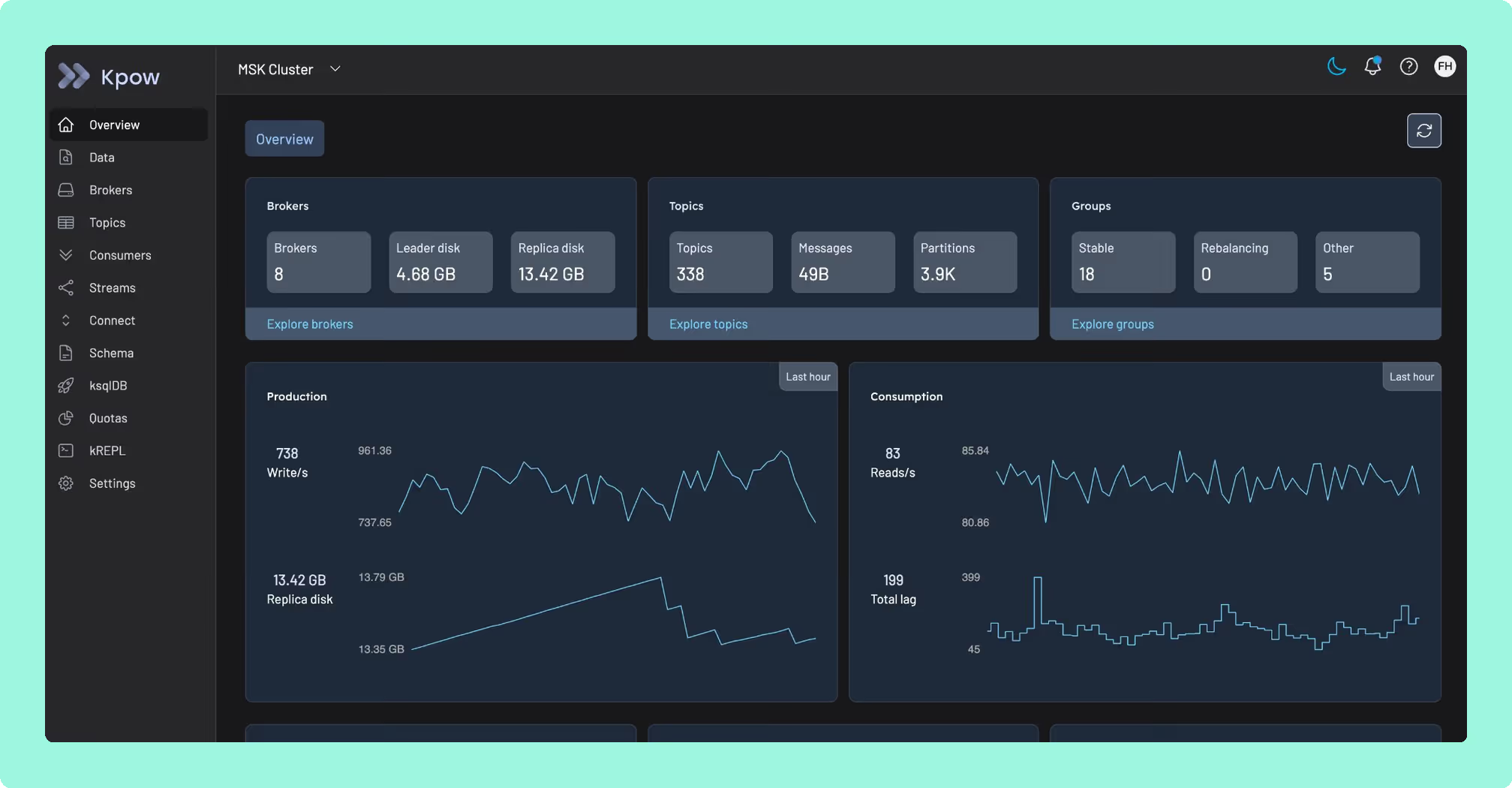
Kpow by Factor House is engineer-facing tooling for Apache Kafka, and it runs against whatever cluster you already have: self-managed Kafka, Amazon MSK, Confluent Cloud, Redpanda, Aiven and Instaclustr. Kpow runs against a Redpanda broker, so these two products are not mutually exclusive, and nobody reading this is being asked to pick a broker vendor.
It is a single stateless JVM container, configured entirely through environment variables, with no external database, no sidecar and no persistent volume. Its telemetry lives in internal Kafka topics on the cluster it is already monitoring, so there is no second system to run, back up or upgrade. One instance manages up to 12 Kafka clusters.
What is the official 2026 pricing of Kpow and Redpanda Console?
Console is free under the Business Source License, indefinitely, and the free tier is not a hobbled one: the message viewer, topic and consumer group management, Kafka Connect management and Schema Registry browsing are all in it. RBAC, OIDC single sign-on and data masking are not. Those need a paid Redpanda Enterprise licence, and Redpanda does not publish a price for it.
The governance layer is licensed to the broker vendor, not to the tool, so a team running vanilla Apache Kafka or Amazon MSK that needs RBAC, single sign-on or masking in Console buys a Redpanda Enterprise licence while running no Redpanda broker at all. Access control is a line item in your Kafka security architecture that outlives most of the stack around it. Kpow prices per cluster, the price is published, and the Community Edition is free for up to 3 clusters and 10 users, with RBAC, masking, single sign-on and the audit log on Enterprise from 4,500 US dollars per cluster with 100 users included.
Where does each one run out?
Each tool here is marked out of 10 on five criteria, 50 points in all, and no criterion is weighted above another. Nothing sits behind a multiplier, so a total is the sum of its five marks and a reader can recompute it. The five are cost as teams grow, deployment footprint, support and maintenance, access control and audit, and multi-cluster reach, because those are the questions a Kafka interface is actually measured against after the first month: a second cluster, an access review with a date on it, an upgrade nobody owns, and a bill that moves when the team does. The widest gap between the two marks is on multi-cluster reach, where Kpow marks 9 and Redpanda Console marks 2. The marks come from the same matrix used on every comparison on this site, so a tool scores the same here as it does anywhere else, and the reason behind each mark is in the card below, under Why these scores.
 Rank 1
 Kpow
44 out of 50 Total
Try Kpow in the live demo No signup needed.
- Cost a year
- $13,500 for 3 clusters, plus about $2,880 in ops (this page's estimate)
- Who the licence is tied to
- The tool, whatever broker you run
- Broker clusters per instance
- Up to 12, from one deployment
- Cost as teams grow
- 7 out of 10
- Deployment footprint
- 9 out of 10
- Support and maintenance
- 9 out of 10
- Access control and audit
- 10 out of 10
- Multi-cluster reach
- 9 out of 10
Why these scores for Kpow
- Cost as teams grow 7 out of 10
- Enterprise from a published 4,500 US dollars per cluster with 100 users included, against a governance licence on the other side that Redpanda does not publish a price for. Held at 7 because Community Edition stops at 3 clusters and 10 users and holds RBAC, masking and audit back from it.
- Deployment footprint 9 out of 10
- One stateless JVM container configured through environment variables, with telemetry in internal Kafka topics on the monitored cluster, so there is no external database, no sidecar, no volume and no second system to back up. Console is a container too, but needs an external Schema Registry beside it.
- Support and maintenance 9 out of 10
- Releases ship continuously with an Enterprise support SLA and priority support, against a public tracker and Redpanda under contract only where a licence is held.
- Access control and audit 10 out of 10
- RBAC, single sign-on, server-side masking and a user action audit log are in the product on Enterprise, licensed to the tool. On this page, the same layer on Console needs a Redpanda Enterprise licence, which is why Console scores 6.
- Multi-cluster reach 9 out of 10
- Up to 12 clusters from one instance, so this page’s three environments are one deployment; the per-instance cap of 12 keeps it at 9 rather than 10.
Kpow runs out where a proxy begins: nothing sits between producers and brokers, so wire-level encryption or server-side payload filtering independent of client code describes a proxy architecture, and a different Kafka UI does not meet that requirement either. Where Console’s governance is licensed to the broker vendor, Kpow’s is licensed to the tool itself, so the number stays the same whether the cluster underneath it is Redpanda, MSK or self-managed.
Kpow answers each of those directly: RBAC, single sign-on, masking and the audit log are licensed to the tool itself rather than the broker vendor; one instance already manages up to 12 Kafka clusters, so three environments is one deployment instead of three; and broker metrics live in the product, held in internal Kafka topics on the monitored cluster, with no second system to stand up beside it.
It also runs the same way regardless of which broker sits underneath: Kpow works against a Redpanda broker as readily as any other, so nobody here is being asked to pick a vendor, and Enterprise starts at 4,500 US dollars per cluster with that number published rather than negotiated.
What it costs a year: 13,500 US dollars for the three environments this page keeps counting, at the published 4,500 per cluster with 100 users included, and RBAC, single sign-on, masking and the audit log are inside that number rather than behind a separate licence. This page’s estimate rather than a vendor price for what running it takes: one container, one deployment covering all three environments, no external database and no Schema Registry to stand up beside it, at two engineer-hours a month, is 2,880 US dollars a year at 120 US dollars an hour, so about 16,380 all in.
Compare Kpow vs Kafbat UIKpow vs Confluent Control CenterKpow vs Kadeck
 Rank 2
 Redpanda Console
redpanda.com
29 out of 50 Total
- Cost a year
- $0 licence, about $8,640 in ops, plus an unpublished licence
- Who the licence is tied to
- The broker vendor, even on MSK or vanilla Kafka
- Broker clusters per instance
- One, so three environments is three deployments
- Cost as teams grow
- 6 out of 10
- Deployment footprint
- 8 out of 10
- Support and maintenance
- 7 out of 10
- Access control and audit
- 6 out of 10
- Multi-cluster reach
- 2 out of 10
Why these scores for Redpanda Console
- Cost as teams grow 6 out of 10
- Free indefinitely under the Business Source License with no seat count, docked because RBAC, OIDC single sign-on and masking all need a paid Redpanda Enterprise licence that Redpanda does not publish a price for, and a team on vanilla Apache Kafka or Amazon MSK still has to buy it.
- Deployment footprint 8 out of 10
- A Docker image and a Helm chart holding no state, docked because an external Schema Registry is needed beside it and one instance reaches one broker cluster, so this page’s three environments are three deployments.
- Support and maintenance 7 out of 10
- Shipping continuously, with Redpanda under contract where a licence is held and a public tracker otherwise. This page records that the multi-cluster request has been open since April 2022.
- Access control and audit 6 out of 10
- RBAC and OIDC single sign-on both exist but are licence-gated and absent from the free tier, and this page notes the failure mode is sharper than the gate, because where enterprise features are enabled and no valid licence is found Console restricts access to the interface entirely rather than degrading to the free feature set.
- Multi-cluster reach 2 out of 10
- No broker-tier multi-cluster, so dev, staging and production is three deployments, and the request has been open since April 2022. Several Kafka Connect clusters are supported; broker clusters are not.
Console has no RBAC and no single sign-on in the free tier, which rules it out for a shared cluster in a multi-team or regulated environment. The licence is strict too: where enterprise features are enabled and no valid licence is found, Console restricts access to the interface entirely rather than degrading to the free feature set.
Reach: no broker-tier multi-cluster, so three environments means three deployments. The request has been open since April 2022.
Monitoring: no broker metrics, no alerting and no historical trends, so Kafka broker monitoring needs a separate Prometheus and Grafana stack.
Timeouts: six seconds for DescribeLogDirs and Metadata, five for DescribeConfigs and thirty-five for ListMessages, with no configuration key for any of them.
Degradation: one broker offline in a multi-node cluster fails every consumer group query, so Kafka consumer monitoring goes dark when it is most worth having.
What it costs a year: nothing to licence under the Business Source License, and nothing published at all for the governance layer, so the only figure a buyer can write down is the one they build themselves. This page’s estimate rather than a vendor price, at 120 US dollars an engineer hour: six engineer-hours a month to run Console across the three deployments dev, staging and production need, with the external Schema Registry beside them, is 8,640 US dollars a year. Those hours do not cover the second dependency this page names, because Console holds no broker metrics, no alerting and no historical trends, so a Prometheus and Grafana stack has to be stood up and kept running beside it. A Redpanda Enterprise licence for RBAC and single sign-on sits on top of that with no published price, which a team running no Redpanda broker still has to buy. Kpow on the same three clusters is 13,500 US dollars published, with the metrics and that governance layer both inside the number.
Compare Kafbat UI vs Redpanda ConsoleKafdrop vs Redpanda ConsoleRedpanda Console review
How do you switch, or run both?
Running both is reasonable, and it suits more teams than either vendor’s marketing implies. Console holds no cluster state and sits outside the data path, so removing it changes nothing on the brokers, and adding a second tool is a container plus a configuration block. Teams integrate Kpow with Redpanda brokers today. What has to move is small: Console’s local proto descriptor maps are configuration rather than product state, and anything relying on the Redpanda admin API integration is specific to a Redpanda broker. What gets simpler is the deployment count, because three Console deployments for three environments become one. Kpow gathers its own broker and consumer telemetry into internal Kafka topics, so Kafka broker monitoring arrives with the tool rather than beside it, and what it does not replace is the Prometheus and Grafana stack carrying the alerting and the long-run dashboards.
Which should you pick?
Kpow by Factor House is the pick for a team on vanilla Apache Kafka or Amazon MSK that needs RBAC, single sign-on or masking, scoring 44 against Redpanda Console’s 29, because Console licenses those to the broker vendor at a negotiated price and reaches one cluster per deployment. Console is the better message viewer, with time-travel offset debugging and Protobuf decoding without a registry.
Pick Redpanda Console if:
- you run a single Redpanda cluster
- the team is small enough that a shared login is not a governance problem
- the need is developer debugging rather than production Kafka monitoring
- Prometheus and Grafana already cover the metrics half
Pick Kpow if:
- the governance requirement sits on a cluster your broker vendor does not sell you
- you run more than one environment, or more than one distribution
- RBAC, single sign-on, masking or an audit trail are needed without buying a broker licence
- a number you can put in a budget before contacting anybody is part of the requirement
On the first shape Console is the right answer, and the message viewer alone justifies it. The test to hand your own team is short: which of your two numbers is growing faster, engineers or clusters, and whose product decides your governance bill?
If the shortlist is wider than these two, Kafka multi-cluster tools ranks what actually reaches more than one cluster from one deployment, and the best Kafka monitoring tools covers the broker metrics and alerting Console leaves to Prometheus and Grafana.
We don't lean into modifying or extending the underlying source technologies. We stick really close to being in love with Apache open source tech, thinking that it's kind of the basis for an enormous amount of value created in the enterprise world.
Derek Troy-West, Co-founder and CEO of Factor House
Where does the governance decision sit?
Redpanda Console’s message viewer is a genuine strength: time-travel offset debugging, JavaScript message filtering, and Protobuf decoding without a schema registry, using local descriptor maps instead. Observer Mode browses and streams topic messages without joining a consumer group, which is exactly what an incident calls for: a look inside a topic that triggers no rebalance and touches no offsets somebody else’s service depends on.
All the same, Console’s governance is a licence away, and the licence isn’t Console’s own. RBAC, OIDC single sign-on and data masking are all gated behind a paid Redpanda Enterprise licence, absent from the free tier entirely, and where those features are enabled and no valid licence is found, Console restricts access to the whole interface rather than degrading gracefully. Broker-tier multi-cluster has never shipped; the request has been open since April 2022, so three environments means three separate deployments. And there’s no broker metrics, alerting or historical trends in the product at all, so Kafka cluster monitoring needs a separate Prometheus and Grafana stack running alongside it. Kpow answers each of those directly: RBAC, single sign-on, masking and the audit log are licensed to the tool itself rather than the broker vendor, so the number stays the same whether the cluster underneath is Redpanda, MSK or self-managed; one instance already manages up to 12 Kafka clusters, so three environments is one deployment instead of three; and broker metrics live in the product, held in internal Kafka topics on the monitored cluster, with no second system to stand up beside it.
It also runs the same way regardless of which broker sits underneath: Kpow works against a Redpanda broker as readily as any other, so nobody here is being asked to pick a vendor, and Enterprise starts at 4,500 US dollars per cluster with that number published rather than negotiated. The Community Edition is free for up to 3 clusters and 10 users, so start on Kpow and make that decision on your own cluster. Console’s governance answers to Redpanda. Kpow’s governance answers to you.
How these tools were scored
Every option is scored from 0 to 10 on each criterion, from the evidence and sources this page cites, and the reason for each score is on its card. Each criterion counts once, for a total out of 50. This page is published by Factor House, which makes Kpow. Every option is scored on the same rubric and the same sources: Kpow's per-criterion scores are set the same way as every other option's and are not adjusted, and the weights apply to every option alike. Kpow ranks first on its total of 44 out of 50. The other options follow by total.
Sources
Related reading
- Integrate Confluent-compatible registries in Kpow
- Accelerating incident response: advanced filters, streaming search, and AI-powered queries
- Releasing Software at Factor House: The Java Compatibility and Evolution Strategy
- Self-Service Kafka Governance: Streamlining Workflows with Kpow and ServiceNow