At a glance
Offset Explorer and Conduktor are scored here on the same five criteria, 50 points in all: Offset Explorer 26 out of 50, Conduktor 36 out of 50. Offset Explorer takes its best score on Deployment footprint (7 out of 10) and its lowest on Access control and audit (1 out of 10). Cost, 10 engineers: 1,390 US dollars up front, then 460 a year, published. Conduktor takes its best score on Access control and audit (10 out of 10) and its lowest on Deployment footprint (3 out of 10). Cost a year, 10 engineers: 12,000 US dollars for 10 Team Edition seats at the published 1,200. Conduktor holds the highest total on this page at 36 out of 50.
Conduktor vs Offset Explorer, compared
Kpow meets 5 of 6 requirements on this page. 2 rows are not a yes or no question.
Key takeaway
Conduktor is a server-side platform that needs PostgreSQL 13 or later behind it, and Offset Explorer is a desktop application installed on each engineer’s own machine, formerly called Kafka Tool. Team Edition is 1,200 US dollars per seat per year, where Offset Explorer is a purchase at 139 to 119 per user by band plus 46 a year. Nothing authenticates a person to Offset Explorer, so there is no identity for an audit trail. Kpow by Factor House is licensed per cluster at a published price.
Kpow live demo
Test the trade-offs in a live Kafka UI
You have compared Conduktor vs Offset Explorer. Open a live Kpow environment to test the everyday workflows a shared Kafka platform needs.
Built for platform and data teams managing shared Kafka clusters.
Try the Kpow demoWhat is Conduktor?
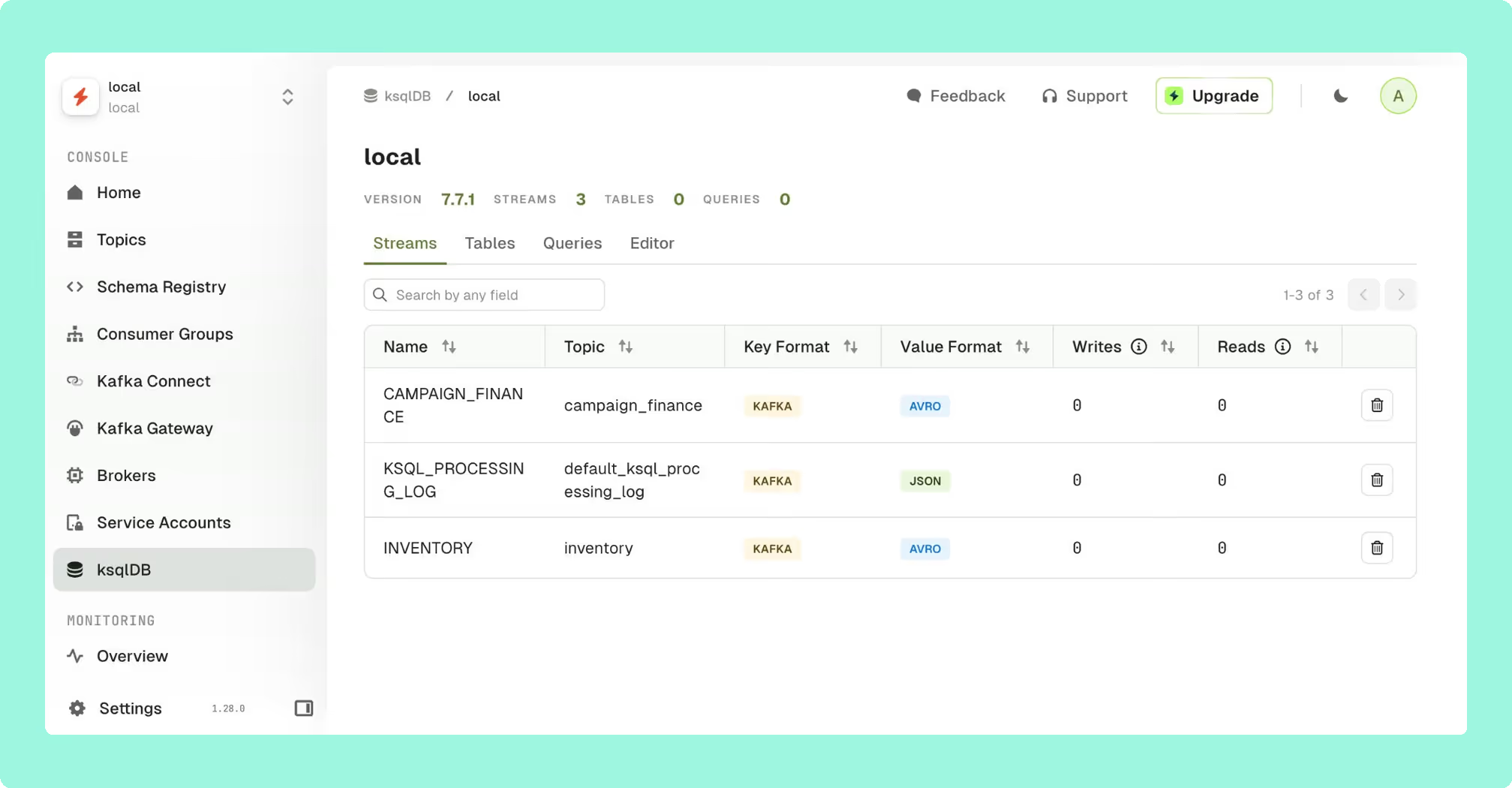
Conduktor is a commercial Kafka management and governance platform, sold as separately licensed parts. Console is a web interface over topics, schemas, connectors, consumer groups and access control, across clusters. Gateway is a proxy between clients and brokers that enforces encryption, data masking, quota policy and multi-tenancy at the wire level. A Schema Registry Proxy is sold as a third product with its own tier.
Gateway is what makes Conduktor a different category of product rather than a nicer interface: field-level encryption without touching a client, virtual topic filtering that runs server-side with no stream processor behind it, and a backend cluster failover applications never notice. Conduktor began as a JavaFX desktop application, moved to Console in 2023 and retired the desktop product at the end of 2025, which is worth knowing here: the shape of tool it is compared against on this page is the shape Conduktor itself walked away from. It was SOC2 Type II certified in 2023.
What is Offset Explorer?
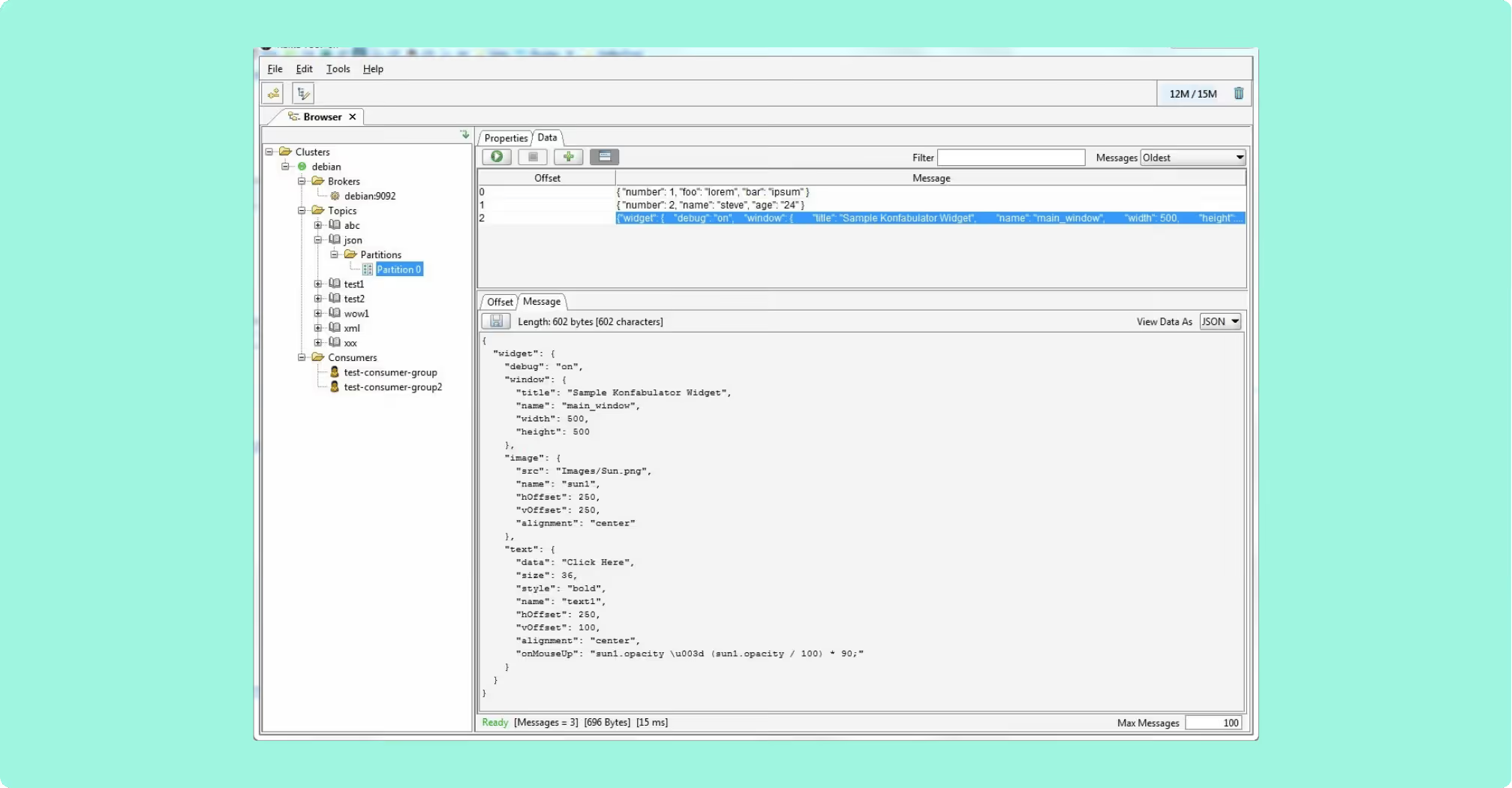
Offset Explorer is a GUI application for managing and using Apache Kafka clusters, installed on an engineer’s own machine rather than deployed as a service. It runs on Windows, Linux and macOS, with a bundled JRE on Windows and macOS, and it supports Apache Kafka 0.11 and above. It is licensed per named user, so it is a personal tool the company pays for rather than shared platform infrastructure.
- Search: string, binary, Avro, Protobuf, JSON Schema, regular expressions and JsonPath.
- Payloads: pretty-printed as JSON or XML rather than arriving as a single line.
- Integrations: Schema Registry, Kafka Connect and ksqlDB, with Compare Clusters as a first-class feature.
- Command line tool: replays a saved project file with real exit codes and output as text, JSON, XML or CSV.
What is the official 2026 pricing of Conduktor and Offset Explorer?
Conduktor Console Team Edition is 1,200 US dollars per seat per year, or 125 US dollars per seat per month billed monthly. Above Team Edition the published prices stop: Console Enterprise, Gateway Enterprise and the Schema Registry Proxy are all contact-only, and Gateway Enterprise is licensed per cluster with a three-cluster minimum, so a team that wants wire-level policy on one cluster buys three.
Offset Explorer is a purchase on a ladder that steps down with headcount: 139 US dollars per user for 1 to 10 users, 128 for 11 to 20, 119 for 21 to 50, and no published price above that. It includes 365 days of support and maintenance, after which a renewal is 46 US dollars per licence. A machine several people share needs a licence for each person on it. The free tiers are not comparable either: Console Community is free for up to 50 users and 3 clusters with SSO or LDAP included, while Offset Explorer is free for personal use only, with commercial, educational and non-profit use getting 30 days and then a purchase. Twenty engineers is 2,560 US dollars up front and 920 a year after on one ladder, against 24,000 a year on the other.
Where does each one run out?
Each tool here is marked out of 10 on five criteria, 50 points in all, and no criterion is weighted above another. Nothing sits behind a multiplier, so a total is the sum of its five marks and a reader can recompute it. The five are cost as teams grow, deployment footprint, support and maintenance, access control and audit, and multi-cluster reach, because those are the questions a Kafka interface is actually measured against after the first month: a second cluster, an access review with a date on it, an upgrade nobody owns, and a bill that moves when the team does. The widest gap between the two marks is on access control and audit, where Conduktor marks 10 and Offset Explorer marks 1. The marks come from the same matrix used on every comparison on this site, so a tool scores the same here as it does anywhere else, and the reason behind each mark is in the card below, under Why these scores.
 Rank 1
 Offset Explorer
kafkatool.com
26 out of 50 Total
- Cost, 10 engineers
- 1,390 US dollars up front, then 460 a year, published
- Free tier
- Personal use only
- Needs to run
- Nothing server-side, a desktop install
- Cost as teams grow
- 5 out of 10
- Deployment footprint
- 7 out of 10
- Support and maintenance
- 6 out of 10
- Access control and audit
- 1 out of 10
- Multi-cluster reach
- 7 out of 10
Why these scores for Offset Explorer
- Cost as teams grow 5 out of 10
- This page’s table gives the pricing unit as 139 US dollars per named user at 1 to 10 users, 128 at 11 to 20 and 119 at 21 to 50, then 46 per licence a year, and the free tier as personal use only, with 30 days for commercial use. The figures for ten engineers are 1,390 US dollars up front at the published 139 a user, then 460 a year at 46 a licence.
- Deployment footprint 7 out of 10
- This page’s table gives what it needs to run as nothing server-side, with a bundled JRE on Windows and macOS, and configuration as per workstation, exported and imported between engineers as files.
- Support and maintenance 6 out of 10
- The Staying current row of this page’s table gives 46 US dollars per licence for a further twelve months of upgrades and support after the first 365 days. The published change history carries no date against any version.
- Access control and audit 1 out of 10
- The Who the tool authenticates row of this page’s table gives the connection only, client to broker, so there is no login to the application, no server-side audit log and no identity to record.
- Multi-cluster reach 7 out of 10
- On this page, Compare Clusters is a first-class feature and it supports Apache Kafka 0.11 and above, but each workstation holds its own cluster list.
Offset Explorer’s costs are structural, and they are all one cost. Nothing authenticates a person to the application: the documented authentication is client to broker only, covering plaintext, SASL, SSL with a truststore and OAUTHBEARER. Those settings authenticate machines to each other, and none of them says who is at the keyboard.
Shared record: no shared deployment, no server-side audit log, and no single place to see what an engineer did.
ACLs: managed in the command line tool as listAcl, addAcl and deleteAcl, writing the client’s identity at the broker rather than the engineer’s in the tool.
Configuration: per workstation, travelling as exported files, so nothing keeps two people in step.
Versions: the published change history carries no date against any version.
Compare Kpow vs Offset ExplorerAKHQ vs Offset ExplorerKafka Tool download
 Rank 2
 Conduktor
conduktor.io
36 out of 50 Total
- Cost a year, 10 engineers
- 12,000 US dollars for 10 Team Edition seats at the published 1,200
- Free tier
- 50 users, 3 clusters
- Needs to run
- PostgreSQL 13 or later, not optional
- Cost as teams grow
- 5 out of 10
- Deployment footprint
- 3 out of 10
- Support and maintenance
- 9 out of 10
- Access control and audit
- 10 out of 10
- Multi-cluster reach
- 9 out of 10
Why these scores for Conduktor
- Cost as teams grow 5 out of 10
- This page’s table gives the pricing unit as 1,200 US dollars per seat per year, or 125 per seat per month, and the free tier as Console Community at 50 users and 3 clusters, with Console Enterprise, Gateway Enterprise and the Schema Registry Proxy contact-only. The annual figure for ten engineers is 12,000 US dollars, ten seats at the published 1,200. Console Community is free at 50 users and 3 clusters, so ten engineers pay nothing until they want the governance this score is based on, which starts on Team Edition.
- Deployment footprint 3 out of 10
- The What it needs to run row of this page’s table gives PostgreSQL 13 or later for Console and it is not optional, a minimum of 2 CPU and 3 GB of RAM, plus 2 CPU and 4 GB wherever Gateway is deployed.
- Support and maintenance 9 out of 10
- This page’s table gives Staying current as a vendor release cycle with support at the tier bought, email on Community and business hours on Team Edition, and the page adds SOC2 Type II certification in 2023.
- Access control and audit 10 out of 10
- The Who the tool authenticates row of this page’s table gives a person, with SSO by OIDC or LDAP on every tier including Community, SAML 2.0 on Enterprise, and group-level RBAC with unlimited audit logs on Team Edition.
- Multi-cluster reach 9 out of 10
- On this page, Console is a web interface across clusters, reaching 3 on Community and unlimited on Team Edition, the value used on every Conduktor page.
Conduktor’s costs are architectural. Console requires PostgreSQL 13 or later, and it is not optional, so a management tool arrives with a database and that database’s backups, upgrade path and failure modes. Minimum resources are 2 CPU and 3 GB of RAM for Console, plus 2 CPU and 4 GB wherever Gateway is deployed.
Latency: Gateway is a proxy in the data path, and a proxy adds a network hop that can slightly increase end-to-end latency.
Index: Console queries the cluster directly when its internal index is stale, which the operator meets as slow page loads.
Graphs: the monitoring graph averages brief spikes across wide windows, so a short spike renders as zero until the range is narrowed.
Directory: Active Directory needs the LDAP search filter (sAMAccountName={0}), or the default configuration returns an invalid user error.
Compare Conduktor vs Kafbat UIConduktor vs KadeckConduktor review
Which should you pick?
Conduktor scores 36 against Offset Explorer’s 26 and is the pick for any team that needs a shared, governed surface, because nothing authenticates a person to Offset Explorer and there is no identity for an audit trail to key on. Offset Explorer suits an individual engineer at 139 US dollars. Conduktor bills 1,200 per seat a year, so for an audit trail priced per cluster, shortlist Kpow by Factor House.
Pick Offset Explorer if:
- the tool is for engineers who already hold cluster credentials
- the value is one person inspecting messages, offsets and schemas
- what is wanted is an installer rather than infrastructure
- a contractor has to work against a client’s cluster and can deploy nothing into it
Pick Conduktor if:
- a regulator or a customer contract makes the audit trail non-negotiable
- encryption or masking has to be enforced below the application
- topic creation is being handed to product teams inside policy guardrails
- the governance layer has to arrive at a published price
Group-level RBAC, topic policies, unlimited audit logs and data masking are all Team Edition rather than Enterprise, so that layer starts at the published price rather than at a negotiation. The question underneath both is whether anybody needs to know who did what. If it is a handful of engineers who all hold cluster access anyway, a desktop application is honest about what it is and cheap to be right about. If most people should never touch a broker, the thing being bought is an identity model, and only one of these two has one. If the shortlist is wider than these two, the best Kafka management tools scores the shared consoles on the same criteria, and the tools for Kafka audit logging takes the who-did-what question on its own.
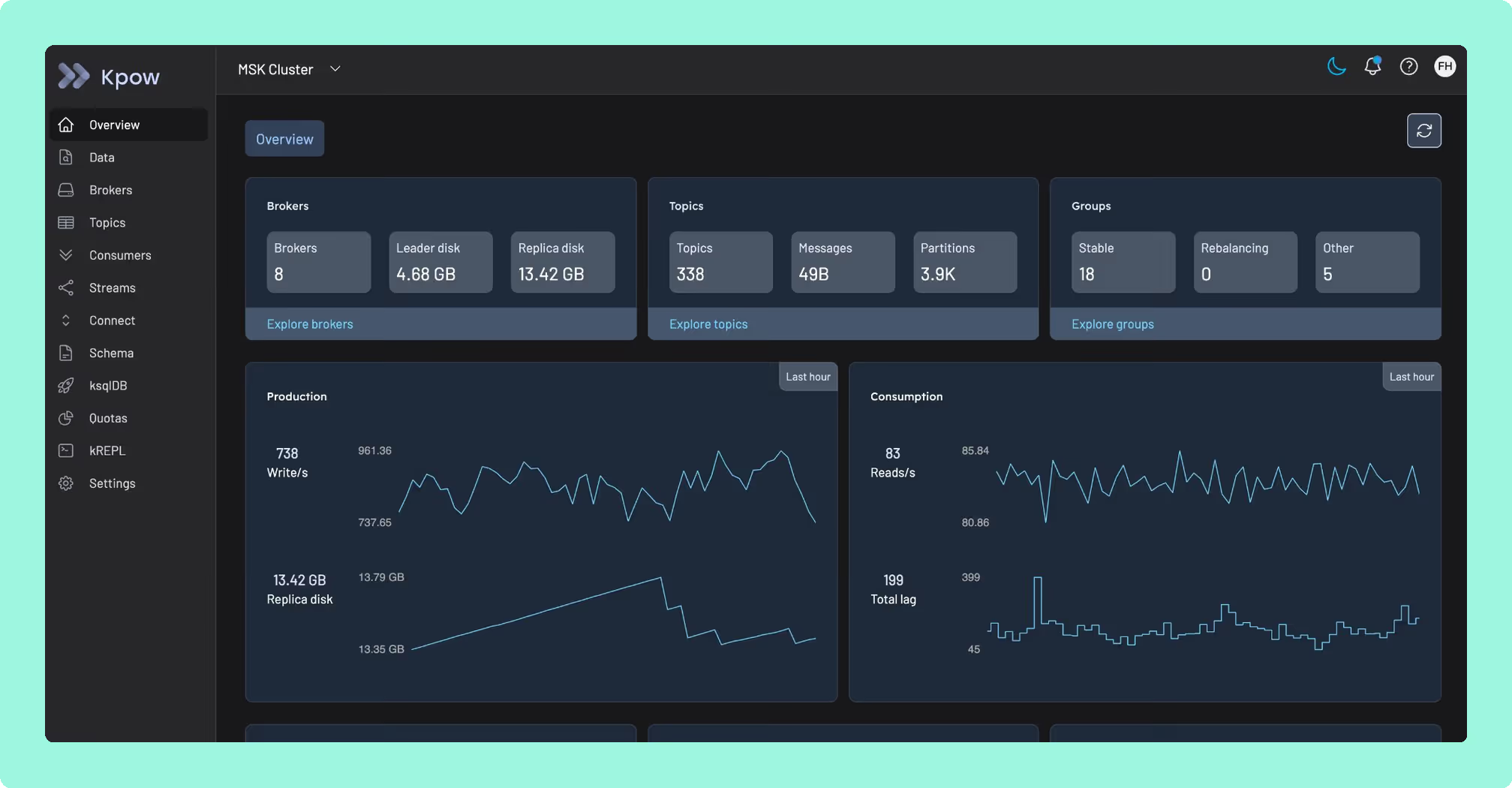
Kpow: an identity model, without a per-seat toll
Offset Explorer and Conduktor both put a price on identity, when there is a price on it at all. Offset Explorer has none: the documented authentication runs client to broker only, so there is no login to the application and no single place to see what an engineer did once a team grows past a handful of people who already hold credentials. Conduktor answers that question, but the answer is another seat: 1,200 US dollars a year the moment a fifty-first person needs one. Kpow by Factor House carries an identity model too, and licenses it per cluster instead of per person, so adding an engineer changes nothing on the bill. It is self-managed, vendor-agnostic tooling that runs against a cluster you already operate, sitting nowhere in the data path, so wire-level encryption and masking stay somebody else’s job.
Price identity by what you operate, not by who’s logged in. Try Kpow against the cluster you already run and see the difference.
How these tools were scored
Every option is scored from 0 to 10 on each criterion, from the evidence and sources this page cites, and the reason for each score is on its card. Each criterion counts once, for a total out of 50. The options are listed by total. Conduktor is listed last whatever its total; on its total of 36 it would place first.
Sources
- Apache Kafka documentation on authorization and ACLs
- Apache Kafka documentation on SASL authentication