
Integrate Kpow with WarpStream

Table of contents

Overview
WarpStream is a Kafka-compatible, BYOC (Bring Your Own Cloud) streaming data platform built directly on top of object storage (such as AWS S3). It delivers high durability, exceptional elasticity, and significant cost savings by eliminating the need for local disks and traditional broker replication.
WarpStream operates on a highly efficient split architecture: a Control Plane (managed by WarpStream) handles cluster lifecycles, IAM, and metadata, while your Data Plane (the Agents deployed in your own cloud) handles the actual streaming traffic.
While WarpStream eliminates the infrastructure headache of managing Kafka brokers, engineering teams still need a dedicated, intuitive interface to monitor, explore, and manage their Kafka data in real-time. That is where Kpow comes in. By leveraging standard Kafka protocols, Kpow connects directly to your Data Plane endpoints and BYOC Schema Registry, delivering a unified, single-pane-of-glass experience without the need for proprietary plugins or sidecars.
Kpow connects natively to a wide range of Kafka vendors and managed service providers. See our Kafka Providers documentation to learn more.
About Factor House
Factor House is a leader in real-time data tooling, empowering engineers with innovative solutions for Apache Kafka® and Apache Flink®.
Our flagship product, Kpow for Apache Kafka, is the market-leading enterprise solution for Kafka management and monitoring.
Start your free 30-day trial or explore our live multi-cluster demo environment to see Kpow in action.
Prerequisites
To connect Kpow to WarpStream, you must have the following resources provisioned:
- A running WarpStream Data Plane: Your WarpStream Agents must be deployed and running in your cloud environment.
- Kafka Connection Details: Your Virtual Cluster Bootstrap URL (exposed via your Data Plane, not the Control Plane URL).
- Kafka Authentication: Your SASL username and password (generated in the WarpStream Console).
- WarpStream Schema Registry (Optional): The Schema Registry URL and its associated credentials.
- A Kpow Enterprise License: Get a free 30-day trial.
Quick Start
The fastest way to connect Kpow to WarpStream is using Docker.
Run the following command in your terminal, replacing the placeholder values with your specific cluster details:
docker run -p 3000:3000 -d --name kpow \
  --env ENVIRONMENT_NAME="WarpStream Kafka" \
  --env BOOTSTRAP="<WARPSTREAM_VIRTUAL_CLUSTER_BOOTSTRAP_URL>" \
  --env SECURITY_PROTOCOL="SASL_SSL" \
  --env SASL_MECHANISM="PLAIN" \
  --env SASL_JAAS_CONFIG='org.apache.kafka.common.security.plain.PlainLoginModule required username="<SASL_USERNAME>" password="<SASL_PASSWORD>";' \
  --env REPLICATION_FACTOR="1" \
  --env NUM_PARTITIONS="1" \
  --env LICENSE_ID="<LICENSE_ID>" \
  --env LICENSE_CODE="<LICENSE_CODE>" \
  --env LICENSEE="<LICENSEE>" \
  --env LICENSE_EXPIRY="<LICENSE_EXPIRY>" \
  --env LICENSE_SIGNATURE="<LICENSE_SIGNATURE>" \
  factorhouse/kpow:latest
Notes
- License details: The license details can be obtained from your signup email or via the Factor House license portal.
- Cluster Authentication: This guide demonstrates connecting using
SASL/PLAIN, which is the standard for credentials generated in the WarpStream Console. Kpow also fully supports SCRAM, Mutual TLS (mTLS), and OAuthBearer for cluster authentication. For a detailed walkthrough, see the WarpStream provider guide. - Internal Topic Configuration (Crucial): Because WarpStream's diskless architecture writes directly to object storage rather than utilizing traditional broker replication, the replication factor acts as a logical durability configuration. You must configure Kpow to use
REPLICATION_FACTOR="1". We also highly recommend settingNUM_PARTITIONS="1"to conserve your WarpStream logical partition limits, as Kpow's internal telemetry topics do not require multi-partition compute fanout. - Authorization configuration: For brevity, Kpow authorization configuration has been omitted. See Simple Access Control to enable necessary user actions.
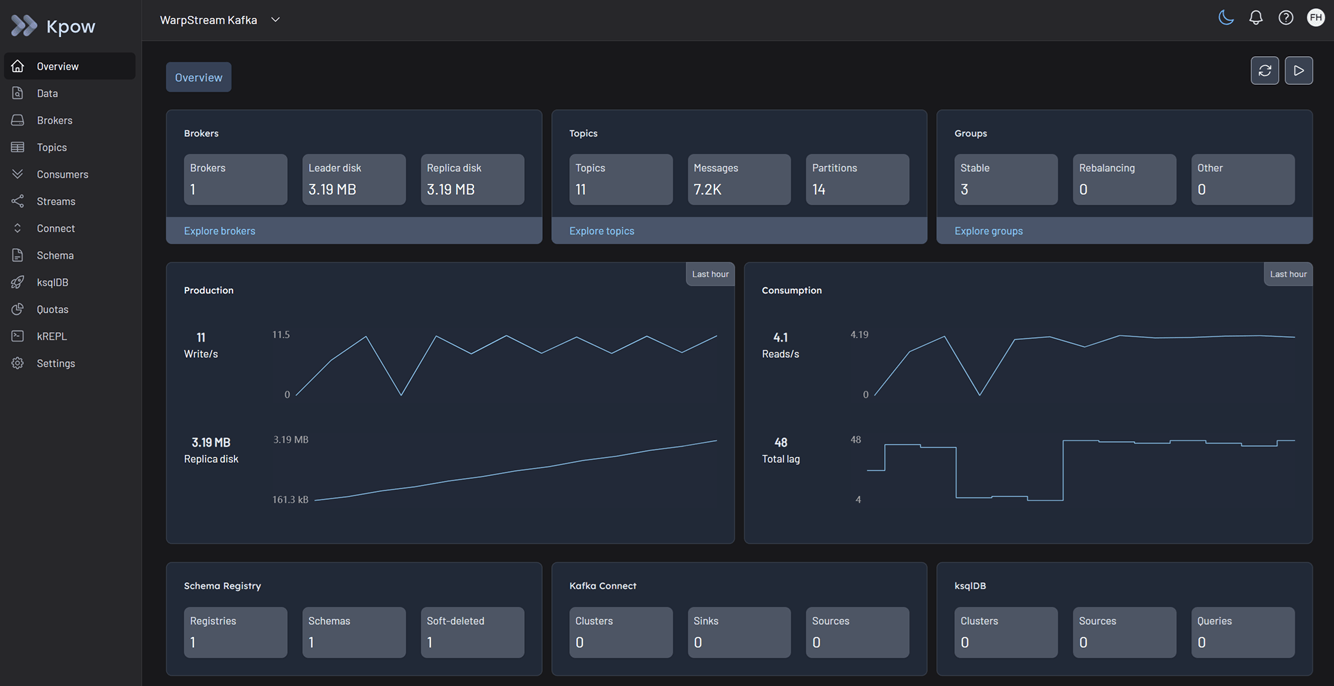
Once the container starts, open a browser and navigate to http://localhost:3000. You will immediately see your WarpStream topics, consumer groups, and cluster telemetry.
Ecosystem Integration
If you use WarpStream's BYOC Schema Registry, you can seamlessly integrate it into Kpow by appending the following environment variables to your deployment command.
WarpStream Schema Registry
WarpStream's Schema Registry requires Basic Authentication (USER_INFO).
By default, Kpow uses an optimized "Version 2" observation strategy that queries the bulk schema listing endpoint (/schemas). Depending on your WarpStream BYOC version and deployment, this bulk endpoint may not be implemented (which will return a 404 Not Found error in Kpow's logs). If you experience this, you may need to instruct Kpow to fall back to the legacy "Version 1" strategy (/subjects) by setting SCHEMA_REGISTRY_OBSERVATION_VERSION="1". See the Schema Registry configuration docs for more details.
  --env SCHEMA_REGISTRY_NAME="WarpStream Schema Registry" \
  --env SCHEMA_REGISTRY_URL="<SCHEMA_REGISTRY_URL>" \
  --env SCHEMA_REGISTRY_AUTH="USER_INFO" \
  --env SCHEMA_REGISTRY_USER="<SCHEMA_USERNAME>" \
  --env SCHEMA_REGISTRY_PASSWORD="<SCHEMA_PASSWORD>" \
  --env SCHEMA_REGISTRY_OBSERVATION_VERSION="1"
Managed Data Pipelines
WarpStream's "Managed Data Pipelines" (their Kafka Connect alternative) is not currently supported by Kpow.
Production Deployment
When you are ready to move from a local Docker test to a production deployment, we recommend the following paths:
Kubernetes
For deploying Kpow to Kubernetes clusters, we recommend using our official Helm Charts. You can store your Aiven ca.pem file as a Kubernetes Secret and securely mount it into the Kpow pod.
Bare Metal / VM
If you prefer running Kpow directly on a Virtual Machine, you can download the Kpow JAR file.
Conclusion
Kpow provides a powerful, single pane of glass view into your WarpStream Data Plane. By using standard Kafka protocols and respecting WarpStream's unique diskless architecture configurations, you can unify your virtual clusters and Schema Registry environments in minutes.
Explore these features in your own environment with a free 30-day trial of Kpow.
If you need assistance with your WarpStream integration, reach out to our engineering support team at support@factorhouse.io.