Best Kafka management tools for ecommerce companies and marketplaces
ComparisonsThe best Kafka management tool for an ecommerce company or marketplace is one a small platform team can run, often as the replacement for Confluent Control Center after leaving a licensed distribution: it stays out of the data path that checkout and order events take, runs as one component with nothing else to operate, finds one order across topics without anyone writing a consumer, masks customer and payment fields for the people who look, names the person behind every action, and signs people in through the company’s identity provider. Kpow, Kafbat UI, AKHQ, Lenses, Confluent Control Center and Conduktor each cover part of that. Scored on the six weighted criteria explained below the rankings, Kpow ranks first with 87 out of 100, ahead of Kafbat UI at 76 and AKHQ at 73.
Tools compared
| Rank | Tool | Total (out of 100) | Out of the data path | Deployment footprint | Inspecting topic data | Who can see unmasked data | Audit trail per person | Directory and Kafka sign-in | Cost a year (modelled) |
|---|---|---|---|---|---|---|---|---|---|
| 1 | Kpow | 87 | One container, state in your Kafka, not a proxy | One container or JAR, no database, sidecar or volume | kJQ search across topics, on the server | Server-side, show last four, no per-role exemption | Every action with the IdP user, data queries included | SAML, OIDC, LDAP; Kerberos, SCRAM or mTLS to brokers | $20,880 |
| 2 | Kafbat UI | 76 | One stateless container | Stateless container, a volume only for the config wizard | Message browsing | Server-side, the same for every viewer | Optional, reads at level ALL, no view | OAuth2, OIDC, LDAP; no SAML | $11,520 |
| 3 | AKHQ | 73 | One stateless container | One JVM container, slows on very large clusters | Topic data browsing | Global filters, the same for every viewer | Opt-in, no reads, no view | LDAP, OIDC; no SAML | $16,320 |
| 4 | Lenses | 56 | HQ on PostgreSQL, agent and database per cluster | HQ, agents and databases, Kubernetes for production | SQL over topics | Strictest, no exemption even for admins | In-product audit log from Team tier | SSO incl. Entra ID and Okta | $2,880 plus quoted licence |
| 5 | Confluent Control Center | 39 | Dedicated host, broker reporter JAR | Dedicated nodes, part of Confluent Platform | Topics > Messages view | No masking described | Broker principal, not always the person | OIDC on self-managed | $2,880 plus quoted subscription |
| 6 | Conduktor | 53 | Console on PostgreSQL; Gateway proxy in the data path | Console, PostgreSQL 13+ and a Gateway tier | Browse and filter | Console exemptions per user or group | 70+ event types with user, in the UI | LDAP, OIDC | $122,880; $212,880 with Gateway Core and Protect |
No tool meets every column. Each of them governs people working through the tool, so services still rely on broker ACLs, and card numbers that should never be readable in Kafka still need tokenising before they are produced.
The tools, ranked for ecommerce companies and marketplaces
 Rank 1
 Kpow
87 out of 100 Total
Try Kpow in the live demo No signup needed.
- Cost a year
- $18,000 licence for 4 clusters plus $2,880 operator time, so $20,880 (modelled)
- Deployment
- One container or JAR, no external database
- Masking
- Server-side data policies, including show last four
- Out of the data path ×3 weight, this criterion counts 3 times toward the total
- 9 out of 10
- Deployment footprint ×2 weight, this criterion counts 2 times toward the total
- 9 out of 10
- Inspecting topic data ×2 weight, this criterion counts 2 times toward the total
- 9 out of 10
- Who can see unmasked data
- 6 out of 10
- Audit trail per person
- 9 out of 10
- Directory and Kafka sign-in
- 9 out of 10
Why these scores for Kpow
- Out of the data path 9 out of 10
- It is one container or JAR whose state lives in Kafka topics on your own cluster, and it connects as an ordinary Kafka client, so nothing sits between your applications and the brokers.
- Deployment footprint 9 out of 10
- It runs as one stateless container or JAR with no external database, sidecar or volume; Kafdrop is lighter elsewhere on this site, so it scores 9, not 10.
- Inspecting topic data 9 out of 10
- Data inspect searches across multiple topics with kJQ filters, which its documentation says scan tens of thousands of messages a second from a topic, and streaming search keeps a query running until it reaches its result or scan limit; Lenses’ SQL scores higher.
- Who can see unmasked data 6 out of 10
- Data policies redact customer and card fields on the server and String SerDes are removed from Data Inspect while policies apply, so a raw deserializer cannot bypass them, but a policy is set per cluster and topic, not per role, so no owning team can be exempted the way Conduktor Console allows.
- Audit trail per person 9 out of 10
- Every action is recorded with the user from the identity provider and the policy that allowed it, including data inspect queries, with a seven-day view in the product, the record written to an audit topic on your own cluster, and webhooks that send it to a SIEM for long-term retention.
- Directory and Kafka sign-in 9 out of 10
- People sign in with SAML, OpenID Connect or OAuth 2.0, or with LDAP through Jetty JAAS, and Kpow connects to brokers with any SASL mechanism, GSSAPI by default, or SSL.
For an ecommerce company or marketplace. Kpow runs inside the company’s own network, next to the brokers, and works the same on community Apache Kafka, Confluent, Amazon MSK and other distributions, so a team that leaves a licensed distribution keeps its tooling. Data inspect searches across topics with kJQ filters, so an engineer can find one order by its ID without writing a consumer, while data policies mask names, addresses and card numbers on the server. Consumer group offset resets and topic changes run in the UI behind RBAC, and the audit log records each action and data query with the person who took it.
Where it falls short. Kpow governs people working through Kpow. Checkout, order and inventory services still authenticate to the brokers with their own principals, so broker ACLs remain the control for services. Its masking hides customer and card data from people inspecting topics and does not change what is stored on the brokers, and it is set per topic, not per viewer. Partition reassignment in the UI works one topic partition at a time. The in-app audit view covers seven days and Kpow’s own topics default to one week of retention, so a longer record goes to a SIEM by webhook. RBAC, masking and the audit log are Enterprise features; Community Edition is free for 3 clusters and 10 users.
Cost a year. $20,880 on this page’s model of an online business running 4 clusters (development, staging and two production clusters) for 100 engineers. Kpow Enterprise is published at $4,500 per cluster per year for up to 100 users, so the licence is $18,000, and the model adds 2 engineer-hours a month at $120 an hour, $2,880, to run one container and keep it current. Factor House prices Kpow per cluster with 100 users included, so on this model the bill does not grow as more developers start using it. On AWS, Kpow is also sold through AWS Marketplace as Kpow for Apache Kafka (Annual) and as an hourly listing, billed through the company’s AWS account.
 Rank 2
 Kafbat UI
76 out of 100 Total
- Cost a year
- $0 licence, about $11,520 in operator time (modelled)
- Deployment
- One stateless container
- Masking
- Server-side, the same for every viewer
- Out of the data path ×3 weight, this criterion counts 3 times toward the total
- 9 out of 10
- Deployment footprint ×2 weight, this criterion counts 2 times toward the total
- 8 out of 10
- Inspecting topic data ×2 weight, this criterion counts 2 times toward the total
- 8 out of 10
- Who can see unmasked data
- 4 out of 10
- Audit trail per person
- 6 out of 10
- Directory and Kafka sign-in
- 7 out of 10
Why these scores for Kafbat UI
- Out of the data path 9 out of 10
- It is one stateless container with no database and no proxy, the same pass as Kpow.
- Deployment footprint 8 out of 10
- It is a stateless container with a published Helm chart, and takes a mounted volume if the configuration wizard is used, which puts it one below Kpow.
- Inspecting topic data 8 out of 10
- Message browsing and inspection are core features of the open-source UI.
- Who can see unmasked data 4 out of 10
- Masking runs on the server and every viewer sees the same result, with no per-role override yet, so the team that owns an order topic cannot be shown the real value while others see it masked.
- Audit trail per person 6 out of 10
- Its audit log names the logged-in user and records reads when the level is set to ALL, but it writes to a topic or the console with no view in the product, so reading the trail is something you build.
- Directory and Kafka sign-in 7 out of 10
- It supports OAuth2 and OIDC, including Microsoft Entra ID, and LDAP or Active Directory, and its documentation does not list SAML.
For an ecommerce company or marketplace. Kafbat UI is the maintained open-source fork of the original kafka-ui, Apache 2.0, with free RBAC, server-side remove, replace and mask policies, and an optional audit log. It is as light to run as Kpow and stays out of the data path, so for a small team on one set of clusters it covers day-to-day message browsing and topic work at no licence cost.
Where it falls short. Masking cannot exempt the team that owns the data, reading its audit trail means building a consumer first, and it does not list SAML, so a company that signs people in with SAML puts a proxy in front of it. Its last release, v1.5.0, shipped in April 2026. There is no SLA, and paid help is a professional services engagement from the maintainers, quoted rather than listed.
Cost a year. $11,520 on this page’s estimate, with no licence fee. Running, securing and upgrading it is 6 engineer-hours a month at $120 an hour, $8,640, and a company that signs people in with SAML also runs a proxy such as oauth2-proxy in front of it, 2 hours a month, $2,880.
 Rank 3
 AKHQ
73 out of 100 Total
- Cost a year
- $0 licence, about $16,320 in operator time and review (modelled)
- Deployment
- One stateless container
- Masking
- Global filters, the same for every viewer
- Out of the data path ×3 weight, this criterion counts 3 times toward the total
- 9 out of 10
- Deployment footprint ×2 weight, this criterion counts 2 times toward the total
- 8 out of 10
- Inspecting topic data ×2 weight, this criterion counts 2 times toward the total
- 8 out of 10
- Who can see unmasked data
- 4 out of 10
- Audit trail per person
- 4 out of 10
- Directory and Kafka sign-in
- 6 out of 10
Why these scores for AKHQ
- Out of the data path 9 out of 10
- It is one stateless container with no database and no proxy, the same pass as Kpow.
- Deployment footprint 8 out of 10
- It is one Micronaut container configured in YAML via Helm, with no database or sidecar, docked one because UI performance is known to degrade on very large clusters.
- Inspecting topic data 8 out of 10
- Topic data browsing is a core AKHQ feature.
- Who can see unmasked data 4 out of 10
- Its masking policies are global, so every viewer sees the same thing, and no guard against reading a topic around them is documented.
- Audit trail per person 4 out of 10
- Audit events are opt-in to a Kafka topic, reads are not recorded, and there is no view for the trail.
- Directory and Kafka sign-in 6 out of 10
- It supports LDAP, OIDC and header authentication from a proxy, does not list SAML, and ships with security disabled until you enable it.
For an ecommerce company or marketplace. AKHQ is free under Apache 2.0, configured in YAML that fits a GitOps review, with roles that combine resource types and cluster patterns, global masking filters, and good topic data browsing. Its latest release, 0.28.0, shipped in August 2026.
Where it falls short. Its documentation warns that if the JWT signing secret is not set, the API will not enforce the group role, so a misconfiguration turns access control into a UI restriction, which matters on topics that carry customer and payment data. Audit is opt-in and reads are not in it, so it cannot show who looked at an order.
Cost a year. $16,320 on this page’s estimate, with no licence fee. Running, securing and upgrading it is 6 engineer-hours a month at $120 an hour, $8,640; a company that signs people in with SAML runs oauth2-proxy in front of it, 2 hours a month, $2,880; and the model adds one access review a year, 40 hours or $4,800, because of the JWT secret behaviour above.
Compare Kpow vs AKHQAKHQ review
 Rank 4
 Lenses
lenses.io
56 out of 100 Total
- Cost a year
- $2,880 operator time, plus a licence quoted above 15 users (modelled)
- Search
- SQL over topics in SQL Studio
- Deployment
- HQ on PostgreSQL, an agent and database per cluster
- Out of the data path ×3 weight, this criterion counts 3 times toward the total
- 4 out of 10
- Deployment footprint ×2 weight, this criterion counts 2 times toward the total
- 2 out of 10
- Inspecting topic data ×2 weight, this criterion counts 2 times toward the total
- 10 out of 10
- Who can see unmasked data
- 6 out of 10
- Audit trail per person
- 7 out of 10
- Directory and Kafka sign-in
- 7 out of 10
Why these scores for Lenses
- Out of the data path 4 out of 10
- It runs a central HQ on PostgreSQL plus an agent and an agent database beside every cluster, and HQ has no high-availability option.
- Deployment footprint 2 out of 10
- HQ runs on PostgreSQL with an agent and an agent database per cluster, and its production deployments need Kubernetes.
- Inspecting topic data 10 out of 10
- SQL over topics is the centre of the product and the strongest query model on this page, ahead of Kpow’s kJQ.
- Who can see unmasked data 6 out of 10
- Its masking is the strictest of the consoles here, with no escape even for admins, but there is no per-group exemption, so it sits below Conduktor Console.
- Audit trail per person 7 out of 10
- Audit logs can be read in the product, with no need to build a consumer first.
- Directory and Kafka sign-in 7 out of 10
- SSO spans Okta, Keycloak, OneLogin, Google and Entra ID, with basic authentication only on Community.
For an ecommerce company or marketplace. Lenses brings vendor-backed RBAC, SSO, in-product audit logs and SQL Studio for querying topics, which is the reason to choose it if analysts or merchandising teams need SQL over Kafka. Its data policies redact by field name across Kafka topics, Postgres tables and Elasticsearch indices.
Where it falls short. Every cluster adds an agent and a database to deploy and patch, HQ is a single node that every cluster depends on, and production needs Kubernetes, which is a heavier footprint than a small platform team running two or three clusters usually wants. Its policies apply to Lenses interfaces only.
Cost a year. $2,880 of operator time on this page’s estimate, 2 hours a month at $120 an hour, plus a licence that is not published. The published Team Edition is $4,000 a year for up to 15 users on one cluster, so 100 engineers across 4 clusters is Multi-Kafka Enterprise at a custom quote.
 Rank 5
 Confluent Control Center
confluent.io
39 out of 100 Total
- Cost a year
- $2,880 operator time, plus a Confluent Platform subscription that is quoted (modelled)
- Deployment
- Dedicated host, Metrics Reporter on every broker
- Scope
- Confluent Platform clusters only
- Out of the data path ×3 weight, this criterion counts 3 times toward the total
- 4 out of 10
- Deployment footprint ×2 weight, this criterion counts 2 times toward the total
- 2 out of 10
- Inspecting topic data ×2 weight, this criterion counts 2 times toward the total
- 6 out of 10
- Who can see unmasked data
- 2 out of 10
- Audit trail per person
- 4 out of 10
- Directory and Kafka sign-in
- 5 out of 10
Why these scores for Confluent Control Center
- Out of the data path 4 out of 10
- It is not a proxy, but it needs a dedicated host of 4 cores, 8 GB and 200 GB and the Confluent Metrics Reporter on each broker.
- Deployment footprint 2 out of 10
- It is bundled with Confluent Platform and needs dedicated nodes at 4 cores, 8 GB and 200 GB, plus the Metrics Reporter JAR on the brokers.
- Inspecting topic data 6 out of 10
- Its Topics > Messages view browses topic data, and its review records a rendering bug for compound, nested Avro keys in that view and a Safari authentication failure when browsing messages.
- Who can see unmasked data 2 out of 10
- No masking of message fields is described, so anyone allowed to read a topic in Control Center sees the full value.
- Audit trail per person 4 out of 10
- Confluent Server’s audit logs record authorization decisions for the connection’s principal, which is not always the person behind a tool.
- Directory and Kafka sign-in 5 out of 10
- OIDC is the only single sign-on protocol on self-managed deployments, with users and groups from LDAP or OIDC through Confluent RBAC.
For an ecommerce company or marketplace. Control Center is the natural console on a topology that is Confluent Platform and nothing else, with Confluent RBAC extending the same bindings to Connect, ksqlDB and Schema Registry.
Where it falls short. It comes with the Confluent Platform subscription and does not reach clusters outside Confluent Platform, so a business that moves to community Kafka or a managed service loses it, which is what happened at Gmarket. No masking of customer or card fields is described, and its role bindings cannot carve a delete out of a broader role because they have no DENY rules.
Cost a year. $2,880 of engineering time on this page’s estimate, 2 hours a month at $120 an hour, on top of a Confluent Platform subscription that Confluent quotes rather than publishes, so the total cannot be compared with the others here.
Compare Kpow vs Confluent Control CenterConfluent Control Center review
 Rank 6
 Conduktor
conduktor.io
53 out of 100 Total
- Cost a year
- 100 seats at $1,200 plus $2,880 operator time, so $122,880; Gateway Core adds $60,000 and Gateway Protect, which carries encryption and masking, a further $30,000 (modelled)
- Sign-in
- LDAP, OIDC; no SAML described
- Deployment
- Console on PostgreSQL 13+; data-level controls through Gateway, a proxy
- Out of the data path ×3 weight, this criterion counts 3 times toward the total
- 3 out of 10
- Deployment footprint ×2 weight, this criterion counts 2 times toward the total
- 3 out of 10
- Inspecting topic data ×2 weight, this criterion counts 2 times toward the total
- 8 out of 10
- Who can see unmasked data
- 7 out of 10
- Audit trail per person
- 8 out of 10
- Directory and Kafka sign-in
- 7 out of 10
Why these scores for Conduktor
- Out of the data path 3 out of 10
- Console needs PostgreSQL 13 or later, and its encryption, data-level masking and Virtual Clusters only work when client traffic goes through Gateway, a proxy in the data path that Conduktor sizes at around 20 to 30 MB/s of sustained throughput per instance, with at least three instances in production.
- Deployment footprint 3 out of 10
- Console needs PostgreSQL 13 or later and sized nodes of its own, and the data-level controls add a Gateway tier that has to be sized to the traffic it carries.
- Inspecting topic data 8 out of 10
- Console browses and filters topic data.
- Who can see unmasked data 7 out of 10
- Console masking policies can exempt users or groups, so an owning team sees the real value while everyone else sees it masked, the best score here, though Flink SQL results bypass masking; Gateway’s masking of the data itself is a separate control that sits in the data path.
- Audit trail per person 8 out of 10
- Console logs produce, consume and admin requests across more than 70 event types with user, IP and timestamp, browsable in the UI and exported as CloudEvents.
- Directory and Kafka sign-in 7 out of 10
- Its SSO configuration covers LDAP and OIDC, with guides for Okta, Entra ID and Keycloak, and does not describe SAML.
For an ecommerce company or marketplace. Conduktor pairs Console, a web UI, with Gateway, a Kafka protocol proxy. Conduktor’s Gateway documentation describes it as “a Kafka-compliant middle layer between clients and Kafka clusters” and says it can “mask sensitive data at the proxy layer”, and that is where field encryption, masking of the data itself, policy enforcement on client traffic and Virtual Clusters are applied. Console alone connects to clusters directly and masks in its UI, with exemptions per user or group. The full picture is in the Conduktor review.
Where it falls short. Console needs its own PostgreSQL, and the data-level controls need every producer and consumer that uses them to connect through Gateway, which puts a vendor’s proxy, and a tier the business has to size for peak trading, on the path that checkout and order events take, and inside PCI DSS scope wherever card data passes through it. Per-seat pricing grows with every engineer who needs access.
Cost a year. $122,880 on this page’s model of 100 engineers. Conduktor’s published Team Edition price is $1,200 a seat a year, $120,000, and the model adds 2 engineer-hours a month at $120 an hour, $2,880. On AWS Marketplace, Conduktor Enterprise lists Gateway Core, which carries Virtual Clusters and policy enforcement, at $60,000 a year and Gateway Protect, the add-on for encryption and masking, at a further $30,000, so the data-level controls take the total to $212,880. Conduktor prices Gateway per cluster with a 3-cluster minimum, and the listing does not say how many clusters that figure covers.
Compare Conduktor review
What ecommerce companies and marketplaces need from a Kafka management tool
This page is about online-first businesses: ecommerce companies that sell direct to customers, marketplaces that connect sellers or suppliers with buyers, and the price comparison and deals services around them. Their platform teams are often small, and many of them run community Apache Kafka or a managed service rather than a licensed platform. For card networks, acquirers and processors, whose topics carry card data by design, see best Kafka management tools for payments companies; for grocers and food distributors running mixed clusters for operational users, see best Kafka management tools for supermarkets and food distributors. Retail groups that sell through stores as well as online, with many squads on shared clusters, are covered in best Kafka management tools for retailers.
At an online business, Kafka carries the events between checkout, orders, payments, inventory, fulfilment and seller systems. The tool question often comes up when the licence changes. Gmarket, a South Korean marketplace, first ran the licensed Confluent distribution, which bundled Control Center for monitoring, then moved to community Kafka and had to replace the consumer lag and topic offset views its teams relied on; it compared open-source options before choosing Kpow on cost. A replacement for a platform console has to be something a small team can run without adding a database, an agent per cluster or a proxy to look after, and it has to work on whatever distribution the business lands on.
More businesses are asking the licence question since IBM completed its acquisition of Confluent on 17 March 2026. The Kafka protocol is what makes a move between distributions technically plausible, and Kai Waehner’s Data Streaming Landscape for the third quarter of 2026 locates the cost of leaving elsewhere: “governance, connectors, and operational tooling are where the real switching cost sits”. A console that is supplied with the distribution is part of that cost, because it leaves when the licence does. A business that chooses its console separately from its distribution keeps the same views on either side of that decision.
The open-source consoles a team compares at that point are not equally current, and Gmarket’s shortlist shows why that matters. It included CMAK and Kafka UI. CMAK’s own README names Kafka 0.8 to 0.11 in its requirements and takes a ZooKeeper address as its minimum configuration, while Apache Kafka 4.0 is the first major release to operate entirely without ZooKeeper, so CMAK cannot follow a cluster onto current Kafka. Kafka UI was the Provectus project, and in January 2024 contributors from its original team announced Kafbat UI as an independent fork to continue development; Kafbat UI is the fork ranked on this page. For a team of one or two, the questions to ask of a free console are who maintains it and whether it tracks the Kafka version the business is moving to.
Without a console, the same visibility is assembled from separate open-source projects, for example Burrow or Kafka Lag Exporter for consumer lag, with a schema registry UI and a topic browser beside them, and each one has its own deployment, upgrades and security patches. That is little work for one cluster and a standing task across the four clusters in this page’s cost model, which is the operator time the model counts against the free tools. Visibility also changes what a small team is willing to run for itself. Claritev, a healthcare technology company, reports that the view it had into its clusters gave it the confidence to stop renewing a third-party Kafka support contract whose price was heading towards $150,000 a year.
Deployment footprint is the criterion where a small team can check a vendor’s claim before installing anything. Kpow’s Helm chart runs it as one pod with resource requests equal to its limits, 2 CPUs and 8 Gi of memory by default for an instance that manages several clusters, with the chart’s comments suggesting 1 CPU for up to six clusters and 0.5 CPU for a single cluster. Kubernetes places a pod configured that way in its Guaranteed quality of service class, the last to be evicted when a node runs short of resources, and the chart is listed on Artifact Hub. A console that keeps its state in PostgreSQL adds a database to size, back up and upgrade, and one that needs an agent beside every cluster adds a deployment for each of the four clusters in the cost model, which is why this page scores those designs 2 or 3 on this criterion.
Most of the daily work is finding things. When an order is stuck, a payment status never arrives or a stock count is wrong, an engineer has to find the messages for that order across several topics, and at Gmarket browsing and filtering partitions without writing a consumer is the feature its teams use most. Many of those engineers are not Kafka specialists, so offset resets, topic changes and consumer monitoring have to be safe to do from a UI. Where no tool answers the question, teams build their own. Pickles, an Australian auction marketplace whose live and online bidding runs on Kafka, found that confirming a message had been delivered could take hours, wrote a custom microservice to check, and concluded that it could not write one for every use case.
The identifier an engineer starts with is rarely the Kafka key. A support ticket carries an order number, an email address or a seller’s reference, which may sit in a nested field of the message value, so a search that only matches complete keys fails at the moment it is needed. NORD/LB’s case study describes the same limit in a bank, where exact-match search meant developers needed complete identifiers to find anything and resorted to manual workarounds, and it is the reason this page scores filtered search across topics above browsing one topic at a time.
Much of what lands in an online business’s Kafka was never designed as an event. Change data capture copies database tables into topics, and Shopify’s engineers describe in Capturing every change from Shopify’s sharded monolith running about 150 Debezium connectors over more than 100 MySQL shards, where records are keyed by the table’s primary key and a compacted topic keeps the latest version for every key. A change event carries the row itself: the Debezium MySQL connector documentation defines its before and after fields as the state of the row before and after the change, with a field for each table column. A topic captured from a customers or orders table is therefore a current copy of every row in it, whichever columns the consuming team meant to use, and compaction keeps the latest version of each row for as long as the row exists and not for a retention period. Debezium can leave columns out or mask them at the connector, with column.exclude.list and its column.mask properties, and that changes what is stored in Kafka. Masking in a management tool changes only what people see when they inspect the topic, so a business has to decide which of the two it is relying on for each table. Factor House’s hands-on CDC project with Debezium shows the shape of these topics on an ecommerce data set. The Shopify post also warns that CDC couples consumers to the source’s internal data model, so a column renamed by the owning team breaks consumers elsewhere, which is one more reason engineers need to read the topic as it is.
Those order and checkout topics carry personal data: names, delivery addresses, email addresses and phone numbers, and, where card data reaches the business’s own systems at all, card details. Article 25 of the GDPR asks for measures that ensure, by default, that personal data is not made accessible to an indefinite number of people without the individual’s intervention, so a tool that shows order topics to every developer should mask those fields for the people who do not need them and record who looked. PCI DSS is written for any business that stores, processes or transmits cardholder data, or could affect the security of the environment that holds it, and the PCI Security Standards Council’s glossary defines masking as concealing a segment of the card number when it is displayed. Many merchants keep card numbers out of Kafka with a hosted payment page or tokens, and those that do not need the tool to mask them.
How card data reaches the business decides how much of that applies. The Council’s 2017 information supplement Best Practices for Securing E-commerce sets out the options, from a redirect or an iFrame hosted by the payment provider to an API integration in which the merchant’s own systems receive and transmit cardholder data. It describes the merchant’s security responsibility under the API method as high, says the method is generally used by larger organisations with specific processing needs, and states that no option completely removes a merchant’s PCI DSS responsibilities. For Kafka, the practical reading is that a business on a hosted payment page should confirm that no producer writes a full card number into an order or payment topic, which is a check that topic inspection makes possible, and a business on the API method should treat every tool that can read those topics, and every proxy that carries them, as part of the environment it has to secure.
A marketplace holds a second set of personal data that a shop does not. Article 30 of the EU Digital Services Act requires a platform that lets consumers buy from traders to obtain each trader’s name, address, telephone number and email address, a copy of an identification document, payment account details and trade register number, to store that information securely for six months after the relationship with the trader ends, and then to delete it. Where a marketplace with customers in the EU runs seller onboarding and payouts over Kafka, those topics carry identity and bank account details beside the order topics that carry buyers’ addresses, and a masking policy written only for the order schema leaves the seller data readable.
Permission to read a topic and permission to see a field in the clear are separate decisions, and treating them as one is what closes order topics to the engineers who have to debug them. With masking on individual fields, an engineer can follow an order or payment message through its topics while the address, card number and account details stay hidden, so debugging production does not become access to customer data. That is the working form of the data minimisation principle in Article 5 of the GDPR, which limits personal data to what is necessary for the purpose. The tools differ on the next question, which is whether the team that owns the data can be shown the real value while everyone else sees it masked: Conduktor Console can exempt users or groups, and Kpow, Kafbat UI, AKHQ and Lenses apply one result to every viewer.
The risk that masking and the audit trail answer is mostly an internal one, and ecommerce has a public example. In September 2020 Shopify confirmed that two members of its support team had obtained customer transactional records from fewer than 200 merchants. TechCrunch’s report lists names, postal addresses and order details, says the data was accessible through Shopify’s Orders API, and adds that the notice sent to one merchant gave the specific number of customer records taken. The same pattern applies to any internal tool that shows order data to staff. Masking limits what such a person can read, and a log of who searched which topic is what lets a business give affected customers and merchants a number afterwards. A console with no audit log leaves no record of who searched a topic, reset an offset or produced a message, however good the rest of the UI is.
Sign-in matters for a small business because the identity provider is where its joiner and leaver process already runs. A tool that accepts the identity provider’s own protocol, SAML or OpenID Connect, inherits the provider’s multi-factor rules and its leaver process without further work. A tool that lacks the protocol the business uses is normally put behind oauth2-proxy or a similar reverse proxy, which works, and which is a second component to deploy, patch and keep available; this page’s cost model counts it at two engineer-hours a month for Kafbat UI and AKHQ where the business signs people in with SAML.
Where the tool sits matters most at peak trading. A proxy between applications and brokers carries every checkout and order event that passes through it, and Kai Waehner’s Kafka Proxy Demystified notes that a proxy “adds an extra network hop between clients and brokers, which can slightly increase end-to-end latency”, and that proxies must be deployed for high availability or they “risk becoming a single point of failure”. A tool that connects beside the brokers as an ordinary Kafka client is one more client, and if it stops, people lose their view of Kafka while orders keep flowing.
For an ecommerce company or marketplace, that is the main difference between Kpow and Conduktor. Conduktor Console connects to clusters directly and masks data in its own UI, with exemptions per user or group, but it needs an external PostgreSQL database, and Conduktor’s encryption, masking of the data itself, policy enforcement on client traffic and Virtual Cluster multi-tenancy all run through Conduktor Gateway, which Conduktor’s own documentation describes as a Kafka proxy between client applications and brokers. Kpow gives people RBAC, masking in inspection and an audit log without putting anything in front of the brokers. The trade runs in both directions, because Gateway can encrypt or mask fields for applications as well as people, and a client-side tool such as Kpow does not attempt that.
A sale is also when the difference between a console and a monitoring stack shows. Traffic is uneven even within the event: Shopify’s change data capture pipeline averaged about 65,000 records a second over the Black Friday and Cyber Monday weekend of 2020 and handled spikes of up to 100,000, by the account in its CDC post, so lag thresholds need checking against the spike and not the average before the sale. The console says what is happening now and offers the action to take, and the monitoring stack holds what happened over time and decides whether to page someone, which is the subject of the chapter on monitoring distributed systems in Google’s SRE book. Dashboards built by hand improve only after each incident, because a team cannot know which panel it needs until it has hit the problem, a point made in the talk on Kafka operational issues, and that is a poor fit for an event that comes once a year. A managed service does not remove the work, because under the shared responsibility model for Amazon MSK AWS answers for the service and the customer for what it runs on it, and a consumer that falls behind during a sale is the customer’s own client code.
What ecommerce companies and marketplaces use Kpow for
Five online businesses that run Kpow are named here: a marketplace, two online retailers, a business-to-business marketplace and a price comparison service. Gmarket has described its use in a published case study, and Factor House’s retail solutions page names Article’s platform engineers among its users; those two cards describe how Kpow is used and are tagged with the rubric criteria their evidence speaks to. The other three cards carry public information about the company itself, not a description of its Kpow setup.
Which customer shows which criterion
- Inspecting topic data
- Gmarket and Article
-

Gmarket
- Inspecting topic data
- Replaced Control Center
- 10 clusters, about 150 users
- Operations for non-Kafka engineers
Gmarket, founded in 2000 and now part of Shinsegae Group, ranked fifth in South Korea by monthly active users as of October 2025, and through its Lazada partnership offers products from Korean sellers to customers across Southeast Asia. It first ran the licensed Confluent distribution, which bundled Control Center, then moved to community Kafka and needed a replacement for the consumer lag and topic offset views it relied on. After comparing open-source options including Kafka UI and CMAK, it chose Kpow as “a more reasonable and cost-effective choice for our needs”, in the words of Yubin Kim, an engineer at Gmarket. About 150 users across production and development now work on 10 Kafka clusters under a per-cluster licence. Data Inspect, which lets teams browse and filter partitions without writing a consumer, is “the most frequently used feature across our teams”, and reassignment, offset resets, topic operations and consumer state monitoring through the UI let “even non-Kafka engineers” handle tasks that used to wait for a specialist.
-

Article
- Inspecting topic data
- Online-first retailer
- Consumer lag and live data
Article has sold furniture and decor online since 2013, working directly with its manufacturers, and says it has delivered to more than two million homes and businesses; it opened its first store, in Vancouver, in 2025. Factor House’s retail solutions page names platform engineers at Article among the teams that use Kpow to trace consumer lag, enforce access controls and inspect live message data across Confluent, MSK and self-hosted clusters. Article has not described its own Kpow setup in public.
Source: Factor House, Kafka for retail
-

Lampenwelt
- Online-first retailer
- Europe
Public context about the company. How it uses the product has not been published.
Lampenwelt GmbH, based in Fulda, runs lampenwelt.de, an online shop for lamps, lights and bulbs that cites more than 25 years of experience and offers 50 days of free returns. It describes itself as Europe’s leading online specialist for lamps and lights, with more than five million customers. Lampenwelt is a Kpow customer, and its logo sits on Factor House’s retail solutions page. It has not described its Kpow use in public.
Source: Lampenwelt.de
-

Le Comptoir des Pharmacies
- B2B marketplace
- Pharmacy supply
Public context about the company. How it uses the product has not been published.
Le Comptoir des Pharmacies describes itself as “La marketplace au service des Pharmacies”, a French marketplace built to serve pharmacies. It is a Kpow customer and has not described its Kpow use in public.
Source: Le Comptoir des Pharmacies
-

Little Birdie
- Price comparison
Public context about the company. How it uses the product has not been published.
Little Birdie describes itself as a browser extension that checks the internet for the lowest price, together with a shopping feed of sale events and voucher codes. Little Birdie is a Kpow customer and has not described its Kpow use in public.
Source: Little Birdie
How an ecommerce company or marketplace runs its Kafka with Kpow
The workflows below are how an online business’s platform and application teams put Kpow to work on their Kafka clusters. Each one is built from documented Kpow features, and Gmarket’s case study describes several of them in daily use.
Install it beside the clusters. Kpow runs as one Docker container or Java JAR, or on Kubernetes with the Helm charts, inside the company’s own network or cloud account. It connects to the brokers as an ordinary Kafka client with the same cluster security settings as any other client, and it needs no external database: its system requirements state that everything it needs to operate, snapshots, metrics and the audit log, is held in topics on the company’s own cluster, so beyond Kafka it has no dependencies. Checkout and order services keep talking to the brokers directly. Kafka data stays in the company’s environment unless the company connects one of Kpow’s optional AI features to a hosted model provider. Kpow is priced per cluster and not per seat, so letting every developer in does not change the bill.
Replace Control Center after leaving a licensed distribution. Kpow connects to community Apache Kafka, Confluent Cloud and Amazon MSK, and one instance manages up to 12 clusters through multi-cluster configuration, so a team moving off a licensed platform keeps one view of lag, offsets and topics across the move. The Kpow vs Confluent Control Center comparison covers the feature-by-feature differences, best Kafka tools for self-managed Apache Kafka ranks the options once the licence is gone, and the migrating to open source Kafka talk works through the total cost of the move.
Find one order across topics. When an order is stuck, an engineer opens data inspect, selects the order, payment and fulfilment topics, sets a time window, and filters by key, value or header with kJQ, for example on the order ID. The search runs on the server, so nobody writes a throwaway consumer against production, and the query lands in the audit log. The schema view shows the subjects in Schema Registry, and in a staging environment data produce sends a corrected message so the team can see how the next service handles it. Producing sample data from the console is also how a consuming team gets started when the producing side is not ready, a use TD describes in its talk on running Kafka at bank scale. Teams whose analysts think in SQL will find Lenses’ SQL a stronger query model than kJQ.
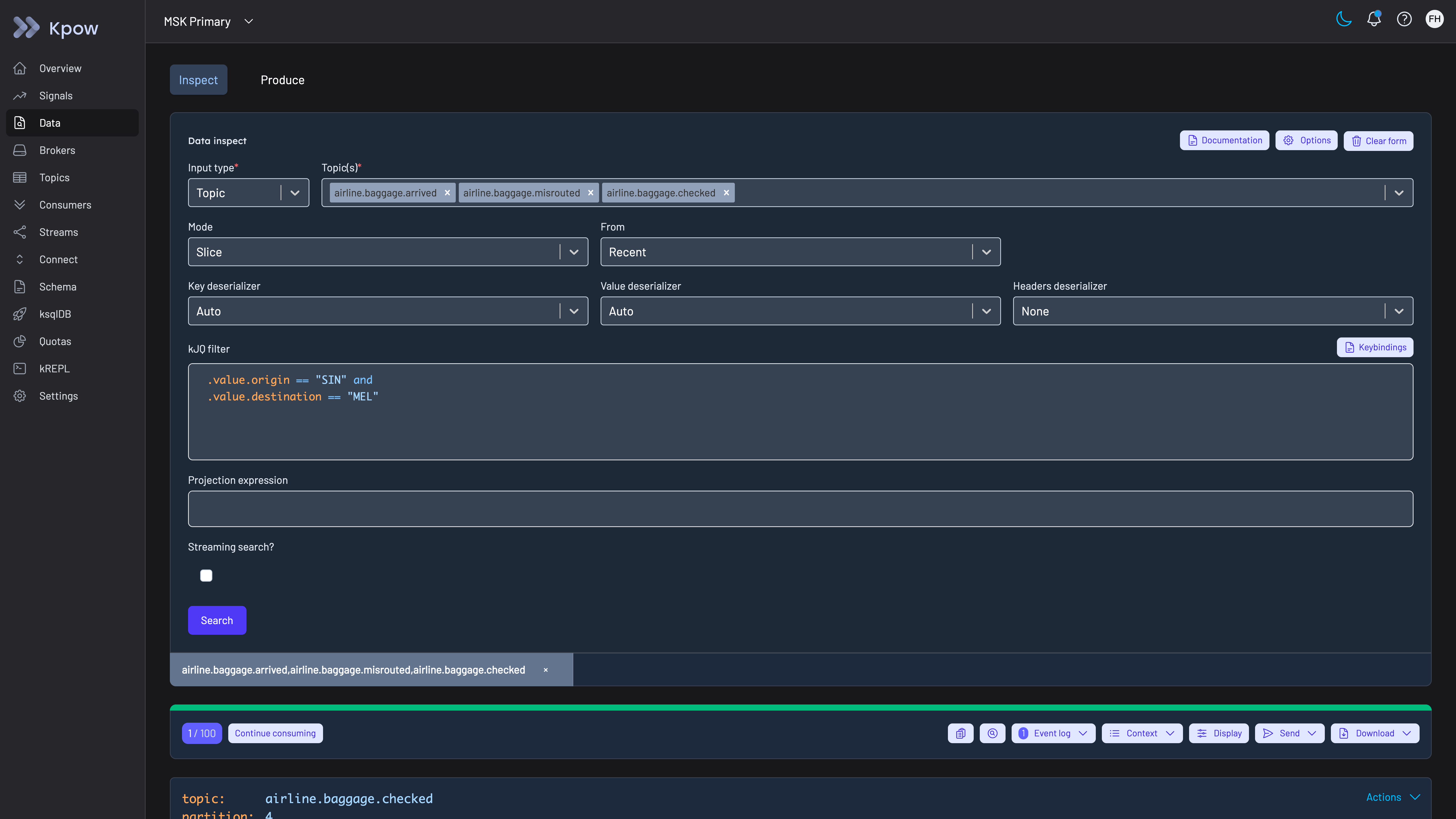
Kpow Data Inspect searching three topics at once with one kJQ filter. The topics in this demo carry airline baggage events; an online business filters its order, payment and fulfilment topics the same way.
Reconcile order counts by reading the topic. A finance or operations query often asks how many orders a topic holds, and the difference between a partition’s start and end offsets does not answer it. Producing one record does not always move the end offset by one, because transactional producers write additional marker records when they commit, and compaction and retention leave gaps, as the article on deleting records in Kafka explains. Kpow shows each partition’s start and end offsets in the topic’s partition table, which gives an estimate, and a reconciliation against the order database means filtering the topic for the records in question.
Mask customer and card fields. Data policies redact names, email addresses, delivery addresses and card numbers in Data Inspect results on the server, in keys, values and headers, including fields nested inside Avro, Protobuf and JSON records. The ShowLast4 function shows a card number as its last four digits, and while policies are active, String SerDes are removed from Data Inspect so nobody can read an order topic around them. Policies need to cover the change data capture topics as well as the event topics, because a topic captured from a customers table carries every column of the row. Kpow’s masking hides customer and card data from people and does not change what is stored on the brokers, so card numbers that should never reach Kafka in the clear still need tokenisation before they are produced, and a policy is set per topic and applies to every viewer.
Let developers fix their own consumers. On the consumer groups page, an engineer resets a group’s offsets to a value, a timestamp or the earliest offset, or skips one bad message on a partition, and topic management covers configuration changes, truncation and moving a single partition’s replicas. RBAC sets Allow, Deny or Stage per action and resource, so developers can reset their own team’s groups while deletes stay with the platform team, and with staged mutations a reset on a production order consumer waits for a second person’s approval.
The approval matters because moving a group’s offsets back makes its consumers process those orders again. Whether that sends a second confirmation email or takes a second payment depends on the consumer and not on Kafka. Shopify’s 10 tips for building resilient payment systems describes the defence, an idempotency key sent with each attempt so that a payment or refund happens exactly once however many times the request is repeated, and observes that a double charge opens the merchant to a chargeback. A reset is safe to approve on a consumer built that way, and on one that is not the approver needs to know what it will repeat. Truncation needs the same care for a different reason: it removes every record below an offset for all consumers of the partition, so truncating to the point one consumer group has reached is safe only when no other group still has those records to read.
Sign people in through the company’s identity provider. Engineers sign in with SAML, OpenID Connect or LDAP, with directory groups mapped to roles, so access ends when someone leaves the company.
Keep the record of who did what. The audit log records each action, data inspect queries included, with the user from the company’s directory and the policy that allowed it. Kpow shows the last seven days in the product and writes the record to the __oprtr_audit_log topic on the company’s own cluster, where Kpow’s topics default to one week of retention, and webhooks send mutations, data inspect queries or both to Slack, Microsoft Teams or the company’s SIEM for long-term retention. A question about who searched an order topic months ago is answered from the SIEM, so the webhook is worth setting up on the day of installation and not after the first incident.
Watch lag through a sale. Kpow publishes consumer group offsets and lag, with broker, topic and connector metrics, on Prometheus endpoints for Grafana, AlertManager or the company’s own monitoring, so the owning team sees an order or inventory consumer falling behind before customers do. Kpow computes those figures from the offsets it observes and exports them ready-made, as group_offset_lag and group_offset_delta for each group, so the alert rules for sale week are thresholds on existing series and not lag arithmetic rebuilt from broker JMX counters. Kpow has no alerting engine of its own, and the alerts live in the company’s alerting service with the rest of its rules. Best tools to monitor Kafka consumer lag compares how other tools track lag.
Keep broker ACLs for services. Kpow governs people working through Kpow, not services connecting to brokers, so checkout, order and inventory services still authenticate to the brokers with their own principals and broker ACLs remain the control for applications. Policy enforced on application traffic itself is what a proxy such as Conduktor Gateway provides, and a client-side tool does not attempt it.
To see these screens before installing anything, the live Kpow demo needs no signup and shows data inspect with kJQ, consumer groups, topic management and the audit log topic on two MSK clusters. A visitor can check the rubric against the product there: run a kJQ search across topics, follow a consumer group’s lag, then open the __oprtr_audit_log topic on MSK Secondary to see what the audit trail records. The demo has no SSO and no data policies configured, so sign-in and masking are the two things to test in the company’s own environment. To run the workflows against the company’s own clusters, install Kpow from its container image or JAR; RBAC, staged mutations, data policies and the audit log are Kpow Enterprise features, and Community Edition is free for 3 clusters and 10 users but holds none of them. Kafbat UI and AKHQ are as light to run and cost nothing to license.
Kpow live demo
Find one order in Kafka the way a marketplace engineer would
The live Kpow demo needs no signup. Filter topic data with kJQ across several topics, check consumer groups and lag on two clusters, then read the audit trail on the __oprtr_audit_log topic of the MSK Secondary cluster.
For platform teams running Kafka under checkout, order, inventory and seller systems.
Try the Kpow demoFAQ
What is the best Kafka tool for an ecommerce company or marketplace?
On this page’s rubric, Kpow: it runs as one container with no external database and nothing in the data path, searches message content across topics with kJQ to find one order, masks customer and card fields on the server, records every action and data query with the person from the company’s directory, and signs people in with SAML, OIDC or LDAP. Kafbat UI is the strongest free option and as light to run, but its masking is the same for every viewer and it has no view of its audit trail. For a small team that only needs to browse, search and manage topics, Kpow Community Edition is free for 3 clusters and 10 users, without the governance features scored here.
What can replace Confluent Control Center after moving to community Kafka?
Control Center comes with the Confluent Platform subscription and manages Confluent Platform clusters only, so a business that moves to community Apache Kafka or a managed service needs another console. Kpow, Kafbat UI and AKHQ all run as one container against any Kafka distribution. Gmarket made this move and chose Kpow after comparing Kafka UI and CMAK, for consumer lag and offset visibility, Data Inspect, and offset resets and topic operations that non-specialists can run from the UI.
Does PCI DSS apply to an ecommerce company’s Kafka tooling?
It applies to a business that stores, processes or transmits cardholder data, and to anything that could affect the security of the environment where that data lives. If card numbers never reach the company’s own Kafka topics, because checkout uses a hosted payment page or tokens, the Kafka tooling is not handling card data. If they do, a management tool that can display those topics handles card data too, so it should mask the card number for anyone without a business need to see it and record who looked, while a proxy that producers and consumers connect through carries every card message in transit.
How do you find one order in Kafka without writing a consumer?
Search the topics on the server. In Kpow, data inspect takes several topics at once, narrows the search to a time window and filters by key, value or header with kJQ, for example on the order ID, and the query is recorded in the audit log with the person who ran it. Data policies can mask the customer’s personal fields in the results. Best Kafka message search tools compares how other tools search.
Is a free Kafka UI enough for an online store?
For a small team on one or two clusters that only needs to browse topics and reset offsets, often yes. Kafbat UI and AKHQ are free, as light to run as Kpow and stay out of the data path, and Kpow Community Edition is free for 3 clusters and 10 users. The gaps show once order topics carry customer data: masking that cannot exempt the team that owns the data, an audit trail nobody can read without building a consumer, and no SAML sign-in. Best free Kafka UI tools in 2026 compares the free options.
How do you watch Kafka consumer lag through Black Friday or a big sale?
Export lag per consumer group and partition to the monitoring the team already uses, and alert on the order, payment and inventory consumers rather than on a cluster-wide average. Kpow publishes group offsets and lag on Prometheus endpoints for Grafana or AlertManager, and because it is an ordinary Kafka client beside the brokers, nothing it does sits on the checkout path while traffic peaks.
Do marketplaces need a different Kafka tool from payments companies?
The tool can be the same, but the priorities differ. This page weights deployment footprint and inspecting topic data twice, because online businesses often run Kafka with a small platform team and spend most of their time finding orders, and it scores who sees unmasked data once. The payments page weights production access and the per-person audit trail twice, because card data sits in every topic there and PCI DSS Requirements 7 and 10 ask who could read it and who did.
How these tools were scored
Six criteria, each taken from how online businesses run Kafka or from what GDPR and PCI DSS ask of a tool that shows customer data, score every option from 0 to 10. They are listed here in order of weight; the weights add up to 10, so the total is out of 100.
1. Out of the data path. A management tool that runs in the company’s own environment, connects as an ordinary Kafka client and keeps no data outside the company’s clusters adds nothing between checkout and order services and the brokers. Scored lower: tools that need an external database, and tools whose controls work only when application traffic passes through a vendor’s proxy. A self-hosted container with no external database and no proxy scores 9, a tool with a database of its own 6, one with several databases or a component on the brokers 4, and one that needs both a database and a proxy for its controls 3; 10 is kept for an option with nothing to deploy at all. This criterion is scored the same way on every Factor House page that uses it, and only its weight changes with the reader.
2. Deployment footprint. What a small platform team has to run and keep current: one stateless container scores highest, a container that needs a volume or has known performance limits a point lower, and a tool that needs PostgreSQL, an agent and database per cluster, Kubernetes, dedicated nodes or a proxy tier scores 2 or 3. Kafdrop, the lightest tool scored elsewhere on this site at 10, is not ranked here because it has no sign-in, roles or masking for a team that handles customer data. This criterion is scored the same way as on best Kafka management tools.
3. Inspecting topic data. Finding one order means finding specific messages by key, value or header across several topics, on the server, without writing a consumer against production. SQL over topics scores highest, filtered search across topics next, and browsing or filtering one topic at a time a point lower.
4. Who can see unmasked data. Order and checkout topics carry names, addresses and contact details, and sometimes card numbers. Scored on whether the tool masks fields on the server, whether a raw read can get round the masking, and whether the team that owns the data can be exempted while everyone else sees masked values. Exemptions per user or group score highest among the management tools, server-side masking with a guard against bypass next, the same masking for every viewer lower, and no masking lowest. Every tool that best Kafka data masking tools scores gets the same score here; Confluent Control Center, which it does not score, gets 2 because no masking is described for its message browser.
5. Audit trail per person. When people work through a shared tool, the broker only sees the tool’s service account, so only the tool’s own log can name the person. The log should include data reads as well as changes, so it can show who looked at an order as well as who reset a consumer group, and be readable without building a consumer first.
6. Directory and Kafka sign-in. People should sign in through the company’s identity provider, whether that is Okta, Microsoft Entra ID or Google through SAML or OIDC, or LDAP, with groups mapped to roles. On the cluster side the tool has to connect the way the company’s clusters already authenticate clients, whether that is SASL, IAM or mutual TLS.
Production access on request and shared clusters for many teams are not scored here, because the online businesses on this page mostly run Kafka for a handful of teams; the banking page scores both. The weights do not decide the order. Counting who can see unmasked data twice instead of once gives Kpow 93 out of 110, Kafbat UI 80 and AKHQ 77, and dropping deployment footprint, which overlaps the data path on the database question, gives Kpow 69 out of 80, Kafbat UI 60 and AKHQ 57. The cost figures model an online business running 4 clusters (development, staging and two production clusters) for 100 engineers at $120 an engineer-hour, and each card prints its own assumptions. The general listicle view, without the ecommerce weighting, is in best Kafka management tools.
Every option is scored from 0 to 10 on each criterion, from the evidence and sources this page cites, and the reason for each score is on its card. The criteria are weighted: Out of the data path counts three times, Deployment footprint counts twice, Inspecting topic data counts twice, Who can see unmasked data counts once, Audit trail per person counts once and Directory and Kafka sign-in counts once, for a total out of 100. Out of the data path counts three times because order, cart, payment and stock events move between an online business's services over Kafka, so a tool that sits between applications and brokers puts another network hop and another component that has to stay up on the checkout path at peak trading, and a proxy that producers and consumers connect through carries every card message that passes it, while a management tool only reads what a person asks to see, which it can mask. Deployment footprint counts twice because the platform team at an online business is often a few engineers, and a business that leaves a licensed distribution, as Gmarket did when it gave up Control Center, needs a replacement that team can run. Inspecting topic data also counts twice, because finding one order or one seller's update across topics is daily work, and Gmarket's case study names Data Inspect as the feature its teams use most. Who can see unmasked data, the per-person audit trail and directory sign-in count once. This page is published by Factor House, which makes Kpow. Every option is scored on the same rubric and the same sources: Kpow's per-criterion scores are set the same way as every other option's and are not adjusted, and the weights apply to every option alike. Kpow ranks first on its total of 87 out of 100. The other options follow by total. Conduktor is listed last whatever its total; on its total of 53 it would place fifth.
Related reading
- Kafka: the complete guide
- Best Kafka management tools for payments companies
- Best Kafka management tools for supermarkets and food distributors
- Best Kafka management tools for retailers
- Best Kafka data masking tools
- Best Kafka message search tools
- Kpow vs Confluent Control Center
- How Gmarket replaced Control Center with Kpow