
RBAC for Kafka: How to Implement and Key Considerations
Table of contents



Key takeaways
- Role-Based Access Control (RBAC) replaces unmanageable per-user ACL rules with role abstractions that scale across teams, topics, and clusters.
- Kafka’s native ACLs and RBAC via a management tool protect different layers. ACLs govern data plane access (producers, consumers, admin clients); RBAC controls what operators can do through the management UI. Both are typically needed.
- Management tools like Kpow connect to Kafka using their own service account, not as the logged-in user. This separation is what makes RBAC enforcement possible without granting every operator direct cluster access.
- A working RBAC setup with Kpow can run in under an hour. This guide walks you through every step.
What is Kafka RBAC?
Role-Based Access Control (RBAC) is a permission model that groups access rights into roles, and then assigns users to those roles. In a Kafka context, it determines what authenticated users can do through a management interface, rather than assigning permissions directly to individuals.
I've seen the pattern multiple times. A team starts with five topics and three services. They write a handful of ACL rules. It works. Then the platform grew to ten teams, 100+ topics, producers and consumers multiplying across environments. Suddenly there were thousands of user-to-resource rules, nobody knew who had access to what, and onboarding a new engineer meant writing rules one by one. That's when ACLs stop being a solution and become the problem.
Role-Based Access Control uses a different model. Rather than assigning permissions directly between individual users and resources, it groups permissions into roles such as viewer, operator, or kafka-admin, and then assigns users to those roles. A single role change propagates to everyone assigned to it, and a single audit query shows you who can do what.
In the Kafka ecosystem, RBAC doesn't replace the broker's native authorization. It layers on top of it, typically through a management tool like Kpow that sits between your operators and the cluster. The broker still enforces ACLs at the protocol level. RBAC controls what humans can do through the operations interface.
Here's the core difference, visualized:
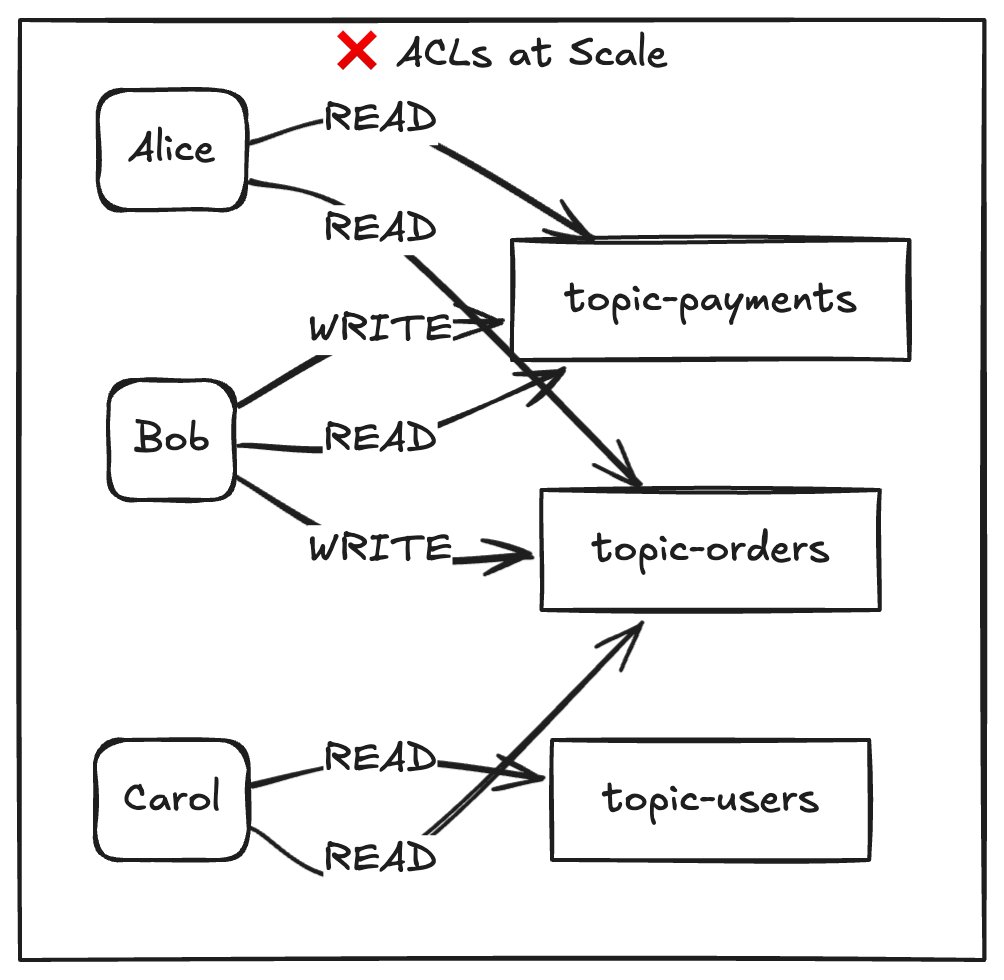
In this example, eight rules are reduced to two role assignments for three users. In larger environments, the reduction in individual rules can become even more significant.
Kafka authorization: RBAC vs ACLs
ACLs can be effective at certain scales. The key consideration is whether they fit the operational and governance needs of your environment as it grows.
Kafka ships with StandardAuthorizer (KRaft) or AclAuthorizer (ZooKeeper). Both enforce allow/deny rules at the broker level: who can produce, consume, create topics, manage groups. They work directly on the Kafka protocol. Every client connection is evaluated against these rules.
RBAC, as implemented by management tools like Kpow, operates at a different layer. It controls what authenticated users can do through the management UI: inspect topics, query data, create or delete resources, edit ACLs. The tool connects to Kafka using a service account with the necessary privileges. The logged-in user never touches the broker directly.
This means they're complementary, not competing. Most teams need both. ACLs for the data plane. RBAC for the operational control plane.
Three layers of Kafka governance
Governance discussions often focus on two layers, but there is a third worth considering.
The first layer is Kafka ACLs. They sit at the broker level and control what every client can do at the protocol level. Every producer, consumer, and admin tool goes through this gate. ACLs are not optional in a serious production environment.
The second layer is RBAC. It controls what your operators can do through the management UI. Without it, every person with Kpow access implicitly has the same privileges as Kpow's service account. That's a broad blast radius for a misconfigured delete operation.
The third layer is multi-tenancy. This is about isolating teams and resources from each other within a shared cluster. Who can see which topics. Which namespaces are off-limits. Kpow supports multi-tenancy as a feature separate from RBAC. See the Kpow multi-tenancy documentation.
Platform engineers who operate shared Kafka infrastructure need all three layers working together. Each one solves a different problem. None of them replaces the others.
Why implement Kafka RBAC?
The technical comparison is useful. But the real driver is usually a business question: can we prove who had access to what, and when?
Governance and compliance
Auditors don't want to read thousands of ACL entries. They want role definitions and assignment logs. RBAC gives you a clean answer: "These three roles exist. Here's who is assigned to each. Here's the audit trail of every action." That conversation takes five minutes instead of five days.
Fine-grained authorization at the UI level
Not every operator needs the same access. A developer on the payments team should inspect payment topics and query messages for debugging. They should not be able to delete production topics or edit ACLs. With Kpow RBAC, I defined a viewer role with exactly three permissions TOPIC_INSPECT, TOPIC_DATA_QUERY, TOPIC_DATA_DOWNLOAD and a kafka-admin role with full CRUD plus ACL_EDIT. Two roles. Clean separation. Done.
Scaling authorization across teams
This is where ACLs collapse. When a new engineer joins, you assign them a role. When someone changes teams, you change their role. When a team is decommissioned, you remove the role. No per-user rules to track. No orphaned ACLs rotting in the broker config.
Central management for multiple clusters
If you operate Kafka in dev, staging, and production, maintaining separate ACL sets per cluster is painful. Kpow's RBAC config is external to the broker. One YAML file defines your roles, and Kpow applies them to whichever cluster it connects to.
Authentication method flexibility
Kafka supports SASL/PLAIN, SASL/SCRAM, SASL/GSSAPI (Kerberos), mTLS, and OAuthBearer for client authentication. Kpow adds its own auth layer on top supporting Jetty (file-based), OpenID Connect (which covers OAuth 2.0 providers like Okta and Azure AD), SAML, and LDAP. So yes, Kafka does support OAuth.
What to consider before implementing RBAC
Before you start, give some consideration to the following five choices. Missteps can introduce security weaknesses that become apparent later, including during incidents.
1. Principle of Least Privilege (PoLP)
Start with zero permissions and add only what each role requires. I made the mistake of testing with an overly generous viewer role first. It worked, but it also let read-only users see data they shouldn't. Strip it down. The right question isn't "what could this role need?" It's "what's the minimum this role must have to do their job?"
2. Multi-tenancy and resource isolation
If multiple teams share a cluster, your RBAC policies need resource-level scoping. Kpow's taxon system supports this. You can restrict a role to specific topics by name or wildcard. But you have to define policies at every taxon depth (more on this in the implementation section). Don't assume a cluster-level wildcard covers topic-level operations. It doesn't.
3. Integration with your identity provider (IdP)
Kpow supports four auth providers: jetty, openid, saml, and LDAP (configured via the Jetty provider). Choose based on what you already run. If you have Okta or Azure AD, go OpenID. If you want a quick local setup for testing, go Jetty. The one thing you cannot do is reuse Kafka's SASL users directly. Kpow's auth is a separate layer.
4. Data masking and sensitive topics
RBAC controls who can query topic data through the UI. But consider whether some topics contain PII or financial data that no role should access in plain text. Kpow's data policies allow sensitive field values to be redacted, even for users who have TOPIC_DATA_QUERY permission.
5. Role explosion
RBAC should reduce the number of individual rules. If you end up with 30 roles for 30 teams, you've rebuilt ACLs with extra steps. Aim for 3 to 7 generic roles (viewer, operator, admin, maybe a data-steward) and use resource scoping for team isolation. The moment you create a role named payments-team-staging-read-only-except-topic-x, stop. Rethink.
How to implement RBAC
Kpow adds a user-facing access control layer on top of your Kafka cluster. Kpow's RBAC lets you define what each user role can do within the Kpow UI: creating topics, querying data, editing consumer groups, and so on.
The two systems are independent. Kafka ACLs govern what client applications (including Kpow's own service account) can do at the broker. Kpow RBAC governs what your human operators can do through Kpow. Both are worth configuring; neither replaces the other.
How it works
Kpow RBAC maps roles from your identity provider to Allow, Deny, or Stage permissions on specific Kafka resources. Roles come from whatever authentication provider you're using: Jetty (file, LDAP, or DB), SAML, or OpenID/OAuth. The RBAC configuration itself lives in a YAML file:
RBAC_CONFIGURATION_FILE=/path/to/rbac-config.yaml
Without RBAC configured, the default effect for all actions is an implicit Deny. With it enabled, you define exactly which roles can do what.
Defining policies
Each policy specifies a resource, an effect, a list of actions, and the role it applies to:
authorized_roles:
  - "*"   # Allow all authenticated users into the UI

admin_roles:
  - "kafka-admin"

policies:
  # Read-only access for viewers
  - role:     "viewer"
    effect:   "Allow"
    resource: ["cluster", "*"]
    actions:  ["TOPIC_INSPECT"]

  - role:     "viewer"
    effect:   "Allow"
    resource: ["cluster", "*", "topic", "*"]
    actions:  ["TOPIC_INSPECT", "TOPIC_DATA_QUERY", "TOPIC_DATA_DOWNLOAD"]

  # Full control for admins
  - role:     "kafka-admin"
    effect:   "Allow"
    resource: ["cluster", "*", "topic", "*"]
    actions:  ["TOPIC_INSPECT", "TOPIC_CREATE", "TOPIC_EDIT", "TOPIC_DELETE",
               "TOPIC_DATA_QUERY", "TOPIC_DATA_DOWNLOAD", "TOPIC_DATA_PRODUCE"]
A few things worth understanding before you write your first config:
Role names are from your auth provider, not usernames. The role field must match the role assigned in your identity provider (e.g. the role in your Jetty realm file, or a group from your SAML IdP), not an individual username.
Taxon depth matters. Resources follow a four-part taxonomy: [DOMAIN_TYPE, DOMAIN_ID, OBJECT_TYPE, OBJECT_ID]. A policy scoped to ["cluster", "*"] only covers cluster-level actions. Topic-level actions (querying data, producing messages) require a separate policy scoped to ["cluster", "*", "topic", "*"]. You need entries at each depth you want to cover.
Deny takes precedence. Where multiple policies apply to the same resource, Deny effects always win. Anything without a matching Allow is implicitly denied.
Debugging access issues
Kpow surfaces permission errors directly in the UI when a user is denied access to a resource. For deeper debugging, every action is recorded in Kpow's audit log topic (__oprtr_audit_log), which includes the principal, the resource taxon, and the effect applied.
For the full list of available actions and detailed configuration options, see the Kpow RBAC documentation.
Try RBAC for free with Kpow by Factor House
ACLs work well for some environments, but often become harder to manage over time. Without RBAC in your management tooling, every operator inherits the full permissions of the tool’s service account, regardless of their actual role.
Kpow gives you what's missing:
- Fine-Grained Authorization. Define exactly what each role can see, query, create, and delete down to specific topics and action types.
- Seamless Integration. Plug into your existing identity provider OpenID Connect (Okta, Azure AD), SAML, LDAP, or file-based Jetty auth. No changes to your Kafka cluster configuration.
- Operational Control. Every action flows through RBAC policies, every action is audited, and sensitive operations can be staged for approval before execution.
Give Kpow a try for yourself with a free 30-day trial. You can connect it to any Kafka cluster in minutes and deploy via Docker, Helm, or JAR.