
Kafka security architecture: best practices for production
Table of contents


Key takeaways
- Kafka ships with authentication, encryption, and authorization disabled by default. Every security control must be explicitly configured.
- There are four distinct traffic flows in a Kafka deployment, each requiring its own security controls: client-to-broker, broker-to-broker, broker-to-controller, and admin clients.
- A layered security model covering network isolation, TLS, authentication, authorization, and audit logging is more reliable than any single control in isolation.
- ZooKeeper is deprecated as of Kafka 4.0. Clusters still running ZooKeeper mode will lose security patches in November 2025.
- Native ACLs become difficult to manage at scale. External authorizers (OPA, Ranger, or custom implementations) address the operational limits.
- The gap between "audit logging is enabled" and "audit logging is actionable" is wider than most teams expect.
Security challenges unique to Kafka
The most important thing to understand about Kafka security is the starting position: Kafka ships insecure by default. Authentication, encryption, and authorization are all off out of the box. An unconfigured Kafka cluster allows any application that can reach the network to produce, consume, and administer the cluster without restriction.
This is documented behavior, not a bug. Kafka was designed for ease of use in development environments. The problem is that teams stand up a cluster for testing, skip hardening, and then find themselves with a production deployment built against open listeners.
Beyond the defaults, Kafka's attack surface is more complex than a conventional service with a single authentication boundary. There are four distinct traffic flows, each of which requires its own security controls:
- Client to broker: Producers and consumers connecting to send or receive data
- Broker to broker: Inter-broker replication traffic, which is the most commonly missed flow
- Broker to controller: Control plane traffic managing cluster metadata, ACLs, and topic configurations (ZooKeeper in older deployments, KRaft controllers in current ones)
- Admin clients: CLI tools, management UIs, Kafka Connect workers, Schema Registry, all operating as principals against the cluster
You can configure TLS and authentication perfectly for client connections and remain exposed through an unauthenticated ZooKeeper port or an admin UI with no access controls. Each flow needs to be accounted for independently.
Kafka is also typically multi-tenant in practice. Multiple teams, services, and sometimes external partners share the same infrastructure. Every new producer-consumer relationship expands the authorization surface that needs to be maintained.
The four pillars of Kafka security
Each pillar addresses a distinct threat. Implementing three of four still leaves a meaningful gap: a cluster with strong authentication and fine-grained ACLs but no audit logging gives you no visibility into what happened when something goes wrong.
Encryption: securing data in transit
The three flows you need to encrypt
Most teams focus on client-to-broker TLS and stop there. Two other flows are commonly overlooked.
Inter-broker replication is the most frequently missed. Replication traffic carries all data transiting the cluster. Teams that configure TLS for client connections often leave inter-broker traffic on PLAINTEXT because it is "internal." The relevant config property, security.inter.broker.protocol, defaults to PLAINTEXT. You need to explicitly set it to SSL or SASL_SSL. Anyone with network access between broker nodes can intercept replication traffic if this is not configured.
Broker-to-controller traffic (either ZooKeeper or KRaft controller) is similarly often left unencrypted. Control plane traffic includes ACL definitions, topic configurations, and cluster membership data.
A minimal broker configuration with inter-broker encryption enabled:
listeners=SASL_SSL://public:9093,SSL://internal:9094
advertised.listeners=SASL_SSL://public.example.com:9093,SSL://internal.example.com:9094
listener.security.protocol.map=SASL_SSL:SASL_SSL,SSL:SSL
sasl.enabled.mechanisms=SCRAM-SHA-256
sasl.mechanism.inter.broker.protocol=SCRAM-SHA-256
ssl.keystore.location=/var/private/ssl/kafka.server.keystore.jks
ssl.keystore.password=[keystore-secret]
ssl.truststore.location=/var/private/ssl/kafka.server.truststore.jks
ssl.truststore.password=[truststore-secret]
TLS version
TLS 1.3 should be enforced for all production traffic. Older TLS versions have known vulnerabilities and should be explicitly disabled via ssl.enabled.protocols.
Certificate management
Certificate rotation is where TLS implementations tend to break down in practice. Teams configure TLS, confirm it is working, and then do not rotate certificates until something expires in production. Automation is the correct approach: certificate rotation should be handled by your PKI infrastructure on a schedule, not manually triggered when something breaks. Uber's internal PKI (uPKI) pushes new X.509 key-cert pairs to brokers and clients before TTLs expire; that pattern is worth replicating regardless of the tooling you use.
Encryption at rest
Kafka does not provide built-in encryption at rest. Data stored on broker disks is protected only at the infrastructure layer: volume encryption (AWS EBS, GCP Persistent Disk) or OS-level encryption. In environments requiring stronger guarantees, some teams encrypt message payloads before they reach the broker, so that the broker itself cannot read the data. This approach adds key management and downstream decryption complexity, but it is the appropriate model for zero-trust environments handling sensitive data.
Authentication: proving identity
Kafka supports four SASL mechanisms and mTLS as an alternative authentication model. The right choice depends on your environment and existing identity infrastructure.
SASL mechanisms compared
SASL/PLAIN sends credentials in cleartext. It is only acceptable over an encrypted connection (SASL_SSL, not SASL_PLAINTEXT). A common misconfiguration is using PLAIN over an unencrypted listener, which exposes usernames and passwords on the wire. Restrict PLAIN to development environments.
SASL/SCRAM (SHA-256 or SHA-512) uses a challenge-response protocol that does not transmit passwords in cleartext. Credentials are stored in ZooKeeper (ZK mode) or cluster metadata (KRaft). SCRAM-SHA-256 is the minimum for production password-based authentication; SCRAM-SHA-512 is stronger.
SASL/GSSAPI (Kerberos) integrates with enterprise identity systems via Active Directory or LDAP. It provides SSO across the organization and strong authentication, at the cost of operational complexity: Kerberos infrastructure, ticket renewal management, and keytab files. The right choice for large on-premises enterprises already running Kerberos. Less practical for cloud-native environments or teams without existing Kerberos investment.
SASL/OAUTHBEARER uses OAuth 2.0 / OpenID Connect tokens. As of 2025 this is the standard authentication mechanism for cloud-native Kafka deployments. It integrates with Okta, Keycloak, Entra ID, and similar identity providers. Short-lived tokens reduce the credential exposure window compared to long-lived passwords, and centralized identity management simplifies principal lifecycle.
mTLS (mutual TLS) requires both the client and the broker to present certificates, providing two-way authentication. The broker validates the client by certificate rather than by username and password. It works well for service-to-service communication where you can automate the certificate lifecycle. It becomes operationally burdensome for human users and dynamic client environments where certificate distribution is difficult to manage.
Choosing a mechanism
Authorization: locking down topics, groups, and the cluster
How Kafka ACLs work
A Kafka ACL is a rule with the structure: Principal + Resource + Operation + Permission (Allow/Deny).
- Principal: A user identity, for example
User:consumer-apporUser:kafka-broker - Resource types: Topics, Consumer Groups, Cluster, Transactional IDs, Delegation tokens
- Operations: Read, Write, Create, Delete, Alter, Describe, DescribeConfigs, AlterConfigs, ClusterAction, IdempotentWrite, All
- Permission: Allow or Deny
When allow.everyone.if.no.acl.found=false (the setting you should always use in production), access is denied by default if no ACL matches. The consequence: the first thing you need to do when enabling authorization is create ACLs for your brokers themselves, so they can replicate.
Role patterns
A read-only consumer needs READ on specific topics, READ on its consumer groups, and DESCRIBE on topics. Missing the DESCRIBE permission causes cryptic "unknown topic" errors even when the topic exists, which is a common troubleshooting dead end.
A write-only producer needs WRITE on specific topics and DESCRIBE on the cluster for metadata requests.
# Minimal producer ACL
kafka-acls --bootstrap-server kafka-broker:9093 \
  --command-config admin.properties \
  --add \
  --allow-principal User:producer-app \
  --operation WRITE \
  --operation DESCRIBE \
  --topic orders

# Minimal consumer ACL
kafka-acls --bootstrap-server kafka-broker:9093 \
  --command-config admin.properties \
  --add \
  --allow-principal User:consumer-app \
  --operation READ \
  --operation DESCRIBE \
  --topic orders

kafka-acls --bootstrap-server kafka-broker:9093 \
  --command-config admin.properties \
  --add \
  --allow-principal User:consumer-app \
  --operation READ \
  --group consumer-group-1
The practical failure mode in authorization is permission creep. ACLs accumulate over time: teams grant broad permissions to reduce access request friction, services get decommissioned without their principals being revoked, and you end up with producers that can also consume and consumer groups with write access they should not have. Auditing ACLs regularly is as important as setting them correctly in the first place.
The limits of native ACLs
Native Kafka ACLs become operationally difficult at scale for several reasons:
- Every user-topic-operation combination requires an explicit entry
- There is no concept of time-limited access; access granted during an incident stays granted until someone manually revokes it
- No group-based assignment; you manage individual principals
- Maintenance overhead grows with team and topic count
External authorizers address these limitations. Open Policy Agent (OPA) evaluates authorization requests against policy-as-code and can also detect security policy violations (overly permissive ACLs, brokers not configured for TLS) before they reach production. Apache Ranger provides centralized policy management with a UI, commonly used in Hadoop and enterprise data environments. At the extreme end of scale, Uber implemented a custom KafkaAuthorizer delegating to their internal IAM framework, using an attribute-based model where a single generic policy replaces thousands of individual ACL entries. Topic ownership changes propagate automatically without any policy update. Most teams will not build this from scratch, but it illustrates what breaks down with native ACLs at scale.
Audit logging: what Kafka logs and what it doesn't
Native logging capabilities
Kafka does not provide audit logging out of the box, but it does provide the components to build one. The primary mechanism is kafka.authorizer.logger:
- Logs denied operations at
INFOlevel - Logs allowed operations at
DEBUGlevel - Each entry includes the principal, client host, attempted operation, and resource
logger.authorizer.name=kafka.authorizer.logger
logger.authorizer.level=DEBUG
logger.authorizer.appenderRef.authorizer.ref=authorizerAppender
logger.authorizer.additivity=false
The practical problem: on a busy cluster processing 10,000 requests per second, DEBUG-level authorizer logs generate gigabytes per hour. Teams enable DEBUG for compliance purposes and find it unmanageable in practice. The result is often logs that capture denials but not allows, meaning you know who was refused access, but not who successfully read your payments topic.
What a useful audit trail covers
A complete audit trail should capture:
- Authentication events: successful logins, failed attempts, mechanism used
- Authorization decisions: both allows and denies
- ACL changes: who created, modified, or deleted ACLs
- Topic access: producer writes and consumer reads per principal
- Administrative operations: topic creation and deletion, configuration changes
Shipping logs to a SIEM
Audit logs sitting in broker-local rolling files are not useful for compliance or incident response. The standard approach:
- Configure
kafka.authorizer.loggerwith a dedicated rolling file appender per broker - Use a log shipper (Filebeat, Fluentd, Logstash) to forward to Elasticsearch, Splunk, or your SIEM of choice
- Set retention appropriate to your compliance requirements. SOC 2 Type II and HIPAA commonly require 90 days or more; some regulations require 7 years
- Build alert rules: failed authentication spikes, ACL changes outside change windows, unexpected principals accessing sensitive topics
When an auditor asks who accessed a specific dataset in the last 90 days, you need 90 days of aggregated, queryable authorizer logs. Teams that have not configured centralized log shipping frequently discover they have 7 days of rolling files on broker disks. That gap typically costs months of remediation work.
Network-level security: the layer beneath Kafka
Kafka was designed with a somewhat trusted network assumption, originating from LinkedIn's internal infrastructure. That assumption does not hold in multi-cloud, cloud-native, or multi-tenant deployments. Network security is not a substitute for authentication and authorization, but it is an additional layer. Even with authentication configured, a broker port reachable from the public internet is an unnecessary attack surface.
Listener configuration
Kafka brokers can expose multiple listeners with different security protocols. Separating internal, external, and controller traffic onto distinct listeners provides isolation:
listeners=INTERNAL://0.0.0.0:9093,EXTERNAL://0.0.0.0:9092,CONTROLLER://0.0.0.0:9094
listener.security.protocol.map=INTERNAL:SASL_SSL,EXTERNAL:SASL_SSL,CONTROLLER:SASL_SSL
The internal listener handles broker-to-broker and trusted service traffic. The external listener handles client applications. The controller listener (KRaft) handles controller-to-broker communication in isolation.
Advertised listeners
advertised.listeners tells clients what address to reconnect to after the initial bootstrap connection. A misconfigured advertised listener can expose an internal hostname to external clients, or direct traffic to a PLAINTEXT listener regardless of how the initial connection was configured. The client connects to the bootstrap address, receives metadata, and then reconnects to the advertised listener. If that address resolves to an unencrypted port, subsequent connections are unencrypted. This is a particularly common misconfiguration in containerized environments.
Network isolation
Kafka brokers should not have public IP addresses unless explicitly required. Use VPC peering, private endpoints, or PrivateLink for cross-account or cross-region access. Firewall rules and security groups should restrict Kafka ports (9092, 9093, and 2181 for ZooKeeper) to known IP ranges: application subnets and management bastion hosts. Port 2181 is frequently the most exposed, and ZooKeeper with unauthenticated access on a reachable port is a critical risk.
ZooKeeper and KRaft: securing the control plane
ZooKeeper: the overlooked attack surface
ZooKeeper stores cluster membership, topic configurations, partition assignments, ACL definitions, and in older Kafka versions, consumer group offsets. An attacker with access to an unauthenticated ZooKeeper can read all of this, modify ACLs, delete topics, and inject bogus broker registrations.
The common failure mode is that teams focus on securing the brokers while leaving ZooKeeper accessible on a "trusted" internal network. Any host compromised on that network then has access to the cluster's entire control plane.
ZooKeeper is deprecated. Kafka 3.9, released November 2024, is the last version to support ZooKeeper mode. ZooKeeper-based clusters lose official security patches in November 2025. Kafka 4.0, released March 2025, removed ZooKeeper entirely. If your cluster is still running ZooKeeper mode, migration to KRaft is a security requirement at this point, not an optimization.
KRaft: what changes
KRaft eliminates ZooKeeper entirely. Cluster metadata moves into an internal Kafka topic (__cluster_metadata), managed by a quorum of controller nodes using the Raft consensus protocol.
From a security standpoint, the main improvements are:
Single security model. Previously you needed separate SASL and ACL configuration for Kafka and ZooKeeper independently. Teams that secured Kafka correctly but not ZooKeeper remained exposed. KRaft removes that second attack surface.
Simplified audit surface. One system's logs to monitor instead of two.
Faster failover. Controller failover drops from minutes to seconds, reducing the window where the cluster is in an uncertain state.
What does not change: ACLs, authentication, and TLS still require proper configuration. The __cluster_metadata topic is internal but subject to the cluster's overall security posture. Sensitive data in KRaft records is not encrypted by Kafka itself; disk-level encryption remains necessary for at-rest protection.
For production KRaft deployments: a minimum of three controller nodes for quorum (five for high availability), deployed on dedicated nodes with fast SSD storage across separate availability zones, with the controller listener isolated from client listeners.
Putting it together: a layered security model
The correct mental model for Kafka security is defense in depth. Each layer provides protection when another is compromised.
Network layer
  VPC isolation, security groups, private listeners
       |
Encryption layer
  TLS 1.3 for all traffic: client-broker, broker-broker, control plane
       |
Authentication layer
  SASL (SCRAM / OAUTHBEARER / GSSAPI) or mTLS (no anonymous connections)
       |
Authorization layer
  ACLs or external authorizer (OPA / Ranger / custom), least privilege
       |
Audit layer
  Centralized, retained, queryable logs shipped to SIEM
       |
Operational layer
  Regular ACL review, certificate rotation, patching, misconfiguration scanning
If an attacker compromises a credential and gets through the authentication layer, the authorization layer limits what they can access. If they get through authorization, the audit layer creates a detectable signal. No single layer is sufficient on its own.
Common security misconfigurations
These are the configurations that most frequently go wrong in real deployments.
Unauthenticated listeners left open. ALLOW_PLAINTEXT_LISTENER=yes is a real environment variable in the Bitnami Docker image, included for development convenience. In clusters that started as "a quick test," this configuration persists into production. Any host that can reach port 9092 becomes a producer, consumer, or admin client.
Wildcard ACLs in production. Granting User:* ALLOW ALL on a topic makes the authorization layer functionally meaningless. You have authenticated clients, but all of them can do everything.
Super users beyond the initial admin. The super.users property bypasses all ACL checks. In many environments this list grows over time as engineers add themselves for debugging access that never gets revoked. It should be a short, actively managed list.
Inter-broker encryption disabled. Client connections use TLS, replication does not. security.inter.broker.protocol defaults to PLAINTEXT and must be explicitly overridden.
ZooKeeper exposed without authentication. Port 2181 open on a security group, no SASL configured, no ACLs on ZooKeeper nodes. With ZooKeeper deprecated, this is increasingly a migration-blocking technical debt issue as well as a security risk.
SASL/PLAIN over unencrypted connections. Using SASL_PLAINTEXT with the PLAIN mechanism transmits credentials in cleartext. Credentials are visible to anyone capturing traffic on the network segment.
Schema Registry and Kafka Connect left unsecured. The security posture applied to brokers should extend to adjacent components. Connect workers running as Kafka clients need authentication and authorization. Schema Registry exposes an HTTP API that needs its own TLS and authentication. A Connect worker with admin-level cluster permissions and no authentication is a privileged path into your cluster.
Audit log retention too short. Seven days of rolling files on broker-local disk fails SOC 2, HIPAA, and PCI-DSS audits that require 90-day or longer access history. Configure centralized shipping with appropriate retention from the start.
Permission creep over time. Deprecated services still have active principals with write access. Team membership changes but ACLs do not. Treat ACL review as a recurring operational task, not a one-time setup.
How Kpow helps with Kafka security management
One area where Kafka's native tooling is limited is visibility into what is actually happening across your cluster, particularly around access control and user activity.
Kpow is a management and monitoring tool for Kafka that includes capabilities relevant to the authorization and audit sections of the architecture described above.
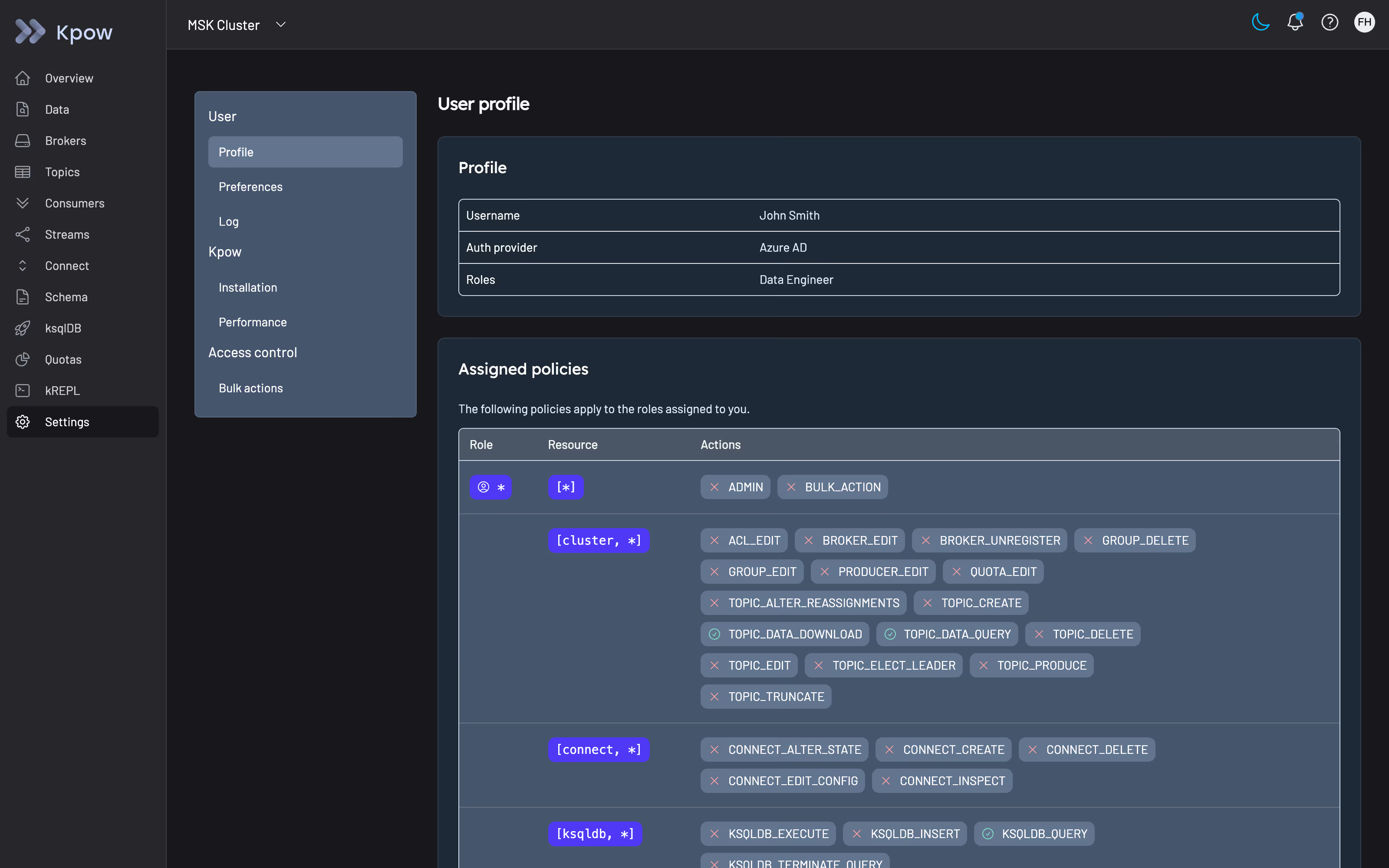
Authorization management. Kpow supports both simple access control via environment variable configuration and full role-based access control that integrates with your identity provider. RBAC in Kpow maps user roles to specific actions across clusters, topics, consumer groups, schemas, and connectors. Users are denied all actions by default; permissions are explicitly granted. This means every operator using Kpow to administer your cluster is subject to the same least-privilege model you are applying to your Kafka clients.
Audit logging. Kpow captures all user actions in an audit log, stored in an internal topic (__oprtr_audit_log) and queryable from the UI. The audit log records the contents of each request, the identity of the user who made it, and the authorization result including which policies were evaluated. Admins can view the last seven days of activity from within the application.
For integration with external systems, Kpow supports webhook delivery of audit log events to Slack, Microsoft Teams, or any custom endpoint. You can configure verbosity to capture mutations only, queries only, or all events, and the structured JSON payload is suitable for routing into a SIEM or triggering downstream workflows.
This addresses a specific gap in the native Kafka audit story: while kafka.authorizer.logger records broker-level authorization decisions, it does not capture actions taken by humans using a management UI. Kpow's audit log covers that layer.
You can try Kpow with a free 30-day trial, and connect it to any Kafka cluster in minutes by deploying via Docker, Helm, or JAR.
Summary
Building a production-ready Kafka security architecture requires deliberate configuration across multiple layers. The starting point is acknowledging that Kafka ships with all security controls disabled. From there, the work is methodical: TLS across all three traffic flows, authentication appropriate to your environment and identity infrastructure, authorization scoped to the principle of least privilege, and audit logging that is centralized, retained, and queryable, not just enabled.
The operational work is as important as the initial configuration. Certificate rotation, ACL review, and misconfiguration scanning need to be recurring processes. Security configurations that are correct at deployment drift over time as teams, services, and infrastructure change. The clusters that end up with the most significant exposures are not the ones that were never secured but the ones that were secured once and then not maintained.