Every Kafka cluster operates under a set of message-size constraints, and getting them wrong costs you in ways that are not always immediately obvious: silent replication stalls, infinite producer retry loops, page-cache eviction cascades, and hard architectural ceilings imposed by cloud providers. This guide covers the sizing targets that production operators at scale converge on, how the configuration chain works, and what to do when your use case genuinely requires large messages.
Best practice for Kafka message size
The production consensus, backed by what LinkedIn, Cloudflare, Netflix, and Uber have published about their own clusters, is to keep individual messages well under 1 MB. The Apache Kafka broker default of message.max.bytes = 1,048,588 bytes (1 MiB plus 12 bytes of overhead, aligned under KAFKA-4203 with the Java producer’s max.request.size = 1,048,576) is the design point Kafka is optimised for. It is not a ceiling to design towards.
LinkedIn, which runs more than 100 clusters, 4,000 brokers, and 7 trillion messages per day, states this policy explicitly in their engineering blog: messages are capped at 1 MB, and anything that exceeds that is handled outside the standard message path using client-side fragmentation.
The practical sweet spot for most production workloads is significantly smaller. Public Kafka benchmarks from Aiven, Google Cloud, and LinkedIn typically use 100 bytes to 10 KB as representative message sizes. Confluent’s canonical performance benchmark uses 1 KB messages. These numbers are not arbitrary: LinkedIn’s 2014 benchmark noted that at 100-byte messages you saturate the network, making small records the harder case for a messaging system to optimise.
The 1 KB to 10 KB range is where Kafka’s batching, compression, and zero-copy I/O work most efficiently together. Messages in this range can be batched densely, compressed effectively at the batch level, and served from page cache without displacing hot data.
Kafka message size limits
Broker defaults
The broker’s message.max.bytes defaults to 1,048,588 bytes. This is the maximum size of a compressed record batch that the broker will accept. At the topic level, max.message.bytes overrides this per topic; the effective limit is whichever value is higher.
Cloud provider ceilings
If you are running on a managed Kafka service, the provider’s hard limits constrain what you can configure:
| Provider | Ceiling |
|---|---|
| Apache Kafka (self-managed) | 1 MB default; configurable upward |
| Confluent Cloud Basic / Standard | 8 MB (8,388,608 bytes) |
| Confluent Cloud Dedicated | 20 MB (20,971,520 bytes) |
| AWS MSK Serverless | 8 MB; not user-configurable without a support case |
| Azure Event Hubs (Kafka API) | 1 MB; no override |
These ceilings are architectural constraints, not soft guidelines. A design that relies on messages larger than 1 MB is incompatible with Azure Event Hubs. A design that needs more than 8 MB is incompatible with both Confluent Cloud Basic/Standard and AWS MSK Serverless. Validate these limits against your managed service tier before settling on an approach.
Sizing tiers
The guidance from Confluent, Red Hat, Strimzi, and operator engineering blogs converges on five tiers:
| Tier | Size range | Recommended approach |
|---|---|---|
| Ideal | Less than 10 KB (typically 100 B – 10 KB) | Default Kafka tuning. Batching and compression dominate. The benchmark sweet spot for most production workloads. |
| Acceptable | 10 KB – 100 KB | No configuration changes required. Tune batch.size to 64–128 KB and linger.ms to 10–20 ms to keep batches efficient. |
| Handle with care | 100 KB – 1 MB | Individual messages can saturate per-partition batches at default config. Increase batch.size to 256 KB or higher and ensure compression is enabled. Messages larger than batch.size are sent unbatched. |
| Avoid unless necessary | 1 MB – 10 MB | Requires raising all four configs in the producer/broker/consumer chain. Confluent’s own documentation describes very large messages as an anti-pattern in Kafka. Run these workloads on a dedicated cluster if other topics have low-latency SLAs. |
| Do not use inline | Over 10 MB | Use the claim-check pattern (store payload in S3 or GCS; put a pointer in Kafka) or client-side chunking. Allocating a 1 GB JVM chunk per 1 GB message on both the client and broker is not operationally viable. |
How to configure larger messages
If the claim-check pattern is not viable and you need to raise the effective message size limit, you must update four interdependent configurations in concert. Missing any one of them produces failures that range from immediately visible to silently catastrophic.
The chain is:
producer max.request.size → topic max.message.bytes / broker message.max.bytes → broker replica.fetch.max.bytes → consumer max.partition.fetch.bytes
Configure them in this order to avoid silent failures:
1. Broker (requires restart for replica.fetch.max.bytes)
message.max.bytes=10485760 replica.fetch.max.bytes=10485760 socket.request.max.bytes=104857600
2. Topic (can be applied without a broker restart)
max.message.bytes=10485760
3. Producer
max.request.size=10485760 buffer.memory=67108864
4. Consumer
fetch.max.bytes=52428800 max.partition.fetch.bytes=10485760
Keep these values equal or monotonically non-decreasing along the chain.
What happens when the chain breaks
The failure mode depends on which link is misconfigured:
- Producer over
max.request.size: a synchronousRecordTooLargeExceptionis thrown. The message never reaches the broker. This is the cleanest failure. - Producer under
max.request.sizebut over brokermessage.max.bytes: the broker returnsMESSAGE_TOO_LARGE. Modern Java producers auto-split the batch and retry. Ifbatch.sizeitself exceedsmessage.max.bytes, you enter an infinite split-and-retry loop (KAFKA-8350). Always validate thatbatch.sizedoes not exceedmessage.max.bytes. replica.fetch.max.bytessmaller thanmessage.max.bytes: historically this caused silent replication stalls, ISR shrinkage, and data loss under unclean leader election. Modern Kafka guarantees forward progress by always returning the first record batch, but replication latency degrades and a permanent replica-lag floor is introduced.- Consumer
max.partition.fetch.bytestoo small: the same forward-progress guarantee applies, but a consumer group can fall permanently behind on partitions containing large records.
Kafka Connect and MirrorMaker 2
For Kafka Connect and MirrorMaker 2, apply the large-message overrides via the producer.override.* and consumer.* prefixes in the connector configuration. The connector-level settings do not inherit from broker defaults automatically.
How to handle very small messages
The performance problem with small messages is a batching problem, not a size problem. Kafka compression operates at the batch level, not the message level. A compressor needs a sufficiently large sample of data to find repeated patterns; on a single 100-byte message, compression saves under 5% while still incurring the full CPU cost.
Apache Kafka 4.0 (released March 2025) changed linger.ms from 0 to 5 ms as a direct acknowledgement that the previous default was actively damaging batching efficiency. If you are on Kafka earlier than 4.0, set linger.ms explicitly. Do not rely on the zero default.
The standard production tuning for small-to-medium messages:
`# Producer
batch.size=131072 # 128 KB; default 16 KB is undersized for high-volume workloads
linger.ms=20 # or 10–100 depending on latency tolerance
compression.type=lz4 # or zstd if storage cost is the bottleneck
buffer.memory=67108864 # 64 MB
Topic
compression.type=producer # broker preserves whatever the producer used
min.insync.replicas=2`
To illustrate the leverage: Confluent’s throughput tuning benchmark shows that with default producer config, 8 KB records produce 23.58 MB/s at 927 ms average latency. With batch.size=200000, linger.ms=100, compression.type=lz4, and acks=1, the same workload achieves 94.89 MB/s at 4.92 ms average latency. That is a 4x throughput increase from producer configuration changes alone.
The JMX metric bufferpool-wait-ratio is a direct signal of buffer pressure. Values above 0.05 indicate that the producer is blocking on buffer allocation; increase buffer.memory to 64–256 MB if this occurs.
Key Kafka message configurations
message.max.bytes (broker)
Default: 1,048,588 bytes. The largest compressed record batch the broker accepts. Raising this without also raising replica.fetch.max.bytes is the most common source of silent replication degradation in misconfigured clusters.
max.message.bytes (topic)
Per-topic override of message.max.bytes. The effective limit for a given partition is the higher of the topic-level and broker-level values. Setting this per topic rather than at the broker level is the safer approach: it limits exposure and allows you to apply large-message config only where it is required.
max.request.size (producer)
Default: 1,048,576 bytes. The maximum size of a single produce request (the entire batch, post-compression). This must be raised before raising broker limits, or the producer will fail at the client before the broker ever sees the message.
replica.fetch.max.bytes (broker, follower)
Default: 1,048,576 bytes. Controls how many bytes a follower fetches per partition per request. This is the configuration most commonly forgotten when raising message size limits, and historically the most dangerous to misconfigure. Per Cloudera’s documentation: a broker can accept messages it cannot replicate if this value is smaller than message.max.bytes, which creates a data loss risk. Always set this equal to or larger than message.max.bytes.
batch.size (producer)
Default: 16,384 bytes (16 KB). Records larger than this value are sent as their own batch, unbatched. For workloads with messages in the 10–100 KB range, the default batch.size becomes the binding constraint on batching efficiency. Set to 64–256 KB for high-volume producers.
linger.ms (producer)
Default: 5 ms (Kafka 4.0+); 0 ms (pre-4.0). The maximum time the producer waits to fill a batch before sending. At 0 ms in low-to-medium throughput environments, most batches are single-message, which eliminates most of the benefit of compression.
compression.type (producer / topic)
Default: none at the producer, producer at the topic level (which means the broker preserves whatever the producer sent). At the topic level, you can override to a specific codec, but this forces broker-side recompression if producers and topics diverge. Setting the topic to producer and controlling compression at the producer is the lower-overhead approach.
Tips for achieving better performance
Use LZ4 as the default compression codec, switch to Zstandard when storage is the bottleneck
LZ4 offers the best throughput-per-CPU ratio for latency-sensitive workloads: compress speeds around 594 MB/s and decompress speeds around 2,428 MB/s on modern hardware. Zstandard at level 1 produces better compression ratios than LZ4 with acceptable throughput. At level 3 (the default), Zstd compresses around 242 MB/s but achieves ratios of roughly 24% of the original payload size for typical Kafka data. The KIP-390 measurements show that moving from Zstd level 3 to level 1 produces 32.7% more messages per second.
Cloudflare’s documented switch from no compression to Snappy to Zstandard reduced their topic size by 4.5x, freeing them from a pending hardware expansion. Their data was highly repetitive HTTP log payloads; your compression ratio will depend on your payload structure.
Gzip is the slowest codec in all benchmarks, with throughput around 830 msg/s in the HUMAN Security benchmark versus 3,400 for LZ4 and Snappy. The bottleneck is not CPU but lock contention in the gzip JNI binding. Prefer LZ4 or Zstd for all new workloads.
Switch from JSON to Avro or Protobuf
JSON is materially larger than its binary equivalents for the same logical record. A typical Avro or Protobuf payload is 30–50% the size of equivalent JSON. Cloudflare moved from JSON to Protobuf specifically because JSON made forward and backward compatibility harder to enforce and produced substantially larger messages.
Using Avro or Protobuf with a schema registry also reduces the per-message overhead: Confluent Schema Registry stores a 4-byte schema ID plus 1 magic byte per message, with the schema itself fetched once per consumer session and cached.
Keep heap small; let the OS manage page cache
Kafka brokers serve data primarily from Linux page cache via sendfile(), which bypasses the JVM heap entirely for message bodies. The JVM heap is used for request handling, metadata management, and format down-conversion. On a 64 GB broker, set JVM heap to 6–10 GB and let the operating system use the remainder as page cache. Setting vm.swappiness=1 prevents the kernel from swapping page cache to disk under memory pressure.
Large messages are particularly damaging in this model: a single large message can evict thousands of small hot records from page cache, converting subsequent reads from cache hits to physical disk reads.
Run large-message workloads on a dedicated cluster
The tuning required for large messages (larger replica.fetch.max.bytes, higher batch.size, longer linger.ms) conflicts with the tuning required for low-latency real-time traffic. Mixing workloads with significantly different size profiles on the same cluster means optimising for neither. If you have topics with 1 MB or larger messages and other topics with strict latency SLAs, use separate clusters.
Monitor the right JMX metrics
The metrics most directly relevant to message size behaviour:
RequestSizeAvgandRequestSizeMax: track againstmessage.max.bytes. Set an alert at 75% of the broker limit onRequestSizeMaxso you detect payload bloat before it becomes an incident.RecordsPerRequestAvg: low values indicate poor batching.bufferpool-wait-ratio: producer-side pressure on buffer allocation.records-lag-max: correlate spikes withRequestSizeAvgto determine whether consumer lag is driven by large records.- Under-replicated partitions (URP): a sustained URP count is the primary signal of a
replica.fetch.max.bytesmisconfiguration for large messages.
For payloads that genuinely need to exceed 1 MB, use the claim-check pattern
Confluent’s own pattern documentation describes this as the standard approach: store the payload in an external store such as S3 or GCS, and publish only a small pointer record to Kafka. The pointer typically contains bucket, key, ETag, content type, size, and schema version. Sign URLs at read time with short TTLs. Manage object cleanup via lifecycle rules, and ensure delete.retention.ms on the Kafka topic is longer than the S3 grace period to avoid orphaned tombstones.
The claim-check pattern adds an external call in the read path, which introduces latency and a dependency on the external store’s availability. It is not suitable for stream-processing topologies where the external hop breaks the processing model. For those cases, in-band chunking using a library such as LinkedIn’s open-source li-apache-kafka-clients is the alternative: the producer fragments messages at a configurable segment size, and the consumer reassembles them before the application sees the record.
How Kpow helps you manage message sizes
Correctly sizing and configuring Kafka messages across a production cluster involves tracking multiple interdependent parameters across brokers, topics, and clients. Kpow is a commercial Kafka management UI and API from Factor House that surfaces the configurations and metrics most relevant to message-size operations without requiring you to instrument a separate observability stack.
Configuration visibility across brokers and topics
Kpow’s topic and broker configuration views show every config parameter alongside its current value, source (default, dynamic, or static), and importance. For message-size-relevant parameters specifically, the topic creation form displays the top five most common values set across your cluster for each config item, which makes it straightforward to spot drift in max.message.bytes across topics. You can view and edit message.max.bytes and replica.fetch.max.bytes at the broker level with appropriate RBAC permissions, and Kpow renders the equivalent kafka-topics.sh command if you prefer to manage changes through GitOps rather than through the UI.
Under-replicated partition detection
Kpow surfaces under-replicated partition counts with elapsed time since the URP was first detected. This is the primary operational signal for catching replica.fetch.max.bytes misconfiguration in large-message environments. The calculation handles offline brokers that are not visible to the AdminClient, so URP counts remain accurate even during partial cluster failures.
Message inspection for large-payload topics
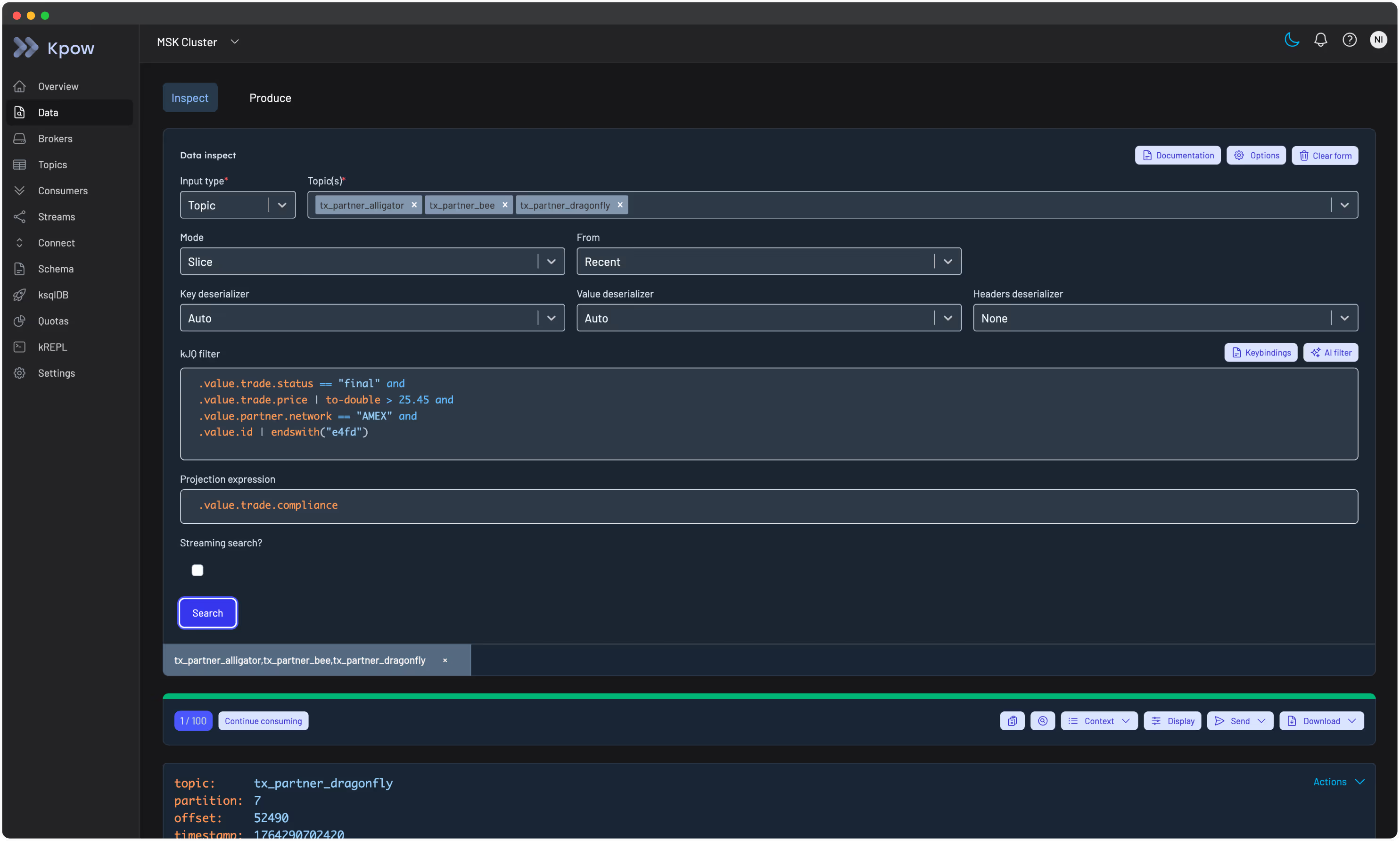
For topics carrying large messages, Kpow’s Data Inspect feature runs server-side JQ-like queries across JSON, Avro, and Protobuf payloads. For topics with large messages, the SAMPLER_POLL_MS parameter can be increased from its 3,500 ms default to give consumers more time to fetch and batch records per poll. Message size configuration is directly relevant here: Kpow’s own documentation explicitly notes this tuning for large-message scenarios.
Throughput and lag metrics per topic
Kpow computes per-topic throughput in both messages per second and MB/s, partition lag, and consumer group offsets without requiring external Prometheus exporters. For clusters running on Confluent Cloud, it integrates with the Confluent Cloud Metrics API to surface retained bytes and active connection counts per topic, which helps you verify whether actual on-disk topic size matches your message-size and retention assumptions. Prometheus endpoints are also available per cluster and per topic for teams that want to pipe data into an existing Grafana stack.
Kpow runs as a single stateless Docker container and is compatible with Apache Kafka 1.0 and later, as well as managed services including Amazon MSK, Confluent Cloud, Azure Event Hubs, Aiven, and Redpanda. A free 30-day trial with full enterprise functionality is available. No credit card is required, and a free Community Edition is permanently available for up to 3 clusters.
Related reading
For guidance on structuring and selecting message keys, which interacts with partitioning behaviour and message ordering, see our article on Kafka message key best practices.