What is a Kafka message key?
A Kafka message key is an optional byte array attached to every record produced to a topic. The producer sets it independently from the message value, and the broker never inspects its contents. In the Java client, the key is serialized via key.serializer, a separate configuration from value.serializer.
The key serves exactly two purposes in Kafka:
Routing. When no explicit partition is specified, the producer’s Partitioner decides which partition a record goes to. With the default Java partitioner, the rule is:
partition = Math.abs(Utils.murmur2(keyBytes)) % numPartitions
This is deterministic: the same key always maps to the same partition, for as long as numPartitions stays constant.
Compaction identity. For topics with cleanup.policy=compact, the key is the primary key against which older values are garbage-collected. Kafka retains only the latest value per key.
The key plays no role in authentication, deduplication, or consumer-side indexing. Consumers can ignore the key entirely if their use case doesn’t require it.
Kafka message structure
A Kafka record consists of four producer-supplied fields and three broker-assigned fields:
| Field | Set by | Description |
|---|---|---|
| Key | Producer | Arbitrary bytes. Drives partition routing and compaction. |
| Value | Producer | Arbitrary bytes. The payload. |
| Headers | Producer | Optional key-value metadata. Useful for routing metadata, correlation IDs, schema version hints. |
| Timestamp | Producer / Broker | Either CreateTime (producer clock) or LogAppendTime (broker clock), depending on message.timestamp.type. |
| Topic | Broker | The topic the record was written to. |
| Partition | Broker | The partition within the topic. |
| Offset | Broker | The monotonically increasing position within the partition. |
Kafka’s only ordering guarantee is per-partition. Records with the same key land on the same partition and are therefore ordered relative to each other. Records with different keys may land on different partitions, and Kafka makes no ordering promises across partitions.
For common key serializer choices: StringSerializer, LongSerializer, and UUIDSerializer cover the vast majority of production use cases and produce keys that are readable in CLI tooling such as kafka-console-consumer --print.key. Schema Registry serializers (KafkaAvroSerializer, KafkaProtobufSerializer) work for keys, but most teams use them only on the value and keep keys as primitive types for human-readable inspection.
Kafka message key best practices
1. Use a key when you need per-entity ordering
Kafka guarantees message order within a partition. If your consumers need events for a specific entity to arrive in the order they were produced, that entity’s identifier must be the key.
Common examples: accountId for banking transactions (credits and debits must apply in sequence), orderId for e-commerce state transitions, driverId or deliveryId for ride-hailing status updates, deviceId for IoT telemetry. In each case, the ordering boundary is the entity, and the key must reflect that boundary precisely. Choosing a coarser key, such as region or status, groups unrelated entities onto the same partition without providing the ordering guarantee your consumers actually need.
2. Use null keys deliberately when ordering does not matter
For log ingestion, metrics pipelines, telemetry, and other append-only workloads where no entity-level ordering is required, producing with a null key is the correct choice.
With null keys, the producer’s partitioner handles distribution. Since Kafka 3.3, the default adaptive partitioner (KIP-794) batches records to a partition based on bytes produced rather than time, and actively routes away from slow brokers. Confluent’s own benchmarks for the KIP-794 partitioner reported p99 latency dropping from roughly 11 seconds to 154 milliseconds under an abnormal-broker scenario.
If you are still on Kafka 2.4-3.2, the sticky partitioner (KIP-480) handles null keys by batching to one partition until linger.ms elapses or the batch fills, then rotating. DoorDash reported tuning linger.ms to 50-100 ms reduced broker CPU by 30-40% on their high-volume null-keyed event ingestion pipeline.
The risky case is accidentally null keys on a topic that requires ordering. A producer that fails to set a key on every record will exhibit intermittent ordering failures that are difficult to reproduce. Add a producer interceptor or unit test that rejects null keys for any topic where per-entity ordering is a requirement.
3. Choose high-cardinality, evenly distributed keys
The murmur2 hash distributes keys across partitions, but only as evenly as the key’s own distribution allows. A low-cardinality key will leave most partitions idle and concentrate traffic on a few.
Good key candidates: userId, orderId, deviceId, sessionId, accountId, transactionId. These typically have many distinct values and no single dominant value.
Poor key candidates: country, region, status, eventType, boolean flags. With status ∈ {SUCCESS, FAILED}, only two partitions ever receive traffic regardless of how many partitions the topic has.
tenantId is a common intermediate case. It may appear high-cardinality, but most B2B systems have a power-law distribution of tenant size. One large tenant can produce the majority of your traffic. If you need tenant-level grouping, combine tenantId with a finer-grained field using a composite key.
4. Always key by an immutable identifier
A key that changes over time breaks ordering and creates orphan records in compacted topics. The most common mistake is using a mutable field like username, email, or status as the key.
If a user changes their username, every subsequent event for that user lands on a different partition from all historical events. Any downstream consumer joining on the key now sees two different histories for the same logical entity. In a compacted topic, the compactor treats the old and new keys as separate records, keeping both as the “current state” indefinitely.
Always use a surrogate, immutable identifier: userId rather than username, accountNumber rather than email, deviceId rather than hostname. If the natural identifier in your domain is mutable, generate an internal UUID at entity creation time and use that as the key.
5. Keys are required for log compaction
cleanup.policy=compact instructs Kafka to retain only the latest record for each key. This makes a compacted topic behave like a distributed key-value store of current state. It is the foundation of Kafka Streams’ changelog topics, CDC streams, and any event-sourced projection that needs to rebuild state from scratch.
A null-keyed record on a compacted topic cannot be compacted. It sits in the log indefinitely, causing unbounded disk growth. Confluent’s documentation is explicit on this point: compacted topics require records with keys.
A null value paired with a non-null key is a tombstone. It signals the compactor to delete that key once delete.retention.ms elapses. If you need to “delete” a record from a compacted topic, produce a tombstone with the same key.
Add a producer-side interceptor that rejects null keys for any topic with cleanup.policy=compact. Catching this in the producer is far cheaper than diagnosing unbounded disk growth in production.
6. Align keys for stateful stream processing
Kafka Streams, ksqlDB, and Flink all require co-partitioning for joins and aggregations. Co-partitioning means: the same number of partitions on both sides, the same partitioning strategy, and the same key type.
Kafka Streams enforces this at startup and will throw TopologyException: Topics not co-partitioned if partition counts differ across joined topics. ksqlDB enforces it at query creation time.
If you cannot co-partition the source topics, the options are: insert an explicit KStream#repartition() step (Kafka 2.6+ via KIP-221) to repartition on the fly, or use GlobalKTable for the smaller side of a join (which broadcasts the entire topic to every instance).
When multiple producer applications write to the same topic, they must all use the same partitioner. The Java default client uses murmur2. The librdkafka client (used by Python, Go, .NET, and C# producers) defaults to CRC32 with random assignment for null keys. Two producers using different hash functions and writing the same logical key will route to different partitions, silently breaking co-partitioning and any downstream join. Set partitioner=Murmur2Random on all librdkafka clients that share a topic with a Java producer.
7. Standardize key serializers across producer teams
A producer using IntegerSerializer and a consumer using StringDeserializer will deserialize silently incorrect data, potentially without throwing an exception. The failure typically surfaces as incorrect behavior in a downstream state store or join.
Define the key serializer in a shared schema or data contract alongside the value schema. For topics consumed by Kafka Streams or ksqlDB, include the key type in the topic metadata. Some teams track this in Confluent Schema Registry using RecordNameStrategy for the key subject; others maintain a topic catalog alongside their schema definitions. Whichever mechanism you use, the key type should be as explicit and controlled as the value schema.
8. Plan for hot keys before you need to
Every production Kafka system at sufficient scale encounters key skew. New Relic’s events pipeline team found that 1.5% of their query keys produced 90% of the events processed for aggregation. Slack observed per-broker hot-spotting persistent enough to mandate that every topic’s partition count be a multiple of the broker count.
The diagnostic approach: use kafka-consumer-groups.sh --describe and look for a single partition with 5-10x the consumer lag of its neighbours. Even disk usage across brokers but uneven consumer lag typically points to a processing bottleneck rather than key skew. Confirm by sampling the top keys by message rate for an hour. If the top 1% of keys produce more than 20% of traffic, you have a skew problem.
Mitigations, in order of preference:
Composite keys combine a high-cardinality field with a coarser one for locality: tenantId|userId or region|customerId. This preserves logical grouping while spreading load across more hash buckets.
Salting appends a deterministic random suffix to known hot keys: userId#0 through userId#K-1. Per-user ordering is lost, but per-(user, salt) ordering is preserved. Consumers that need a final per-user aggregation re-key downstream on userId only. This pattern is used by Pinterest’s MemQ system for storage-layer hot key mitigation.
Time-window bucketing appends a time bucket: userId|2025-10-21T10:00. This works for hotness that is bursty rather than sustained.
Do not respond to consumer lag by immediately adding partitions. That breaks the hash mapping and the ordering guarantee for keyed topics, as described in point 9 below.
9. Over-provision partitions at topic creation
Adding partitions to an existing topic changes the murmur2 modulus. Records for customer-42 produced before the change and records produced after may land on different partitions. Per-key ordering is broken from that point forward, with no automated warning to downstream consumers.
Confluent’s operations documentation is explicit: “If the number of partitions changes, this delivery guarantee may no longer hold.”
Choose your initial partition count based on the consumer parallelism you expect 12-18 months out, then over-provision beyond that by a factor of 2-3. For small clusters, Slack’s rule is useful: make partition counts a multiple of the broker count to distribute partition leadership evenly. For large clusters, anything under 100 partitions per topic starts to produce uneven load distribution.
If you must add partitions, do it during a low-traffic window, document that ordering is broken at the cutover point, and validate that downstream Kafka Streams topologies do not assume positional ordering across the partition count boundary.
10. Rekey via a new topic, never in-place
If the key on an existing topic needs to change, the safe pattern is to create a new topic with the desired key and partition count, run a rekeying pipeline to migrate data, and then cut consumers over once they have caught up.
The steps:
- Create the new topic (
orders.v2) with the target partition count and key scheme. - Run a rekeying consumer:
sourceStream.selectKey(...).to("orders.v2")in Kafka Streams, or an equivalent Flink or custom consumer. - Dual-write from producers to both topics during the migration window.
- Switch consumers to the new topic once consumer lag on
orders.v2reaches zero. - Drain and delete the old topic.
Rewriting keys into the same topic is not a safe operation. It interleaves records under two different key schemes in the same partition, making it impossible for any consumer to maintain a consistent ordering guarantee.
11. Set idempotent producer configuration
Producer configuration affects ordering guarantees independently of the key. Without an idempotent producer, setting retries > 0 and max.in.flight.requests.per.connection > 1 allows retries to reorder records within a partition even when the key is correct.
The recommended production configuration:
enable.idempotence=true acks=all max.in.flight.requests.per.connection=5 retries=2147483647
enable.idempotence=true has been the default since Kafka 3.0. The broker tracks a producer ID and sequence number per partition and deduplicates retries automatically. If you are running a producer configuration inherited from before Kafka 3.0, audit it before assuming ordering is safe.
12. Document key semantics alongside the schema
The key type, cardinality expectations, and ordering guarantees are not inferable from the schema alone. A topic named user-events with a userId key does not communicate whether records are ordered per-user, whether the topic is compacted, or whether multiple producer applications write to it.
At minimum, document: the key type and serializer, what the key represents, whether per-key ordering is guaranteed, and whether the topic is compacted. Teams using Confluent Platform have Topic Tags and data contract features for this. If you are managing Kafka independently, a README alongside your schema definitions or an entry in your internal data catalog is sufficient.
How Kpow helps with Kafka message key management
Kpow provides observability and management capabilities that are useful at several points in the key lifecycle described above.
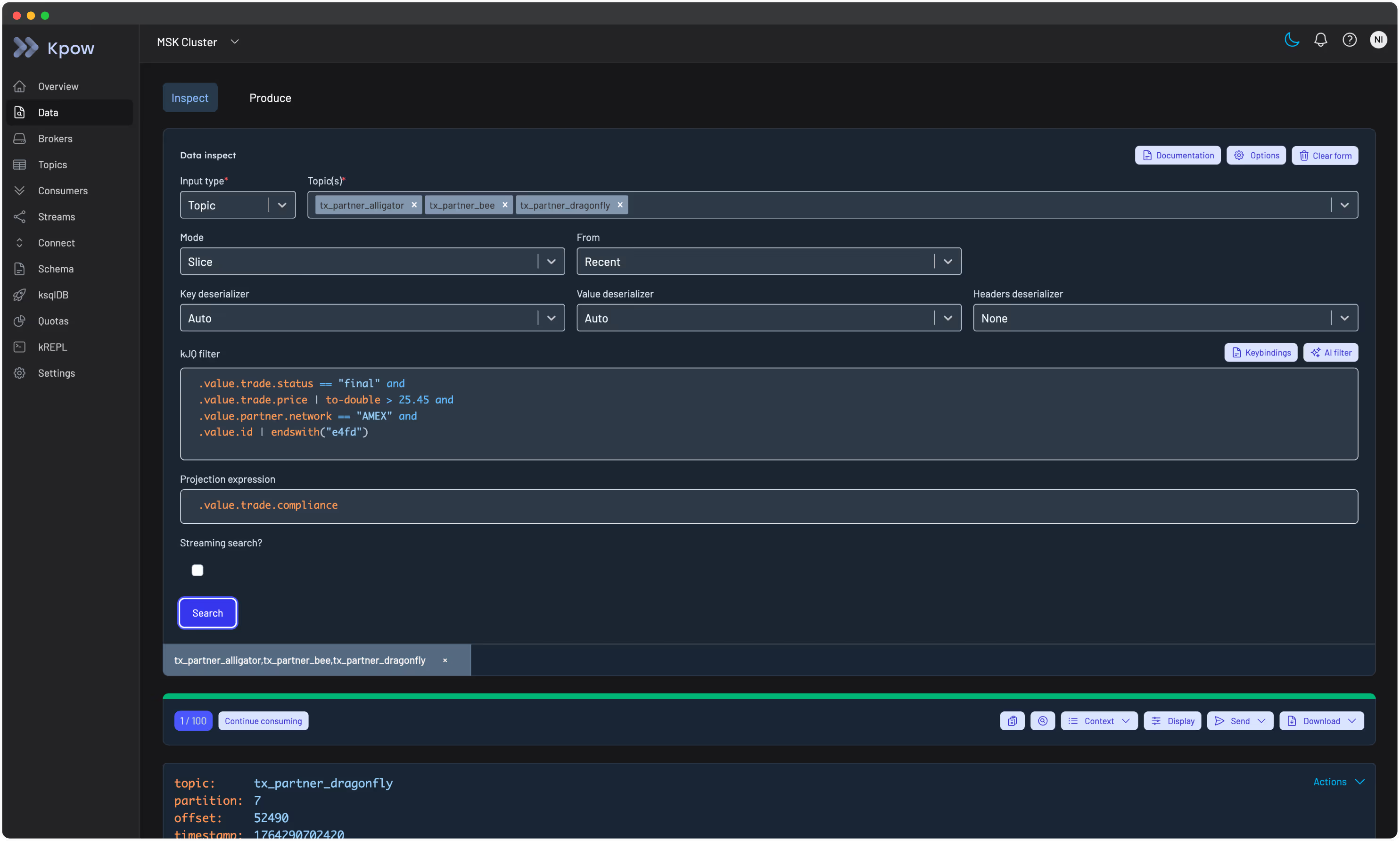
Inspecting key content and distribution. Kpow’s Data Inspect feature allows you to search topic records by key directly. The Key mode queries records from one or more topics, starting from a configured point in time, and matches on an exact key value. This is useful for confirming that a key is routing to the expected partition, checking that a compacted topic is not accumulating null-keyed records, or debugging serialization mismatches. Auto SerDes mode will attempt to infer the key and value deserialization format automatically, which reduces the setup overhead when you are inspecting an unfamiliar topic for the first time.
kJQ filters allow server-side filtering across message keys and values at high throughput, which is practical for profiling key distribution across large topics.
Monitoring consumer lag per partition. Kpow’s consumer group monitoring shows lag at the partition level, which is the first place a hot key problem becomes visible. A single partition running significantly behind its peers is the diagnostic signal described in best practice 8. Kpow exposes this breakdown in the consumer group topology view and in the detailed consumer table.
Managing offsets during rekeying operations. When executing the new-topic rekeying pattern described in best practice 10, Kpow’s offset management tools let you reset or adjust consumer group offsets at the group, topic, or partition level, which can be necessary when validating that a cutover consumer has fully caught up before switching production traffic.
Kpow connects to any Kafka cluster and deploys via Docker, Helm, or JAR. You can try it with a free 30-day trial.
For guidance on managing message payload size alongside key strategy, see our Kafka message size best practice guide.
For the operational side of what you build here, see the complete guide to Kafka.